What Is Computer Vision?
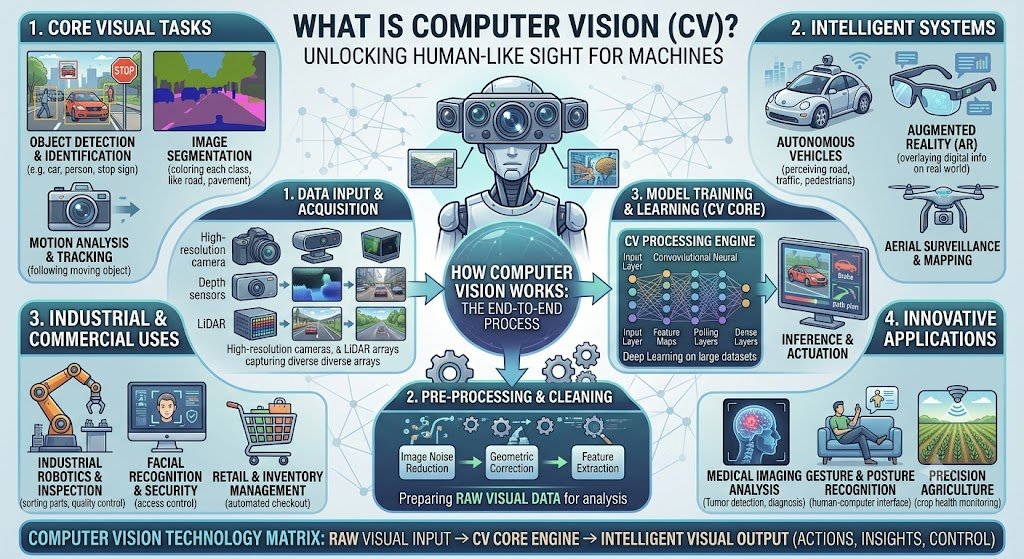
Computer vision is the field of AI that helps machines see and understand images and video.
Every time your phone unlocks with your face, Google Lens identifies an object, or a self-driving car detects a pedestrian, computer vision is working. It is how machines interpret visual information.
Computer vision sits at the intersection of AI, machine learning, and image processing. Its goal: give machines the ability to extract meaning from pixels.
This guide explains what computer vision is, how it works, key tasks, and real-world uses — in plain words, with costs in INR and USD.
For organisations building computer vision applications, Innovative AI Solutions provides AI development and deep learning solutions.
Why Computer Vision Is Hard
Seeing is easy for humans. It is hard for machines.
| Challenge | Why It Is Hard |
|---|---|
| Variation | Same object looks different from angles, lighting |
| Occlusion | Objects can be partially hidden |
| Scale | Objects appear at different sizes |
| Context | Meaning depends on surroundings |
| Noise | Images are imperfect |
| Real-time | Video needs fast processing |
A cat is a cat regardless of angle, lighting, or pose. Teaching a machine that is the challenge.
How Computer Vision Works
Computer vision pipelines typically follow these steps.
| Step | What Happens | Example |
|---|---|---|
| 1. Image acquisition | Capture image or video | Camera, scanner |
| 2. Preprocessing | Resize, normalize, denoise | Resize to 224x224 |
| 3. Feature extraction | Identify edges, shapes, textures | Edges, corners |
| 4. Model | Apply CNN or transformer | Classify, detect |
| 5. Post-processing | Refine output | Draw bounding boxes |
| 6. Output | Produce result | Label, box, mask |
Image Acquisition
Getting the image into the system. Sources include cameras, scanners, drones, satellites, and medical imaging devices.
Preprocessing
Preparing the image for the model.
| Operation | Purpose |
|---|---|
| Resizing | Standardize input size |
| Normalization | Scale pixel values |
| Denoising | Remove noise |
| Augmentation | Create variations for training |
| Color conversion | Grayscale, RGB, HSV |
Feature Extraction
Identifying important patterns in the image.
| Feature | What It Captures |
|---|---|
| Edges | Boundaries between objects |
| Corners | Intersections |
| Textures | Surface patterns |
| Shapes | Object outlines |
| Colors | Hue, saturation, brightness |
Traditional computer vision used hand-crafted features (SIFT, HOG). Deep learning learns features automatically.
Models
Deep learning models, especially CNNs (convolutional neural networks), are the backbone of modern computer vision.
| Model Type | Best For | Example |
|---|---|---|
| CNN | Image classification | ResNet, VGG |
| Object detection | Finding objects | YOLO, Faster R-CNN |
| Segmentation | Pixel-level labeling | U-Net, Mask R-CNN |
| Transformer | Vision tasks | ViT, DETR |
| Generative | Image generation | GANs, Diffusion |
Post-Processing
Refining the model output.
| Operation | Purpose |
|---|---|
| Non-max suppression | Remove duplicate detections |
| Thresholding | Filter low-confidence results |
| Bounding box refinement | Adjust box coordinates |
| Tracking | Follow objects across frames |
Key Computer Vision Tasks
1. Image Classification
Assigning a label to an entire image.
| Input | Output |
|---|---|
| Image of a cat | "Cat" |
| X-ray image | "Normal" / "Pneumonia" |
| Product photo | "Shoe" / "Bag" |
Use cases: Medical diagnosis, product categorization, content moderation.
2. Object Detection
Finding and locating objects in an image.
| Input | Output |
|---|---|
| Street scene | Boxes around cars, pedestrians, signs |
| Retail shelf | Boxes around products |
| Factory floor | Boxes around defects |
Use cases: Self-driving, retail analytics, quality control.
3. Image Segmentation
Labeling every pixel in an image.
| Type | What It Does |
|---|---|
| Semantic | Labels each pixel by class |
| Instance | Separates individual objects |
| Panoptic | Combines both |
Use cases: Medical imaging, autonomous driving, satellite analysis.
4. Facial Recognition
Identifying or verifying people by face.
| Task | Example |
|---|---|
| Verification | Phone unlock |
| Identification | Security check |
| Analysis | Emotion detection |
Use cases: Security, access control, attendance.
5. Optical Character Recognition (OCR)
Converting text in images to machine-readable text.
| Input | Output |
|---|---|
| Scanned invoice | Text fields |
| Handwritten note | Digital text |
| Signboard photo | Text |
Use cases: Document processing, KYC, invoice automation.
6. Pose Estimation
Detecting body positions and movements.
| Input | Output |
|---|---|
| Video of person | Skeleton keypoints |
| Sports footage | Player poses |
Use cases: Fitness apps, sports analytics, animation.
7. Object Tracking
Following objects across video frames.
| Input | Output |
|---|---|
| Video | Object trajectory |
| Traffic footage | Vehicle paths |
Use cases: Surveillance, traffic monitoring, retail analytics.
8. Image Generation
Creating new images.
| Type | Example |
|---|---|
| GANs | Realistic faces |
| Diffusion | DALL-E, Midjourney |
| Style transfer | Artistic filters |
Use cases: Design, marketing, entertainment.
Computer Vision Tasks Summary
| Task | Input | Output | Example |
|---|---|---|---|
| Classification | Image | Label | Cat vs dog |
| Detection | Image | Boxes + labels | Cars, people |
| Segmentation | Image | Pixel masks | Tumor regions |
| Facial recognition | Face image | Identity | Phone unlock |
| OCR | Document image | Text | Invoice processing |
| Pose estimation | Image/video | Keypoints | Fitness tracking |
| Tracking | Video | Trajectories | Traffic |
| Generation | Prompt/noise | Image | DALL-E |
Real-World Uses
Everyday Examples
| Application | Computer Vision Task |
|---|---|
| Phone face unlock | Facial recognition |
| Google Lens | Object recognition |
| Google Photos search | Image classification |
| Self-driving cars | Detection, segmentation |
| Instagram filters | Face detection, AR |
| Amazon Go | Object tracking |
| OCR apps | Text extraction |
| Medical imaging | Classification, segmentation |
Business Examples
| Use Case | Task | Industry |
|---|---|---|
| Medical imaging | Classification, segmentation | Healthcare |
| Quality control | Detection, segmentation | Manufacturing |
| Retail checkout | Detection, tracking | Retail |
| Document processing | OCR, extraction | BFSI, insurance |
| KYC automation | OCR, facial recognition | BFSI |
| Surveillance | Detection, tracking | Security |
| Traffic monitoring | Detection, tracking | Government |
| Agriculture | Classification, segmentation | AgriTech |
| Warehouse automation | Detection, tracking | Logistics |
| Defect detection | Detection, segmentation | Manufacturing |
Computer Vision in India
Indian Use Cases
| Use Case | Industry | Example |
|---|---|---|
| KYC automation | BFSI | Aadhaar, PAN verification |
| Document processing | BFSI | Cheque, invoice processing |
| Medical imaging | Healthcare | Radiology screening |
| Quality control | Manufacturing | Defect detection |
| Retail analytics | Retail | Footfall, shelf monitoring |
| Traffic monitoring | Government | ANPR, congestion |
| Agriculture | AgriTech | Crop health, yield |
| Surveillance | Security | Face recognition |
Indian Ecosystem
| Player | Focus |
|---|---|
| Sarvam AI | Multimodal AI |
| Krutrim (Ola) | Vision + language |
| AI4Bharat | Indian language + vision |
| IndiaAI Mission | Compute, datasets |
Cost of Computer Vision Solutions
Build Costs
| Solution | Cost Range (INR) | Cost Range (USD) |
|---|---|---|
| Image classification | ₹75,000–₹3,00,000 | $900–$3,600 |
| Object detection | ₹1,50,000–₹5,00,000 | $1,800–$6,000 |
| OCR system | ₹1,00,000–₹4,00,000 | $1,200–$4,800 |
| Facial recognition | ₹1,50,000–₹6,00,000 | $1,800–$7,200 |
| Quality control | ₹2,00,000–₹8,00,000 | $2,400–$9,600 |
| Medical imaging | ₹3,00,000–₹15,00,000 | $3,600–$18,000 |
| Custom CV model | ₹3,00,000–₹20,00,000 | $3,600–$24,000 |
Ongoing Costs
| Cost Category | Monthly (INR) | Monthly (USD) |
|---|---|---|
| API usage | ₹5,000–₹1,00,000 | $60–$1,200 |
| Infrastructure | ₹10,000–₹80,000 | $120–$960 |
| GPU compute (self-hosted) | ₹50,000–₹5,00,000+ | $600–$6,000+ |
| Monitoring | ₹5,000–₹30,000 | $60–$360 |
| Maintenance | ₹15,000–₹1,00,000 | $180–$1,200 |
Cost Per Image
| Task | Cost (INR) | Cost (USD) |
|---|---|---|
| Classification | ₹0.5–₹3 | $0.006–$0.036 |
| Detection | ₹1–₹5 | $0.012–$0.06 |
| OCR | ₹1–₹4 | $0.012–$0.048 |
| Segmentation | ₹2–₹10 | $0.024–$0.12 |
Tools and Frameworks
| Category | Tools |
|---|---|
| Deep learning | PyTorch, TensorFlow, Keras |
| CV libraries | OpenCV, scikit-image, Pillow |
| Detection | YOLO, Detectron2, MMDetection |
| Segmentation | U-Net, Mask R-CNN, Segment Anything |
| OCR | Tesseract, EasyOCR, Google Vision |
| Cloud CV | AWS Rekognition, Google Vision, Azure CV |
| Edge | TensorRT, OpenVINO, TFLite |
India-Specific Considerations
Cost Advantage
| Factor | Advantage |
|---|---|
| Developer rates | 40–60% below Western markets |
| AI talent | Growing rapidly |
| Infrastructure | Competitive |
| Domestic models | Sarvam, BharatGen |
Compliance
| Requirement | Impact |
|---|---|
| DPDPA | 5–15% cost addition |
| RBI compliance | 10–25% for finance |
| Healthcare compliance | 15–30% |
| AI governance | 10–20% |
Cost Optimisation
| Strategy | Saving |
|---|---|
| Cloud APIs over self-hosted | Lower upfront |
| Open-source models | Lower ongoing |
| Edge deployment | Reduced cloud cost |
| Model quantization | Faster, cheaper inference |
| IndiaAI Mission compute | Subsidised GPU access |
Decision Framework
Which CV Approach Scorecard
| Criteria | Weight | Score (1–5) | Weighted Score |
|---|---|---|---|
| Task is well-defined | 20% | ||
| Data available | 20% | ||
| Volume of images | 15% | ||
| Accuracy needed | 15% | ||
| Real-time needed | 15% | ||
| Budget available | 15% | ||
| Total | 100% | /5 |
Recommended Approach
| Your Need | Best Approach |
|---|---|
| Simple classification | Cloud API or pre-trained model |
| Object detection | YOLO or cloud API |
| OCR | Tesseract, EasyOCR, or cloud |
| Facial recognition | Cloud API or custom |
| Quality control | Custom model + edge |
| Medical imaging | Custom model + specialist |
| Real-time video | Edge deployment |
| Proprietary advantage | Custom model |
Frequently Asked Questions
1. What is computer vision in simple words?
Computer vision is how machines see and understand images and video. It powers face unlock, Google Lens, self-driving cars, and medical imaging.
2. How does computer vision work?
It captures images, preprocesses them, extracts features using deep learning models (usually CNNs), and produces output — a label, bounding box, or pixel mask.
3. What are examples of computer vision?
Face unlock, Google Lens, Google Photos search, self-driving cars, Instagram filters, Amazon Go, OCR apps, and medical imaging.
4. What is the difference between computer vision and image processing?
Image processing transforms images (resize, filter, enhance). Computer vision understands images (classify, detect, segment). Computer vision often uses image processing as a step.
5. What is object detection?
Object detection finds and locates objects in an image, drawing bounding boxes around them and labeling them. YOLO and Faster R-CNN are common models.
6. What is OCR?
Optical Character Recognition converts text in images to machine-readable text. It is used for invoice processing, KYC, and document digitization.
7. What is facial recognition?
Facial recognition identifies or verifies people by their faces. It is used for phone unlock, security, access control, and attendance.
8. Can computer vision work in real-time?
Yes. Edge deployment (TensorRT, OpenVINO, TFLite) enables real-time processing on cameras, phones, and embedded devices.
9. How much does computer vision cost in India?
Image classification: ₹75,000–₹3,00,000. Object detection: ₹1,50,000–₹5,00,000. OCR: ₹1,00,000–₹4,00,000. Medical imaging: ₹3,00,000–₹15,00,000.
10. Do I need deep learning for computer vision?
Yes, for most modern computer vision. CNNs and vision transformers are the standard. Traditional methods (SIFT, HOG) are rarely used now.
11. What is the difference between computer vision and image generation?
Computer vision understands images (classification, detection). Image generation creates new images (GANs, diffusion). Both use deep learning but for different goals.
12. How can Innovative AI Solutions help?
Innovative AI Solutions is a Delhi-based AI development company. We build computer vision applications — classification, detection, OCR, facial recognition, quality control, and medical imaging — with transparent pricing and full code ownership. Explore our deep learning solutions.
Contact Innovative AI Solutions
Ready to build computer vision solutions?
We help Indian businesses design, build, and deploy computer vision applications with transparent pricing and full code ownership.
Contact Information
Innovative AI Solutions
📍 Netaji Subhash Place, Pitampura, Delhi – 110034
🌐 Website: https://innovativeais.com 📧 Email: info@innovativeais.com
рџ“ћ Phone: +91 7464 099 059 / +91 96899 67356
Business Services
•⁠⁠AI Automation •⁠⁠AI Development •⁠⁠AI Consulting
•⁠⁠Machine Learning Solutions
•⁠⁠Deep Learning Solutions
•⁠⁠Generative AI Services
•⁠⁠NLP Solutions •⁠⁠AI Agents •⁠⁠AI Chatbots •⁠⁠Voice AI •⁠⁠CRM Development
•⁠⁠Custom Software Development
•⁠⁠Website Development
•⁠⁠Mobile App Development
About the Author
Abhishek Kumar
Founder & CEO, Innovative AI Solutions
5+ years building production AI systems for Indian businesses. Based in Delhi, serving clients across India.
Ready to build computer vision solutions?
Innovative AI Solutions — Delhi's leading AI development company. Free consultation available.
Get Free Consultation в†’
A simple 2026 guide to computer vision — what it is, how it works, key tasks, real-world uses, business applications, and costs in INR and USD.
#ComputerVision #Explained #HowItWorks #RealWorldUses #2026 #AI #ImageRecognition #ObjectDetection #ImageClassification #OCR #FacialRecognition #Segmentation #PoseEstimation #CNN #DeepLearning #India #DelhiNCRTech #BusinessAI #HealthcareAI #RetailAI #ManufacturingAI #InnovativeAISolutions
Copyright © 2015–2026 Innovative AI Solutions. All Rights Reserved. | Privacy Policy | Terms & Conditions