Why Website Security Matters More Than Ever
Every business has a website. For many Indian businesses, the website is the primary customer touchpoint — where enquiries come in, orders are placed, and payments are made.
That makes the website a target. Attackers do not need to specifically target your business. Automated tools scan millions of websites for known vulnerabilities and exploit whatever they find. Your website does not need to be important to be attacked. It just needs to be vulnerable.
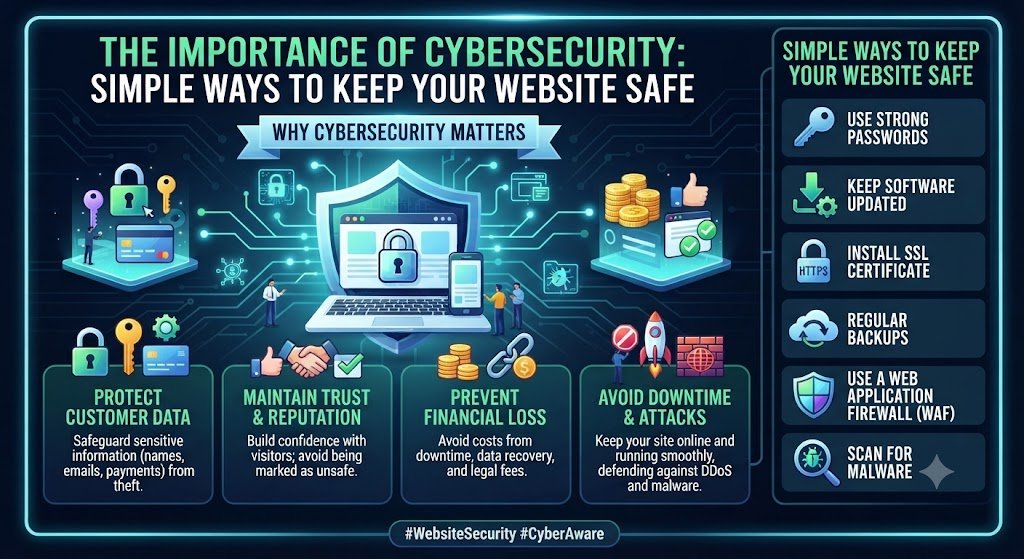
The consequences of a breach are real. Customer data exposed. Payment information stolen. Website defaced. Search rankings destroyed. Customer trust lost. Regulatory penalties under DPDPA. For a small business, a serious breach can be existential.
The good news is that most breaches exploit simple, preventable weaknesses. Unpatched software. Weak passwords. Missing encryption. No backups. These are not sophisticated attacks. They are basics that were never implemented.
This guide covers the importance of cybersecurity for websites, the threats that actually matter, and the simple protections that stop them. It includes costs in India and the compliance requirements that apply in 2026.
For organisations building secure web applications, Innovative AI Solutions provides specialised web development and custom software development with security built in.
What Attackers Actually Target
The Most Common Website Threats
| Threat | How It Works | Prevalence |
|---|---|---|
| Outdated software | Exploiting known vulnerabilities | Very high |
| Weak passwords | Brute force, credential stuffing | High |
| SQL injection | Malicious database queries | Moderate |
| Cross-site scripting (XSS) | Injecting malicious scripts | Moderate |
| Malware injection | Injecting malicious code | High |
| DDoS attacks | Overwhelming with traffic | Moderate |
| Phishing | Tricking users into revealing credentials | Very high |
| Misconfigured servers | Exposed services, default settings | High |
Why Small Businesses Are Targeted
| Reason | Explanation |
|---|---|
| Automated attacks | Tools scan millions of sites |
| Weaker defences | Less security investment |
| Valuable data | Customer data, payment info |
| Reputation damage | Small businesses suffer more |
| Supply chain | Entry point to larger targets |
What Attackers Want
| Target | Value |
|---|---|
| Customer data | Sold, used for fraud |
| Payment information | Direct financial theft |
| Login credentials | Access to other systems |
| Server resources | Cryptomining, botnet |
| Website reputation | SEO spam, phishing hosting |
The Simple Protections That Matter
Protection 1: Keep Everything Updated
Outdated software is the single largest cause of website breaches. Updates patch known vulnerabilities.
| What to Update | Frequency |
|---|---|
| CMS core | Immediately on release |
| Plugins and themes | Weekly |
| Server software | Monthly |
| Dependencies | Monthly |
| Operating system | Monthly |
Simple action: Enable automatic updates where possible. Review and apply updates weekly for critical components.
Protection 2: Use Strong Passwords and 2FA
Weak passwords are exploited constantly. Multi-factor authentication stops most credential-based attacks.
| Practice | Implementation |
|---|---|
| Strong passwords | 12+ characters, unique per account |
| Password manager | Generate and store passwords |
| Two-factor authentication | Enable on all admin accounts |
| Limit admin accounts | Only those who need access |
| Remove unused accounts | Delete accounts for former staff |
Simple action: Enable 2FA on all administrative accounts today. It takes minutes and stops most attacks.
Protection 3: Install SSL/TLS Certificates
SSL encrypts data between visitors and your website. It is also a ranking factor and a trust signal.
| What SSL Does | Why It Matters |
|---|---|
| Encrypts data | Protects data in transit |
| Verifies identity | Confirms site authenticity |
| Prevents interception | Blocks man-in-the-middle |
| Builds trust | Browser padlock indicator |
| Improves SEO | Google ranking factor |
Simple action: Ensure HTTPS is enabled and enforced. Free certificates are available from Let's Encrypt.
Protection 4: Use a Web Application Firewall
A WAF filters malicious traffic before it reaches your website.
| What WAF Blocks | Protection |
|---|---|
| SQL injection | Database attacks |
| XSS attacks | Script injection |
| Bot traffic | Automated attacks |
| DDoS | Traffic floods |
| Known exploits | Signature-based blocking |
Simple action: Use a WAF — many CDNs include one. Cloudflare offers a free tier.
Protection 5: Back Up Regularly
Backups are your recovery plan. If something goes wrong, backups restore your website.
| Backup Consideration | Best Practice |
|---|---|
| Frequency | Daily for active sites |
| Storage | Off-site, separate from hosting |
| Retention | 30+ days |
| Testing | Verify backups restore |
| Automation | Automatic, not manual |
Simple action: Set up automated daily backups stored separately from your hosting.
Protection 6: Limit Access
Every account with access is a potential entry point.
| Access Practice | Implementation |
|---|---|
| Least privilege | Minimum access needed |
| Role-based access | Roles, not individual permissions |
| Regular reviews | Audit accounts quarterly |
| Remove unused | Delete inactive accounts |
| Unique accounts | No shared credentials |
Simple action: Audit all accounts with website access. Remove anyone who does not need it.
Protection 7: Monitor and Scan
Regular scanning catches problems before attackers do.
| Monitoring Type | Frequency |
|---|---|
| Malware scanning | Daily |
| Vulnerability scanning | Weekly |
| Log review | Weekly |
| Uptime monitoring | Continuous |
| Security alerts | Real-time |
Simple action: Enable malware scanning and review security logs weekly.
Protection 8: Secure Forms and Inputs
Forms are a common attack vector. Validate and sanitise all input.
| Form Security | Implementation |
|---|---|
| Input validation | Validate all inputs |
| Output encoding | Encode before display |
| CSRF protection | Prevent cross-site requests |
| CAPTCHA | Prevent automated submissions |
| Rate limiting | Prevent brute force |
Simple action: Ensure all forms validate input and use CSRF protection.
What Website Security Costs in India
Basic Security Costs
| Protection | Annual Cost (INR) | Annual Cost (USD) |
|---|---|---|
| SSL certificate | Free–₹8,000 | Free–$96 |
| WAF (basic) | Free–₹24,000 | Free–$288 |
| Backup service | ₹3,000–₹12,000 | $36–$144 |
| Malware scanning | ₹3,000–₹15,000 | $36–$180 |
| Security plugins | ₹5,000–₹20,000 | $60–$240 |
| Monitoring | ₹5,000–₹24,000 | $60–$288 |
Total Basic Security
| Business Size | Annual Cost (INR) | Annual Cost (USD) |
|---|---|---|
| Small website | ₹15,000–₹40,000 | $180–$480 |
| Medium website | ₹40,000–₹1,20,000 | $480–$1,440 |
| E-commerce | ₹1,00,000–₹3,00,000 | $1,200–$3,600 |
Advanced Security Costs
| Service | Cost Range (INR) | Cost Range (USD) |
|---|---|---|
| Penetration testing | ₹50,000–₹2,00,000 | $600–$2,400 |
| Security audit | ₹30,000–₹1,50,000 | $360–$1,800 |
| Managed security | ₹15,000–₹75,000/month | $180–$900/month |
| Incident response | ₹50,000–₹5,00,000 | $600–$6,000 |
| Security development | ₹2,00,000–₹10,00,000 | $2,400–$12,000 |
The Cost of a Breach
| Impact | Estimated Cost (INR) |
|---|---|
| Malware cleanup | ₹15,000–₹1,00,000 |
| Website downtime | ₹10,000–₹5,00,000 |
| Data breach notification | ₹50,000–₹5,00,000 |
| DPDPA penalties | Variable, potentially significant |
| Customer loss | Variable, potentially severe |
| Reputation damage | Difficult to quantify |
For most businesses, the cost of basic protection is a fraction of the cost of a breach.
India-Specific Compliance
DPDPA Requirements
| Requirement | Website Implementation |
|---|---|
| Consent | Clear consent for data collection |
| Privacy policy | Accessible, comprehensive |
| Data minimisation | Collect only necessary data |
| Security safeguards | Encryption, access control |
| Breach notification | Notify users and authorities |
| User rights | Access, correction, deletion |
CERT-In Requirements
CERT-In (Indian Computer Emergency Response Team) mandates specific compliance.
| Requirement | Implementation |
|---|---|
| Incident reporting | Report incidents within 6 hours |
| Log retention | Maintain logs for 180 days |
| KYC for services | Maintain user records |
| Synchronised clocks | Use NTP with Indian servers |
Sector-Specific Requirements
| Sector | Additional Requirements |
|---|---|
| Banking | RBI cybersecurity framework |
| Insurance | IRDAI guidelines |
| Healthcare | Patient data protection |
| E-commerce | Payment security standards |
Simple Security Checklist
Immediate Actions (Today)
□ Enable two-factor authentication on all admin accounts □ Ensure HTTPS is enabled and enforced □ Check for available software updates
This Week
□ Update all software, plugins, and themes □ Set up automated daily backups □ Review all accounts with website access □ Enable a WAF (many free options exist)
This Month
□ Implement malware scanning □ Review and strengthen password policies □ Audit forms for input validation □ Review security logs □ Document your security setup
Ongoing
□ Weekly: Check for updates, review logs □ Monthly: Run vulnerability scans, review accounts □ Quarterly: Full security review, test backups □ Annually: Security audit, penetration testing
Decision Framework: Website Security Readiness
Security Readiness Scorecard
| Criteria | Weight | Score (1–5) | Weighted Score |
|---|---|---|---|
| Software updates current | 20% | ||
| Two-factor authentication | 20% | ||
| SSL/TLS enabled | 15% | ||
| Backups configured | 15% | ||
| WAF in place | 10% | ||
| Access control | 10% | ||
| Monitoring | 10% | ||
| Total | 100% | /5 |
Priority Matrix
| Protection | Effort | Impact | Priority |
|---|---|---|---|
| Two-factor authentication | Low | Very high | Immediate |
| Software updates | Low | Very high | Immediate |
| SSL/TLS | Low | High | Immediate |
| Backups | Low | High | Immediate |
| WAF | Low | High | This week |
| Access control | Low | High | This week |
| Malware scanning | Low | Moderate | This month |
Frequently Asked Questions
1. Why is website cybersecurity important?
Most website breaches exploit simple, preventable weaknesses. A breach can expose customer data, damage reputation, destroy search rankings, and trigger regulatory penalties under DPDPA. Basic protection prevents most attacks.
2. What are the most common website security threats?
Outdated software, weak passwords, SQL injection, cross-site scripting, malware injection, DDoS attacks, phishing, and misconfigured servers. Outdated software is the largest cause of breaches.
3. What are the simplest ways to keep my website safe?
Keep software updated, enable two-factor authentication, use SSL/TLS, install a WAF, back up regularly, limit access, and monitor for issues. These basics stop most attacks.
4. How much does website security cost in India?
Basic protection costs ₹15,000–₹40,000 annually for small websites. Medium websites cost ₹40,000–₹1,20,000. E-commerce sites cost ₹1,00,000–₹3,00,000. Advanced services like penetration testing cost ₹50,000–₹2,00,000.
5. Is SSL/TLS necessary for my website?
Yes. SSL encrypts data between visitors and your website, prevents interception, builds trust, and is a Google ranking factor. Free certificates are available from Let's Encrypt.
6. What is a WAF and do I need one?
A WAF (Web Application Firewall) filters malicious traffic before it reaches your website. It blocks SQL injection, XSS, bots, and known exploits. Many CDNs include WAF, and Cloudflare offers a free tier.
7. How often should I update my website software?
Update CMS core immediately on release. Update plugins and themes weekly. Update server software and dependencies monthly. Outdated software is the largest cause of breaches.
8. How do I recover from a website hack?
Restore from a clean backup, identify and fix the vulnerability, update all software, change all passwords, and monitor for reinfection. Having backups is essential for recovery.
9. How does DPDPA affect website security?
DPDPA requires consent for data collection, a privacy policy, data minimisation, security safeguards, breach notification, and user rights. Websites collecting personal data must comply.
10. What are CERT-In requirements for websites?
CERT-In requires incident reporting within 6 hours, log retention for 180 days, KYC for services, and synchronised clocks using Indian NTP servers.
11. Can I secure my website myself?
Basic protections — updates, 2FA, SSL, backups, WAF — can be implemented without specialised skills. Advanced security requires expertise. For business-critical sites, professional security services are recommended.
12. How can Innovative AI Solutions help?
Innovative AI Solutions is a Delhi-based technology company that builds secure web applications. We implement security best practices from the start — encryption, access control, input validation, and monitoring — and help businesses comply with DPDPA and CERT-In requirements. Explore our web development and custom software development services.
Contact Innovative AI Solutions
Ready to secure your website?
We help Indian businesses build and maintain secure websites with encryption, access control, monitoring, and compliance.
Contact Information
Innovative AI Solutions
📍 Netaji Subhash Place, Pitampura, Delhi – 110034
🌐 Website: https://innovativeais.com 📧 Email: info@innovativeais.com
📞 Phone: +91 7464 099 059 / +91 96899 67356
Business Services
• AI Automation • AI Development • AI Consulting • Machine Learning Solutions • Deep Learning Solutions • Generative AI Services • NLP Solutions • AI Agents • AI Chatbots • Voice AI • CRM Development • Custom Software Development • Website Development • Mobile App Development
About the Author
Abhishek Kumar
Founder & CEO, Innovative AI Solutions
5+ years building production AI systems for Indian businesses. Based in Delhi, serving clients across India.
Ready to build AI solutions for your business?
Innovative AI Solutions — Delhi's leading AI development company. Free consultation available.
Get Free Consultation →
A practical 2026 guide to website cybersecurity — common threats, simple protections, costs in India, and DPDPA and CERT-In compliance.
#Cybersecurity #WebsiteSecurity #2026 #WebsiteProtection #SSL #WAF #Malware #Backups #DPDPA #CERTIn #SmallBusinessSecurity #WordPressSecurity #Vulnerability #Patching #AccessControl #India #DelhiNCRTech #EnterpriseApps #StartupApps #WebDevelopment #TechIndia #DigitalProducts #WebSecurity #DataProtection #BusinessSecurity #InnovativeAISolutions
Copyright © 2015–2026 Innovative AI Solutions. All Rights Reserved. | Privacy Policy | Terms & Conditions