The Automation That Went Too Far
A financial services company automates its loan approval process. The AI model scores applications, and high-scoring applications are approved automatically, with funds disbursed within minutes. The system works well for months. Then a regulatory change alters the eligibility criteria for a specific customer segment. The model has not been retrained. It approves applications that should have been declined, and the error is discovered only when the regulator audits.
The company had automated the decision. It had not designed the oversight.
This is the danger of full automation without human-in-the-loop controls. AI is powerful, but it is not infallible. It can be wrong when the world changes, when the data drifts, or when the case is unusual. In high-stakes decisions—loan approvals, medical recommendations, contract execution, payment releases—the cost of an AI error can be severe.
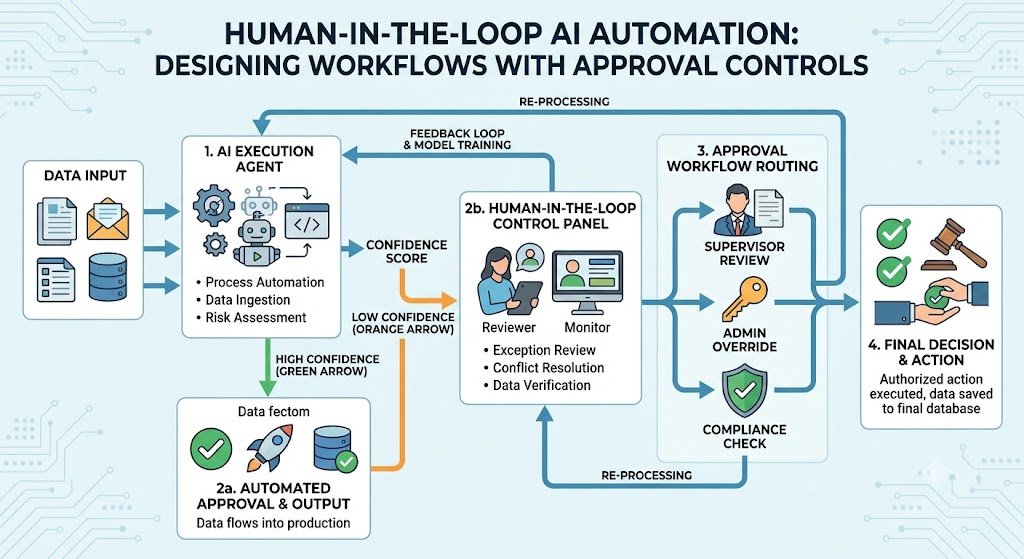
Human-in-the-loop (HITL) AI automation is the design pattern that balances automation with oversight. AI handles the routine cases. Humans review the cases that matter: high-value decisions, low-confidence outputs, unusual situations, and anything that affects a person's rights or finances. The goal is not to slow down automation. It is to automate confidently, knowing that the system has appropriate checks.
For Indian businesses, this matters because regulation increasingly requires human oversight. DPDPA requires accountability for automated decisions that affect individuals. MeitY AI governance guidelines emphasise human oversight for consequential decisions. Sectoral regulators (RBI, SEBI, IRDAI) expect human review for high-stakes financial decisions. And customers expect that a human can be reached when something goes wrong.
India adds specific considerations. DPDPA consent and accountability apply to automated processing. MeitY's seven Sutras include transparency and accountability. Sectoral regulations vary by industry. And operational realities—staff availability, time zones, languages—shape how the human review queue is designed.
This guide is written for Indian CTOs, operations heads, compliance officers, and product managers designing AI automation. We will cover the HITL design patterns, the approval gate design, the escalation rules, the audit trails, real costs in rupees and dollars, DPDPA compliance, and a phased implementation framework with clear go/no-go gates.
What Human-in-the-Loop Actually Means
HITL is not a single pattern. It is a spectrum of designs, from full automation with spot checks to full human control with AI assistance.
The HITL Spectrum
1. Human does everything. AI provides information but no decisions. Suitable for high-stakes, low-volume decisions.
2. AI recommends, human decides. AI generates a recommendation, human reviews and decides. Suitable for consequential decisions.
3. AI decides, human reviews. AI makes the decision, human reviews before it takes effect. Suitable for medium-risk decisions with time for review.
4. AI decides, human audits. AI makes the decision and it takes effect, human audits a sample. Suitable for low-risk, high-volume decisions.
5. AI decides, human handles exceptions. AI makes most decisions; exceptions are escalated to humans. Suitable for well-understood, high-volume decisions.
6. Full automation. AI decides without human involvement. Suitable only for low-risk, reversible decisions.
The HITL Spectrum Table
| Pattern | AI Role | Human Role | Best For |
|---|---|---|---|
| Human does everything | Information | Decision | High-stakes, low-volume |
| AI recommends | Recommendation | Decision | Consequential decisions |
| AI decides, human reviews | Decision | Review | Medium-risk decisions |
| AI decides, human audits | Decision | Sample audit | Low-risk, high-volume |
| AI decides, exceptions escalate | Most decisions | Exceptions | Well-understood, high-volume |
| Full automation | All decisions | None | Low-risk, reversible |
For teams building the automation workflows and approval systems, our AI Automation and Custom Software Development practices cover the full stack.
Designing Approval Gates
Approval gates are the points in the workflow where a human must review and approve before the process continues.
Where to Place Gates
Gates should be placed based on risk:
1. Before irreversible actions. Payments, contract execution, data deletion, account closure.
2. Before high-value decisions. Above a threshold amount, above a risk score, for key accounts.
3. Before decisions affecting individuals. Loan approvals, hiring, medical recommendations.
4. Before actions with regulatory implications. KYC approvals, transaction reporting.
5. When AI confidence is low. When the model's confidence is below a threshold.
6. When the case is unusual. When inputs are outside the training distribution.
Gate Design Principles
Clear criteria: the gate triggers on specific, documented conditions.
Right reviewer: the gate routes to the person with authority.
Context provided: the reviewer sees the AI's output, the reasoning, and the source data.
Fast approval: the approval process is one click, not a multi-step workflow.
Escalation: if the reviewer does not act, the case escalates.
Audit: every approval is logged.
The Approval Interface
The reviewer's interface must show:
The AI's recommendation: what the AI decided and why.
The confidence score: how confident the AI is.
The source data: the inputs the AI used.
The relevant policy: the rule the AI applied.
The actions: approve, edit, reject, escalate.
Approval Gate Table
| Gate Trigger | Reviewer | Action |
|---|---|---|
| Amount > ₹10 lakh | Finance controller | Approve/reject |
| Confidence < 80% | Operations | Review/edit |
| New customer | Sales manager | Approve |
| Unusual pattern | Senior analyst | Investigate |
| Regulatory flag | Compliance | Review |
Escalation Rules: When to Involve a Human
Escalation is the process of moving a case from AI to a human. The rules determine when and to whom.
The Escalation Triggers
1. Low confidence. The AI's confidence is below a threshold.
2. High value. The decision involves an amount above a threshold.
3. New or unusual cases. The inputs are outside the training distribution.
4. Customer request. The customer asks to speak to a human.
5. Regulatory flags. The case has regulatory implications.
6. Anomalies. The case deviates from expected patterns.
7. Failures. The AI encounters an error or cannot complete the task.
The Escalation Hierarchy
Level 1: front-line reviewer (operations, support).
Level 2: senior reviewer (manager, specialist).
Level 3: expert (compliance, legal, senior management).
Cases escalate based on severity, value, and unresolved issues.
Escalation Table
| Trigger | Escalation Level | Timeframe |
|---|---|---|
| Low confidence | Level 1 | Same day |
| High value | Level 2 | 24 hours |
| Regulatory flag | Level 3 | Immediate |
| Customer request | Level 1 | Immediate |
| Failure | Level 1 | Immediate |
Audit Trails: The Record of Decisions
Every AI decision and every human approval must be logged. The audit trail is the evidence that the system is working as designed.
What to Log
1. Input data. The data the AI used to make the decision.
2. AI output. The recommendation, score, or decision.
3. Confidence and reasoning. Why the AI decided what it decided.
4. Human action. Who reviewed, what they did (approve/edit/reject), and when.
5. Final outcome. The final decision and its result.
6. Timestamps. Every action timestamped.
Why Audit Trails Matter
Compliance: DPDPA and sectoral regulators require accountability.
Debugging: when something goes wrong, the audit trail shows what happened.
Improvement: the audit trail shows where the AI is failing.
Defensibility: if a decision is challenged, the audit trail is the evidence.
Audit Trail Table
| Element | What to Log | Retention |
|---|---|---|
| Input | Data used | Per policy |
| AI output | Decision, score | Per policy |
| Reasoning | Explanation | Per policy |
| Human action | Reviewer, action | Per policy |
| Outcome | Result | Per policy |
Real Costs in India (2026)
HITL automation costs depend on the scope: approval workflows only, or full system with escalation and audit.
Implementation Costs
| Scope | Cost (₹) | Cost ($ approx.) | Timeline |
|---|---|---|---|
| Approval workflow (gate, interface, logging) | ₹2–5 lakh | $2,400–$6,000 | 4–8 weeks |
| Approval + escalation | ₹4–10 lakh | $4,800–$12,000 | 8–14 weeks |
| Full HITL system (approval, escalation, audit, analytics) | ₹10–25 lakh | $12,000–$30,000 | 14–24 weeks |
| Enterprise HITL (multi-level, multi-role, integrations) | ₹25–60 lakh | $30,000–$72,000 | 24–36 weeks |
Running Costs
| Component | Monthly Cost (₹) | Monthly Cost ($ approx.) | Notes |
|---|---|---|---|
| Hosting | ₹10,000–₹50,000 | $120–$600 | Cloud infrastructure |
| LLM API | ₹5,000–₹40,000 | $60–$480 | If AI used |
| Notifications | ₹2,000–₹15,000 | $24–$180 | Email, WhatsApp, SMS |
| Maintenance | ₹15,000–₹60,000 | $180–$720 | 15–25% of build annually |
The ROI Case
HITL is not primarily a cost-saving measure. It is a risk-management measure. The ROI comes from:
Reduced errors: human review catches AI mistakes before they cause harm.
Compliance: avoids regulatory penalties.
Customer trust: customers know a human can be reached.
Operational confidence: the business can automate more, knowing there are checks.
For a financial services company, a single prevented regulatory penalty can justify the entire HITL investment.
India-Specific Compliance: DPDPA and MeitY
DPDPA
Under the DPDP Act:
Accountability: the data fiduciary is accountable for automated decisions.
Consent: processing personal data requires consent.
Right to grievance redressal: individuals can complain about automated decisions.
Human review: for significant decisions, human review may be required.
MeitY AI Governance
MeitY's seven Sutras include:
Transparency: individuals should know when AI is used.
Accountability: a named owner for AI systems.
Human oversight: for consequential decisions.
Redressal: a mechanism for complaints.
Sectoral Regulations
RBI: human oversight for credit decisions.
SEBI: oversight for investment advice.
IRDAI: oversight for insurance underwriting.
Compliance Checklist
| Requirement | Implementation | Priority |
|---|---|---|
| Human oversight | Approval gates | High |
| Transparency | Disclose AI use | High |
| Accountability | Named owner | High |
| Redressal | Complaint mechanism | High |
| Audit trail | Log all decisions | High |
| Consent | For personal data | High |
Implementation Framework: A Phased Approach With Cost Gates
Phase 1: Risk Assessment (Week 1–3)
Objective: Identify which decisions need human oversight.
Activities:
Inventory automated decisions.
Classify by risk: low, medium, high.
Identify regulatory requirements.
Define approval criteria and thresholds.
Design the HITL pattern for each decision type.
Cost: ₹50,000–₹1.5 lakh ($600–$1,800).
Go/No-Go: Risk classification complete. HITL patterns defined.
Phase 2: Approval Workflow (Week 4–11)
Objective: Build the approval gates and interface.
Activities:
Implement approval gates.
Build reviewer interface.
Configure notification (email, WhatsApp).
Implement approve/edit/reject actions.
Test with sample cases.
Cost: ₹2–5 lakh ($2,400–$6,000).
Go/No-Go: Approvals work. Reviewers find interface usable.
Phase 3: Escalation (Week 12–18)
Objective: Implement escalation rules.
Activities:
Define escalation triggers and hierarchy.
Implement escalation logic.
Configure timeouts and auto-escalation.
Build escalation notifications.
Cost: ₹2–5 lakh ($2,400–$6,000).
Go/No-Go: Escalation works. Cases reach the right level.
Phase 4: Audit and Analytics (Week 19–26)
Objective: Build audit trail and analytics.
Activities:
Implement comprehensive logging.
Build audit trail viewer.
Build analytics dashboard: approval rates, override rates, time to approve.
Implement feedback loop.
Cost: ₹3–8 lakh ($3,600–$9,600).
Go/No-Go: Audit trail complete. Analytics used.
Phase 5: Optimization (Ongoing)
Objective: Improve continuously.
Activities:
Monitor override rates.
Tune confidence thresholds.
Expand automation for low-risk cases.
Review escalations for patterns.
Cost: ₹15,000–₹60,000/month ($180–$720).
Phase Summary Table
| Phase | Duration | Key Deliverable | Cost (₹) | Go/No-Go Criteria |
|---|---|---|---|---|
| 1. Risk Assessment | 3 weeks | Risk classification | 50,000–1.5 lakh | Patterns defined |
| 2. Approval Workflow | 8 weeks | Approval gates | 2–5 lakh | Approvals work |
| 3. Escalation | 7 weeks | Escalation rules | 2–5 lakh | Escalation works |
| 4. Audit | 8 weeks | Audit trail, analytics | 3–8 lakh | Trail complete |
| 5. Optimization | Ongoing | Continuous improvement | 15,000–60,000/month | Override reduced |
Risks, Pitfalls, and Governance
The Most Common HITL Failures
Approval fatigue. Reviewers approve everything without reviewing. Mitigation: Risk-based gates, sampling, rotation.
Slow approvals. The queue becomes a bottleneck. Mitigation: Fast interface, escalation, SLAs.
Unclear criteria. Reviewers do not know when to approve or reject. Mitigation: Clear policy, training.
No audit trail. Cannot prove what happened. Mitigation: Comprehensive logging.
Over-automation. AI decisions without human oversight for high-risk cases. Mitigation: Risk-based gates.
Under-automation. Humans review everything, losing the benefits. Mitigation: Automate low-risk cases.
Risk Summary Table
| Risk | Likelihood | Impact | Mitigation |
|---|---|---|---|
| Approval fatigue | High | High (rubber-stamping) | Risk-based gates |
| Slow approvals | High | Medium (bottleneck) | Fast interface, SLAs |
| Unclear criteria | High | Medium | Clear policy |
| No audit trail | Medium | High (compliance) | Comprehensive logging |
| Over-automation | Medium | Critical | Risk-based gates |
| Under-automation | High | Medium (no savings) | Automate low-risk |
Benchmark Summary and Decision Framework
Decision Matrix: HITL Pattern by Risk
| Risk Level | Pattern | Human Role |
|---|---|---|
| High | AI recommends, human decides | Decision |
| Medium | AI decides, human reviews | Review |
| Low | AI decides, human audits | Sample audit |
| Very low | Full automation | Exception handling |
Approval Priority Table
| Decision Type | Gate Required | Reviewer |
|---|---|---|
| Payment > ₹10 lakh | Yes | Finance controller |
| Loan approval | Yes | Credit officer |
| Contract execution | Yes | Legal |
| Data deletion | Yes | DPO |
| Low-value refund | No (sample audit) | Operations |
The One-Paragraph Decision Rule
If you are automating decisions, start with a risk assessment. Place approval gates before irreversible actions, high-value decisions, and decisions affecting individuals. Automate low-risk cases with sample audits. Build fast approval interfaces so reviewers are not bottlenecked. Log everything. And tune the balance over time—as confidence grows, automate more; when errors appear, add oversight.
Frequently Asked Questions
1. What is human-in-the-loop AI automation?
HITL automation is a design pattern where AI handles routine decisions while humans review and approve high-risk or low-confidence cases. It balances automation with oversight.
2. When should I use human-in-the-loop?
Use HITL for high-stakes decisions, decisions affecting individuals, low-confidence AI outputs, and anything with regulatory implications. Use full automation only for low-risk, reversible decisions.
3. What is an approval gate?
An approval gate is a point in the workflow where a human must review and approve before the process continues. Gates are placed before irreversible or high-value actions.
4. What are escalation rules?
Escalation rules determine when and to whom a case is escalated. Triggers include low confidence, high value, regulatory flags, and customer requests.
5. What should an audit trail include?
Input data, AI output, confidence and reasoning, human action, final outcome, and timestamps. It is the evidence that the system is working as designed.
6. How do I prevent approval fatigue?
Use risk-based gates (only gate what matters), sample audits for low-risk cases, rotation of reviewers, and clear criteria.
7. How does DPDPA affect HITL?
DPDPA requires accountability for automated decisions, consent for processing, grievance redressal, and human review for significant decisions.
8. How fast should approvals be?
As fast as possible. Slow approvals create bottlenecks. Use one-click approval interfaces, mobile approvals, and escalation for delays.
9. What is the difference between human review and human audit?
Human review means the human reviews every decision before it takes effect. Human audit means the human reviews a sample after the decision takes effect.
10. How do I tune confidence thresholds?
Monitor override rates and error rates. If the AI is frequently overridden, raise the threshold (more human review). If the AI is rarely overridden, lower the threshold (more automation).
11. How long does HITL implementation take?
Approval workflow takes 4–8 weeks. Full HITL system takes 14–24 weeks. Timeline depends on complexity and integrations.
12. How can Innovative AI Solutions help?
Innovative AI Solutions designs and builds HITL automation for Indian businesses—approval gates, escalation rules, audit trails, and DPDPA-compliant governance. Our Delhi-based team handles risk assessment, implementation, and optimization. Visit https://innovativeais.com to discuss your requirements.
Contact Innovative AI Solutions
Ready to automate confidently, with the right human oversight in the right places?
[One-line supporting sentence.]
Contact Information
Innovative AI Solutions
📍 Netaji Subhash Place, Pitampura, Delhi – 110034
🌐 Website: https://innovativeaislabs.com 📧 Email: info@innovativeais.com
📞 Phone: +91 7464 099 059 / +91 96899 67356
Business Services
AI Automation
AI Development
AI Consulting
Machine Learning Solutions
Deep Learning Solutions
Generative AI Services
NLP Solutions
AI Agents
AI Chatbots
Voice AI
CRM Development
Custom Software Development
Website Development
Mobile App Development
About the Author
Abhishek Kumar
Founder & CEO, Innovative AI Solutions
5+ years building production AI systems for Indian businesses. Based in Delhi, serving clients across India.
Ready to build AI solutions for your business?
Innovative AI Solutions — Delhi's leading AI development company. Free consultation available.
Get Free Consultation →
A practical 2026 guide for Indian businesses designing human-in-the-loop AI automation—approval gate placement, escalation rules, audit trails, real rupee costs, and DPDPA and MeitY compliance.
#HumanInTheLoop #HITL #AIApprovalWorkflows #HumanOversight #EscalationRules #ApprovalGates #AuditTrail #AIGovernance #ConfidenceThresholds #ExceptionHandling #DPDPA #MeitY #AIAgents #WorkflowAutomation #DelhiNCR #InnovativeAISolutions
Copyright ©️ 2015–2026 Innovative AI Solutions. All Rights Reserved. | Privacy Policy | Terms & Conditions