The PDF Problem
PDFs are the universal document format. Invoices arrive as PDFs. Bank statements are downloaded as PDFs. Contracts are signed as PDFs. Government forms are published as PDFs. Reports are shared as PDFs.
But PDFs are not data. They are visual representations of documents. The information inside — invoice numbers, amounts, dates, names — is not structured for software to use.
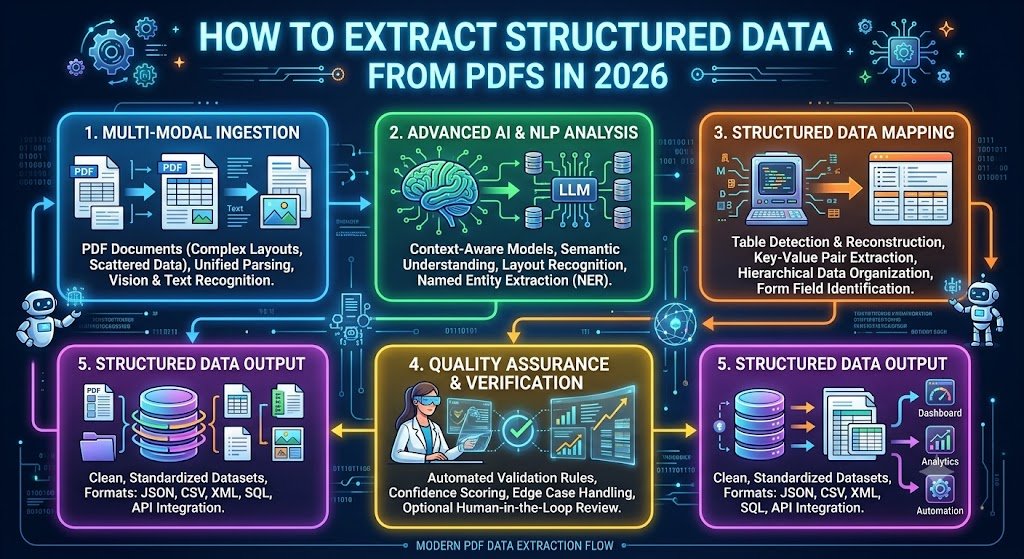
Extracting structured data from PDFs means converting that information into fields and values that systems can process. This is harder than it sounds, because PDFs come in two fundamentally different types, and each requires a different approach.
A text PDF contains actual text. The characters are stored with positioning information. Software can read them directly.
A scanned PDF contains images. Each page is a picture of a document. Software sees pixels, not text. OCR is required.
Most business PDFs in India are scanned PDFs — signed contracts, stamped invoices, bank statements, government documents. But even text PDFs present challenges, because the text is positioned visually rather than structured semantically.
This guide explains how to extract structured data from PDFs in 2026. It covers both PDF types, extraction methods, validation, tools, costs, and India-specific considerations.
For organisations building document automation, Innovative AI Solutions provides specialised AI development services for PDF data extraction.
Step 1: Identify Your PDF Type
Text PDFs vs Scanned PDFs
| Characteristic | Text PDF | Scanned PDF |
|---|---|---|
| Content | Actual text characters | Images of pages |
| Selectable | Yes | No |
| Searchable | Yes | No (without OCR) |
| Extraction method | Direct text extraction | OCR required |
| Accuracy | Higher | Lower |
How to Tell the Difference
| Test | Text PDF | Scanned PDF |
|---|---|---|
| Try to select text | Works | Does not work |
| Search for a word | Finds it | Finds nothing |
| Zoom in | Text stays sharp | Text pixelates |
| File size | Smaller | Larger |
Mixed PDFs
Some PDFs contain both text and scanned images — a text-based invoice with a scanned signature, for example. These require hybrid approaches.
Step 2: Extract Text From Text PDFs
Direct Text Extraction
For text PDFs, text can be extracted directly without OCR.
| Tool | Approach |
|---|---|
| pdfplumber (Python) | Extracts text with positioning |
| PyPDF2 (Python) | Basic text extraction |
| PDFBox (Java) | Text extraction |
| Commercial libraries | Enhanced extraction |
What Direct Extraction Provides
text PDF text extraction output:
"ABC Supplies Pvt Ltd
Invoice No: INV-2026-1234
Date: 15/01/2026
...
Total: 53100"
This is text with positioning information, but not structured data.
Table Extraction
Tables are the hardest part of PDF extraction. Text positioning does not automatically indicate table structure.
| Approach | How It Works |
|---|---|
| Coordinate-based | Use text positions to infer tables |
| Line-based | Use drawn lines to identify cells |
| AI-based | Use ML models to detect tables |
| Hybrid | Combine approaches |
Tools for table extraction:
| Tool | Approach |
|---|---|
| Camelot | Coordinate and line-based |
| Tabula | Line-based detection |
| pdfplumber | Table detection |
| AI models | Learned table detection |
Layout Understanding
Text PDFs contain positioning information that reveals layout.
| Element | How It Is Detected |
|---|---|
| Headers | Position, font size |
| Columns | X-coordinate clustering |
| Tables | Alignment patterns |
| Fields | Label-value proximity |
Step 3: Extract Text From Scanned PDFs
OCR Required
Scanned PDFs require OCR before any extraction can happen.
text
Scanned PDF
↓ Render pages to images ↓ OCR (extract text) ↓
Text with positioning
↓ Field extraction
The OCR Pipeline
| Stage | Purpose |
|---|---|
| Page rendering | Convert PDF pages to images |
| Preprocessing | Improve image quality |
| Text detection | Locate text regions |
| Recognition | Convert to characters |
| Post-processing | Correct errors |
OCR Accuracy
| Document Quality | OCR Accuracy |
|---|---|
| Clean scan | 98–99.5% |
| Standard business doc | 95–99% |
| Poor quality scan | 85–95% |
| Handwritten | 80–95% |
Step 4: Extract Structured Fields
The Field Extraction Challenge
Having text is not the same as having structured data. Field extraction identifies which text is which field.
text Text: "Invoice No: INV-2026-1234 Date: 15/01/2026 Total: Rs. 53,100" ↓ Structured: { "invoice_number": "INV-2026-1234", "date": "2026-01-15", "total": 53100 }
Extraction Methods
| Method | Best For | Limitations |
|---|---|---|
| Template-based | Consistent layouts | Breaks on layout changes |
| Rule-based | Known patterns | Requires setup per document |
| AI-based | Variable layouts | Requires training data |
| Hybrid | Mixed documents | More complex |
Template-Based Extraction
Define where fields appear on the page.
| Approach | How It Works |
|---|---|
| Coordinate mapping | Fields at fixed positions |
| Anchor-based | Find text relative to anchors |
| Regex patterns | Match field patterns |
AI-Based Extraction
Use machine learning to identify fields regardless of layout.
| Approach | How It Works |
|---|---|
| Named entity recognition | Identify entities in text |
| Layout models | Understand document structure |
| Vision-language models | Holistic document understanding |
| Fine-tuned models | Trained on specific document types |
Key-Value Extraction
For forms and documents with label-value pairs.
text
"Vendor Name: ABC Supplies Pvt Ltd"
↓
{"vendor_name": "ABC Supplies Pvt Ltd"}
Table Extraction
For line items and tabular data.
text
Item Qty Rate Amount
Widget A 10 3000 30000
Widget B 5 3000 15000
↓ [ {"item": "Widget A", "qty": 10, "rate": 3000, "amount": 30000}, {"item": "Widget B", "qty": 5, "rate": 3000, "amount": 15000} ]
Step 5: Validate Extracted Data
Why Validation Matters
Raw extraction achieves 95–99% accuracy. Validation pushes effective accuracy to 98–99.5%.
Validation Types
| Validation Type | What It Checks |
|---|---|
| Format validation | Field formats |
| Range validation | Value ranges |
| Cross-field validation | Consistency |
| Database validation | Against master data |
| Checksum validation | Numbers with checksums |
Validation Examples
| Field | Validation |
|---|---|
| GSTIN | Valid GSTIN format |
| Invoice total | Sum of line items |
| Tax amount | Rate × taxable amount |
| Date | Valid date, reasonable range |
Exception Handling
Documents that fail validation route to human review.
text
Extraction
↓
Validation
├── Pass → Auto-process └── Fail → Human review
Step 6: Output and Integrate
Output Formats
| Format | Use Case |
|---|---|
| JSON | API integration |
| XML | System integration |
| CSV | Spreadsheet import |
| Database records | Direct storage |
Integration Methods
| Method | Best For |
|---|---|
| API | Real-time integration |
| Batch | Scheduled processing |
| File-based | Legacy systems |
| Webhook | Event-driven |
Tools for PDF Data Extraction
Open-Source Tools
| Tool | Best For |
|---|---|
| pdfplumber | Text PDF extraction |
| Camelot | Table extraction |
| Tabula | Table extraction |
| Tesseract | OCR for scanned PDFs |
| OCRmyPDF | Adding OCR to PDFs |
Commercial Tools
| Tool | Best For |
|---|---|
| Adobe Acrobat Pro | Manual extraction |
| ABBYY FineReader | OCR and extraction |
| Cloud OCR APIs | Scanned PDF processing |
| Document AI platforms | Structured extraction |
AI Extraction Platforms
| Platform Type | Capability |
|---|---|
| Cloud document AI | End-to-end extraction |
| Specialised IDP | Document-specific extraction |
| Custom pipelines | Tailored extraction |
What It Costs in India
Implementation Costs
| Scope | Cost Range (INR) | Cost Range (USD) | Timeline |
|---|---|---|---|
| Basic text PDF extraction | ₹1,00,000–₹3,00,000 | $1,200–$3,600 | 3–6 weeks |
| Scanned PDF extraction | ₹2,00,000–₹5,00,000 | $2,400–$6,000 | 4–8 weeks |
| With field extraction | ₹4,00,000–₹10,00,000 | $4,800–$12,000 | 8–14 weeks |
| Full pipeline with validation | ₹8,00,000–₹20,00,000 | $9,600–$24,000 | 12–20 weeks |
| Enterprise platform | ₹20,00,000–₹50,00,000+ | $24,000–$60,000+ | 20–36 weeks |
Ongoing Costs
| Cost Category | Monthly Range (INR) | Monthly Range (USD) |
|---|---|---|
| OCR/API usage | ₹5,000–₹50,000 | $60–$600 |
| Infrastructure | ₹5,000–₹30,000 | $60–$360 |
| Human review | ₹30,000–₹3,00,000 | $360–$3,600 |
| Maintenance | ₹10,000–₹50,000 | $120–$600 |
Cost Per Document
| Document Type | Cost (INR) | Cost (USD) |
|---|---|---|
| Simple text PDF | ₹0.50–₹2 | $0.006–$0.024 |
| Scanned PDF | ₹2–₹8 | $0.024–$0.096 |
| Complex PDF with tables | ₹5–₹20 | $0.06–$0.24 |
| Handwritten PDF | ₹10–₹30 | $0.12–$0.36 |
India-Specific Considerations
Common Indian PDF Types
| Document | Extraction Consideration |
|---|---|
| GST invoices | Variable layouts, specific fields |
| E-way bills | Standardised format |
| Bank statements | Varied formats by bank |
| Aadhaar/PAN | Standard formats |
| Property documents | Poor quality, stamps |
| Government forms | Specific formats |
Indian Language PDFs
| Language | Support Level |
|---|---|
| English | Excellent |
| Hindi | Good |
| Hinglish | Moderate |
| Regional languages | Variable |
DPDPA Compliance
| Requirement | Implementation |
|---|---|
| Consent | For personal data processing |
| Data minimisation | Extract only required fields |
| Security | Encryption, access control |
| Audit trails | Log all processing |
| Data residency | Where processing happens |
Decision Framework
Extraction Approach Selection
| Your PDF Type | Recommended Approach |
|---|---|
| Text PDF, consistent layout | Template-based extraction |
| Text PDF, variable layout | AI-based extraction |
| Scanned PDF, clean | OCR + template extraction |
| Scanned PDF, variable | OCR + AI extraction |
| Mixed PDF | Hybrid pipeline |
| Handwritten PDF | AI handwriting recognition |
Readiness Scorecard
| Criteria | Weight | Score (1–5) | Weighted Score |
|---|---|---|---|
| PDF volume | 25% | ||
| PDF type (text vs scanned) | 20% | ||
| Layout consistency | 20% | ||
| Extraction complexity | 15% | ||
| Integration needs | 10% | ||
| Budget | 10% | ||
| Total | 100% | /5 |
Implementation Roadmap
| Phase | What to Build | Timeline |
|---|---|---|
| Phase 1 | Text extraction (text PDFs) | 3–6 weeks |
| Phase 2 | OCR (scanned PDFs) | 4–8 weeks |
| Phase 3 | Field extraction | 4–6 weeks |
| Phase 4 | Validation and integration | 4–6 weeks |
Frequently Asked Questions
1. How do I extract structured data from PDFs?
Identify whether the PDF is text or scanned. Text PDFs allow direct extraction; scanned PDFs require OCR. Then extract fields, validate data, and output structured formats like JSON.
2. What is the difference between text PDFs and scanned PDFs?
Text PDFs contain actual text characters that can be selected and searched. Scanned PDFs contain images of pages — text cannot be selected and OCR is required.
3. How do I extract data from scanned PDFs?
Scanned PDFs require OCR. Render pages to images, run OCR to extract text, then extract structured fields from the text. Validate results and route exceptions to human review.
4. How do I extract tables from PDFs?
Use table extraction tools like Camelot, Tabula, or pdfplumber for text PDFs. For scanned PDFs, use AI-based table detection. Table extraction is the hardest part of PDF extraction.
5. How much does PDF data extraction cost in India?
Basic text PDF extraction costs ₹1,00,000–₹3,00,000 ($1,200–$3,600). Full pipelines with validation cost ₹8,00,000–₹20,00,000 ($9,600–$24,000). Cost per document ranges from ₹0.50 for simple text PDFs to ₹30 for handwritten PDFs.
6. How accurate is PDF data extraction?
Text PDF extraction achieves 99%+ accuracy. Scanned PDF extraction achieves 95–99% with good quality scans. With validation, effective accuracy reaches 98–99.5%.
7. What tools extract data from PDFs?
Open-source: pdfplumber, Camelot, Tabula, Tesseract. Commercial: Adobe Acrobat Pro, ABBYY FineReader. AI platforms: cloud document AI, specialised IDP platforms.
8. Can I extract data from handwritten PDFs?
Yes, AI-powered handwriting recognition handles handwritten PDFs at 80–95% accuracy. With validation and human review, effective accuracy reaches 90–97%.
9. How do I handle PDFs with both text and scanned content?
Use a hybrid pipeline: direct extraction for text content, OCR for scanned content. Combine results into structured output.
10. How does DPDPA affect PDF data extraction?
DPDPA requires consent for personal data processing, data minimisation, security safeguards, audit trails, and potentially data residency. For sensitive documents, on-premise processing may be required.
11. What is the ROI of PDF data extraction?
For 10,000 documents monthly, extraction saves ₹54,00,000 annually after implementation costs. Payback periods are typically under 2 months for high-volume processing.
12. How can Innovative AI Solutions help?
Innovative AI Solutions is a Delhi-based AI development company specialising in PDF data extraction. We build extraction pipelines for both text and scanned PDFs with field extraction, validation, and system integration — designed for Indian document types and DPDPA compliance. Explore our AI development services to accelerate your document automation.
Contact Innovative AI Solutions
Ready to extract structured data from your PDFs?
We help Indian businesses build PDF data extraction pipelines with field extraction, validation, and system integration.
Contact Information
Innovative AI Solutions
📍 Netaji Subhash Place, Pitampura, Delhi – 110034
🌐 Website: https://innovativeais.com 📧 Email: info@innovativeais.com
📞 Phone: +91 7464 099 059 / +91 96899 67356
Business Services
• AI Automation • AI Development • AI Consulting • Machine Learning Solutions • Deep Learning Solutions • Generative AI Services • NLP Solutions • AI Agents • AI Chatbots • Voice AI • CRM Development • Custom Software Development • Website Development • Mobile App Development
About the Author
Abhishek Kumar
Founder & CEO, Innovative AI Solutions
5+ years building production AI systems for Indian businesses. Based in Delhi, serving clients across India.
Ready to build AI solutions for your business?
Innovative AI Solutions — Delhi's leading AI development company. Free consultation available.
Get Free Consultation →
A step-by-step 2026 guide to extracting structured data from PDFs — text PDFs vs scanned PDFs, extraction methods, validation, costs, and India use cases.
#PDFExtraction #StructuredData #2026 #PDFParsing #DataExtraction #InvoiceProcessing #TableExtraction #ScannedPDFs #PDFToJSON #DocumentAutomation #ExtractionTools #Validation #DocumentAI #India #DelhiNCRTech #EnterpriseApps #BusinessAutomation #TechIndia #DigitalProducts #DocumentProcessing #DataPipeline #ProcessAutomation #PDFForms #DataQuality #InnovativeAISolutions
Copyright © 2015–2026 Innovative AI Solutions. All Rights Reserved. | Privacy Policy | Terms & Conditions