The Onboarding Drop-Off That Costs More Than Acquisition
An Indian fintech company spends ₹800 to acquire a customer through paid advertising. The customer downloads the app, starts onboarding, and abandons at the document upload step because the app asked for a selfie at a specific angle and the customer could not get it right. Another customer abandons because the KYC verification is "under review" for 48 hours with no communication. A third abandons because the form asked for 14 fields, three of which the customer did not understand.
The acquisition cost was spent. The customer did not activate. And the business has no idea why.
This is the onboarding gap, and it is one of the most expensive inefficiencies in customer-facing businesses. Onboarding is the process by which a new customer becomes an active, paying user. It includes identity verification, document collection, account setup, approvals, and the first experience of the product or service. If onboarding is slow, confusing, or manual, customers abandon—and the acquisition cost is wasted.
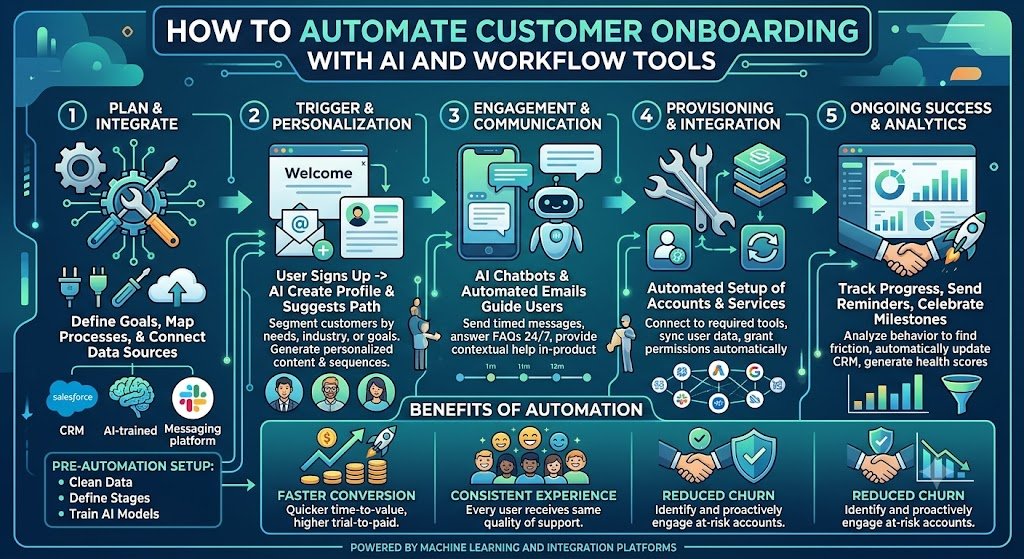
AI and workflow automation address this by making onboarding faster, more accurate, and more transparent. AI handles document verification, identity checks, and data extraction. Workflow tools handle the routing, approvals, notifications, and follow-ups. Together, they reduce onboarding time from days to minutes, reduce drop-off, and give the business visibility into where customers are getting stuck.
For Indian businesses, this matters because onboarding is where regulatory requirements and customer experience collide. KYC (Know Your Customer) is mandatory for financial services, and it is document-heavy. DPDPA applies to the personal data collected during onboarding. MeitY AI guidelines apply if AI is used for verification. And customers—accustomed to instant digital experiences—have low tolerance for slow, manual processes.
This guide is written for Indian founders, product managers, operations heads, and compliance officers evaluating onboarding automation. We will cover the AI document verification, the workflow automation, the activation sequencing, real costs in rupees and dollars, DPDPA compliance, and a phased implementation framework with clear go/no-go gates.
What Customer Onboarding Actually Involves
Onboarding differs by industry, but the core stages are similar.
The Onboarding Stages
1. Sign-up and data collection. The customer provides basic information: name, email, phone, and for B2B, company details. The form should be minimal—every additional field increases drop-off.
2. Identity verification (KYC). For regulated services, the customer verifies identity through documents (Aadhaar, PAN, passport, driving licence) or digital methods (Aadhaar-based eKYC, video KYC).
3. Document upload and verification. The customer uploads documents (address proof, income proof, business registration). The documents must be verified for authenticity and completeness.
4. Risk assessment. For financial services, the customer is assessed for risk (AML/CFT). This may involve screening against sanctions lists and PEP databases.
5. Approval decision. Based on the verification and risk assessment, the application is approved, rejected, or referred for manual review.
6. Account setup. The account is created, credentials are issued, and the customer is onboarded to the product.
7. Activation and first use. The customer completes the first meaningful action: makes a transaction, creates a project, invites a team member, etc.
8. Welcome and education. The customer receives welcome communication, onboarding guides, and support information.
The Onboarding Stages Table
| Stage | Manual Effort | Automation Potential |
|---|---|---|
| Sign-up | Low | High (forms, validation) |
| Identity verification | High (manual review) | Very High (AI KYC) |
| Document verification | Very High (manual review) | Very High (AI extraction) |
| Risk assessment | High (manual screening) | High (automated screening) |
| Approval decision | Medium | High (rules + AI) |
| Account setup | Low | High (automated) |
| Activation | Medium | High (guided flows) |
| Welcome | Low | High (automated) |
For teams building the onboarding systems and AI verification, our AI Automation and Custom Software Development practices cover the full stack.
AI Document Verification: The Core Automation
Document verification is where AI adds the most value. Manual verification is slow, error-prone, and expensive. AI verification is fast, consistent, and scalable.
The Verification Process
1. Document capture. The customer uploads or photographs the document. Quality checks (blur, glare, cropping) happen at capture to avoid rejections.
2. Document classification. The system identifies the document type: Aadhaar, PAN, passport, driving licence, utility bill, bank statement.
3. OCR and extraction. The system extracts fields: name, date of birth, address, document number, expiry date.
4. Authenticity checks. The system checks for tampering, forgery, and document validity. This includes checking the document format, holograms, and security features.
5. Data validation. The extracted data is validated against the customer's entered data and against external databases (e.g., PAN verification, Aadhaar verification).
6. Face matching. For identity verification, the system compares the customer's selfie with the photo on the document.
7. Liveness detection. For video KYC, the system confirms that the customer is a real person, not a photo or video.
8. Decision. Based on the checks, the document is approved, rejected, or referred for manual review.
India-Specific Verification
Aadhaar-based eKYC. Aadhaar verification via UIDAI-authorized agencies provides instant identity verification. The customer enters their Aadhaar number and receives an OTP; the system verifies the identity.
PAN verification. The PAN is verified against the Income Tax Department database via authorized APIs.
Video KYC. RBI permits video-based KYC for certain services. The customer completes a video call with an AI agent or a human agent, who verifies identity and liveness.
GSTIN verification. For B2B onboarding, the GSTIN is verified against the GST database.
Bank account verification. The customer's bank account is verified via penny drop (a small deposit) or API.
Verification Table
| Document | Verification Method | India-Specific |
|---|---|---|
| Aadhaar | eKYC via UIDAI | Yes |
| PAN | API verification | Yes |
| Passport | OCR + authenticity | No |
| Driving licence | OCR + authenticity | No |
| GSTIN | API verification | Yes |
| Bank account | Penny drop / API | Yes |
Workflow Automation: Routing and Approvals
AI verifies documents. Workflow automation handles the process around them: routing, approvals, notifications, and follow-ups.
The Workflow Components
1. Intake. The workflow captures the customer's application and routes it to the appropriate verification steps.
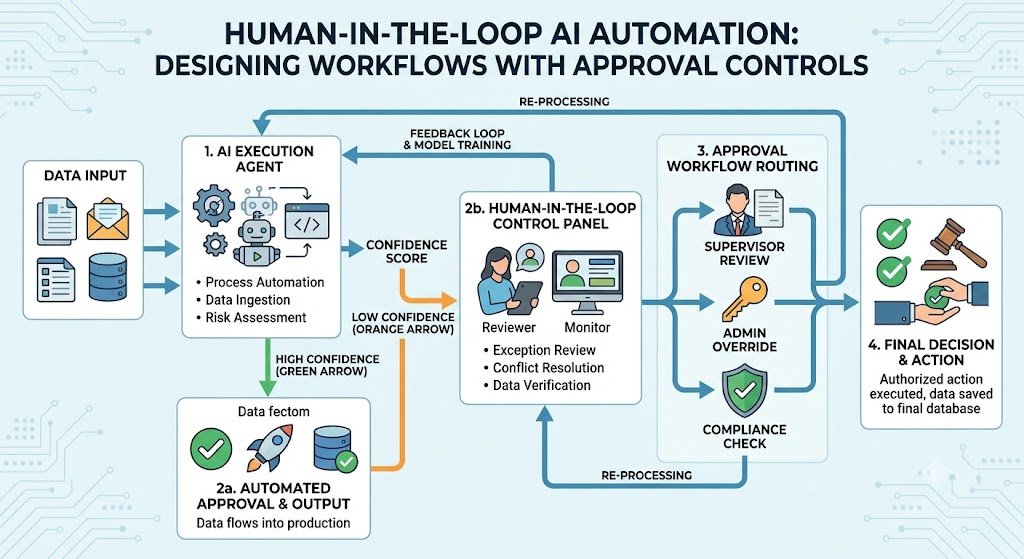
2. Routing. Applications are routed based on type, risk, or completeness. Simple applications may auto-approve; complex ones route to manual review.
3. Approval. Multi-level approvals for high-risk or high-value applications.
4. Notifications. Automated emails, SMS, and WhatsApp messages keep the customer informed at each stage.
5. Follow-ups. If the customer abandons or provides incomplete information, automated follow-ups remind them.
6. Escalation. Applications that sit too long escalate to supervisors.
7. Audit trail. Every step is logged for compliance and debugging.
Workflow Tools
| Tool | Type | Best For |
|---|---|---|
| Zapier | No-code automation | Simple integrations |
| Make | No-code automation | Visual workflows |
| n8n | Open-source automation | Self-hosted, technical teams |
| Temporal | Workflow orchestration | Complex, long-running workflows |
| Custom workflow engine | Built | Unique requirements |
Workflow Design Principles
Minimize steps. Every step is a potential drop-off.
Parallelize where possible. Run independent checks simultaneously.
Fail fast. If a check fails, inform the customer immediately with a clear reason.
Keep the customer informed. Notifications at each stage reduce anxiety.
Provide a human escape hatch. If automation fails, the customer can reach a human.
Activation: The Step After Onboarding
Onboarding is not complete when the account is created. It is complete when the customer takes their first meaningful action—the activation event.
What Activation Means
Activation differs by business:
Fintech: first transaction.
SaaS: first project created, first integration connected.
E-commerce: first order.
B2B: first team member invited, first workflow configured.
Activation Automation
Guided onboarding flows: step-by-step prompts that guide the customer to the activation event.
Progress tracking: show the customer how far they are.
Nudges: email, SMS, and WhatsApp reminders if the customer does not activate.
Incentives: discounts, credits, or bonuses for completing activation.
Human intervention: for high-value customers who do not activate, a human follow-up.
Activation Metrics
| Metric | Definition | Target |
|---|---|---|
| Time to activate | Time from sign-up to activation | Minimize |
| Activation rate | % of sign-ups who activate | Maximize |
| Drop-off by step | % who abandon at each step | Identify and fix |
| Support contacts | Support tickets during onboarding | Minimize |
Real Costs in India (2026)
Onboarding automation costs depend on the scope: document verification only, or full onboarding with workflow and activation.
Implementation Costs
| Scope | Cost (₹) | Cost ($ approx.) | Timeline |
|---|---|---|---|
| Document verification (OCR + AI) | ₹3–8 lakh | $3,600–$9,600 | 6–10 weeks |
| Document verification + KYC (Aadhaar, PAN APIs) | ₹6–15 lakh | $7,200–$18,000 | 10–16 weeks |
| Full onboarding automation (verification + workflow + activation) | ₹15–40 lakh | $18,000–$48,000 | 16–28 weeks |
| Enterprise onboarding platform (multi-product, multi-region) | ₹40–90 lakh | $48,000–$1,08,000 | 24–36 weeks |
Running Costs
| Component | Monthly Cost (₹) | Monthly Cost ($ approx.) | Notes |
|---|---|---|---|
| KYC API costs | ₹5–20 per verification | $0.06–$0.24 | Per-customer |
| OCR/AI API | ₹3–10 per document | $0.04–$0.12 | Per-document |
| Workflow hosting | ₹10,000–₹50,000 | $120–$600 | Cloud infrastructure |
| WhatsApp/SMS | ₹5,000–₹30,000 | $60–$360 | Per-message |
| Maintenance | ₹20,000–₹1,00,000 | $240–$1,200 | 15–25% of build annually |
The ROI Case
For a fintech onboarding 5,000 customers/month:
Manual onboarding cost: ₹150 per customer = ₹7.5 lakh/month.
Automated onboarding cost: ₹40 per customer = ₹2 lakh/month.
Monthly savings: ₹5.5 lakh.
Annual savings: ₹66 lakh.
Payback: 3–8 months.
Plus, the reduction in drop-off increases activation, which directly increases revenue.
India-Specific Compliance: KYC, DPDPA and MeitY
KYC Requirements
KYC is mandatory for financial services under RBI's KYC Master Directions. The requirements include:
Customer identification: name, address, and identity verification.
Customer due diligence: risk assessment and ongoing monitoring.
Enhanced due diligence: for high-risk customers.
DPDPA
Onboarding collects significant personal data: identity documents, addresses, financial information. Under the DPDP Act:
Consent: must be free, specific, informed, and unambiguous.
Purpose limitation: data collected for KYC should not be used for marketing without separate consent.
Data minimisation: collect only what is required for KYC and the service.
Retention: define retention periods (KYC records have statutory retention requirements).
Erasure: support data deletion where legally permitted.
MeitY AI Governance
If AI is used for document verification:
Transparency: customers should know they are interacting with AI.
Accountability: a named owner for AI verification decisions.
Human oversight: customers should be able to appeal AI decisions to a human.
Non-discrimination: verification should not discriminate based on protected characteristics.
Compliance Checklist
| Requirement | Implementation | Priority |
|---|---|---|
| KYC verification | Aadhaar eKYC, PAN API | High |
| Consent for processing | Specific, informed consent | High |
| Purpose limitation | KYC data not used for marketing | High |
| Retention policy | Statutory + policy | High |
| Human appeal | Mechanism for AI decision appeal | High |
| Audit trail | All verification steps logged | High |
Implementation Framework: A Phased Approach With Cost Gates
Phase 1: Onboarding Audit (Week 1–3)
Objective: Understand current onboarding flow and identify drop-off points.
Activities:
Map current onboarding stages.
Measure drop-off at each stage.
Identify manual steps that slow down onboarding.
Assess compliance requirements (KYC, DPDPA).
Assess document types and volumes.
Cost: ₹50,000–₹1.5 lakh ($600–$1,800).
Go/No-Go: Drop-off points identified. Business case validated.
Phase 2: Document Verification (Week 4–12)
Objective: Automate document extraction and verification.
Activities:
Integrate document capture with quality checks.
Implement OCR and AI extraction.
Implement authenticity checks.
Integrate Aadhaar eKYC and PAN verification.
Set up human review for exceptions.
Cost: ₹6–15 lakh ($7,200–$18,000).
Go/No-Go: Verification accuracy >95%. Manual review reduced.
Phase 3: Workflow Automation (Week 13–20)
Objective: Automate routing, approvals, and notifications.
Activities:
Implement workflow engine.
Configure routing rules.
Set up multi-level approvals.
Implement notifications (email, SMS, WhatsApp).
Set up escalation and audit trail.
Cost: ₹5–12 lakh ($6,000–$14,400).
Go/No-Go: Workflow routes correctly. Notifications sent. Audit trail complete.
Phase 4: Activation and Analytics (Week 21–28)
Objective: Add activation flows and analytics.
Activities:
Build guided activation flows.
Implement nudges for non-activated customers.
Build onboarding analytics dashboard.
Integrate with CRM for follow-up.
Cost: ₹4–13 lakh ($4,800–$15,600).
Go/No-Go: Activation rate improves. Analytics used.
Phase 5: Optimization (Ongoing)
Objective: Improve continuously.
Activities:
Monitor drop-off by step.
A/B test form fields and flows.
Optimize verification accuracy.
Reduce onboarding time.
Cost: ₹20,000–₹1,00,000/month ($240–$1,200).
Phase Summary Table
| Phase | Duration | Key Deliverable | Cost (₹) | Go/No-Go Criteria |
|---|---|---|---|---|
| 1. Audit | 3 weeks | Current state, drop-off | 50,000–1.5 lakh | Business case validated |
| 2. Verification | 9 weeks | Automated verification | 6–15 lakh | Accuracy >95% |
| 3. Workflow | 8 weeks | Routing, approvals | 5–12 lakh | Workflow works |
| 4. Activation | 8 weeks | Activation, analytics | 4–13 lakh | Activation improves |
| 5. Optimization | Ongoing | Continuous improvement | 20,000–1,00,000/month | Drop-off reduced |
Risks, Pitfalls, and Governance
The Most Common Onboarding Automation Failures
Too many form fields. Every field increases drop-off. Mitigation: Minimize fields; collect data progressively.
Document capture failures. Blurry photos, bad lighting, and wrong document types cause rejections. Mitigation: Quality checks at capture, clear instructions.
Slow manual review. AI rejects, manual review takes days. Mitigation: Fast review queue, SLA tracking.
No communication. Customer does not know what is happening. Mitigation: Notifications at each stage.
DPDPA violations. Data collected without proper consent. Mitigation: Consent capture, purpose limitation.
AI bias in verification. Verification fails for certain demographics. Mitigation: Bias testing, human appeal.
Risk Summary Table
| Risk | Likelihood | Impact | Mitigation |
|---|---|---|---|
| Too many fields | High | High (drop-off) | Minimize fields |
| Capture failures | High | High (rejections) | Quality checks |
| Slow manual review | Medium | High (drop-off) | Fast queue, SLA |
| No communication | High | Medium | Notifications |
| DPDPA violations | Medium | Critical | Consent, purpose |
| AI bias | Medium | High | Bias testing, appeal |
Benchmark Summary and Decision Framework
Decision Matrix: Build vs Buy
| Factor | Build Custom | Buy Onboarding Platform |
|---|---|---|
| Unique workflow | Complex, industry-specific | Standard onboarding |
| KYC integration | Custom APIs | Vendor KYC |
| Cost | Higher upfront | Subscription |
| Time to market | 12–28 weeks | Weeks |
| Best for | Large enterprises, unique needs | Mid-sized, standard needs |
Onboarding Optimization Priority Table
| Optimization | Impact | Effort |
|---|---|---|
| Reduce form fields | Very High | Low |
| Document capture quality | High | Medium |
| Automated verification | High | High |
| Notifications | High | Low |
| Fast manual review | High | Medium |
| Activation nudges | Medium | Medium |
The One-Paragraph Decision Rule
If your onboarding drop-off is high, start by reducing form fields and improving document capture quality—these are cheap and effective. Add AI document verification to reduce manual review time. Implement workflow automation for routing and notifications. Add activation flows to guide customers to their first meaningful action. And ensure DPDPA compliance—consent, purpose limitation, retention—from day one.
Frequently Asked Questions
1. How much does customer onboarding automation cost in India?
Document verification costs ₹3–8 lakh ($3,600–$9,600). Verification + KYC costs ₹6–15 lakh ($7,200–$18,000). Full onboarding automation costs ₹15–40 lakh ($18,000–$48,000).
2. What is AI document verification?
AI document verification uses OCR, computer vision, and machine learning to extract data from documents, check authenticity, and verify identity—reducing manual review.
3. How does KYC automation work in India?
Aadhaar eKYC verifies identity via UIDAI-authorized agencies. PAN verification checks the Income Tax database. Video KYC uses AI or human agents for identity confirmation.
4. How do I reduce onboarding drop-off?
Minimize form fields, improve document capture quality, send notifications at each stage, provide fast manual review, and add activation nudges.
5. What is activation and why does it matter?
Activation is the customer's first meaningful action (first transaction, first project). It indicates the customer has received value. Activation rate is a key onboarding metric.
6. How does DPDPA affect onboarding?
Onboarding collects personal data. Consent must be specific and informed, purpose limitation applies, data minimisation is required, and retention policies must be defined.
7. Can AI verification be biased?
Yes, if the training data is biased. Verification should be tested across demographics, and customers should have a human appeal mechanism.
8. What workflow tools should I use?
Zapier or Make for simple automation. n8n for self-hosted. Temporal for complex workflows. Custom engines for unique requirements.
9. How long does onboarding automation take to implement?
Document verification takes 6–10 weeks. Full onboarding automation takes 16–28 weeks. Timeline depends on KYC integrations and workflow complexity.
10. How do I measure onboarding success?
Track drop-off by step, time to activate, activation rate, and support contacts during onboarding.
11. Should I build or buy onboarding automation?
Build if you have unique workflows or specific KYC requirements. Buy if you have standard onboarding and need to move fast.
12. How can Innovative AI Solutions help?
Innovative AI Solutions builds onboarding automation for Indian businesses—AI document verification, KYC integration, workflow automation, activation flows, and DPDPA-compliant data handling. Our Delhi-based team handles assessment, implementation, and optimization. Visit https://innovativeais.com to discuss your requirements.
Contact Innovative AI Solutions
Ready to turn onboarding from a drop-off point into a competitive advantage?
[One-line supporting sentence.]
Contact Information
Innovative AI Solutions
📍 Netaji Subhash Place, Pitampura, Delhi – 110034
🌐 Website: https://innovativeaislabs.com 📧 Email: info@innovativeais.com
📞 Phone: +91 7464 099 059 / +91 96899 67356
Business Services
AI Automation
AI Development
AI Consulting
Machine Learning Solutions
Deep Learning Solutions
Generative AI Services
NLP Solutions
AI Agents
AI Chatbots
Voice AI
CRM Development
Custom Software Development
Website Development
Mobile App Development
About the Author
Abhishek Kumar
Founder & CEO, Innovative AI Solutions
5+ years building production AI systems for Indian businesses. Based in Delhi, serving clients across India.
Ready to build AI solutions for your business?
Innovative AI Solutions — Delhi's leading AI development company. Free consultation available.
Get Free Consultation →
A practical 2026 guide for Indian businesses automating customer onboarding—AI document verification, KYC integration, workflow automation, activation flows, real rupee costs, and DPDPA compliance.
#CustomerOnboarding #OnboardingAutomation #AIOnboarding #KYC #DocumentVerification #WorkflowAutomation #DigitalOnboarding #Activation #BFSIOnboarding #SaaSOnboarding #DPDPA #MeitY #CustomerExperience #DelhiNCR #InnovativeAISolutions
Copyright ©️ 2015–2026 Innovative AI Solutions. All Rights Reserved. | Privacy Policy | Terms & Conditions