Why Most Mobile App Cost Estimates in India Are Wrong by 40–60% Ask three Indian app development companies for a quote on the same app, and you will get three numbers that differ by lakhs. The reason is not that one is overcharging. It is that each quote covers a different scope—and almost none of them include the costs that determine whether the app succeeds after launch.
The most common mistake is quoting only the build phase. A mobile app is not a one-time purchase. It is a product that requires hosting, API costs, app store renewals, OS updates, bug fixes, security patches, and feature iterations. Industry benchmarks consistently show that maintenance runs 15–25% of the initial build cost per year—and that is before the cost of the features you will inevitably want to add in year two.
The second mistake is platform confusion. iOS and Android are not the same app built twice. They have different design conventions, different user expectations, different testing requirements, and different development costs. Cross-platform frameworks like Flutter and React Native have narrowed the gap, but they have not eliminated it. A cross-platform app is not automatically cheaper than two native apps—it depends on the app’s complexity and how much platform-specific functionality it needs.
The third mistake is ignoring the India-specific compliance layer. If your app collects personal data—and almost every app does—the DPDP Act applies. Consent architecture, data minimisation, erasure workflows, and audit logging are not optional add-ons. They are build requirements. Apps in fintech, healthcare, and education face additional sectoral obligations.
This guide is written for Indian founders, product managers, CTOs, and business leaders who need a realistic budget. We will cover real 2026 costs by platform and complexity, the iOS vs Android vs cross-platform decision, team structure and hourly rates in India, the hidden costs that inflate budgets, DPDPA compliance requirements, and a phased development framework with clear cost gates.
By the end, you should be able to scope, budget, and evaluate a mobile app project with confidence.
The Platform Decision: iOS, Android, or Cross-Platform?
This is the first decision that affects cost, and it is often made on assumptions rather than data.
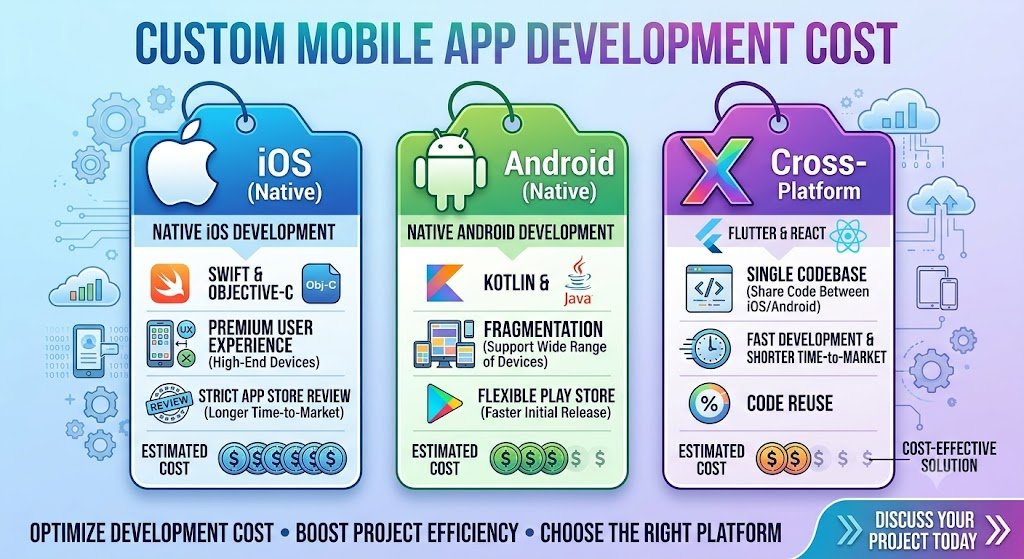
Native iOS Built with Swift and SwiftUI for Apple's ecosystem. Native iOS apps deliver the best performance, the smoothest animations, and the deepest integration with iOS features (Face ID, Apple Pay, HealthKit, widgets).
Cost implication: Highest per-platform cost, but the development is focused on a single codebase and a single set of design guidelines. iOS users in India tend to have higher average transaction values, making iOS-first viable for premium products.
Native Android
Built with Kotlin and Jetpack Compose. Android dominates Indian market share, with the vast majority of smartphone users on Android. Native Android apps deliver the best performance on Android devices and deep integration with Android features (Google Pay, notifications, background services).
Cost implication: Similar to iOS per-platform, but the device fragmentation in India—thousands of Android models across price points—adds testing time and cost.
Cross-Platform (Flutter / React Native)
A single codebase deployed to both iOS and Android. Flutter (Dart) and React Native (JavaScript/TypeScript) are the dominant frameworks in India.
Cost implication: Typically 20–35% cheaper than building two native apps, because the core logic is written once. However, the savings shrink if the app needs heavy platform-specific features, complex animations, or deep hardware integration. Cross-platform apps may also require platform-specific code for certain features, reducing the savings further.
Platform Comparison Table
| Dimension | Native iOS | Native Android | Cross-Platform (Flutter/React Native) |
|---|---|---|---|
| Languages | Swift, SwiftUI | Kotlin, Jetpack Compose | Dart / JavaScript |
| Codebase | Single (iOS only) | Single (Android only) | Shared (both platforms) |
| Build cost (India) | ₹6–30 lakh+ | ₹6–30 lakh+ | ₹4–22 lakh+ |
| Time to market | 10–20 weeks | 10–20 weeks | 8–16 weeks |
| Performance | Best | Best | Near-native (good enough for most apps) |
| Device fragmentation testing | Limited (fewer models) | High (thousands of models) | High (both platforms) |
| Best for | Premium, iOS-first products | Mass-market Indian apps | MVPs, budget-constrained, dual-platform reach |
Sources: Synthesised from Indian app development market rates, 2026.
The Decision Rule
If your users are primarily on Android (which is most of India), build Android-first or cross-platform. If your product is premium, design-heavy, or requires deep iOS integration, build native iOS. If you need both platforms on a constrained budget, cross-platform is the pragmatic choice—but budget for platform-specific customisation.
For teams building AI-powered mobile apps, our Mobile App Development and AI Development practices cover the full stack.
Real Costs by App Complexity (2026 India)
Cost is driven by feature complexity, not by platform alone. A simple app on two platforms costs less than a complex app on one. The table below categorises apps by complexity and gives realistic India market ranges.
App Complexity Tiers
| Tier | Description | Examples | Build Cost (₹) | Build Cost ($ approx.) | Timeline |
|---|---|---|---|---|---|
| Simple | 5–10 screens, basic auth, static content, simple forms | Utility app, event app, basic catalogue | ₹3–8 lakh | $3,600–$9,600 | 6–10 weeks |
| Medium | 15–25 screens, API integration, payments, push notifications | E-commerce, booking, loyalty, basic social | ₹8–20 lakh | $9,600–$24,000 | 10–16 weeks |
| Complex | 30+ screens, real-time features, AI/ML, multi-role, integrations | Fintech, healthcare, on-demand, marketplace | ₹20–50 lakh | $24,000–$60,000 | 16–28 weeks |
| Enterprise | Custom backend, high security, compliance, scale | BFSI, large-scale consumer, regulated | ₹50 lakh–₹1.5 crore+ | $60,000–$180,000+ | 28–40+ weeks |
Note: USD conversions at ₹83/$. These ranges are indicative for Indian development teams and include design, development, and basic testing. They do not include maintenance, third-party services, or compliance audits.
Platform-Specific Cost Multipliers
| Scenario | Cost Multiplier vs Single Native | Example (Medium App) |
|---|---|---|
| Single native (iOS or Android) | 1.0x | ₹8–20 lakh |
| Cross-platform (Flutter/React Native) | 0.65x–0.8x | ₹5–16 lakh |
| Two native apps (iOS + Android) | 1.6x–1.9x | ₹13–38 lakh |
The cross-platform multiplier reflects shared code but also accounts for platform-specific customisation and testing. The two-native multiplier is less than 2x because some backend and design work is shared.
Feature Cost Breakdown (Add-On Estimates)
| Feature | Additional Cost (₹) | Additional Cost ($ approx.) | Notes |
|---|---|---|---|
| User authentication (email/OTP) | ₹40,000–₹1 lakh | $480–$1,200 | Social login adds cost |
| Payment gateway integration | ₹60,000–₹1.5 lakh | $720–$1,800 | Razorpay, PayU, Stripe |
| Push notifications | ₹30,000–₹75,000 | $360–$900 | FCM/APNs setup |
| Chat/messaging | ₹1.5–4 lakh | $1,800–$4,800 | Real-time infra, moderation |
| AI chatbot integration | ₹1–3 lakh | $1,200–$3,600 | RAG pipeline, API integration |
| Maps and geolocation | ₹50,000–₹1.5 lakh | $600–$1,800 | Google Maps API costs apply |
| Video calling | ₹2–6 lakh | $2,400–$7,200 | WebRTC infrastructure |
| Multi-language (Indian languages) | ₹50,000–₹2 lakh | $600–$2,400 | Translation, testing, fonts |
| Admin dashboard | ₹1–4 lakh | $1,200–$4,800 | Web-based backend management |
Team Structure and Hourly Rates in India
App development cost is ultimately a function of team size × time × rate. Understanding the rate structure helps you evaluate quotes and spot underpriced (and overpriced) proposals.
India Market Rates (2026)
| Role | Hourly Rate (₹) | Hourly Rate ($ approx.) | Monthly Rate (₹) |
|---|---|---|---|
| Junior developer | ₹500–₹1,000 | $6–$12 | ₹80,000–₹1.6 lakh |
| Mid-level developer | ₹1,000–₹2,000 | $12–$24 | ₹1.6–3.2 lakh |
| Senior developer | ₹2,000–₹3,500 | $24–$42 | ₹3.2–5.6 lakh |
| UI/UX designer | ₹1,000–₹2,500 | $12–$30 | ₹1.6–4 lakh |
| QA engineer | ₹700–₹1,500 | $8–$18 | ₹1.1–2.4 lakh |
| Project manager | ₹1,200–₹2,500 | $14–$30 | ₹1.9–4 lakh |
| DevOps engineer | ₹1,500–₹3,000 | $18–$36 | ₹2.4–4.8 lakh |
Sources: Synthesised from Indian IT market salary surveys and agency rate cards, 2026.
Typical Team Composition by App Complexity
| App Tier | Team Composition | Duration | Estimated Cost (₹) |
|---|---|---|---|
| Simple | 1 developer, 0.5 designer, 0.5 QA | 6–10 weeks | ₹3–8 lakh |
| Medium | 2 developers, 1 designer, 1 QA, 0.5 PM | 10–16 weeks | ₹8–20 lakh |
| Complex | 3–4 developers, 1–2 designers, 1–2 QA, 1 PM, 0.5 DevOps | 16–28 weeks | ₹20–50 lakh |
| Enterprise | 5+ developers, 2 designers, 2 QA, 1 PM, 1 DevOps, 1 security | 28–40+ weeks | ₹50 lakh–₹1.5 crore+ |
Why the Cheapest Quote Is Usually the Most Expensive
A quote of ₹2 lakh for a medium-complexity app is not a bargain. It usually means one of three things:
The scope is much smaller than you described.
The team is junior and will produce code that requires expensive rework.
The quote excludes testing, deployment, and post-launch support.
The cost of rework is 2–3x the cost of building it right the first time. A cheap build that fails at launch is not cheap.
The Hidden Costs That Inflate Budgets
1. Maintenance and Updates (15–25% of Build Cost Annually)
Mobile apps are not static. Apple and Google release new OS versions annually. Third-party APIs change. Security vulnerabilities are discovered. User feedback requires iteration. Budget 15–25% of the initial build cost per year for maintenance—and more if the app is actively evolving.
What maintenance covers: OS compatibility updates, bug fixes, security patches, third-party API updates, minor feature enhancements, app store compliance.
2. App Store Fees
| Store | Annual Fee (₹) | Annual Fee ($ approx.) |
|---|---|---|
| Apple App Store | ₹8,300 | $99 |
| Google Play Store | ₹2,100 | $25 |
These are small but must be budgeted.
3. Backend Infrastructure
If the app requires a backend (user accounts, data storage, APIs), that is a separate cost. Backend development adds ₹2–10 lakh ($2,400–$12,000) depending on complexity, plus monthly hosting costs of ₹5,000–₹50,000 ($60–$600).
4. Third-Party Services
| Service | Monthly Cost (₹) | Monthly Cost ($ approx.) |
|---|---|---|
| Push notifications (FCM) | Free | Free |
| Maps (Google Maps API) | ₹5,000–₹30,000 | $60–$360 |
| Payment gateway | Per-transaction fee | Per-transaction fee |
| SMS/OTP | ₹0.15–₹0.30 per SMS | $0.002–$0.004 per SMS |
| Cloud hosting (AWS/GCP) | ₹10,000–₹50,000 | $120–$600 |
| Analytics | Free–₹5,000 | Free–$60 |
5. Compliance and Security
If the app handles personal data, DPDPA compliance is mandatory. This includes consent architecture, privacy policy, data mapping, and potentially a Data Protection Impact Assessment. Budget ₹1–5 lakh ($1,200–$6,000) for compliance design and review, more for regulated sectors (fintech, healthcare).
6. Testing on Real Devices
Indian Android fragmentation means testing on multiple device models. A device lab or cloud testing service (BrowserStack, Firebase Test Lab) costs ₹5,000–₹30,000 per month during development.
DPDPA Compliance for Mobile Apps
Every mobile app that collects personal data—name, phone number, location, usage data—is subject to the DPDP Act. The compliance obligations are not optional, and the penalties are significant.
Key Requirements
1. Consent architecture. Consent must be free, specific, informed, and unambiguous. A blanket "I agree to the terms" checkbox is not sufficient. The app must explain what data is collected, why, and for how long—and allow users to withdraw consent.
2. Data minimisation. Collect only what the app needs. A food delivery app does not need access to contacts. A utility app does not need location when the screen is off. Every permission request must be justified.
3. Purpose limitation. Data collected for one purpose cannot be used for another without fresh consent. Order history cannot be used for marketing without consent.
4. Erasure and rights. Users have the right to access their data, correct it, and request erasure. The app must provide a mechanism for this, and the backend must support deletion across all systems.
5. Children's data. If the app is likely to be accessed by children, verifiable parental consent is required. This is particularly relevant for gaming, education, and social apps.
6. Breach notification. If personal data is compromised, notification to CERT-In within six hours and to affected individuals is required.
Sectoral Obligations
Fintech: RBI guidelines on data localisation, KYC, and transaction security apply.
Healthcare: Sensitive personal data under DPDPA; additional obligations for medical records.
Education: Children's data protections; parental consent requirements.
Compliance Checklist for Mobile Apps
| Requirement | Action | Priority |
|---|---|---|
| Privacy policy | Publish in-app, plain language, covering all data flows | High |
| Consent capture | Granular, purpose-specific, withdrawable | High |
| Permission justification | Every permission request explained in-app | High |
| Data minimisation | Audit all data collected, remove unnecessary | Medium |
| Erasure workflow | In-app mechanism for account/data deletion | High |
| Third-party DPAs | Every SDK and service receiving data | High |
| Security | TLS, secure storage, certificate pinning | High |
| Breach response plan | Incident response covering the app | Medium |
The Development Process: A Phased Framework With Cost Gates
Phase 1: Discovery and Scoping (Week 1–2)
Objective: Define what the app does and what it does not do.
Activities:
Define the core user journey and the problem it solves.
Write down what the app will NOT do in v1. Scope creep is the single biggest cause of budget overruns.
Decide platform: iOS, Android, or cross-platform.
Assess DPDPA exposure: what personal data will be collected, why, and how consent will be captured.
Identify third-party integrations: payment, maps, messaging, analytics.
Cost: ₹50,000–₹1.5 lakh ($600–$1,800) for discovery workshop and scope document.
Go/No-Go: Clear v1 scope defined. Platform decision made. Compliance requirements understood.
Phase 2: Design and Prototype (Week 3–5)
Objective: Design the user experience before building it.
Activities:
Wireframes for all screens.
UI design: visual style, navigation, interaction patterns.
Clickable prototype for user testing.
Test with 5–10 target users. Fix usability issues before development.
Cost: ₹1–4 lakh ($1,200–$4,800) for design and prototype.
Go/No-Go: Prototype tested with real users. Usability issues resolved. Design approved.
Phase 3: Development (Week 6–14)
Objective: Build the app.
Activities:
Backend development (if required): APIs, database, authentication.
Frontend development: screens, navigation, state management.
Third-party integrations: payment, maps, notifications.
Weekly builds for internal testing.
Cost: ₹3–25 lakh ($3,600–$30,000) depending on complexity.
Progress check: Weekly demos. If you are not seeing progress every week, the project is drifting.
Phase 4: Testing and QA (Week 15–17)
Objective: Find and fix bugs before launch.
Activities:
Functional testing: all features work as specified.
Device testing: multiple Android models, iOS versions.
Performance testing: load times, memory usage, battery.
Security testing: authentication, data storage, API security.
UAT (user acceptance testing) with real users.
Cost: ₹50,000–₹3 lakh ($600–$3,600) for comprehensive testing.
Go/No-Go: Critical bugs fixed. Performance acceptable. Security review passes. DPDPA compliance verified.
Phase 5: Launch and Monitor (Week 18–20)
Objective: Deploy to app stores and monitor.
Activities:
App store submission (Apple review can take 1–2 weeks).
Analytics and crash reporting setup.
Monitor: crashes, performance, user feedback, uninstall rate.
First 30 days: intensive bug fixing and minor iterations.
Cost: App store fees plus ₹50,000–₹1.5 lakh for launch support.
Phase 6: Maintain and Iterate (Month 6+)
Ongoing: 15–25% of build cost annually for maintenance, OS updates, and feature iterations.
Phase Summary Table
| Phase | Duration | Key Deliverable | Cost Gate (₹) | Go/No-Go Criteria |
|---|---|---|---|---|
| 1. Discovery | 1–2 weeks | Scope document, platform decision | 50,000–1.5 lakh | Clear v1 scope |
| 2. Design | 2–3 weeks | Wireframes, UI, clickable prototype | 1–4 lakh | Prototype tested |
| 3. Development | 8–10 weeks | Working app, integrations | 3–25 lakh | Weekly demos show progress |
| 4. Testing | 2–3 weeks | Bug-free build, security verified | 50,000–3 lakh | UAT passed |
| 5. Launch | 2 weeks | App store deployment, monitoring | 50,000–1.5 lakh | Analytics live, crashes monitored |
| 6. Maintain | Ongoing | OS updates, bug fixes, features | 15–25% of build annually | Stability maintained |
Risks, Pitfalls, and Governance
The Most Common Budget Killers
Scope creep. The client asks for "just one more feature" repeatedly. Each feature adds development, testing, and maintenance cost. Mitigation: Write down what is out of scope for v1. Use a change request process with cost estimates.
Underestimating backend complexity. The app is the visible part. The backend—APIs, database, authentication, scaling—is often more work. Mitigation: Scope backend separately. Do not assume it is simple.
Skipping design. Building without a tested prototype means discovering usability problems after code is written. Mitigation: Always prototype and test with users first.
No maintenance budget. The app launches, then breaks with the next iOS/Android update. Mitigation: Budget 15–25% of build cost annually for maintenance from day one.
Ignoring DPDPA. Compliance retrofitted after launch is expensive. Mitigation: Build consent, data minimisation, and erasure into v1.
Risk Summary Table
| Risk | Likelihood | Impact | Mitigation |
|---|---|---|---|
| Scope creep | High | High (budget overrun) | Written scope, change request process |
| Backend underestimated | High | High | Separate backend scoping |
| Skipping design phase | Medium | High (rework) | Prototype and user test |
| No maintenance budget | High | Medium (app breaks) | Budget 15–25% annually |
| DPDPA non-compliance | Medium | Critical (penalties) | Compliance in v1 |
| App store rejection | Medium | Medium (delay) | Follow guidelines, test submission |
Benchmark Summary and Decision Framework
Decision Matrix: Platform Selection
| Factor | Native iOS | Native Android | Cross-Platform |
|---|---|---|---|
| Target users | iOS-heavy, premium | Android-heavy (most of India) | Both platforms |
| Budget | Higher | Higher | Lower (20–35% savings) |
| Performance needs | High (gaming, AR) | High | Standard |
| Time to market | Slower | Slower | Faster |
| Platform-specific features | Deep integration | Deep integration | May need custom code |
| Best for | Premium iOS-first | Mass-market India | MVPs, dual-platform |
Cost Summary Table
| App Tier | Single Native (₹) | Cross-Platform (₹) | Two Native (₹) |
|---|---|---|---|
| Simple | 3–8 lakh | 2–6 lakh | 5–13 lakh |
| Medium | 8–20 lakh | 5–16 lakh | 13–38 lakh |
| Complex | 20–50 lakh | 13–40 lakh | 32–95 lakh |
| Enterprise | 50 lakh–1.5 crore | 35 lakh–1 crore | 80 lakh–2.85 crore |
The One-Paragraph Decision Rule
If you are building for the Indian mass market, Android-first or cross-platform is the pragmatic choice. If your product is premium, design-heavy, or iOS-first, build native iOS. If you need both platforms on a constrained budget, cross-platform saves 20–35%—but budget for platform-specific customisation. In all cases, budget 15–25% of build cost annually for maintenance, and build DPDPA compliance into v1, not after launch.
Frequently Asked Questions
1. How much does it cost to build a mobile app in India in 2026?
A simple app costs ₹3–8 lakh ($3,600–$9,600). A medium-complexity app costs ₹8–20 lakh ($9,600–$24,000). A complex app costs ₹20–50 lakh ($24,000–$60,000). An enterprise app costs ₹50 lakh–₹1.5 crore+ ($60,000–$180,000+). These ranges include design, development, and basic testing, but not maintenance or third-party services.
2. Is cross-platform cheaper than native?
Cross-platform (Flutter/React Native) is typically 20–35% cheaper than building two native apps because the core logic is written once. However, the savings shrink if the app needs heavy platform-specific features or complex animations. For a single platform, native and cross-platform costs are closer.
3. How long does it take to build a mobile app?
A simple app takes 6–10 weeks. A medium app takes 10–16 weeks. A complex app takes 16–28 weeks. An enterprise app takes 28–40+ weeks. Timeline depends on feature complexity, backend requirements, and testing scope.
4. Should I build for iOS or Android first in India?
Android dominates Indian market share, so Android-first or cross-platform is the pragmatic choice for most consumer apps. iOS-first makes sense for premium products, design-heavy apps, or if your target users are primarily iOS. Cross-platform lets you reach both without building twice.
5. What are the ongoing costs after launch?
Budget 15–25% of the initial build cost per year for maintenance: OS updates, bug fixes, security patches, third-party API changes, and minor feature iterations. Add app store fees (₹8,300/year for Apple, ₹2,100/year for Google), backend hosting (₹5,000–₹50,000/month), and third-party services.
6. What DPDPA requirements apply to mobile apps?
If the app collects personal data, consent must be free, specific, informed, and unambiguous. Data minimisation and purpose limitation apply. Users have the right to access, correct, and erase their data. Children's data requires verifiable parental consent. Breach notification to CERT-In within six hours is required.
7. Do I need a backend for my mobile app?
If the app requires user accounts, data storage, or integration with other systems, yes. Backend development adds ₹2–10 lakh ($2,400–$12,000) depending on complexity, plus monthly hosting costs. Some apps can use backend-as-a-service (Firebase, Supabase) to reduce cost.
8. How do I prevent scope creep from blowing my budget?
Write down what the app will NOT do in v1. Use a change request process where any new feature is estimated and approved before development. Review the scope weekly with the development team. Scope creep is the single biggest cause of budget overruns.
9. What is the cheapest way to build a mobile app?
The cheapest path is a cross-platform MVP with a limited feature set, built by a competent team. Do not choose the lowest quote—it usually means junior developers or excluded testing, both of which lead to expensive rework. A well-built MVP at ₹5–8 lakh is cheaper than a poorly built app at ₹3 lakh that fails at launch.
10. How do I choose a mobile app development company in India?
Ask for: portfolio of production apps (not just designs), references from past clients, clarity on what is included and excluded in the quote, a maintenance plan, and DPDPA compliance experience. Avoid companies that quote a fixed price before discovery. Avoid companies that cannot explain their testing process.
11. What are the biggest risks in mobile app development?
Scope creep, underestimated backend complexity, skipping design, no maintenance budget, and DPDPA non-compliance. All are preventable with proper scoping, a phased process, and compliance built into v1.
12. How can Innovative AI Solutions help?
Innovative AI Solutions builds production-grade mobile apps for Indian businesses—native iOS, native Android, and cross-platform Flutter/React Native—with AI features, DPDPA compliance, and backend integration. Our Delhi-based team handles discovery, design, development, testing, and maintenance. Visit https://innovativeais.com to discuss your requirements.
Contact Innovative AI Solutions
Ready to build a mobile app that survives launch and its first OS update?
[One-line supporting sentence.]
Contact Information
Innovative AI Solutions
📍 Netaji Subhash Place, Pitampura, Delhi – 110034
🌐 Website: https://innovativeaislabs.com 📧 Email: info@innovativeais.com
📞 Phone: +91 7464 099 059 / +91 96899 67356
Business Services
AI Automation
AI Development
AI Consulting
Machine Learning Solutions
Deep Learning Solutions
Generative AI Services
NLP Solutions
AI Agents
AI Chatbots
Voice AI
CRM Development
Custom Software Development
Website Development
Mobile App Development
About the Author
Abhishek Kumar
Founder & CEO, Innovative AI Solutions
5+ years building production AI systems for Indian businesses. Based in Delhi, serving clients across India.
Ready to build AI solutions for your business?
Innovative AI Solutions — Delhi's leading AI development company. Free consultation available.
Get Free Consultation →
A practical 2026 guide for Indian businesses budgeting a custom mobile app—platform decisions, real rupee costs by complexity, the hidden maintenance line item, DPDPA compliance, and a phased process that prevents budget overruns.
#MobileAppDevelopment #AppDevelopmentCost #iOSApp #AndroidApp #CrossPlatformApps #Flutter #ReactNative #AppDevelopmentIndia #DPDPA #MeitY #IndiaAI #Nasscom #DigitalIndia #FintechApps #HealthcareApps #DelhiNCR #AppDevelopmentCompany #InnovativeAISolutions
Copyright ©️ 2015–2026 Innovative AI Solutions. All Rights Reserved. | Privacy Policy | Terms & Conditions