What Cloud-Based Software Actually Is
Cloud-based software runs on cloud infrastructure — servers, storage, databases, and services provided by cloud platforms. But that definition is too simple.
The distinction that matters is between software that runs in the cloud and software designed for the cloud.
Software that merely runs in the cloud is traditional software hosted on cloud servers. It works, but it does not use cloud capabilities.
Software designed for the cloud uses managed services, auto-scaling, serverless functions, and cloud-native patterns. It is more resilient, more scalable, and often more cost-effective.
Most modern software is cloud-based. The question is not whether to use cloud, but how to use it well.
This guide covers cloud-based software development in 2026. It explains the benefits, key features, architecture approaches, costs in India, and what businesses need to know.
For organisations building cloud-based software, Innovative AI Solutions provides custom software development and AI development services.
Benefits of Cloud-Based Software
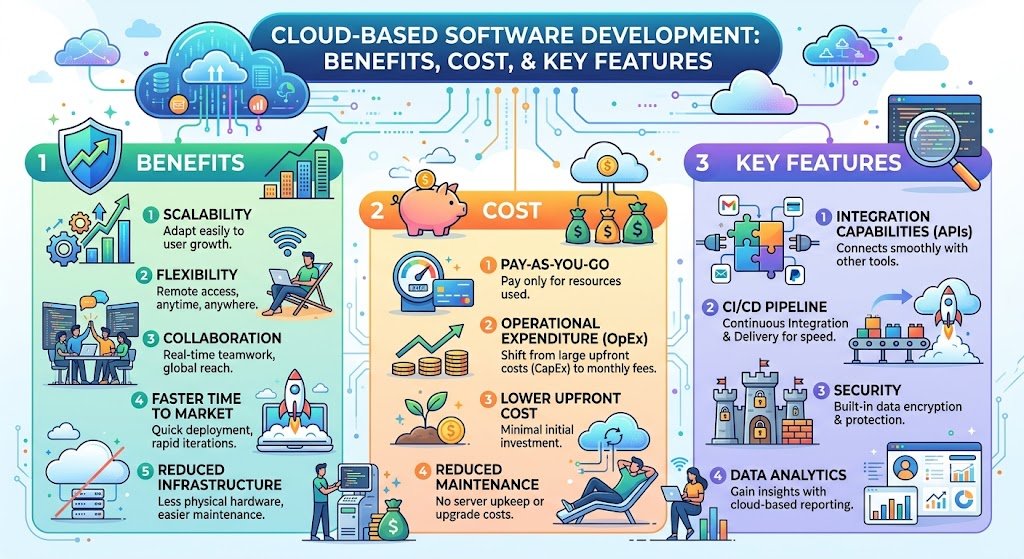
Benefit 1: Scalability
Cloud infrastructure scales up and down based on demand.
| Traditional | Cloud |
|---|---|
| Buy capacity upfront | Scale on demand |
| Fixed capacity | Elastic capacity |
| Over-provision or under-provision | Right-size continuously |
Impact: Handle traffic spikes without over-provisioning.
Benefit 2: Cost Efficiency
Cloud converts capital expenditure to operating expenditure.
| Traditional | Cloud |
|---|---|
| Large upfront investment | Pay for what you use |
| Fixed costs | Variable costs |
| Underutilised capacity | Efficient utilisation |
Impact: Lower upfront cost, better cost alignment with usage.
Benefit 3: Reliability
Cloud platforms provide redundancy and failover.
| Traditional | Cloud |
|---|---|
| Single data centre | Multiple availability zones |
| Manual failover | Automatic failover |
| Downtime risk | Higher availability |
Impact: Higher uptime, better disaster recovery.
Benefit 4: Global Reach
Cloud infrastructure is available globally.
| Traditional | Cloud |
|---|---|
| Limited geographic presence | Global presence |
| Latency for distant users | Edge locations |
| Complex expansion | Rapid expansion |
Impact: Serve global users with low latency.
Benefit 5: Speed of Innovation
Cloud services enable faster development.
| Traditional | Cloud |
|---|---|
| Build everything | Use managed services |
| Maintain infrastructure | Focus on application |
| Slow to add capabilities | Fast to add services |
Impact: Faster time to market, more innovation.
Benefit 6: Security
Cloud providers invest heavily in security.
| Traditional | Cloud |
|---|---|
| Your security team | Provider + your team |
| Your compliance | Provider compliance + yours |
| Your certifications | Provider certifications |
Impact: Better baseline security, shared responsibility.
Benefit 7: Accessibility
Cloud software is accessible from anywhere.
| Traditional | Cloud |
|---|---|
| Network access required | Internet access |
| Device restrictions | Any device |
| Location restrictions | Anywhere |
Impact: Support remote work, distributed teams.
Key Features of Cloud-Based Software
Feature 1: Multi-Tenancy
Serving multiple customers from shared infrastructure.
| Aspect | Benefit |
|---|---|
| Shared infrastructure | Cost efficiency |
| Tenant isolation | Security |
| Centralised updates | Easier maintenance |
| Shared resources | Better utilisation |
Feature 2: Auto-Scaling
Automatically adjusting capacity based on demand.
| Type | How It Works |
|---|---|
| Horizontal | Add/remove instances |
| Vertical | Increase/decrease instance size |
| Scheduled | Scale based on time |
| Predictive | Scale based on forecasts |
Feature 3: Managed Services
Using cloud provider services instead of building.
| Service Type | Examples |
|---|---|
| Databases | RDS, Cosmos DB |
| Queues | SQS, Service Bus |
| Caching | ElastiCache, Redis Cache |
| Storage | S3, Blob Storage |
| AI/ML | SageMaker, Azure ML |
Feature 4: Serverless
Running code without managing servers.
| Aspect | Benefit |
|---|---|
| No servers | No infrastructure management |
| Pay per use | Cost efficiency |
| Auto-scaling | Handles demand |
| Event-driven | Natural fit |
Feature 5: Containerisation
Packaging applications for consistent deployment.
| Benefit | Impact |
|---|---|
| Consistency | Same environment everywhere |
| Portability | Move between clouds |
| Isolation | Better resource use |
| Orchestration | Kubernetes management |
Feature 6: CI/CD Integration
Automated build, test, and deployment.
| Benefit | Impact |
|---|---|
| Faster releases | More frequent deployment |
| Better quality | Automated testing |
| Reduced risk | Smaller changes |
| Consistency | Same process every time |
Feature 7: Observability
Monitoring, logging, and tracing.
| Type | Purpose |
|---|---|
| Monitoring | Track performance |
| Logging | Record events |
| Tracing | Follow requests |
| Alerting | Notify issues |
Feature 8: Security Controls
Cloud-native security features.
| Control | Purpose |
|---|---|
| IAM | Access control |
| Encryption | Data protection |
| Network security | Traffic control |
| Secrets management | Credential protection |
| Audit logging | Compliance |
Cloud Architecture Patterns
Pattern 1: Lift and Shift
Moving applications to cloud with minimal changes.
| Aspect | Detail |
|---|---|
| Speed | Fast |
| Cost | Low upfront |
| Benefit | Limited cloud benefits |
| Best for | Quick migration |
Pattern 2: Replatform
Making targeted changes to use cloud services.
| Aspect | Detail |
|---|---|
| Speed | Moderate |
| Cost | Moderate |
| Benefit | Significant cloud benefits |
| Best for | Most applications |
Pattern 3: Refactor
Re-architecting for cloud-native patterns.
| Aspect | Detail |
|---|---|
| Speed | Slowest |
| Cost | Highest |
| Benefit | Full cloud benefits |
| Best for | Strategic applications |
Pattern 4: Cloud-Native
Building for cloud from the start.
| Aspect | Detail |
|---|---|
| Speed | Depends on scope |
| Cost | Depends on scope |
| Benefit | Maximum cloud benefits |
| Best for | New applications |
What Cloud-Based Software Costs in India
Development Cost Benchmarks
| Application Type | Cost Range (INR) | Cost Range (USD) | Timeline |
|---|---|---|---|
| Simple cloud app | ₹3,00,000–₹8,00,000 | $3,600–$9,600 | 8–14 weeks |
| Standard cloud app | ₹8,00,000–₹20,00,000 | $9,600–$24,000 | 14–24 weeks |
| Complex cloud platform | ₹20,00,000–₹50,00,000 | $24,000–$60,000 | 24–40 weeks |
| Enterprise cloud software | ₹50,00,000–₹1,50,00,000+ | $60,000–$180,000+ | 40–78 weeks |
Cloud Infrastructure Costs
| Service Type | Monthly Range (INR) | Monthly Range (USD) |
|---|---|---|
| Small application | ₹5,000–₹20,000 | $60–$240 |
| Medium application | ₹20,000–₹80,000 | $240–$960 |
| Large application | ₹80,000–₹3,00,000 | $960–$3,600 |
| Enterprise platform | ₹3,00,000–₹15,00,000+ | $3,600–$18,000+ |
Cost by Cloud Provider
| Provider | India Regions | Cost Profile |
|---|---|---|
| AWS | Mumbai, Hyderabad | Competitive |
| Azure | Pune, Chennai | Competitive |
| GCP | Mumbai, Delhi | Competitive |
| Indian providers | Multiple | Cost-effective |
Total Cost of Ownership
| Component | On-Premise (3 yr) | Cloud (3 yr) |
|---|---|---|
| Hardware | ₹15,00,000 | ₹0 |
| Software | ₹5,00,000 | ₹0 |
| Data centre | ₹8,00,000 | ₹0 |
| Cloud services | ₹0 | ₹40,00,000 |
| Staff | ₹30,00,000 | ₹10,00,000 |
| Total | ₹58,00,000 | ₹50,00,000 |
Cloud is often cheaper over three years, but depends on usage patterns.
India-Specific Considerations
Indian Cloud Adoption
| Factor | Status |
|---|---|
| Adoption | Rapidly growing |
| Providers | AWS, Azure, GCP, Indian providers |
| Data residency | Increasingly important |
| Cost sensitivity | High |
Data Residency and Compliance
| Requirement | Implication |
|---|---|
| DPDPA | Data protection obligations |
| RBI | Financial data localisation |
| IRDAI | Insurance data requirements |
| Government | Indian infrastructure preferred |
Indian Cloud Providers
| Provider | Consideration |
|---|---|
| E2E Networks | Indian infrastructure |
| NxtGen | Enterprise focus |
| Sify | Established provider |
| Jio Cloud | Growing presence |
IndiaAI Mission
The IndiaAI Mission provides subsidised compute access (38,000+ GPUs onboarded). Eligible entities can reduce AI infrastructure costs.
Decision Framework: Cloud Development Readiness
Should You Build Cloud-Based?
| Question | If Yes | If No |
|---|---|---|
| Do you need scalability? | Cloud helps | On-premise may work |
| Is cost efficiency important? | Cloud helps | On-premise may work |
| Do you need global reach? | Cloud helps | On-premise may work |
| Is fast innovation important? | Cloud helps | On-premise may work |
| Do you have compliance constraints? | Evaluate carefully | Cloud viable |
Readiness Scorecard
| Criteria | Weight | Score (1–5) | Weighted Score |
|---|---|---|---|
| Scalability requirements | 20% | ||
| Cost efficiency priorities | 20% | ||
| Compliance requirements | 20% | ||
| Team cloud capability | 15% | ||
| Budget for cloud costs | 15% | ||
| Migration needs | 10% | ||
| Total | 100% | /5 |
Architecture Selection
| Your Situation | Recommended Approach |
|---|---|
| New application | Cloud-native |
| Existing application, quick move | Lift and shift |
| Existing application, modernise | Replatform |
| Strategic application | Refactor |
Implementation Roadmap
| Phase | What to Build | Timeline |
|---|---|---|
| Phase 1 | Cloud assessment, strategy | 2–4 weeks |
| Phase 2 | Architecture design | 2–4 weeks |
| Phase 3 | Development or migration | 8–24 weeks |
| Phase 4 | Optimisation | Ongoing |
Frequently Asked Questions
1. What is cloud-based software development?
Cloud-based software development is building applications that run on cloud infrastructure and use cloud capabilities — managed services, auto-scaling, serverless, and cloud-native patterns.
2. What are the benefits of cloud-based software?
Scalability, cost efficiency, reliability, global reach, speed of innovation, security, and accessibility. Cloud converts capital expenditure to operating expenditure.
3. How much does cloud-based software development cost in India?
Simple cloud apps cost ₹3,00,000–₹8,00,000 ($3,600–$9,600). Standard cloud apps cost ₹8,00,000–₹20,00,000 ($9,600–$24,000). Complex platforms cost ₹20,00,000–₹50,00,000 ($24,000–$60,000).
4. What are the key features of cloud-based software?
Multi-tenancy, auto-scaling, managed services, serverless, containerisation, CI/CD integration, observability, and security controls.
5. Is cloud cheaper than on-premise?
It depends. Cloud is often cheaper over three years for variable or growing workloads. On-premise may be cheaper for stable, high-volume workloads. TCO analysis is essential.
6. What is cloud-native development?
Cloud-native development builds applications designed for cloud from the start, using managed services, containers, serverless, and auto-scaling.
7. How does DPDPA affect cloud-based software?
DPDPA requires data protection, consent, and potentially data residency. Cloud providers offer India regions, but compliance must be maintained.
8. What cloud providers are available in India?
AWS (Mumbai, Hyderabad), Azure (Pune, Chennai), GCP (Mumbai, Delhi), and Indian providers like E2E Networks, NxtGen, and Sify.
9. How long does cloud-based software development take?
Simple apps take 8–14 weeks. Standard apps take 14–24 weeks. Complex platforms take 24–40 weeks. Timelines depend on scope and complexity.
10. What is the biggest mistake in cloud development?
Lift-and-shift without modernisation. Moving applications to cloud without using cloud capabilities delivers limited benefits at cloud costs.
11. How do I control cloud costs?
Right-size resources, use auto-scaling, use reserved instances for predictable workloads, monitor usage, and eliminate idle resources.
12. How can Innovative AI Solutions help?
Innovative AI Solutions is a Delhi-based software development company that builds cloud-based software. We implement cloud-native architecture, managed services, and security — designed for Indian requirements and DPDPA compliance. Explore our custom software development.
Contact Innovative AI Solutions
Ready to build cloud-based software?
We help Indian businesses build cloud-native applications with proper architecture, security, and cost management.
Contact Information
Innovative AI Solutions
📍 Netaji Subhash Place, Pitampura, Delhi – 110034
🌐 Website: https://innovativeais.com 📧 Email: info@innovativeais.com
📞 Phone: +91 7464 099 059 / +91 96899 67356
Business Services
• AI Automation • AI Development • AI Consulting • Machine Learning Solutions • Deep Learning Solutions • Generative AI Services • NLP Solutions • AI Agents • AI Chatbots • Voice AI • CRM Development • Custom Software Development • Website Development • Mobile App Development
About the Author
Abhishek Kumar
Founder & CEO, Innovative AI Solutions
5+ years building production AI systems for Indian businesses. Based in Delhi, serving clients across India.
Ready to build AI solutions for your business?
Innovative AI Solutions — Delhi's leading AI development company. Free consultation available.
Get Free Consultation →
A practical 2026 guide to cloud-based software development — benefits, key features, architecture, costs in India, and implementation.
#CloudBasedSoftware #Development #Benefits #Cost #Features #2026 #CloudNative #IaaS #PaaS #SaaS #AWS #Azure #GCP #Scalability #Security #Architecture #India #DelhiNCRTech #EnterpriseApps #StartupApps #CloudComputing #TechIndia #DigitalProducts #CloudDevelopment #SoftwareDevelopment #BusinessSoftware #InnovativeAISolutions
Copyright © 2015–2026 Innovative AI Solutions. All Rights Reserved. | Privacy Policy | Terms & Conditions