The Pipeline Problem
Every agency claims to do CI/CD. Every proposal includes DevOps. Every team says they have a pipeline.
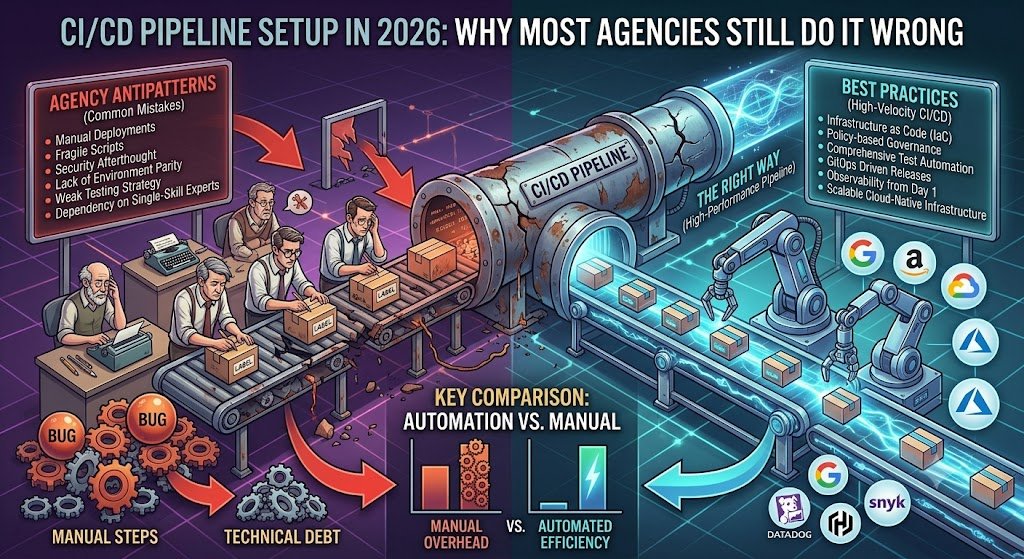
But look closer, and most pipelines are broken. They take 45 minutes to run. They fail randomly. They skip tests when time is short. They deploy manually after the "automated" pipeline finishes. They have no security scanning. They are not actually continuous anything.
The result is that CI/CD becomes a checkbox rather than a capability. Teams have pipelines, but they do not deploy faster. They have automation, but they do not have confidence. They have DevOps, but they still have deployment days.
This is the gap between having CI/CD and having effective CI/CD. And most agencies, unfortunately, operate in the gap.
This guide explains why most agencies get CI/CD wrong, the anti-patterns that cause problems, and how to build pipelines that actually accelerate delivery in 2026. It includes costs in India and the practices that separate effective pipelines from theatre.
Why Most Agencies Get CI/CD Wrong
Reason 1: CI/CD Is Sold, Not Built
Agencies sell CI/CD as part of their offering. But building effective CI/CD requires understanding the application, the team, and the deployment environment. Generic pipelines do not fit.
| What Agencies Sell | What Teams Need |
|---|---|
| Standard pipeline template | Pipeline fit to the application |
| Basic build and deploy | Comprehensive quality gates |
| "Automated" deployment | Actually automated deployment |
| Setup and handover | Ongoing optimisation |
Reason 2: Speed Over Correctness
Agencies optimise for delivery speed, not pipeline quality. A pipeline that deploys is considered done. Whether it deploys safely is a separate question.
Reason 3: No Ownership After Handover
Agencies build the pipeline and hand it over. But pipelines need maintenance. Without ownership, they degrade.
Reason 4: Inexperience with Production Systems
Many agency developers have not operated production systems. They build pipelines that work in development but fail in production.
Reason 5: Cost Pressure
Comprehensive CI/CD costs more to build. Under cost pressure, agencies cut corners — skipping security scanning, reducing test coverage, simplifying deployment.
The Anti-Patterns
Anti-Pattern 1: The 45-Minute Pipeline
What it looks like: Pipeline takes 45+ minutes to run. Developers avoid running it. Feedback is too slow to be useful.
Why it happens: Sequential stages, no caching, running all tests every time, no parallelism.
The fix: Parallelise stages, cache dependencies, run affected tests only, use faster runners.
Anti-Pattern 2: Flaky Tests
What it looks like: Pipeline fails randomly. Tests pass locally but fail in CI. Developers rerun pipelines until they pass.
Why it happens: Timing-dependent tests, shared state, environment differences, no isolation.
The fix: Fix flaky tests, isolate test environments, use deterministic test data, quarantine known flaky tests.
Anti-Pattern 3: Manual Steps in "Automated" Pipelines
What it looks like: Pipeline runs, then someone manually deploys. "Automated" pipeline requires manual approval for every step.
Why it happens: Lack of trust in automation, unclear deployment procedures, no staging environment.
The fix: Build trust through testing, automate deployment, use staging environments, implement proper approval gates.
Anti-Pattern 4: No Security Scanning
What it looks like: Pipeline builds and deploys without security checks. Vulnerabilities reach production.
Why it happens: Security treated as separate concern, no security expertise, cost pressure.
The fix: Add dependency scanning, SAST, secret scanning, container scanning to pipeline.
Anti-Pattern 5: Environment Drift
What it looks like: Staging and production differ. Deployments work in staging but fail in production.
Why it happens: Manual environment configuration, different infrastructure, configuration drift.
The fix: Infrastructure as code, identical environments, configuration management.
Anti-Pattern 6: No Rollback Strategy
What it looks like: Deployment fails, no way to roll back. Team scrambles to fix forward.
Why it happens: No rollback planning, immutable deployments not used, database migrations not reversible.
The fix: Design for rollback, use blue-green or canary deployments, make migrations reversible.
Anti-Pattern 7: Pipeline as Bottleneck
What it looks like: Pipeline is the slowest part of development. Developers wait for pipeline instead of writing code.
Why it happens: Insufficient runners, sequential execution, unnecessary stages.
The fix: Scale runners, parallelise, optimise stages.
Anti-Pattern 8: No Observability
What it looks like: Pipeline runs, but nobody knows what happened. Failures are mysterious.
Why it happens: No logging, no metrics, no dashboards.
The fix: Log pipeline events, track metrics, build dashboards.
The Correct CI/CD Architecture
The Pipeline Stages
text 1. Code commit (trigger) ↓ 2. Build (compile, package) ↓ 3. Unit tests (fast feedback) ↓ 4. Static analysis (lint, type check) ↓ 5. Security scan (dependencies, secrets) ↓ 6. Integration tests (with dependencies) ↓ 7. Artifact storage (versioned) ↓ 8. Staging deployment (automated) ↓ 9. Acceptance tests (staging) ↓ 10. Production deployment (automated or gated) ↓
11. Monitoring (post-deployment)
Stage Design Principles
| Principle | Purpose |
|---|---|
| Fast feedback first | Run fastest tests first |
| Fail fast | Stop pipeline on first failure |
| Parallelise | Run independent stages simultaneously |
| Cache aggressively | Avoid redundant work |
| Idempotent | Safe to rerun |
| Reproducible | Same input, same output |
The Fast Feedback Principle
text
Commit
↓ Lint (10 seconds) ↓ Unit tests (2 minutes) ↓ Build (3 minutes) ↓ ← Developer knows within 5 minutes ↓ Integration tests (10 minutes) ↓ Security scan (5 minutes) ↓ Deploy to staging (5 minutes) ↓ ← Full pipeline completes in 25 minutes
Pipeline Optimisation Techniques
| Technique | Impact |
|---|---|
| Parallel stages | 2–3x faster |
| Caching | 30–50% faster |
| Incremental builds | 50–70% faster |
| Affected tests only | 50–80% faster |
| Faster runners | 20–40% faster |
| Container reuse | 10–30% faster |
What a Good Pipeline Actually Does
Build Stage
| Action | Purpose |
|---|---|
| Compile code | Catch syntax errors |
| Build artifacts | Prepare for deployment |
| Version artifacts | Enable traceability |
| Cache dependencies | Speed up builds |
Test Stage
| Action | Purpose |
|---|---|
| Unit tests | Verify individual components |
| Integration tests | Verify component interactions |
| Contract tests | Verify service contracts |
| End-to-end tests | Verify user flows |
Quality Stage
| Action | Purpose |
|---|---|
| Linting | Enforce code style |
| Type checking | Catch type errors |
| Code coverage | Track test coverage |
| Complexity analysis | Identify problem areas |
Security Stage
| Action | Purpose |
|---|---|
| Dependency scanning | Find vulnerable dependencies |
| SAST | Find code vulnerabilities |
| Secret scanning | Detect exposed secrets |
| Container scanning | Find image vulnerabilities |
Deployment Stage
| Action | Purpose |
|---|---|
| Deploy to staging | Verify in production-like environment |
| Run smoke tests | Verify basic functionality |
| Deploy to production | Release to users |
| Verify deployment | Confirm success |
CI/CD Tools Comparison
CI/CD Platforms
| Platform | Strengths | Cost |
|---|---|---|
| GitHub Actions | Integrated, large ecosystem | Free tier, usage-based |
| GitLab CI | Integrated, comprehensive | Free tier, paid tiers |
| Jenkins | Flexible, self-hosted | Free, infrastructure cost |
| CircleCI | Fast, good UX | Usage-based |
| Buildkite | Hybrid, scalable | Usage-based |
| Azure DevOps | Microsoft integration | Usage-based |
Tool Selection Criteria
| Criterion | Consideration |
|---|---|
| Integration | Works with your repository |
| Ecosystem | Available actions/plugins |
| Cost | Usage vs self-hosted |
| Scalability | Handles your volume |
| Team familiarity | Learning curve |
India-Specific Considerations
| Factor | Implication |
|---|---|
| Cost sensitivity | Free tiers and self-hosted options |
| Data residency | Self-hosted for sensitive data |
| Talent | GitHub Actions and GitLab CI most common |
| Cloud providers | Integration with AWS/Azure/GCP India |
What CI/CD Costs in India
Implementation Costs
| Scope | Cost Range (INR) | Cost Range (USD) | Timeline |
|---|---|---|---|
| Basic pipeline (build, test, deploy) | ₹1,00,000–₹3,00,000 | $1,200–$3,600 | 3–6 weeks |
| Standard pipeline (with security, staging) | ₹3,00,000–₹8,00,000 | $3,600–$9,600 | 6–12 weeks |
| Advanced pipeline (multi-env, canary) | ₹8,00,000–₹20,00,000 | $9,600–$24,000 | 12–20 weeks |
| Enterprise platform | ₹20,00,000–₹50,00,000+ | $24,000–$60,000+ | 20–36 weeks |
Ongoing Costs
| Cost Category | Monthly Range (INR) | Monthly Range (USD) |
|---|---|---|
| CI/CD platform (cloud) | ₹5,000–₹50,000 | $60–$600 |
| Self-hosted runners | ₹10,000–₹60,000 | $120–$720 |
| Security scanning tools | ₹5,000–₹30,000 | $60–$360 |
| Maintenance | ₹10,000–₹50,000 | $120–$600 |
Cost Per Build
| Pipeline Type | Cost Per Build (INR) |
|---|---|
| Simple pipeline | ₹5–₹20 |
| Standard pipeline | ₹20–₹80 |
| Complex pipeline | ₹80–₹300 |
ROI Calculation
| Factor | Value |
|---|---|
| Developer time saved | 5–10 hours/week |
| For 10 developers | 50–100 hours/week |
| Value | ₹1,00,000–₹4,00,000 monthly |
| Pipeline cost | ₹30,000–₹1,50,000 monthly |
| Net benefit | Positive |
India-Specific Considerations
Common Indian CI/CD Challenges
| Challenge | Consideration |
|---|---|
| Cost sensitivity | Optimise for cost |
| Talent availability | DevOps engineers competitive |
| Legacy systems | Integration challenges |
| Compliance | DPDPA, sector requirements |
Indian Team Practices
| Practice | Benefit |
|---|---|
| Pipeline reviews | Catch issues |
| Runbook documentation | Enable recovery |
| On-call rotation | Handle failures |
| Continuous improvement | Optimise over time |
Compliance Requirements
| Requirement | Pipeline Implementation |
|---|---|
| DPDPA | Data protection in pipelines |
| Audit trails | Pipeline logging |
| Access control | Restrict pipeline access |
| Secret management | Secure secrets in pipelines |
Decision Framework: CI/CD Maturity
Maturity Levels
| Level | Characteristics |
|---|---|
| Level 0: Manual | No automation |
| Level 1: Basic | Build and deploy automated |
| Level 2: Tested | Tests run in pipeline |
| Level 3: Secured | Security scanning integrated |
| Level 4: Optimised | Fast, reliable, observable |
| Level 5: Continuous | Continuous deployment, feature flags |
Readiness Scorecard
| Criteria | Weight | Score (1–5) | Weighted Score |
|---|---|---|---|
| Version control discipline | 20% | ||
| Test coverage | 20% | ||
| Deployment automation | 20% | ||
| Security integration | 15% | ||
| Observability | 15% | ||
| Team capability | 10% | ||
| Total | 100% | /5 |
Improvement Priority Matrix
| Improvement | Effort | Impact | Priority |
|---|---|---|---|
| Fix flaky tests | Low | High | Immediate |
| Add caching | Low | High | Immediate |
| Parallelise stages | Moderate | High | High |
| Add security scanning | Moderate | High | High |
| Implement rollback | Moderate | High | High |
| Add observability | Moderate | Moderate | Medium |
Frequently Asked Questions
1. Why do most agencies get CI/CD wrong?
They sell CI/CD as a checkbox, optimise for speed over correctness, do not own the pipeline after handover, lack production experience, and cut corners under cost pressure.
2. What is the biggest CI/CD anti-pattern?
The 45-minute pipeline. Slow feedback makes the pipeline useless. Developers avoid running it, and quality suffers.
3. How long should a CI/CD pipeline take?
Fast feedback (lint, unit tests) should complete in under 5 minutes. Full pipeline should complete in under 30 minutes. Faster is better.
4. What stages should a CI/CD pipeline have?
Build, unit tests, static analysis, security scan, integration tests, artifact storage, staging deployment, acceptance tests, production deployment, and monitoring.
5. What security scanning should be in a pipeline?
Dependency scanning, SAST (static application security testing), secret scanning, and container scanning. Security should be integrated, not separate.
6. How do I fix flaky tests?
Identify flaky tests through historical analysis, fix timing dependencies, isolate test environments, use deterministic test data, and quarantine known flaky tests until fixed.
7. Should I use GitHub Actions or Jenkins?
GitHub Actions for simplicity and integration. Jenkins for flexibility and self-hosting. GitLab CI for integrated GitLab workflows. Choose based on your repository and requirements.
8. How much does CI/CD setup cost in India?
Basic pipelines cost ₹1,00,000–₹3,00,000 ($1,200–$3,600). Standard pipelines cost ₹3,00,000–₹8,00,000 ($3,600–$9,600). Advanced pipelines cost ₹8,00,000–₹20,00,000 ($9,600–$24,000).
9. How do I make my pipeline faster?
Parallelise stages, cache dependencies, run affected tests only, use faster runners, and reuse containers. These techniques can reduce pipeline time by 50–80%.
10. What is continuous deployment vs continuous delivery?
Continuous delivery means every change is deployable. Continuous deployment means every change is deployed automatically. Continuous deployment requires higher maturity.
11. How does DPDPA affect CI/CD?
DPDPA requires data protection, audit trails, access control, and secret management. Pipelines must handle data securely and maintain logs for compliance.
12. How can Innovative AI Solutions help?
Innovative AI Solutions is a Delhi-based technology company that builds CI/CD pipelines. We design pipelines with fast feedback, comprehensive testing, security scanning, and reliable deployment — designed for Indian team practices and compliance requirements. Explore our custom software development services.
Contact Innovative AI Solutions
Ready to build a CI/CD pipeline that actually works?
We help Indian engineering teams design, build, and optimise CI/CD pipelines with fast feedback, security, and reliable deployment.
Contact Information
Innovative AI Solutions
📍 Netaji Subhash Place, Pitampura, Delhi – 110034
🌐 Website: https://innovativeais.com 📧 Email: info@innovativeais.com
📞 Phone: +91 7464 099 059 / +91 96899 67356
Business Services
• AI Automation • AI Development • AI Consulting • Machine Learning Solutions • Deep Learning Solutions • Generative AI Services • NLP Solutions • AI Agents • AI Chatbots • Voice AI • CRM Development • Custom Software Development • Website Development • Mobile App Development
About the Author
Abhishek Kumar
Founder & CEO, Innovative AI Solutions
5+ years building production AI systems for Indian businesses. Based in Delhi, serving clients across India.
Ready to build AI solutions for your business?
Innovative AI Solutions — Delhi's leading AI development company. Free consultation available.
Get Free Consultation →
A practical 2026 guide to CI/CD pipeline setup — why most agencies get it wrong, the anti-patterns to avoid, correct architecture, and costs for Indian engineering teams.
#CICD #PipelineSetup #2026 #ContinuousIntegration #ContinuousDeployment #DevOps #GitHubActions #GitLabCI #Jenkins #DeploymentAutomation #BestPractices #AntiPatterns #PipelineArchitecture #Testing #Security #India #DelhiNCRTech #EnterpriseEngineering #StartupEngineering #DevOpsIndia #TechIndia #DigitalProducts #SoftwareDelivery #ReleaseAutomation #InnovativeAISolutions
Copyright © 2015–2026 Innovative AI Solutions. All Rights Reserved. | Privacy Policy | Terms & Conditions