The Silent Cost of Disconnected Systems
In most Indian businesses, the CRM knows the customer's name, the ERP knows the invoice, the payment gateway knows the transaction, and the support tool knows the complaint. None of them talk to each other reliably. The result is a familiar set of symptoms: sales teams re-enter order details into the ERP, finance reconciles payments manually against invoices, support agents cannot see the customer's purchase history, and management reports are built in spreadsheets because no single system has the full picture.
This is not a technology problem in the abstract. It is a measurable operational cost. Every manual re-entry is a data entry headcount. Every reconciliation is a delay in recognising revenue. Every disconnected system is a customer who has to repeat themselves.
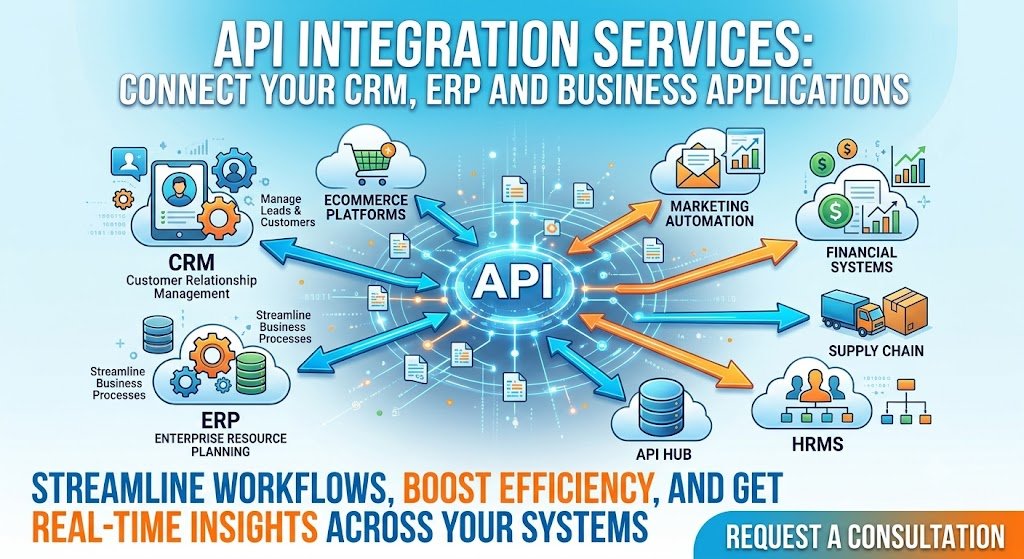
API integration services exist to solve this. They connect your CRM, ERP, payment systems, messaging channels, and custom applications through application programming interfaces—so that data flows automatically, accurately, and securely between systems that were never designed to work together. The global integration platform as a service (iPaaS) market has matured rapidly, and custom integration remains the backbone of enterprise digital transformation.
But integration is not a commodity. The difference between a reliable integration and a fragile one is architecture. A point-to-point connection between two systems works until a third system needs the same data. A well-architected integration layer—with API gateways, event-driven messaging, idempotency, and retry logic—survives years of change.
This guide is written for Indian CTOs, IT managers, operations heads, and founders evaluating API integration. We will cover the architecture patterns that work, the build-versus-buy decision (custom integration vs iPaaS), real costs in rupees and dollars, the DPDPA obligations for data in transit, and a phased implementation framework with clear go/no-go gates.
What API Integration Actually Means for Indian Businesses
The Core Concept
An API (Application Programming Interface) is a defined way for one software system to request data or actions from another. When your CRM calls an API to retrieve a customer's invoice history from your ERP, that is an API integration. When your payment gateway sends a webhook to your order management system confirming a payment, that is an API integration. When your WhatsApp chatbot looks up order status, that is an API integration.
API integration services encompass the design, development, deployment, and maintenance of these connections—including the architecture that makes them reliable.
The Four Integration Patterns
Not all integrations are the same. The pattern you choose determines latency, reliability, and cost.
1. Point-to-Point (Direct API Calls). System A calls System B's API directly. Simple, fast to build, but becomes unmanageable as the number of systems grows. With five systems, there are ten possible connections. With ten systems, there are forty-five. Each connection must be built and maintained separately.
2. Hub-and-Spoke (API Gateway / ESB). All systems connect to a central hub, which routes requests and responses. This reduces the number of connections but creates a single point of failure if the hub is not resilient. Modern API gateways (Kong, Apigee, AWS API Gateway) provide routing, authentication, rate limiting, and monitoring in one place.
3. Event-Driven (Pub/Sub, Message Queue). System A publishes an event ("invoice created") to a message broker. System B subscribes to that event and acts on it. This decouples systems: the publisher does not need to know who is listening. It is more resilient (messages can be retried) but more complex to operate.
4. iPaaS (Integration Platform as a Service). A vendor-hosted platform provides pre-built connectors, visual workflow builders, and managed infrastructure. Examples: Zapier, Make, Workato, Mulesoft, Boomi. Faster to deploy for standard integrations, but less control and potentially higher long-term cost.
Integration Pattern Comparison
| Pattern | Latency | Reliability | Complexity | Best For |
|---|---|---|---|---|
| Point-to-Point | Lowest | Low (fragile) | Low (initially) | 2–3 systems, simple data sync |
| Hub-and-Spoke (API Gateway) | Low-Medium | Medium-High | Medium | 5–15 systems, centralised auth/monitoring |
| Event-Driven | Medium | High | High | Real-time workflows, decoupled systems |
| iPaaS | Medium-High | High (vendor-managed) | Low (configuration) | Standard connectors, fast deployment |
Sources: Synthesised from Nividous integration architecture guide, Kellton integration services analysis .
For Indian businesses with 3–5 core systems (CRM, ERP, payment gateway, support tool), a hub-and-spoke API gateway pattern is usually the right starting point. It centralises authentication, provides a single point for monitoring and rate limiting, and reduces the number of point-to-point connections that must be maintained.
The Systems Most Indian Businesses Need to Connect
| System Type | Common Indian Products | What Needs to Flow |
|---|---|---|
| CRM | Zoho CRM, Salesforce, Freshsales, HubSpot | Customer data, leads, deals, activity logs |
| ERP | SAP, Oracle, Tally, Zoho Books, Marg | Invoices, orders, inventory, payments, GST data |
| Payment | Razorpay, PayU, Cashfree, Stripe | Payment confirmation, refunds, reconciliation |
| Messaging | WhatsApp Business API, SMS gateways | Notifications, reminders, OTPs |
| Support | Freshdesk, Zendesk, Zoho Desk | Tickets, customer history, SLA tracking |
| E-commerce | Shopify, WooCommerce, Magento | Orders, inventory, customer data |
The integration challenge in India is that many businesses run a mix of modern SaaS (Zoho, Razorpay) and legacy on-premise systems (Tally, SAP ECC, custom-built ERPs). The API capabilities of these systems vary widely. A Zoho CRM has a well-documented REST API. A legacy Tally installation may require middleware or a custom connector.
Architecture Patterns That Survive Production
The API Gateway: Centralise Authentication and Monitoring
An API gateway sits between your systems and the outside world. It handles authentication (verifying that a request is legitimate), rate limiting (preventing one system from overwhelming another), routing (sending requests to the right backend), and monitoring (logging every request for debugging and audit).
For Indian businesses, an API gateway is particularly valuable because it centralises DPDPA compliance. Every request that carries personal data passes through the gateway, where it can be logged, rate-limited, and checked against access policies. Without a gateway, each integration must implement its own security and logging—which means each integration can fail differently.
Common API gateways used in India: Kong (open source, widely deployed), AWS API Gateway (if on AWS), Apigee (enterprise), and self-hosted Nginx/Envoy for smaller deployments.
Idempotency: The Feature That Prevents Double Payments
In any integration where a write operation occurs—creating an invoice, processing a payment, updating an order status—idempotency is mandatory. Idempotency means that if the same request is sent twice (because of a network retry, a timeout, or a duplicate webhook), the system processes it only once.
Without idempotency, a payment gateway webhook that fires twice creates two payment records. A retry on an invoice creation API creates two invoices. These are not hypothetical; they are the most common production incidents in integration systems.
Implementation: Every write request includes a unique idempotency key. The receiving system stores the key and the result. If the same key arrives again, the system returns the stored result instead of re-executing the operation.
Retry Logic and Circuit Breakers
Networks fail. APIs time out. Third-party services have outages. A production integration must handle these failures gracefully.
Retry with exponential backoff: If a request fails, retry after a short delay, then a longer delay, then longer still. This handles transient failures without overwhelming a recovering system.
Circuit breaker: If a system fails repeatedly, stop sending requests to it for a period. This prevents cascading failures where one slow system causes timeouts across the integration layer.
Dead letter queue: If a message cannot be processed after multiple retries, route it to a dead letter queue for human investigation rather than losing it.
Webhooks vs Polling
Polling means asking a system repeatedly: "Has anything changed?" It is simple but inefficient. Polling every minute for order status changes wastes API calls and adds latency.
Webhooks mean the system tells you when something changes. The payment gateway sends a POST request to your endpoint when a payment succeeds. This is efficient and near-real-time.
Most modern Indian SaaS products (Razorpay, Zoho, Freshdesk) support webhooks. Legacy systems often do not, requiring polling as a fallback.
Architecture Decision Table
| Requirement | Recommended Pattern | Why |
|---|---|---|
| Real-time payment confirmation | Webhook + idempotency | Instant, reliable with deduplication |
| CRM-ERP customer sync | API gateway + scheduled sync | Centralised auth, handles volume |
| Order status in chatbot | API gateway + caching | Reduces load on OMS, fast response |
| Multi-system event handling | Event-driven (pub/sub) | Decoupled, resilient to failures |
| Simple 2-system sync | Point-to-point | Fastest to build, lowest overhead |
For teams building integration layers alongside AI features, our AI Automation and Custom Software Development practices cover the full stack.
Build vs Buy: Custom Integration vs iPaaS This is the most consequential decision in an API integration project, and it is often made on incomplete information.
The Case for iPaaS
iPaaS platforms (Zapier, Make, Workato, Mulesoft, Boomi) provide pre-built connectors for common systems, visual workflow builders, and managed infrastructure. For standard integrations—"when a new lead is created in Zoho CRM, create a contact in Mailchimp"—iPaaS is fast and cost-effective.
Advantages:
Time to deploy: days to weeks, not months.
No infrastructure to manage.
Pre-built connectors for common SaaS products.
Vendor handles updates when APIs change.
Disadvantages:
Per-task or per-connection pricing scales with volume.
Limited control over data flow and error handling.
Custom logic (complex transformations, Indian-specific validations) is difficult or impossible.
Data passes through the vendor's infrastructure, which may raise DPDPA concerns for personal data.
The Case for Custom Integration
Custom integration means building the integration layer yourself (or with an integration services partner) using APIs, message queues, and your own infrastructure.
Advantages:
Full control over data flow, security, and error handling.
No per-transaction pricing; cost is infrastructure and maintenance.
Data stays in your infrastructure (important for DPDPA and data sovereignty).
Custom logic for Indian requirements (GST validation, Aadhaar masking, INR formatting).
Disadvantages:
Higher upfront cost and longer time to deploy.
You are responsible for maintaining the integration when APIs change.
Requires engineering capability.
The Decision Matrix
| Factor | iPaaS | Custom Integration |
|---|---|---|
| Number of integrations | Few (1–5) | Many (5+) |
| Volume | Low to medium | High |
| Data sensitivity | Low (no personal data) | High (PII, financial data) |
| Custom logic | Minimal | Complex (GST, Indian formats) |
| Time to market | Fast (days–weeks) | Slower (weeks–months) |
| Long-term cost | Scales with volume | Fixed infrastructure + maintenance |
| Control | Limited | Full |
| Best for | Standard SaaS-to-SaaS sync | Enterprise, regulated, high-volume |
The Hybrid Approach (Recommended for Most Indian Enterprises) The pragmatic answer for most Indian businesses is a hybrid: use iPaaS for simple, low-risk, standard integrations (marketing automation, notification triggers) and custom integration for core business systems (CRM-ERP sync, payment reconciliation, customer data hub).
This gives you speed where speed matters and control where control matters.
Real Costs in India (2026)
API integration costs depend on the number of systems, the complexity of data transformations, whether real-time or batch, and whether you build custom or use iPaaS.
Build Costs: Custom Integration
| Scope | Build Cost (₹) | Build Cost ($ approx.) | Timeline | What It Covers |
|---|---|---|---|---|
| Single integration (2 systems) | ₹50,000–₹2 lakh | $600–$2,400 | 2–4 weeks | One-directional sync, basic error handling |
| Multi-system integration (3–5 systems) | ₹2–8 lakh | $2,400–$9,600 | 4–10 weeks | API gateway, bidirectional sync, retry logic |
| Enterprise integration layer (5+ systems) | ₹8–25 lakh+ | $9,600–$30,000+ | 10–20 weeks | Event-driven architecture, monitoring, DPDPA compliance |
Note: These ranges are indicative for Indian market rates. Actual costs vary with system complexity, API quality, and data volume.
iPaaS Costs (Annual Subscription)
| Platform | Starting Price (₹/month) | Starting Price ($/month approx.) | Best For |
|---|---|---|---|
| Zapier | ₹1,600–₹8,000 | $20–$100 | Simple 2-system automations |
| Make | ₹800–₹4,000 | $10–$50 | Visual workflows, moderate volume |
| Workato | ₹40,000+ | $500+ | Enterprise, complex workflows |
| Mulesoft | ₹1.5 lakh+ | $1,800+ | Large enterprise, API management |
Note: iPaaS pricing scales with task volume. A workflow running 10,000 tasks/month costs significantly more than one running 1,000.
Running Costs: Custom Integration
| Cost Component | Monthly Range (₹) | Monthly Range ($ approx.) | Notes |
|---|---|---|---|
| Infrastructure (servers, queue, monitoring) | ₹10,000–₹50,000 | $120–$600 | Scales with volume |
| Maintenance (15–20% of build annually) | ₹1–5 lakh/year | $1,200–$6,000/year | API updates, bug fixes, monitoring |
| Monitoring and alerting | ₹5,000–₹20,000 | $60–$240 | Uptime, error rates, latency |
The Hidden Costs
API changes. Third-party APIs change. Fields are deprecated, authentication methods change, rate limits are adjusted. Budget for 1–2 significant API changes per year per integration.
Data mapping and transformation. The most time-consuming part of any integration is mapping fields between systems that use different schemas. A CRM's "customer name" may be two fields in the ERP ("first name", "last name"). A GST invoice's line items may need to be flattened for one system and nested for another.
Testing. Integration testing is harder than application testing because it involves external systems. You need sandbox environments, test data, and the ability to simulate failures.
DPDPA Compliance for Data in Transit
API integrations move personal data between systems. Under the DPDP Act, that data movement is processing, and it carries obligations.
Key Obligations
1. Data Processing Agreements (DPAs). Every third-party system that receives personal data from your integration is a data processor. You need a DPA with each one. This includes SaaS vendors (Zoho, Salesforce), payment gateways (Razorpay), and messaging providers (WhatsApp Business API).
2. Purpose limitation. Data should only flow between systems for the purpose it was collected for. A customer's phone number collected for order delivery should not be synced to a marketing automation tool without consent.
3. Data minimisation. Integrations should transmit only the fields necessary for the receiving system's function. Syncing a customer's entire profile to a support tool when only name and order history are needed violates minimisation.
4. Encryption in transit. All API traffic carrying personal data must use TLS. This is standard practice but must be verified.
5. Audit logging. Every data transfer involving personal data should be logged: what data, from which system, to which system, when, and for what purpose. The API gateway is the natural place to capture this.
6. Breach notification. If an integration is compromised and personal data is exposed, breach notification obligations apply. CERT-In requires notification within six hours .
The SDF Question
If your integration layer processes substantial volumes of personal data, your organisation may fall within the DPDP Act's Significant Data Fiduciary framework. SDFs have additional obligations: appointing a Data Protection Officer, conducting independent data audits, and performing Data Protection Impact Assessments.
An integration layer that syncs customer data across CRM, ERP, support, and marketing systems is exactly the kind of processing the framework anticipates. If you are processing at scale, assess whether SDF obligations apply.
Compliance Checklist for API Integrations
| Requirement | Action | Priority |
|---|---|---|
| DPAs with all data processors | Legal review of every third-party system receiving personal data | High |
| TLS for all API traffic | Verify certificate management, enforce HTTPS | High |
| Data minimisation | Map fields, transmit only what is necessary | Medium |
| Purpose limitation | Document why each data flow exists | Medium |
| Audit logging | Log data transfers at the API gateway | High |
| Breach notification readiness | Incident response plan covering integrations | High |
Implementation Framework: A Phased Approach With Cost Gates
Phase 1: Integration Audit and Prioritisation (Week 1–2)
Objective: Map your systems, data flows, and integration priorities.
Activities:
Inventory all systems that hold or need customer, order, or financial data.
Map current data flows (including manual ones). Where does data enter the system? Where is it re-entered?
Identify the highest-value integration: which manual process, if automated, would save the most time or reduce the most errors?
Assess DPDPA exposure: which integrations involve personal data? Which third-party systems need DPAs?
Cost: ₹0–₹75,000 ($0–$900) for internal analysis or external diagnostic.
Go/No-Go: Clear priority integration identified with measurable ROI. Data flow map completed. Compliance obligations understood.
Phase 2: Architecture Design (Week 3–4)
Objective: Design the integration architecture before writing code.
Activities:
Choose the pattern: point-to-point, API gateway, or event-driven.
Decide build vs buy: custom integration or iPaaS for each connection.
Design idempotency, retry logic, and error handling.
Design the audit logging and DPDPA compliance layer.
Define the API contract for each connection.
Cost: ₹50,000–₹1.5 lakh ($600–$1,800) for architecture design.
Go/No-Go: Architecture reviewed and approved. Error handling and compliance designed in, not bolted on.
Phase 3: Development and Testing (Week 5–10)
Objective: Build and test the integration.
Activities:
Implement the integration layer: API connections, data transformation, error handling.
Build the API gateway configuration: authentication, rate limiting, logging.
Test with sandbox environments and real data.
Test failure scenarios: what happens when the ERP is down? When the payment webhook fires twice? When the API returns an error?
Cost: ₹2–8 lakh ($2,400–$9,600) for a multi-system integration.
Go/No-Go: Integration passes happy path and failure scenario tests. Idempotency verified. Audit logging works.
Phase 4: Production Pilot (Week 11–14)
Objective: Run in parallel with manual process and measure.
Activities:
Deploy to production with a limited scope (e.g., one product line, one region).
Run in parallel with existing manual process. Compare outputs.
Monitor: error rates, latency, data accuracy, duplicate records.
Conduct DPDPA review: verify DPAs are in place, audit logs are capturing the right data.
Cost: Running costs plus governance review.
Go/No-Go: Error rate below acceptable threshold. Data accuracy matches manual process. No duplicate records. Compliance review passes.
Phase 5: Scale and Monitor (Month 4–9)
Objective: Expand to full volume and establish ongoing operations.
Activities:
Expand scope to all products, regions, and systems.
Establish monitoring: uptime, error rates, latency, data quality.
Establish change management: how are API changes handled? Who monitors for deprecations?
Conduct quarterly compliance reviews.
Ongoing cost: 15–20% of build cost annually for maintenance and monitoring.
Phase Summary Table
| Phase | Duration | Key Deliverable | Cost Gate (₹) | Go/No-Go Criteria |
|---|---|---|---|---|
| 1. Audit & Prioritisation | 1–2 weeks | System inventory, data flow map, priority | 0–75,000 | Clear ROI case, compliance map |
| 2. Architecture Design | 2 weeks | Pattern selected, error handling designed | 50,000–1.5 lakh | Architecture approved |
| 3. Development & Testing | 6 weeks | Working integration, failure tests | 2–8 lakh | Failure scenarios handled, idempotency verified |
| 4. Production Pilot | 4 weeks | Parallel run, monitoring | Running costs + review | Error rate acceptable, data accurate |
| 5. Scale & Monitor | 6 months | Full rollout, monitoring, change management | 15–20% annually | Stable uptime, compliance clean |
Risks, Pitfalls, and Governance
The Most Common Integration Failures
No idempotency. Duplicate payments, duplicate invoices, duplicate records. This is the single most common production incident in integration systems. It is preventable with idempotency keys.
No retry logic. Transient network failures cause data loss. A payment webhook that fails once is never retried. The order is paid but the system does not know.
No monitoring. Integrations fail silently. The sync stops, but no one notices until a customer complains or a month-end reconciliation fails. Monitoring and alerting are mandatory.
API deprecation without notice. Third-party APIs change. If you are not monitoring for deprecations and testing migrations, the integration will break.
DPDPA Risks
Data leakage through over-permissioned APIs. An API key with full access to the CRM can read all customer data, not just the fields the integration needs. Scope API permissions to the minimum required.
PII in logs. API gateways and application logs often capture request and response bodies. If those bodies contain personal data, the logs become a DPDPA liability. Redact PII from logs.
No DPAs with vendors. Every third-party system receiving personal data needs a DPA. This is frequently overlooked for smaller SaaS tools.
Risk Summary Table
| Risk | Likelihood | Impact | Mitigation |
|---|---|---|---|
| Duplicate records/payments | High | Critical | Idempotency keys on all writes |
| Silent sync failure | High | High | Monitoring, alerting, health checks |
| API deprecation breaks integration | Medium | Medium | Deprecation monitoring, abstraction layer |
| Data leakage via over-permissioned API | Medium | Critical | Least-privilege API scopes |
| PII in logs | Medium | High | Redaction at gateway and application |
| Missing DPAs with vendors | Medium | High (penalties) | Legal review of all data processors |
Benchmark Summary and Decision Framework
Decision Matrix: iPaaS vs Custom Integration
| Factor | iPaaS | Custom Integration |
|---|---|---|
| Integration count | 1–5 | 5+ |
| Volume | Low-medium | High |
| Personal data | Low sensitivity | High sensitivity |
| Custom logic needed | Minimal | Complex (GST, Indian formats) |
| Time to market | Days–weeks | Weeks–months |
| Long-term cost | Scales with volume | Fixed infrastructure + maintenance |
| Data residency | Vendor-dependent | Full control |
| Best for | Marketing automation, notifications | CRM-ERP sync, payment reconciliation |
Integration Priority Table for Indian Businesses
| Integration | Business Value | Complexity | Recommended Pattern |
|---|---|---|---|
| Payment gateway → ERP | High (reconciliation) | Medium | Webhook + idempotency |
| CRM → ERP (customer sync) | High (single view) | Medium | API gateway + scheduled sync |
| E-commerce → ERP (orders) | High (fulfilment) | High | Event-driven |
| CRM → WhatsApp | Medium (engagement) | Low | Point-to-point or iPaaS |
| Support tool → CRM | Medium (context) | Low | iPaaS |
| ERP → BI/reporting | High (visibility) | Medium | Scheduled API extraction |
The One-Paragraph Decision Rule
If you are connecting two standard SaaS tools with no personal data and low volume, use iPaaS. If you are connecting core business systems (CRM, ERP, payment) with personal data and high volume, build a custom integration with an API gateway, idempotency, retry logic, and audit logging. If you are unsure, start with the highest-value integration, build it custom, and measure. The cost of a failed integration—duplicate payments, lost orders, compliance penalties—is higher than the cost of building it right.
Frequently Asked Questions
1. What are API integration services?
API integration services connect different software systems—CRM, ERP, payment gateways, messaging platforms—so they can exchange data automatically. This includes designing the architecture, building the connections, handling errors and retries, and ensuring compliance with data protection regulations.
2. How much does API integration cost in India in 2026?
A single integration between two systems costs ₹50,000–₹2 lakh ($600–$2,400). A multi-system integration (3–5 systems) costs ₹2–8 lakh ($2,400–$9,600). An enterprise integration layer (5+ systems) costs ₹8–25 lakh+ ($9,600–$30,000+). Ongoing maintenance is 15–20% of build cost annually.
3. Should I use iPaaS or build custom integrations?
Use iPaaS for simple, low-volume, standard SaaS-to-SaaS integrations with minimal personal data. Build custom integration for core business systems (CRM, ERP, payment) with high volume, personal data, and custom logic (GST, Indian formats). Most Indian enterprises benefit from a hybrid approach.
4. What is idempotency and why does it matter?
Idempotency means that if the same request is sent twice (due to a retry, timeout, or duplicate webhook), the system processes it only once. Without idempotency, a payment webhook that fires twice creates two payment records. It is mandatory for any write operation in an integration.
5. How do I connect Zoho CRM to Tally ERP?
Tally does not have a modern REST API, so integration typically requires a middleware layer or a custom connector that reads from Tally's XML/ODBC interface and pushes to Zoho via its REST API. This is a custom integration, not an iPaaS connector. Budget ₹1.5–4 lakh for the build.
6. What DPDPA obligations apply to API integrations?
Every third-party system receiving personal data needs a Data Processing Agreement. Data must be encrypted in transit (TLS). Purpose limitation and data minimisation apply. Audit logging of data transfers is recommended. If processing at scale, assess Significant Data Fiduciary obligations.
7. How do I prevent duplicate records in my CRM-ERP sync?
Use idempotency keys on all write operations. Match records on a stable identifier (GSTIN, email, phone) before creating new ones. Implement a "check-then-create" pattern with a unique constraint at the database level. Monitor for duplicates and alert when they occur.
8. What is an API gateway and do I need one?
An API gateway is a central layer that handles authentication, rate limiting, routing, and logging for all API traffic. You need one if you have 5+ integrations or if you need centralised security and audit logging for DPDPA compliance. For 2–3 simple integrations, point-to-point may suffice.
9. How long does an API integration project take?
A single integration takes 2–4 weeks. A multi-system integration takes 4–10 weeks. An enterprise integration layer takes 10–20 weeks. Timeline depends on the number of systems, API quality, and complexity of data transformations.
10. How do I handle API changes and deprecations?
Monitor third-party API changelogs and deprecation notices. Abstract the integration layer so that a change in one API does not require rewriting the entire integration. Test migration paths before you need them. Budget for 1–2 significant API changes per year per integration.
11. What are the biggest risks in API integration projects?
Duplicate records/payments (no idempotency), silent sync failures (no monitoring), API deprecation without notice, data leakage through over-permissioned APIs, PII in logs, and missing DPAs with vendors. All are preventable with proper architecture and governance.
12. How can Innovative AI Solutions help?
Innovative AI Solutions builds production-grade API integrations for Indian businesses—CRM-ERP sync, payment gateway reconciliation, WhatsApp integration, and custom middleware. Our Delhi-based team handles architecture design, development, DPDPA compliance, and ongoing monitoring. Visit https://innovativeais.com to discuss your requirements.
Contact Innovative AI Solutions
Ready to connect your CRM, ERP and business applications into one reliable data flow?
[One-line supporting sentence.]
Contact Information
Innovative AI Solutions
📍 Netaji Subhash Place, Pitampura, Delhi – 110034
🌐 Website: https://innovativeaislabs.com 📧 Email: info@innovativeais.com
📞 Phone: +91 7464 099 059 / +91 96899 67356
Business Services
AI Automation
AI Development
AI Consulting
Machine Learning Solutions
Deep Learning Solutions
Generative AI Services
NLP Solutions
AI Agents
AI Chatbots
Voice AI
CRM Development
Custom Software Development
Website Development
Mobile App Development
About the Author
Abhishek Kumar
Founder & CEO, Innovative AI Solutions
5+ years building production AI systems for Indian businesses. Based in Delhi, serving clients across India.
Ready to build AI solutions for your business?
Innovative AI Solutions — Delhi's leading AI development company. Free consultation available.
Get Free Consultation →
A practical 2026 guide for Indian businesses integrating CRM, ERP and business applications—architecture patterns that survive production, real rupee costs, DPDPA compliance, and a phased rollout that prevents duplicate payments and silent failures.
#APIIntegration #IntegrationServices #CRMERPIntegration #iPaaS #APIGateway #BusinessAutomation #Idempotency #DPDPA #MeitY #IndiaAI #Nasscom #DigitalIndia #ZohoSalesforce #SAPTally #DelhiNCR #CustomSoftware #InnovativeAISolutions
Copyright ©️ 2015–2026 Innovative AI Solutions. All Rights Reserved. | Privacy Policy | Terms & Conditions