The Accounts Payable Team That Spends Its Week Chasing Paper
An Indian manufacturing company processes 8,000 vendor invoices a month. The accounts payable team has 14 people. Their week looks like this: open invoices from email and WhatsApp, print the ones that arrive as scanned PDFs, key the data into the ERP, chase the purchase department for a missing PO, chase the stores team for a goods receipt note, route the invoice for approval, follow up on approvals that are sitting in someone's inbox, and then, finally, process the payment.
The invoice itself takes minutes to read. The process around it takes days. And the errors—a mistyped GSTIN, a wrong HSN code, a duplicate payment, a missed TDS deduction—cost money that is discovered only at audit.
This is the reality of accounts payable in most Indian businesses. The function is critical—it controls cash outflow, vendor relationships, and compliance—but it is buried in manual work that adds no value. AI invoice processing software exists to change this: to extract invoice data automatically, match it against purchase orders and goods receipts, route it through approval workflows, and prepare it for payment—with humans reviewing exceptions rather than keying data.
The benefits are substantial. Finance teams that automate AP report faster processing, fewer errors, better vendor relationships (because invoices are paid on time), improved compliance (because GST and TDS are validated automatically), and—critically—better visibility into cash flow and payables.
For Indian businesses, this matters because AP is a compliance-sensitive function. GST requires accurate invoice data for input tax credit. E-invoicing requires invoice data in a specific format. TDS requires correct deduction and reporting. DPDPA applies to vendor and employee data in the AP system. And audit requires documentation that manual processes often fail to provide.
This guide is written for Indian CFOs, finance controllers, AP managers, and founders evaluating AP automation. We will cover the AI extraction process, the three-way matching, the approval workflows, real costs in rupees and dollars, DPDPA and GST compliance, and a phased implementation framework with clear go/no-go gates.
What End-to-End AP Automation Actually Means
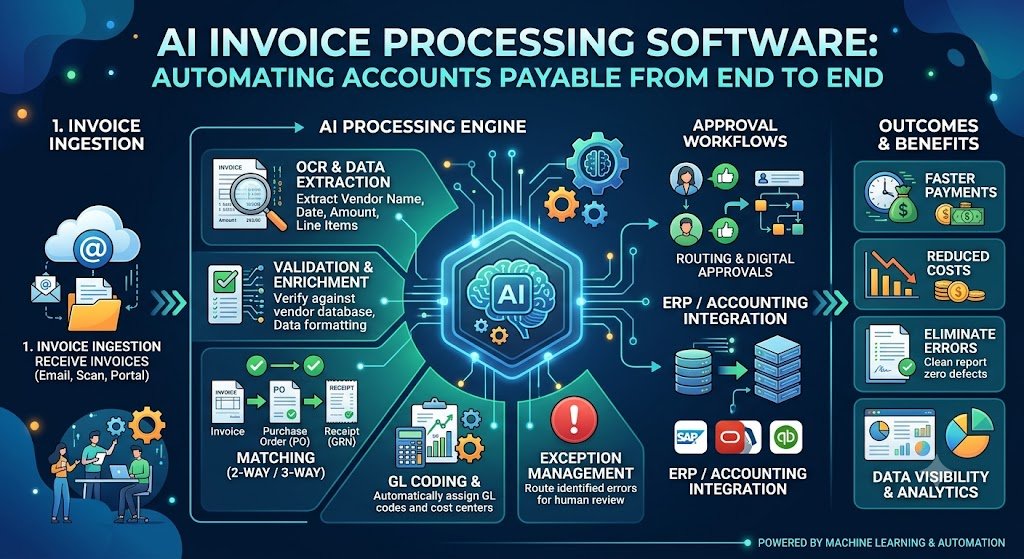
"AP automation" is often used to describe invoice extraction alone. But extraction is one step in a longer process. End-to-end automation covers the full lifecycle from invoice receipt to payment.
The AP Lifecycle
1. Invoice ingestion. Invoices arrive through multiple channels: email attachments, WhatsApp, vendor portals, scanned paper, e-invoice feeds. The system must capture them all.
2. Data extraction. The system extracts invoice fields: invoice number, date, vendor details, GSTIN, line items, HSN codes, tax breakdown (CGST/SGST/IGST), total amount, TDS applicability.
3. Validation. The system validates the extracted data against business rules: GSTIN format, HSN validity, invoice total reconciliation, duplicate detection.
4. Matching. The system matches the invoice against the purchase order (PO) and goods receipt note (GRN)—the three-way match. Quantities, prices, and totals must align.
5. Exception handling. Invoices that fail validation or matching are routed to a human reviewer with the specific reason.
6. Approval workflow. Matched invoices are routed through the approval hierarchy based on amount, department, and vendor.
7. Payment preparation. Approved invoices are prepared for payment, with TDS deduction and payment scheduling.
8. Payment execution. Payment is made via bank transfer, NEFT/RTGS, or other methods.
9. Reconciliation. Payments are reconciled against bank statements and vendor records.
10. Analytics and reporting. The system provides visibility into payables, aging, vendor performance, and compliance.
The AP Lifecycle Table
| Stage | Manual Effort | Automation Potential |
|---|---|---|
| Invoice ingestion | High (opening emails, printing) | High |
| Data extraction | Very High (keying data) | Very High |
| Validation | Medium (checking fields) | High |
| Matching | High (chasing PO/GRN) | High |
| Exception handling | Medium | Medium (routing) |
| Approval workflow | High (chasing approvals) | High |
| Payment preparation | Medium | High |
| Payment execution | Low | Medium (bank integration) |
| Reconciliation | High | High |
| Analytics | Low | High |
For teams building the AP automation systems and integrating them with ERP, our AI Automation and Custom Software Development practices cover the full stack.
AI Invoice Extraction: The Foundation
Extraction is where AI adds the most immediate value. It converts unstructured invoices into structured data.
The Extraction Process
1. Document ingestion. The system receives the invoice—PDF, image, email attachment, or e-invoice XML. It identifies the document type (tax invoice, credit note, debit note, e-way bill).
2. OCR and vision understanding. For scanned documents, OCR converts pixels to text. Vision-language models understand the layout, tables, and spatial relationships.
3. Field extraction. The system extracts fields according to the invoice schema: header fields (invoice number, date, vendor GSTIN, buyer GSTIN), line items (description, HSN, quantity, rate, amount), and tax fields (CGST, SGST, IGST, total).
4. Confidence scoring. Each extracted field has a confidence score. Low-confidence fields are flagged for review.
5. Validation. Extracted data is validated: does the total equal the sum of line items plus taxes? Is the GSTIN format valid? Is the HSN code valid for the item?
India-Specific Extraction Requirements
GSTIN extraction. The vendor and buyer GSTIN are critical for input tax credit. Extraction must be accurate.
HSN/SAC codes. Each line item requires an HSN code for GST. Extraction must capture this.
Tax breakdown. CGST, SGST, and IGST must be extracted separately and validated (CGST + SGST for intra-state, IGST for inter-state).
TDS applicability. Some invoices require TDS deduction. The system must identify TDS applicability based on the nature of the service.
E-invoice data. For e-invoices, the IRN (Invoice Reference Number) and QR code must be captured.
Extraction Accuracy
| Document Type | Typical Accuracy | Notes |
|---|---|---|
| Digital-native PDF | 98–99% | Highest accuracy |
| Scanned PDF (good quality) | 95–98% | Depends on scan quality |
| Scanned PDF (poor quality) | 85–95% | Requires human review |
| Photograph | 80–90% | Requires human review |
| E-invoice XML | 99%+ | Structured data |
The important caveat: Accuracy varies by vendor template. A vendor that always uses the same template extracts reliably. A new vendor with an unusual layout may need review. The system should handle both.
Extraction Table
| Field | Criticality | Extraction Challenge |
|---|---|---|
| Invoice number | High (duplicate detection) | Low |
| Invoice date | High | Low |
| Vendor GSTIN | Very High (ITC) | Medium |
| Buyer GSTIN | High | Medium |
| Line items | High | Medium-High (tables) |
| HSN codes | High (GST) | High |
| Tax breakdown | Very High | Medium |
| Total amount | Very High | Low |
Three-Way Matching: The Control That Prevents Errors
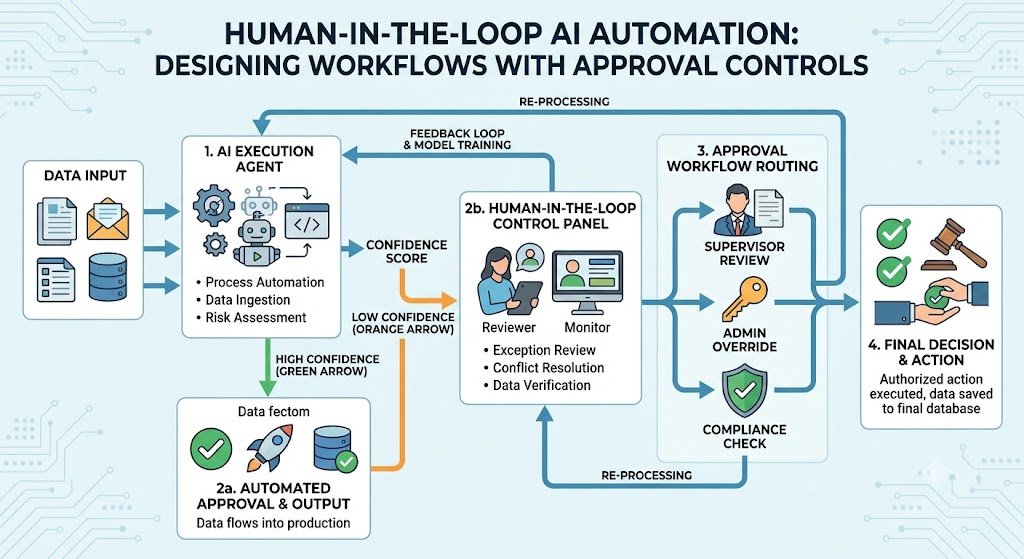
Three-way matching compares the invoice against the purchase order (PO) and the goods receipt note (GRN). It is the control that prevents paying for goods that were not ordered or not received.
How Three-Way Matching Works
1. PO matching. Does the invoice match a valid purchase order? Vendor, items, quantities, and prices should align.
2. GRN matching. Does the goods receipt note confirm that the goods were received? Quantities received should match quantities invoiced.
3. Invoice matching. Does the invoice total match the PO total (within tolerance)? Are there discrepancies in price or quantity?
4. Tolerance rules. Small discrepancies (e.g., 2% price variance) may be auto-approved. Larger discrepancies are routed for review.
Matching Outcomes
| Outcome | Action |
|---|---|
| Exact match | Auto-approve for payment |
| Within tolerance | Auto-approve with note |
| Outside tolerance | Route to reviewer |
| No PO | Route to procurement for PO creation |
| No GRN | Route to stores for GRN creation |
| Duplicate | Block and alert |
AI in Matching
AI improves matching in several ways:
Fuzzy matching: handles minor variations in vendor names, item descriptions, and invoice numbers.
Exception classification: categorises exceptions by type (price variance, quantity variance, missing PO) for faster resolution.
Anomaly detection: flags unusual invoices (unusual amount, unusual vendor, unusual timing) for review.
Approval Workflows: Getting the Right Sign-Off
Approval workflows route invoices to the right approvers based on amount, department, and vendor.
Workflow Design
1. Amount-based routing. Small invoices (e.g., under ₹10,000) may be auto-approved. Larger invoices route to managers, directors, or CFO based on thresholds.
2. Department-based routing. Invoices route to the department that requested the goods or services.
3. Vendor-based routing. Some vendors may have specific approvers or payment terms.
4. Exception-based routing. Invoices with exceptions (mismatch, missing PO) route to the appropriate resolver.
Workflow Features
Multi-level approval: sequential or parallel approvals.
Delegation: approvers can delegate during absence.
Escalation: approvals that sit too long escalate to the next level.
Mobile approval: approvers can approve via mobile app or WhatsApp.
Audit trail: every approval is logged with timestamp and approver.
Approval Workflow Table
| Invoice Amount | Approver | SLA |
|---|---|---|
| < ₹10,000 | Auto-approve | Immediate |
| ₹10,000–₹1,00,000 | Department manager | 24 hours |
| ₹1,00,000–₹10,00,000 | Finance controller | 48 hours |
| > ₹10,00,000 | CFO | 72 hours |
| Exception | Resolver + approver | Depends |
Real Costs in India (2026)
AI invoice processing costs depend on the scope: extraction only, or full AP automation with matching and workflows.
Implementation Costs
| Scope | Cost (₹) | Cost ($ approx.) | Timeline |
|---|---|---|---|
| Invoice extraction (OCR + AI) | ₹2–6 lakh | $2,400–$7,200 | 4–8 weeks |
| Extraction + validation | ₹5–12 lakh | $6,000–$14,400 | 8–14 weeks |
| Full AP automation (extraction, matching, workflow, ERP) | ₹10–30 lakh | $12,000–$36,000 | 12–24 weeks |
| Enterprise AP automation (multi-entity, multi-currency, analytics) | ₹30–80 lakh | $36,000–$96,000 | 24–36 weeks |
Running Costs
| Component | Monthly Cost (₹) | Monthly Cost ($ approx.) | Notes |
|---|---|---|---|
| OCR/AI API | ₹5,000–₹50,000 | $60–$600 | Per-document pricing |
| Hosting | ₹10,000–₹50,000 | $120–$600 | Cloud infrastructure |
| ERP integration | ₹5,000–₹25,000 | $60–$300 | API maintenance |
| Maintenance | ₹20,000–₹1,00,000 | $240–$1,200 | 15–25% of build annually |
The ROI Case
For a company processing 8,000 invoices/month:
Manual cost: 14 people × ₹40,000/month = ₹5.6 lakh/month.
Automated cost: 4 people (exceptions) × ₹40,000 + ₹50,000 tooling = ₹2.1 lakh/month.
Monthly savings: ₹3.5 lakh.
Annual savings: ₹42 lakh.
Payback: 3–8 months on a ₹10–30 lakh implementation.
The ROI is even stronger when you account for duplicate payment prevention, early payment discounts, and TDS/GST accuracy.
India-Specific Compliance: GST, TDS, E-Invoicing and DPDPA
GST Compliance
AP automation must support GST compliance:
GSTIN validation: validate vendor GSTIN format and status.
HSN validation: validate HSN codes against the item description.
Tax computation: verify CGST, SGST, IGST computation.
Input tax credit: ensure invoices meet ITC conditions.
GSTR-2B reconciliation: match invoices against GSTR-2B for ITC claims.
E-Invoicing
For businesses above the turnover threshold, e-invoicing is mandatory. AP automation must:
Capture IRN: record the Invoice Reference Number.
Validate e-invoice: verify the e-invoice against the IRP.
Handle exceptions: flag invoices without valid e-invoice data.
TDS
TDS deduction depends on the nature of the service and the vendor. AP automation must:
Identify TDS applicability: based on service type and vendor.
Compute TDS: at the correct rate.
Generate TDS returns: provide data for TDS filing.
DPDPA
AP systems process personal data: vendor contact details, employee approver data. Under the DPDP Act:
Consent: vendor and employee data should be collected with consent.
Purpose limitation: data used for AP should not be repurposed.
Data minimisation: collect only what is needed.
Retention: define retention periods for invoice data.
Compliance Checklist
| Requirement | Implementation | Priority |
|---|---|---|
| GSTIN validation | API validation | High |
| HSN validation | Against item master | High |
| E-invoice capture | IRN and QR | High |
| TDS computation | Based on service type | High |
| GSTR-2B reconciliation | Match invoices | Medium |
| DPDPA consent | Vendor/employee data | Medium |
Implementation Framework: A Phased Approach With Cost Gates
Phase 1: AP Process Audit (Week 1–3)
Objective: Understand current AP process and identify pain points.
Activities:
Map current invoice flow: ingestion, extraction, matching, approval, payment.
Measure current metrics: processing time, error rate, duplicate rate, cost per invoice.
Identify pain points: manual data entry, matching delays, approval bottlenecks.
Assess data quality: vendor master, PO/GRN availability.
Assess compliance: GST, TDS, e-invoicing.
Cost: ₹50,000–₹1.5 lakh ($600–$1,800).
Go/No-Go: Process mapped. Pain points identified. Business case validated.
Phase 2: Invoice Extraction (Week 4–10)
Objective: Automate invoice data extraction.
Activities:
Integrate invoice ingestion (email, WhatsApp, portal).
Implement OCR and AI extraction.
Configure schema for GST invoice fields.
Implement validation rules.
Set up human review for low-confidence extractions.
Cost: ₹2–6 lakh ($2,400–$7,200).
Go/No-Go: Extraction accuracy >95% on critical fields. Review queue manageable.
Phase 3: Matching and Validation (Week 11–18)
Objective: Automate three-way matching and validation.
Activities:
Integrate with ERP for PO and GRN data.
Implement three-way matching.
Configure tolerance rules.
Implement duplicate detection.
Set up exception routing.
Cost: ₹3–8 lakh ($3,600–$9,600).
Go/No-Go: Auto-match rate >70%. Exceptions routed correctly.
Phase 4: Approval Workflow (Week 19–24)
Objective: Automate approval routing.
Activities:
Configure approval hierarchy.
Implement multi-level approval.
Set up mobile approval.
Configure escalation.
Implement audit trail.
Cost: ₹2–6 lakh ($2,400–$7,200).
Go/No-Go: Approvals route correctly. SLA tracking works.
Phase 5: Payment and Analytics (Week 25–32)
Objective: Automate payment preparation and add analytics.
Activities:
TDS computation and deduction.
Payment file generation.
Bank integration.
GSTR-2B reconciliation.
AP analytics dashboard.
Cost: ₹3–10 lakh ($3,600–$12,000).
Go/No-Go: Payment files generate correctly. TDS accurate. Analytics used.
Phase Summary Table
| Phase | Duration | Key Deliverable | Cost (₹) | Go/No-Go Criteria |
|---|---|---|---|---|
| 1. Process Audit | 3 weeks | Current state, business case | 50,000–1.5 lakh | Business case validated |
| 2. Extraction | 7 weeks | Automated extraction | 2–6 lakh | Accuracy >95% |
| 3. Matching | 8 weeks | Three-way matching | 3–8 lakh | Auto-match >70% |
| 4. Workflow | 6 weeks | Approval routing | 2–6 lakh | Approvals work |
| 5. Payment & Analytics | 8 weeks | Payment, TDS, analytics | 3–10 lakh | Payment accurate |
Risks, Pitfalls, and Governance
The Most Common AP Automation Failures
Poor extraction accuracy on Indian documents. Scanned invoices, regional languages, unusual templates. Mitigation: Test on real documents, human review for low confidence.
Matching without clean master data. PO and GRN data incomplete or inconsistent. Mitigation: Data cleanup before matching.
Vendor resistance to e-invoicing. Vendors continue sending paper. Mitigation: Vendor onboarding, incentives for e-invoice.
Approval bottlenecks. Approvers do not act. Mitigation: Mobile approval, escalation, SLA tracking.
Duplicate payments. Without duplicate detection, duplicates slip through. Mitigation: Duplicate detection on invoice number, vendor, amount, date.
DPDPA violations. Vendor and employee data used without consent. Mitigation: Consent capture, purpose limitation.
Risk Summary Table
| Risk | Likelihood | Impact | Mitigation |
|---|---|---|---|
| Poor extraction | High | High (manual review) | Test, human review |
| Dirty master data | High | High (matching fails) | Data cleanup |
| Vendor resistance | Medium | Medium | Onboarding, incentives |
| Approval bottlenecks | High | Medium | Mobile, escalation |
| Duplicate payments | Medium | High (financial loss) | Duplicate detection |
| DPDPA violations | Medium | High (penalties) | Consent, purpose limitation |
Benchmark Summary and Decision Framework
Decision Matrix: Build vs Buy
| Factor | Build Custom | Buy AP Automation Software |
|---|---|---|
| Unique workflow | Complex, company-specific | Standard AP workflow |
| ERP integration | Custom ERP | Standard connectors |
| Cost | Higher upfront, lower per-invoice | Subscription, per-invoice |
| Time to market | 12–24 weeks | Weeks |
| Control | Full | Limited |
| Best for | Large enterprises, unique needs | Mid-sized, standard needs |
AP Automation Priority Table
| Pain Point | First Module | Why |
|---|---|---|
| Manual data entry | Invoice extraction | Fastest ROI |
| Matching delays | Three-way matching | Reduces cycle time |
| Approval bottlenecks | Approval workflow | Reduces delays |
| Compliance errors | GST/TDS validation | Reduces risk |
| Duplicate payments | Duplicate detection | Prevents loss |
The One-Paragraph Decision Rule
If your AP team spends most of its time keying data, start with invoice extraction. If matching is the bottleneck, add three-way matching. If approvals are slow, add workflow automation. Build the compliance layer (GST, TDS, e-invoicing) into the extraction and validation stages, not as an afterthought. And measure cost per invoice, cycle time, and error rate—not just the number of invoices processed.
Frequently Asked Questions
1. How much does AI invoice processing software cost in India?
Invoice extraction costs ₹2–6 lakh ($2,400–$7,200). Extraction + validation costs ₹5–12 lakh ($6,000–$14,400). Full AP automation costs ₹10–30 lakh ($12,000–$36,000). Enterprise AP automation costs ₹30–80 lakh ($36,000–$96,000).
2. What is three-way matching?
Three-way matching compares the invoice against the purchase order (PO) and goods receipt note (GRN). It ensures you pay only for goods that were ordered and received.
3. How accurate is AI invoice extraction?
98–99% for digital-native PDFs, 95–98% for good-quality scans, 85–95% for poor scans. Accuracy varies by vendor template and document quality.
4. Can AI extract GSTIN and HSN codes?
Yes. AI extraction captures GSTIN, HSN codes, and tax breakdowns (CGST/SGST/IGST). Validation rules verify format and computation.
5. How does AP automation handle TDS?
The system identifies TDS applicability based on service type and vendor, computes TDS at the correct rate, and provides data for TDS returns.
6. What is the ROI of AP automation?
For a company processing 8,000 invoices/month, savings can be ₹3–4 lakh/month from reduced manual effort, plus duplicate payment prevention and early payment discounts. Payback is typically 3–8 months.
7. How does DPDPA affect AP automation?
AP systems process vendor and employee personal data. Consent, purpose limitation, data minimisation, and retention policies apply.
8. Should I build or buy AP automation software?
Build if you have unique workflows or complex ERP integration. Buy if you have standard AP processes and need to move fast. Many companies start with a bought solution and customize.
9. How do I handle vendors who send paper invoices?
Provide multiple ingestion channels (email, WhatsApp, portal, scan). Onboard vendors to e-invoicing with incentives. Accept paper but digitise it immediately.
10. What is the difference between AP automation and invoice extraction? Invoice extraction captures data from invoices. AP automation covers the full lifecycle: extraction, matching, approval, payment, and analytics.
11. How long does AP automation implementation take?
Invoice extraction takes 4–8 weeks. Full AP automation takes 12–24 weeks. Enterprise automation takes 24–36 weeks.
12. How can Innovative AI Solutions help?
Innovative AI Solutions builds AI invoice processing and AP automation systems for Indian businesses—extraction, three-way matching, approval workflows, GST/TDS compliance, and ERP integration. Our Delhi-based team handles assessment, implementation, and optimization. Visit https://innovativeais.com to discuss your requirements.
Contact Innovative AI Solutions
Ready to stop chasing invoices and start processing them automatically?
[One-line supporting sentence.]
Contact Information
Innovative AI Solutions
📍 Netaji Subhash Place, Pitampura, Delhi – 110034
🌐 Website: https://innovativeaislabs.com 📧 Email: info@innovativeais.com
📞 Phone: +91 7464 099 059 / +91 96899 67356
Business Services
AI Automation
AI Development
AI Consulting
Machine Learning Solutions
Deep Learning Solutions
Generative AI Services
NLP Solutions
AI Agents
AI Chatbots
Voice AI
CRM Development
Custom Software Development
Website Development
Mobile App Development
About the Author
Abhishek Kumar
Founder & CEO, Innovative AI Solutions
5+ years building production AI systems for Indian businesses. Based in Delhi, serving clients across India.
Ready to build AI solutions for your business?
Innovative AI Solutions — Delhi's leading AI development company. Free consultation available.
Get Free Consultation →
A practical 2026 guide for Indian finance teams automating accounts payable—AI invoice extraction, three-way matching, approval workflows, real rupee costs, and GST, TDS and DPDPA compliance.
#AIInvoiceProcessing #AccountsPayable #APAutomation #InvoiceExtraction #ThreeWayMatching #ApprovalWorkflow #GSTInvoice #TDS #EInvoicing #DPDPA #MeitY #FinanceAutomation #CFO #DelhiNCR #InnovativeAISolutions
Copyright ©️ 2015–2026 Innovative AI Solutions. All Rights Reserved. | Privacy Policy | Terms & Conditions