The Startup App Trap: Building a Product Before Proving a Business An Indian startup raises a seed round. The founders hire a development team and begin building the app. Eight months later, the app launches with a polished interface, a full feature set, and a well-documented codebase. Six months after that, the startup shuts down. The app was excellent. The business model was not validated until it was too late.
This is the startup app trap: building a complete product before proving that anyone wants it. The trap is not caused by the wrong framework. React Native is an excellent choice for startups. The trap is caused by scope, architecture, and delivery decisions that prioritise completeness over validation.
React Native app development for startups is not about building a smaller version of an enterprise app. It is about building the smallest possible product that can test the core business hypothesis, with an architecture that can scale if the hypothesis is validated. The goal of a startup MVP is not a polished app. It is learning—as fast and as cheaply as possible.
React Native is well-suited to this goal. A single codebase for iOS and Android reduces cost and time. The JavaScript ecosystem is familiar to most developers. The framework is mature enough for production apps and flexible enough for rapid iteration. And the ecosystem of libraries for common startup needs—authentication, payments, push notifications, analytics—is mature.
But React Native also has specific architectural decisions that startups must get right early:
Expo vs bare workflow: Expo is faster to start; bare workflow gives more control. The choice affects how quickly you can ship and how easily you can add native modules.
State management: Redux, Zustand, Context, or React Query. The choice affects code complexity and maintainability.
Navigation: React Navigation is the standard, but the structure matters.
Backend integration: REST, GraphQL, or Firebase. The choice affects development speed and future flexibility.
Deployment: Over-the-air updates (CodePush, EAS Update) vs app store releases.
This guide is written for Indian startup founders, CTOs, and product managers building a first app with React Native. We will cover MVP scoping, architecture decisions, delivery timelines, real costs in rupees and dollars, DPDPA compliance, and a phased framework that prioritises learning over completeness.
Scoping the Startup MVP: What to Build First
The most important decision in a startup app is what not to build. Every feature added to the MVP increases cost, delays launch, and delays learning.
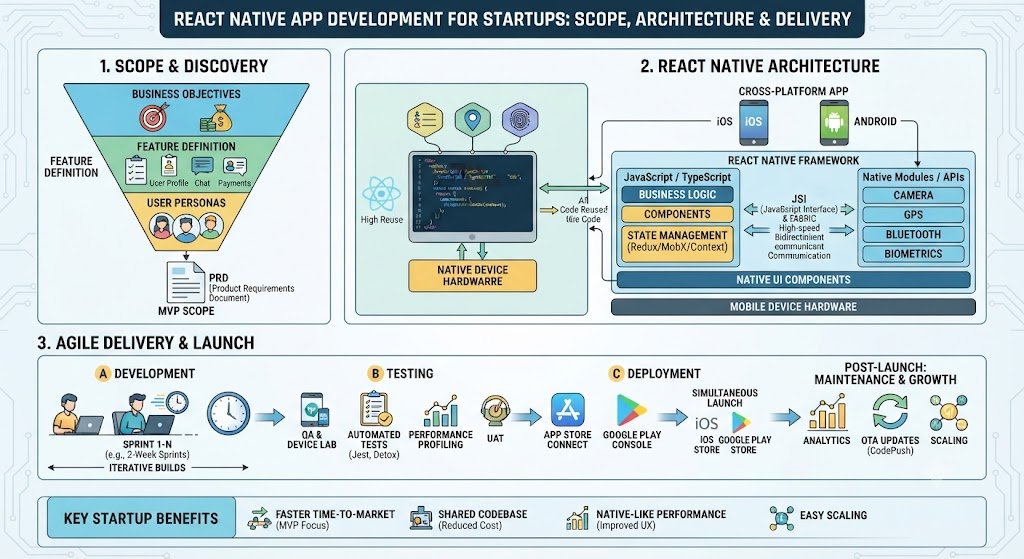
The MVP Scoping Framework
A startup MVP should test one core hypothesis: will users take this specific action? Everything else is secondary.
Step 1: Define the core action. What is the one thing users must do for the business to be validated? Order a product? Book a service? Complete a lesson? Send a message? The MVP must make this action possible.
Step 2: Identify the minimum path to the core action. What is the shortest sequence of screens and steps required for the user to complete the core action? Build only this.
Step 3: Add only the supporting features that are essential. Authentication, payment, and basic notifications are usually essential. Profiles, settings, reviews, and social features are usually not.
Step 4: Defer everything else. Make a list of deferred features. This list becomes the roadmap after validation.
MVP Feature Tiers
| Tier | Features | Include in MVP? |
|---|---|---|
| Core action | The one action that validates the business | Yes |
| Essential supporting | Authentication, payment, basic notifications | Yes |
| Nice-to-have | Profiles, settings, search filters | Defer |
| Growth | Referrals, social sharing, loyalty | Defer |
| Advanced | AI recommendations, analytics dashboards | Defer |
Common MVP Scope Mistakes
Building for scale before validation. Microservices, complex infrastructure, and multi-region deployment are premature.
Polishing UI before proving the flow. A beautiful app that nobody uses is a waste.
Adding features requested by early users. Early users request features that may not matter to the broader market.
Building admin panels for every function. Build the minimum admin needed to operate.
MVP Scope Table for Common Startup Types
| Startup Type | Core Action | Essential Features | Defer |
|---|---|---|---|
| E-commerce | Place an order | Catalogue, cart, checkout, payment | Reviews, wishlist, loyalty |
| Marketplace | Book a service | Search, listing, booking, payment | Chat, ratings, subscriptions |
| SaaS tool | Complete a task | Onboarding, core tool, save/export | Team features, integrations |
| Content app | Consume content | Feed, content view, save | Social, comments, recommendations |
| Fintech | Complete a transaction | KYC, transaction, history | Budgeting, analytics, rewards |
For startups building the backend and AI features that support the app, our Mobile App Development and AI Development practices cover the full stack.
Architecture Decisions for Startups
React Native architecture decisions have long-term consequences. The goal is to choose an architecture that is fast to build now and scalable later—without over-engineering.
Expo vs Bare Workflow
This is the first major decision.
Expo (managed workflow): A framework and platform built on React Native that handles build, deployment, and many native features. It is faster to start, easier to maintain, and provides over-the-air updates.
Bare workflow: Plain React Native with native iOS and Android projects. More control, but more setup and maintenance.
| Factor | Expo | Bare Workflow |
|---|---|---|
| Setup time | Fast (minutes) | Slower (hours) |
| Native module access | Limited (Expo modules, config plugins) | Full |
| Over-the-air updates | EAS Update (built-in) | CodePush or custom |
| Build and deployment | EAS Build (managed) | Custom CI/CD |
| Best for | Most startups | Apps needing deep native integration |
Recommendation for startups: Start with Expo. It is faster to ship, easier to maintain, and covers most startup needs. Move to bare workflow only if you need a native module that Expo does not support.
State Management
State management determines how data flows through the app.
| Option | Complexity | Best For |
|---|---|---|
| React Context | Low | Simple apps, minimal global state |
| Zustand | Low-Medium | Most startups, simple and fast |
| Redux Toolkit | Medium | Complex apps, large teams |
| React Query | Low (for server state) | Data fetching and caching |
Recommendation for startups: Use Zustand for global state and React Query for server state. This combination is simpler than Redux and sufficient for most startup apps.
Navigation
React Navigation is the standard. The structure matters more than the library.
Recommendation: Use React Navigation with a clear structure: authentication stack, main tab navigator, and modal stack. Keep navigation logic separate from screens.
Backend Integration
| Option | Speed | Flexibility |
|---|---|---|
| Firebase | Fastest | Limited (vendor lock-in) |
| REST API | Medium | Full |
| GraphQL | Medium | Full (with more setup) |
| Supabase | Fast | Good (open source) |
Recommendation for startups: Firebase or Supabase for speed, if the app's needs fit. REST API for custom backends. Avoid GraphQL unless the team has experience and the app needs it.
Architecture Decision Table
| Decision | Recommendation for Startups | Rationale |
|---|---|---|
| Expo vs bare | Expo | Faster to ship, easier to maintain |
| State management | Zustand + React Query | Simple, sufficient |
| Navigation | React Navigation | Standard, well-documented |
| Backend | Firebase/Supabase or REST | Speed vs flexibility |
| OTA updates | EAS Update | Ship fixes without app store review |
| Analytics | Firebase Analytics or Mixpanel | Understand user behaviour |
The Architecture at a Glance
| Layer | Component | Startup Recommendation |
|---|---|---|
| UI | Screens, components | React Native components, design system |
| State | Global and server state | Zustand + React Query |
| Navigation | Screen routing | React Navigation |
| Backend | API and data | Firebase/Supabase or REST |
| Auth | Authentication | Firebase Auth or custom |
| Payments | Payment gateway | Razorpay/Stripe SDK |
| Notifications | Push | Firebase Cloud Messaging |
| Analytics | User behaviour | Firebase Analytics |
Delivery: Shipping Fast Without Breaking Things
Startup delivery is about speed with discipline. The goal is to ship the MVP quickly, learn from users, and iterate—without accumulating technical debt that slows future releases.
The Delivery Framework
Phase 1: Setup (Week 1). Project setup, Expo configuration, navigation structure, authentication, design system.
Phase 2: Core Features (Week 2–5). Build the core action and essential supporting features. Weekly builds for internal testing.
Phase 3: Testing (Week 6–7). QA on real devices, fix bugs, test payment and notifications.
Phase 4: Launch (Week 8). App store submission, analytics, monitoring, launch.
Phase 5: Iterate (Ongoing). Use OTA updates for fixes, app store releases for features, measure and iterate.
Delivery Timeline Table
| Phase | Duration | Deliverable |
|---|---|---|
| Setup | 1 week | Project, navigation, auth |
| Core Features | 4 weeks | Core action, payment, notifications |
| Testing | 2 weeks | QA, bug fixes |
| Launch | 1 week | App store submission, launch |
| Iterate | Ongoing | Updates, features, fixes |
Total MVP timeline: 8–10 weeks for a focused MVP.
Over-the-Air Updates
One of React Native's advantages is over-the-air (OTA) updates. Using EAS Update or CodePush, you can push JavaScript changes to users without going through app store review.
When to use OTA:
Bug fixes.
Copy changes.
Minor UI adjustments.
When not to use OTA:
Native code changes (require app store release).
Major feature releases (better to use app store for visibility).
App Store Deployment
Both Apple App Store and Google Play Store have review processes. Build time for review into the launch plan—Apple review can take 1–2 weeks.
Delivery Checklist
| Item | Check |
|---|---|
| Expo/EAS configured | Build and update pipelines work |
| Authentication | Login, signup, password reset |
| Core action | The one action that validates the business |
| Payment | Razorpay/Stripe integrated and tested |
| Push notifications | FCM configured and tested |
| Analytics | Events tracked |
| Crash reporting | Sentry or Firebase Crashlytics |
| App store assets | Screenshots, descriptions, privacy policy |
| DPDPA consent | Consent screen for data collection |
Real Costs in India (2026)
React Native startup app costs depend on scope, team composition, and whether the backend is included.
Build Costs
| Scope | Build Cost (₹) | Build Cost ($ approx.) | Timeline |
|---|---|---|---|
| Simple MVP (5–10 screens) | ₹3–8 lakh | $3,600–$9,600 | 6–10 weeks |
| Medium MVP (15–25 screens) | ₹8–20 lakh | $9,600–$24,000 | 10–16 weeks |
| Complex MVP (30+ screens) | ₹20–50 lakh | $24,000–$60,000 | 16–24 weeks |
Note: USD conversions at ₹83/$. These ranges include design, development, and basic testing. They exclude backend development (if custom), third-party service costs, and app store fees.
Team Composition
| Role | Monthly Cost (₹) | Monthly Cost ($ approx.) |
|---|---|---|
| React Native developer | ₹60,000–₹1.5 lakh | $720–$1,800 |
| UI/UX designer | ₹50,000–₹1.2 lakh | $600–$1,440 |
| Backend developer | ₹60,000–₹1.5 lakh | $720–$1,800 |
| QA engineer | ₹40,000–₹80,000 | $480–$960 |
Typical MVP team: 1–2 React Native developers, 1 designer (part-time), 1 backend developer (if custom backend), 1 QA (part-time).
Running Costs
| Cost Component | Monthly Range (₹) | Monthly Range ($ approx.) |
|---|---|---|
| Backend hosting | ₹5,000–₹30,000 | $60–$360 |
| Firebase/Supabase | ₹0–₹20,000 | $0–$240 |
| Push notifications | Free (FCM) | Free |
| Payment gateway fees | 2% of transactions | — |
| Analytics | Free–₹5,000 | Free–$60 |
| App store fees | ₹8,300/year (Apple), ₹2,100/year (Google) | $99/year, $25/year |
The Hidden Costs
Backend development. If the app needs a custom backend, add ₹5–20 lakh ($6,000–$24,000) depending on complexity.
Design. A well-designed MVP requires UI/UX work. Budget ₹1–4 lakh ($1,200–$4,800).
App store assets. Screenshots, descriptions, and privacy policy are required for submission.
Maintenance. Budget 15–20% of build cost annually for updates, OS compatibility, and bug fixes.
India-Specific Compliance: DPDPA and MeitY
DPDPA for Startup Apps
Any app that collects personal data—name, phone, email, location—is subject to the DPDP Act.
Key requirements:
Consent: free, specific, informed, unambiguous. A pre-ticked checkbox is not valid.
Privacy policy: clear, plain language, covering all data collected.
Data minimisation: collect only what the app needs.
Purpose limitation: data collected for one purpose not used for another without consent.
Erasure: users can request deletion of their data.
Breach notification: CERT-In within six hours.
MeitY AI Governance
If the app includes AI features (chatbot, recommendations), transparency and accountability apply. Disclose AI use to users and name an accountable owner.
Compliance Checklist for Startup Apps
| Requirement | Implementation | Priority |
|---|---|---|
| Privacy policy | In-app, plain language | High |
| Consent screen | Unchecked checkbox, specific purposes | High |
| Data minimisation | Audit data collected | Medium |
| Erasure workflow | In-app account deletion | High |
| Secure storage | Encrypted storage for sensitive data | High |
| Breach response | Incident response plan | Medium |
Risks, Pitfalls, and Governance
The Most Common Startup App Failures
Over-scoping the MVP. Building too much delays learning. Mitigation: Define the core action and defer everything else.
Over-engineering the architecture. Microservices and complex infrastructure before validation. Mitigation: Start simple, scale later.
Skipping testing. Launching with bugs damages first impressions. Mitigation: Test on real devices before launch.
Ignoring analytics. Without analytics, you cannot learn from the MVP. Mitigation: Instrument key events from day one.
No maintenance plan. The app breaks with OS updates. Mitigation: Budget 15–20% annually for maintenance.
Risk Summary Table
| Risk | Likelihood | Impact | Mitigation |
|---|---|---|---|
| Over-scoping | High | High (delayed launch) | Core action only |
| Over-engineering | Medium | Medium (wasted cost) | Start simple |
| Skipping testing | Medium | High (bad launch) | Real device testing |
| No analytics | High | High (no learning) | Instrument events |
| No maintenance | High | Medium (app breaks) | Budget annually |
| DPDPA non-compliance | Medium | High (penalties) | Consent, privacy policy |
Benchmark Summary and Decision Framework
Decision Matrix: Expo vs Bare Workflow
| Factor | Expo | Bare Workflow |
|---|---|---|
| Speed to launch | Fast | Slower |
| Native module access | Limited | Full |
| OTA updates | Built-in | Custom |
| Maintenance | Easier | Harder |
| Best for | Most startups | Deep native integration |
MVP Scope Priority Table
| Feature | Include in MVP? | Rationale |
|---|---|---|
| Core action | Yes | Validates the business |
| Authentication | Yes | Required for most apps |
| Payment | Yes (if transactional) | Core to the business model |
| Push notifications | Yes | Re-engagement |
| Analytics | Yes | Learning |
| Profiles | Defer | Not essential for validation |
| Reviews | Defer | Growth feature |
| AI recommendations | Defer | Advanced feature |
The One-Paragraph Decision Rule
If you are a startup building a first app, start with Expo, use Zustand and React Query, and build only the core action plus essential supporting features. Defer everything else. Instrument analytics from day one. Test on real devices. Launch in 8–10 weeks. Then iterate based on what you learn—not on what you assumed.
Frequently Asked Questions
1. How much does React Native app development cost for a startup in India? A simple MVP costs ₹3–8 lakh ($3,600–$9,600). A medium MVP costs ₹8–20 lakh ($9,600–$24,000). A complex MVP costs ₹20–50 lakh ($24,000–$60,000). These exclude custom backend development.
2. Should I use Expo or bare React Native for my startup?
Start with Expo. It is faster to ship, easier to maintain, and covers most startup needs. Move to bare workflow only if you need a native module that Expo does not support.
3. How long does it take to build a React Native MVP?
A focused MVP takes 8–10 weeks: 1 week setup, 4 weeks core features, 2 weeks testing, 1 week launch. Timeline depends on scope and team size.
4. What features should be in my MVP?
The core action that validates the business, plus essential supporting features: authentication, payment (if transactional), push notifications, and analytics. Defer everything else.
5. What state management should I use in React Native?
Zustand for global state and React Query for server state. This combination is simpler than Redux and sufficient for most startup apps.
6. How do I handle payments in a React Native app in India?
Use Razorpay or Stripe React Native SDKs. Both support UPI, cards, and net banking. Integrate and test thoroughly before launch.
7. Can I push updates without app store review?
Yes, using over-the-air updates (EAS Update or CodePush). Use OTA for bug fixes and copy changes; use app store releases for native code changes and major features.
8. What DPDPA requirements apply to my startup app?
Consent must be free, specific, informed, and unambiguous. Publish a privacy policy. Collect only necessary data. Provide an erasure workflow. Report breaches to CERT-In within six hours.
9. How do I measure success of my MVP?
Instrument analytics from day one. Track the core action completion rate, retention, and user feedback. The goal is learning, not just downloads.
10. What are the biggest risks in startup app development?
Over-scoping the MVP, over-engineering the architecture, skipping testing, ignoring analytics, and no maintenance plan. All are preventable with disciplined scoping and delivery.
11. How much should I budget for maintenance?
Budget 15–20% of build cost annually for updates, OS compatibility, and bug fixes.
12. How can Innovative AI Solutions help?
Innovative AI Solutions builds React Native MVPs for Indian startups—focused scope, Expo architecture, payment integration, DPDPA compliance, and fast delivery. Our Delhi-based team helps you ship in 8–10 weeks and iterate based on real user feedback. Visit https://innovativeais.com to discuss your requirements.
Contact Innovative AI Solutions
Ready to ship a React Native MVP that validates your business in weeks, not months?
[One-line supporting sentence.]
Contact Information
Innovative AI Solutions
📍 Netaji Subhash Place, Pitampura, Delhi – 110034
🌐 Website: https://innovativeaislabs.com 📧 Email: info@innovativeais.com
📞 Phone: +91 7464 099 059 / +91 96899 67356
Business Services
AI Automation
AI Development
AI Consulting
Machine Learning Solutions
Deep Learning Solutions
Generative AI Services
NLP Solutions
AI Agents
AI Chatbots
Voice AI
CRM Development
Custom Software Development
Website Development
Mobile App Development
About the Author
Abhishek Kumar
Founder & CEO, Innovative AI Solutions
5+ years building production AI systems for Indian businesses. Based in Delhi, serving clients across India.
Ready to build AI solutions for your business?
Innovative AI Solutions — Delhi's leading AI development company. Free consultation available.
Get Free Consultation →
A practical 2026 guide for Indian startups building React Native apps—MVP scoping that prioritises learning, Expo architecture decisions, delivery timelines, real rupee costs, and DPDPA compliance.
#ReactNative #StartupApps #MVPDevelopment #AppDevelopmentIndia #Expo #CrossPlatformApps #StartupMVP #MobileApps #AppArchitecture #DeliveryTimeline #DPDPA #MeitY #JavaScript #StartupIndia #DelhiNCR #InnovativeAISolutions
Copyright ©️ 2015–2026 Innovative AI Solutions. All Rights Reserved. | Privacy Policy | Terms & Conditions