The AWS Bill That Grows Faster Than Revenue
An Indian SaaS company crosses ₹10 crore in annual revenue. Its AWS bill crosses ₹2 crore. The founders look at the number and ask a reasonable question: where is this money going?
The answer, in most cases, is not one big mistake. It is dozens of small ones: instances that are twice the size they need to be, EBS volumes that are provisioned but unattached, S3 buckets holding years of logs that nobody reads, data transfer between regions that could be avoided, snapshots that were never cleaned up, and development environments running 24/7 when they are used eight hours a day.
This is the nature of cloud waste. It accumulates silently. There is no single invoice line that says "waste." The waste is distributed across hundreds of line items, and without deliberate management, it grows every month.
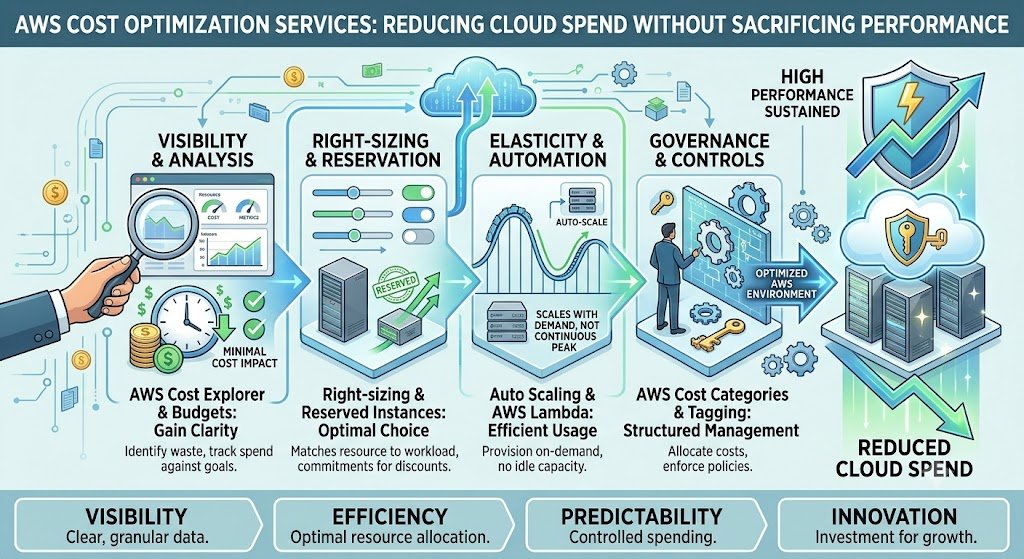
AWS cost optimization is the discipline of reducing cloud spend without sacrificing the performance the business needs. It is not about cutting costs indiscriminately—turning off production databases to save money is not optimization. It is about eliminating waste, matching resources to actual requirements, using commitment discounts where predictable, and establishing the governance (FinOps) that keeps costs under control as the business grows.
For Indian businesses, AWS cost optimization matters because cloud is now a material operating expense. A 30% reduction in AWS spend on a ₹2 crore annual bill is ₹60 lakh—money that can fund hiring, product development, or margin improvement. And the optimization is usually achievable without performance degradation, because most waste is genuinely unnecessary.
India adds specific considerations. Data localisation for regulated sectors means workloads must stay in Indian regions, which affects pricing and architecture options. DPDPA applies to data stored in AWS services, and retention policies affect storage costs. Graviton instances (ARM-based) are available in Indian regions and offer significant price-performance advantages. And commitment discounts require forecasting discipline that many Indian businesses lack.
This guide is written for Indian CTOs, finance leaders, DevOps teams, and platform engineers managing AWS spend. We will cover the optimization levers, the cost allocation and visibility practices, the commitment strategies, real costs and savings in rupees and dollars, DPDPA compliance considerations, and a phased implementation framework with clear go/no-go gates.
Where AWS Spend Actually Goes
Before optimizing, it helps to understand the major cost categories and where waste typically hides.
The Major Cost Categories
1. Compute (EC2, ECS, EKS, Lambda). Usually the largest category. Waste comes from oversized instances, idle instances, and non-production environments running 24/7.
2. Storage (S3, EBS, EFS, snapshots). Often the fastest-growing category. Waste comes from old data, unattached volumes, old snapshots, and expensive storage tiers used for cold data.
3. Database (RDS, DynamoDB, ElastiCache). Waste comes from oversized instances, over-provisioned IOPS, and unused read replicas.
4. Data transfer. Often overlooked. Waste comes from cross-region transfer, NAT gateway data processing, and CDN misconfiguration.
5. Networking (NAT Gateway, Load Balancers, Elastic IPs). Waste comes from idle load balancers, unused Elastic IPs, and NAT gateway data processing charges.
The Common Sources of Waste
| Waste Source | Typical Share of Bill | Ease of Fix |
|---|---|---|
| Oversized instances | 15–25% | Medium (rightsizing) |
| Idle/non-production resources | 10–20% | Easy (scheduling) |
| Unattached storage | 5–10% | Easy (cleanup) |
| Old snapshots | 3–8% | Easy (lifecycle) |
| No commitment discounts | 15–25% | Medium (planning) |
| Data transfer | 5–15% | Medium (architecture) |
| Over-provisioned databases | 5–10% | Medium |
The typical finding: Most AWS bills can be reduced by 25–40% without performance impact. The savings come from eliminating waste, not from cutting capacity.
For teams building the applications and AI workloads that run on AWS, our AI Development and Custom Software Development practices cover the full stack.
The Optimization Levers
Lever 1: Visibility and Cost Allocation
You cannot optimize what you cannot see. The first step is making costs visible and attributable.
Tagging. Every resource should have tags: environment (prod/staging/dev), team/owner, application, cost center. Without tags, you cannot attribute costs to teams or applications.
Cost Explorer and Cost Allocation Tags. AWS Cost Explorer shows costs by service, region, and tag. Cost allocation tags enable chargeback.
Budgets and alerts. Set budget alerts per team or application. Alert when spend exceeds forecast.
AWS Cost and Usage Report (CUR). The detailed line-item report, queryable with Athena. Essential for deep analysis.
Lever 2: Rightsizing
Rightsizing matches instance size to actual utilization. Most instances are oversized because someone chose a size "to be safe" and never revisited it.
How to rightsize:
Analyze utilization. Use CloudWatch metrics (CPU, memory, network) over 2–4 weeks. AWS Compute Optimizer provides recommendations.
Identify candidates. Instances with CPU below 20% and memory below 40% are candidates for downsizing.
Test before resizing. Downsize in non-production first, then production.
Use auto scaling. For variable workloads, auto scaling adjusts capacity to demand.
Lever 3: Commitment Discounts
AWS offers discounts for committing to usage:
Savings Plans: commit to a consistent amount of compute spend ($/hour) for 1 or 3 years. Savings up to 72%.
Reserved Instances: commit to specific instance types for 1 or 3 years. Savings up to 72%.
Spot Instances: use spare capacity at up to 90% discount, but instances can be interrupted.
The strategy: Use Savings Plans for the baseline (steady-state) usage. Use On-Demand for variable usage. Use Spot for fault-tolerant workloads (batch, CI/CD, stateless services).
The commitment discipline: Committing requires forecasting. Over-committing wastes money; under-committing leaves savings on the table. Start with 1-year commitments at 60–70% of baseline usage, then expand.
Lever 4: Storage Optimization
Storage is often the fastest-growing cost category.
S3:
Lifecycle policies: move objects to cheaper storage classes (Standard-IA, Glacier) after a period, and delete after retention.
Intelligent-Tiering: automatically moves objects between tiers based on access patterns.
Delete incomplete multipart uploads.
EBS:
Delete unattached volumes.
Migrate gp2 to gp3: gp3 is 20% cheaper and provides baseline IOPS.
Right-size volumes.
Delete old snapshots.
EFS:
Use Infrequent Access storage class for cold files.
Lever 5: Compute Modernization
Graviton instances. AWS Graviton (ARM-based) instances offer 20–40% better price-performance than x86 for many workloads. Available in Indian regions. Migration requires testing but often pays off quickly.
Newer instance generations. Each generation is typically more cost-effective than the previous. Migrating from older generations (m4, m5) to newer (m6i, m7i) improves price-performance.
Serverless and containers. For appropriate workloads, Lambda and Fargate can be more cost-effective than always-on EC2.
Lever 6: Data Transfer and Networking
Cross-region transfer is expensive. Design architectures to minimize it.
NAT Gateway charges per GB processed. For high-volume traffic, consider alternatives (VPC endpoints, NAT instances).
CloudFront can reduce origin data transfer and improve performance.
Idle resources: delete unused load balancers, Elastic IPs, and NAT gateways.
Lever 7: Non-Production Environment Management
Development, staging, and test environments often run 24/7 but are used 8 hours a day. Scheduling them to shut down outside working hours saves 65–70% of their cost.
Implementation: Use AWS Instance Scheduler, or custom Lambda functions triggered by EventBridge.
Optimization Levers Table
| Lever | Typical Savings | Effort | Risk |
|---|---|---|---|
| Rightsizing | 15–25% | Medium | Low (if tested) |
| Commitment discounts | 15–25% | Medium | Medium (forecast risk) |
| Storage lifecycle | 5–15% | Low | Low |
| Graviton migration | 10–20% | High | Medium (compatibility) |
| Non-prod scheduling | 5–10% | Low | Low |
| Data transfer optimization | 5–10% | Medium | Low |
| Idle resource cleanup | 3–8% | Low | Low |
FinOps: The Governance That Keeps Costs Down
Optimization is a project. FinOps is the ongoing practice that keeps costs optimized as the business grows.
The FinOps Principles
1. Everyone owns their cloud spend. Engineering teams are accountable for the cost of the resources they use.
2. Costs are visible and attributable. Tagging and cost allocation make spend visible per team and application.
3. Optimization is continuous. Not a one-time project, but an ongoing practice.
4. Trade-offs are explicit. Performance, reliability, and cost are balanced deliberately, not by accident.
The FinOps Cadence
| Activity | Frequency | Owner |
|---|---|---|
| Cost review | Weekly | Platform/FinOps team |
| Rightsizing review | Monthly | Engineering teams |
| Commitment review | Quarterly | Finance + platform |
| Budget forecasting | Monthly | Finance |
| Architecture review for cost | Per project | Engineering |
Cost Allocation and Chargeback
Tags enable chargeback: showing each team or business unit their cloud cost. Chargeback creates accountability—teams that see their costs make different decisions.
Implementation:
Define a tagging standard (environment, team, application, cost center).
Enforce tagging with AWS Config rules or SCPs.
Build dashboards per team.
Review monthly with team leads.
DPDPA and AWS Cost Optimization
DPDPA affects cost optimization in two ways:
1. Retention policies: DPDPA requires deleting personal data when no longer needed. This aligns with storage optimization—deleting old data reduces storage costs.
2. Data localisation: For regulated sectors, data must stay in Indian regions. This constrains architecture but does not prevent optimization within those regions.
FinOps Checklist
| Requirement | Implementation | Priority |
|---|---|---|
| Tagging standard | All resources tagged | High |
| Cost dashboards | Per team/application | High |
| Budget alerts | Per team/application | High |
| Weekly cost review | Platform team | High |
| Chargeback | Monthly report to teams | Medium |
| Commitment tracking | Quarterly review | Medium |
Real Costs and Savings in India (2026)
Consulting Costs
| Scope | Cost (₹) | Cost ($ approx.) | Timeline |
|---|---|---|---|
| Cost optimization audit | ₹50,000–₹1.5 lakh | $600–$1,800 | 1–2 weeks |
| Full optimization engagement (audit + implementation) | ₹3–10 lakh | $3,600–$12,000 | 4–10 weeks |
| FinOps setup (tagging, dashboards, governance) | ₹2–8 lakh | $2,400–$9,600 | 4–8 weeks |
| Ongoing FinOps retainer | ₹50,000–₹1.5 lakh/month | $600–$1,800/month | Ongoing |
Typical Savings
| AWS Annual Spend (₹) | Typical Savings (25–35%) | Annual Savings (₹) | Annual Savings ($ approx.) |
|---|---|---|---|
| ₹25 lakh | 25–35% | ₹6–9 lakh | $7,200–$10,800 |
| ₹50 lakh | 25–35% | ₹12–17 lakh | $14,400–$20,400 |
| ₹1 crore | 25–35% | ₹25–35 lakh | $30,000–$42,000 |
| ₹5 crore | 25–35% | ₹1.25–1.75 crore | $1,50,000–$2,10,000 |
The ROI: A ₹3–10 lakh optimization engagement on a ₹1 crore annual bill typically pays for itself within 2–4 months. For larger bills, the payback is faster.
The Cost of Inaction
Every month without optimization is a month of waste. A business spending ₹1 crore annually on AWS with 30% waste is losing ₹30 lakh per year—₹2.5 lakh per month—to resources it does not need.
Implementation Framework: A Phased Approach With Cost Gates
Phase 1: Visibility and Baseline (Week 1–2)
Objective: Understand where the money is going.
Activities:
Enable Cost Explorer and CUR.
Audit tagging coverage.
Identify top services by cost.
Identify untagged resources.
Establish baseline spend.
Cost: ₹50,000–₹1.5 lakh ($600–$1,800).
Go/No-Go: Costs visible by service and tag. Baseline established.
Phase 2: Quick Wins (Week 3–6)
Objective: Capture low-risk savings.
Activities:
Delete unattached EBS volumes, old snapshots, unused Elastic IPs, idle load balancers.
Implement S3 lifecycle policies.
Migrate gp2 to gp3.
Schedule non-production environments.
Delete orphaned resources.
Cost: Included in engagement.
Go/No-Go: Quick wins implemented. Savings measured.
Phase 3: Rightsizing and Modernization (Week 7–12)
Objective: Match resources to requirements.
Activities:
Analyze utilization with Compute Optimizer.
Rightsize instances (non-prod first, then prod).
Evaluate Graviton migration.
Implement auto scaling.
Right-size databases.
Cost: ₹2–6 lakh ($2,400–$7,200) for implementation effort.
Go/No-Go: Rightsizing implemented. Performance maintained.
Phase 4: Commitment Strategy (Week 13–16)
Objective: Use commitment discounts for predictable usage.
Activities:
Forecast baseline usage.
Purchase Savings Plans (1-year, 60–70% of baseline).
Use Spot for fault-tolerant workloads.
Set up commitment tracking.
Cost: Included in engagement.
Go/No-Go: Commitments purchased. Savings realized.
Phase 5: FinOps Governance (Ongoing)
Objective: Sustain optimization.
Activities:
Tagging enforcement.
Cost dashboards per team.
Weekly cost reviews.
Monthly rightsizing reviews.
Quarterly commitment reviews.
Cost: ₹50,000–₹1.5 lakh/month ($600–$1,800) retainer or internal team.
Phase Summary Table
| Phase | Duration | Key Deliverable | Cost (₹) | Go/No-Go Criteria |
|---|---|---|---|---|
| 1. Visibility | 2 weeks | Cost baseline, tagging audit | 50,000–1.5 lakh | Costs visible |
| 2. Quick Wins | 4 weeks | Cleanup, lifecycle, scheduling | Included | Savings measured |
| 3. Rightsizing | 6 weeks | Right-sized resources | 2–6 lakh | Performance maintained |
| 4. Commitments | 4 weeks | Savings Plans, Spot | Included | Savings realized |
| 5. FinOps | Ongoing | Governance | 50,000–1.5 lakh/month | Sustained savings |
Risks, Pitfalls, and Governance
The Most Common Cost Optimization Failures
Cutting capacity that is needed. Reducing instance size without testing causes performance problems. Mitigation: Test rightsizing in non-production first.
Over-committing. Buying Savings Plans for more than actual usage wastes money. Mitigation: Commit to 60–70% of baseline, use 1-year terms initially.
No tagging. Costs cannot be attributed, so no one is accountable. Mitigation: Tagging standard, enforced.
Optimization as a one-time project. Costs creep back up. Mitigation: FinOps cadence.
Ignoring data transfer. The largest overlooked category. Mitigation: Analyze data transfer, optimize architecture.
Breaking compliance. Deleting data that must be retained. Mitigation: Retention policies aligned with DPDPA and business requirements.
Risk Summary Table
| Risk | Likelihood | Impact | Mitigation |
|---|---|---|---|
| Cutting needed capacity | Medium | High (performance) | Test rightsizing |
| Over-committing | Medium | Medium (wasted spend) | Commit to baseline |
| No tagging | High | High (no accountability) | Tagging standard |
| One-time optimization | High | Medium (cost creep) | FinOps cadence |
| Ignoring data transfer | High | Medium (hidden cost) | Data transfer analysis |
| Breaking compliance | Low | Critical | Retention policies |
Benchmark Summary and Decision Framework
Decision Matrix: Optimization Priority by Bill Size
| Annual AWS Spend | First Priority | Second Priority |
|---|---|---|
| < ₹25 lakh | Quick wins (cleanup, scheduling) | Rightsizing |
| ₹25–50 lakh | Rightsizing | Commitments |
| ₹50 lakh–₹1 crore | Commitments | Storage, data transfer |
| > ₹1 crore | FinOps governance | Graviton, architecture |
Savings Summary Table
| Lever | Typical Savings | Effort | Risk |
|---|---|---|---|
| Commitment discounts | 15–25% | Medium | Medium |
| Rightsizing | 15–25% | Medium | Low |
| Graviton | 10–20% | High | Medium |
| Storage lifecycle | 5–15% | Low | Low |
| Non-prod scheduling | 5–10% | Low | Low |
| Data transfer | 5–10% | Medium | Low |
| Cleanup | 3–8% | Low | Low |
The One-Paragraph Decision Rule
If your AWS bill is growing faster than revenue, start with visibility: enable Cost Explorer, audit tagging, and establish a baseline. Capture quick wins—cleanup, lifecycle policies, non-production scheduling. Rightsize instances based on actual utilization. Use Savings Plans for baseline usage and Spot for fault-tolerant workloads. Then establish FinOps governance so costs stay optimized. Do not cut capacity that the business needs—optimize the waste first.
Frequently Asked Questions
1. How much can I save on my AWS bill?
Most AWS bills can be reduced by 25–40% without performance impact. The savings come from rightsizing, commitment discounts, storage lifecycle, non-production scheduling, and cleanup.
2. How much does AWS cost optimization consulting cost in India?
A cost optimization audit costs ₹50,000–₹1.5 lakh ($600–$1,800). A full optimization engagement costs ₹3–10 lakh ($3,600–$12,000). An ongoing FinOps retainer costs ₹50,000–₹1.5 lakh/month ($600–$1,800).
3. What is the fastest way to reduce my AWS bill?
Quick wins: delete unattached EBS volumes, old snapshots, and unused Elastic IPs; implement S3 lifecycle policies; migrate gp2 to gp3; schedule non-production environments to shut down outside working hours.
4. What are Savings Plans and how do they work?
Savings Plans are commitments to a consistent amount of compute spend ($/hour) for 1 or 3 years in exchange for discounts up to 72%. Commit to 60–70% of your baseline usage to avoid over-committing.
5. Should I use Reserved Instances or Savings Plans?
Savings Plans are more flexible because they apply to any instance family and region. Reserved Instances are better if you have stable, specific instance requirements. Most businesses should start with Savings Plans.
6. What are Graviton instances and should I migrate?
Graviton instances use ARM processors and offer 20–40% better price-performance than x86. They are available in Indian regions. Migration requires testing but often pays off quickly.
7. How do I reduce S3 costs?
Implement lifecycle policies to move objects to cheaper storage classes (Standard-IA, Glacier) after a period, and delete objects after retention. Use Intelligent-Tiering for unpredictable access patterns. Delete incomplete multipart uploads.
8. How do I reduce data transfer costs?
Minimize cross-region transfer, use VPC endpoints instead of NAT Gateway for AWS service traffic, use CloudFront for content delivery, and review data transfer patterns.
9. What is FinOps?
FinOps is the practice of managing cloud costs collaboratively—making costs visible, attributing them to teams, and making trade-offs explicit. It is the ongoing governance that keeps costs optimized.
10. How does DPDPA affect AWS cost optimization?
DPDPA requires deleting personal data when no longer needed, which aligns with storage optimization. Data localisation for regulated sectors constrains architecture to Indian regions.
11. How often should I review AWS costs?
Weekly cost reviews, monthly rightsizing reviews, and quarterly commitment reviews. Optimization is continuous, not a one-time project.
12. How can Innovative AI Solutions help?
Innovative AI Solutions provides AWS cost optimization services for Indian businesses—audits, rightsizing, commitment strategy, storage optimization, Graviton migration, and FinOps governance. Our Delhi-based team handles assessment, implementation, and ongoing management. Visit https://innovativeais.com to discuss your requirements.
Contact Innovative AI Solutions
Ready to reduce your AWS bill without reducing performance?
[One-line supporting sentence.]
Contact Information
Innovative AI Solutions
📍 Netaji Subhash Place, Pitampura, Delhi – 110034
🌐 Website: https://innovativeaislabs.com 📧 Email: info@innovativeais.com
📞 Phone: +91 7464 099 059 / +91 96899 67356
Business Services
AI Automation
AI Development
AI Consulting
Machine Learning Solutions
Deep Learning Solutions
Generative AI Services
NLP Solutions
AI Agents
AI Chatbots
Voice AI
CRM Development
Custom Software Development
Website Development
Mobile App Development
About the Author
Abhishek Kumar
Founder & CEO, Innovative AI Solutions
5+ years building production AI systems for Indian businesses. Based in Delhi, serving clients across India.
Ready to build AI solutions for your business?
Innovative AI Solutions — Delhi's leading AI development company. Free consultation available.
Get Free Consultation →
A practical 2026 guide for Indian teams optimizing AWS spend—rightsizing, commitment discounts, storage lifecycle, Graviton migration, data transfer savings, real rupee costs, and FinOps governance that keeps costs down as the business grows.
#AWSCostOptimization #FinOps #CloudCostManagement #Rightsizing #SavingsPlans #SpotInstances #S3Lifecycle #Graviton #DataTransfer #CostExplorer #DPDPA #MeitY #AWSIndia #CloudFinOps #DelhiNCR #InnovativeAISolutions
Copyright ©️ 2015–2026 Innovative AI Solutions. All Rights Reserved. | Privacy Policy | Terms & Conditions