The Platform You Did Not Plan to Build
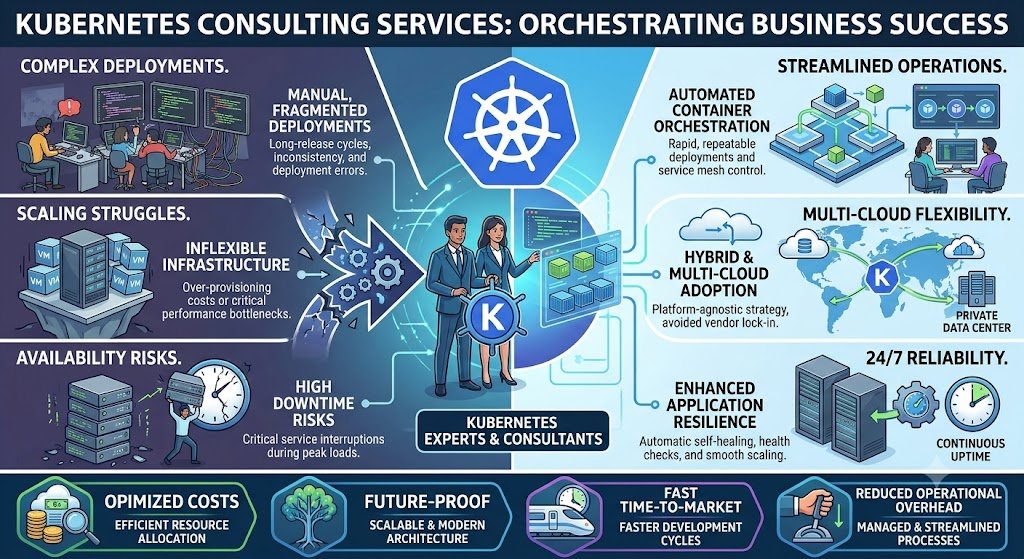
A growing Indian SaaS company moves its application to Kubernetes. The motivation is reasonable: containerisation, autoscaling, and portability. Six months later, the company has a Kubernetes cluster, a CI/CD pipeline, and a new problem—it now needs a platform team to operate the cluster. Someone has to manage upgrades, security patches, networking, storage, monitoring, and cost. The application team did not sign up for this. The infrastructure team is stretched thin. And the cloud bill has grown because the cluster is over-provisioned.
This is the Kubernetes paradox. It solves real problems—scalability, portability, operational consistency—but it also creates a new platform that must be operated. For some businesses, the trade-off is worth it. For others, it is not.
Kubernetes consulting services exist to help businesses navigate this decision and, when the answer is yes, to implement and operate Kubernetes without building a platform team from scratch. The consulting engagement is not just about installing a cluster. It is about deciding whether Kubernetes is the right choice, designing the architecture, securing it, and establishing the operational practices that keep it running.
India adds specific considerations. Cost management matters because Kubernetes clusters can be over-provisioned, and the cloud bill grows silently. Security is critical because Kubernetes has a large attack surface and misconfigurations are common. Data localisation may require clusters in Indian regions for regulated sectors. DPDPA applies to logs and data processed by cluster workloads. And talent is scarce—Kubernetes expertise is in demand and expensive.
This guide is written for Indian CTOs, engineering leaders, DevOps teams, and platform engineers evaluating Kubernetes. We will cover when Kubernetes is the right choice (and when it is not), the cluster architecture, security practices, real costs in rupees and dollars, DPDPA compliance, and a phased implementation framework with clear go/no-go gates.
Do You Actually Need Kubernetes?
The most important Kubernetes consulting question is whether you need Kubernetes at all. For many businesses, the answer is no—or not yet.
When Kubernetes Makes Sense
1. Many services. If you have dozens of microservices that need to be deployed, scaled, and managed independently, Kubernetes provides the orchestration.
2. Variable traffic. If traffic spikes require rapid scaling, Kubernetes autoscaling handles it.
3. Multi-cloud or hybrid. If you need portability across clouds or between on-premise and cloud, Kubernetes provides a consistent platform.
4. Platform team exists. If you have (or will build) a platform team to operate the cluster, Kubernetes is viable.
5. Complex deployment requirements. If you need canary deployments, service mesh, or advanced traffic management, Kubernetes supports it.
When Kubernetes Does Not Make Sense
1. A single monolith. If you have one application, a simpler deployment (PaaS, containers on VMs, serverless) is easier.
2. Small team. If you do not have the people to operate a cluster, Kubernetes will become a burden.
3. Predictable traffic. If traffic is stable, autoscaling benefits are minimal.
4. Simple requirements. If you need basic deployment and scaling, managed platforms (App Runner, Cloud Run, App Service) are simpler.
5. Cost sensitivity. Kubernetes can be more expensive than simpler alternatives for small workloads.
Kubernetes vs Alternatives
| Requirement | Kubernetes | Managed Containers (ECS, Cloud Run) | PaaS (Heroku, App Engine) | Serverless (Lambda) |
|---|---|---|---|---|
| Complexity | High | Medium | Low | Low |
| Control | Full | Medium | Limited | Limited |
| Scaling | Excellent | Good | Good | Excellent |
| Portability | High | Low | Low | Low |
| Operational burden | High | Medium | Low | Low |
| Best for | Many services, platform teams | Moderate complexity | Simple apps | Event-driven |
The honest answer for many Indian businesses: Start with a simpler platform. Move to Kubernetes when the complexity justifies it—when you have many services, a platform team, and a genuine need for orchestration.
For teams building the applications that Kubernetes will host, our Custom Software Development and AI Development practices cover the full stack.
Cluster Architecture: Designing for Production
If Kubernetes is the right choice, the architecture determines whether it is reliable, secure, and cost-effective.
The Control Plane
The control plane manages the cluster: scheduling, API server, etcd (the cluster state store), and controllers.
Managed vs self-managed:
Managed (EKS, AKS, GKE): The cloud provider manages the control plane. You manage worker nodes and workloads. Recommended for most businesses.
Self-managed: You manage everything. Only for teams with deep Kubernetes expertise and specific requirements.
Worker Nodes
Worker nodes run the application pods. Design considerations:
Node pools: separate node pools for different workload types (general, memory-intensive, GPU).
Instance types: choose based on workload requirements.
Autoscaling: cluster autoscaler adds/removes nodes based on demand.
Spot instances: for fault-tolerant workloads, reduce cost significantly.
Networking
CNI (Container Network Interface): Calico, Cilium, or cloud-provider CNI.
Ingress: NGINX Ingress, Traefik, or cloud load balancers.
Service mesh: Istio, Linkerd for advanced traffic management (optional, adds complexity).
Network policies: restrict pod-to-pod communication for security.
Storage
Persistent volumes: for stateful workloads (databases, file storage).
Storage classes: define different performance tiers.
CSI drivers: for cloud storage integration.
Security
RBAC: role-based access control for cluster access.
Network policies: restrict pod-to-pod traffic.
Pod security standards: enforce security contexts.
Secrets management: external secrets (Vault, AWS Secrets Manager) or sealed secrets.
Image scanning: scan container images for vulnerabilities.
Cluster Architecture Table
| Component | Options | Recommendation |
|---|---|---|
| Control plane | Managed (EKS/AKS/GKE) vs self-managed | Managed |
| Worker nodes | Node pools, instance types | Multiple pools by workload |
| Networking | Calico, Cilium, cloud CNI | Cilium or cloud CNI |
| Ingress | NGINX, Traefik, cloud LB | Cloud LB or NGINX |
| Service mesh | Istio, Linkerd | Only if needed |
| Storage | Cloud CSI drivers | Cloud-native storage |
| Security | RBAC, network policies, pod security | Enforce all |
Security: The Largest Attack Surface
Kubernetes security is complex because the cluster has many components, each of which can be misconfigured.
The Security Layers
1. Cluster access. Who can access the cluster API? Use RBAC, integrate with identity providers (SSO), and enforce least privilege.
2. Network. Restrict pod-to-pod communication with network policies. Default deny, allow only what is needed.
3. Pod security. Enforce pod security standards: no privileged containers, no root, read-only filesystems where possible.
4. Image security. Scan images for vulnerabilities, use trusted registries, sign images.
5. Secrets. Do not store secrets in environment variables or ConfigMaps. Use external secrets management.
6. Runtime security. Monitor for anomalous behaviour (Falco, cloud provider tools).
7. Supply chain. SBOM, signed images, admission controllers.
Common Kubernetes Security Mistakes
Over-permissive RBAC: giving cluster-admin to too many users.
No network policies: all pods can talk to all pods.
Secrets in ConfigMaps: secrets stored in plain text.
Unpatched clusters: running old Kubernetes versions.
Privileged containers: containers running with unnecessary privileges.
No image scanning: deploying images with known vulnerabilities.
DPDPA and Kubernetes
If cluster workloads process personal data:
Logs: redact personal data from application and cluster logs.
Secrets: protect credentials for databases containing personal data.
Access control: restrict who can access workloads processing personal data.
Data localisation: cluster in Indian region for regulated data.
Security Checklist
| Requirement | Implementation | Priority |
|---|---|---|
| RBAC | Least privilege, SSO integration | High |
| Network policies | Default deny, allow needed | High |
| Pod security | Enforce standards | High |
| Image scanning | In CI/CD and admission | High |
| Secrets management | External secrets | High |
| Cluster upgrades | Regular patching | High |
| Audit logging | API server audit logs | Medium |
| Runtime security | Falco or cloud tools | Medium |
Real Costs in India (2026)
Kubernetes costs have two components: the cluster infrastructure (nodes, control plane) and the people to operate it.
Infrastructure Costs
| Component | Monthly Cost (₹) | Monthly Cost ($ approx.) | Notes |
|---|---|---|---|
| Managed control plane (EKS/AKS/GKE) | ₹8,000–₹25,000 | $96–$300 | Per cluster |
| Worker nodes (general purpose) | ₹30,000–₹2,00,000 | $360–$2,400 | Depends on instance count |
| GPU nodes (if needed) | ₹80,000–₹5,00,000+ | $960–$6,000+ | For AI workloads |
| Load balancer | ₹2,000–₹15,000 | $24–$180 | Per LB |
| Storage | ₹5,000–₹50,000 | $60–$600 | Persistent volumes |
| Monitoring/logging | ₹10,000–₹60,000 | $120–$720 | Depends on volume |
Implementation Costs
| Scope | Cost (₹) | Cost ($ approx.) | Timeline |
|---|---|---|---|
| Cluster setup and hardening | ₹2–6 lakh | $2,400–$7,200 | 3–6 weeks |
| Production platform (CI/CD, monitoring, security) | ₹8–25 lakh | $9,600–$30,000 | 8–16 weeks |
| Migration from VMs | ₹5–20 lakh | $6,000–$24,000 | 6–16 weeks |
People Costs
| Role | Monthly Cost (₹) | Monthly Cost ($ approx.) |
|---|---|---|
| Platform engineer | ₹1–3 lakh | $1,200–$3,600 |
| DevOps engineer | ₹80,000–₹2 lakh | $960–$2,400 |
The platform team reality: A production Kubernetes cluster typically requires 1–2 platform engineers to operate. This is the hidden cost that many businesses underestimate.
Cost Optimization
Spot instances: 60–70% savings for fault-tolerant workloads.
Right-sizing: match node types to workload requirements.
Cluster autoscaler: scale down when demand is low.
Namespace quotas: prevent over-provisioning.
Bin packing: improve node utilization.
Implementation Framework: A Phased Approach With Cost Gates
Phase 1: Decision and Assessment (Week 1–3)
Objective: Decide whether Kubernetes is the right choice.
Activities:
Inventory applications and deployment requirements.
Assess team capability: do you have or will you hire platform engineers?
Compare alternatives: managed containers, PaaS, serverless.
Define the business case: what problem does Kubernetes solve?
Assess compliance requirements (data localisation, DPDPA).
Cost: ₹50,000–₹1.5 lakh ($600–$1,800).
Go/No-Go: Kubernetes is justified. Team plan exists. Business case defined.
Phase 2: Cluster Setup (Week 4–9)
Objective: Set up a production-ready cluster.
Activities:
Provision managed cluster (EKS/AKS/GKE).
Configure node pools and autoscaling.
Set up networking and ingress.
Configure storage.
Implement RBAC and network policies.
Set up monitoring and logging.
Cost: ₹2–6 lakh ($2,400–$7,200).
Go/No-Go: Cluster is secure. Monitoring works. RBAC enforced.
Phase 3: Platform Services (Week 10–17)
Objective: Build the platform services that make the cluster usable.
Activities:
CI/CD integration for deployments.
Secrets management.
Image scanning and admission control.
Service mesh (if needed).
Observability (metrics, logs, traces).
Cost: ₹5–15 lakh ($6,000–$18,000).
Go/No-Go: Developers can deploy without platform team involvement. Security controls work.
Phase 4: Migration and Onboarding (Week 18–28)
Objective: Migrate workloads and onboard teams.
Activities:
Migrate applications to the cluster in waves.
Train development teams.
Establish runbooks and on-call.
Optimize costs.
Cost: ₹5–20 lakh ($6,000–$24,000).
Go/No-Go: Workloads migrated. Teams trained. Costs optimized.
Phase 5: Operations (Ongoing)
Objective: Operate and improve.
Activities:
Cluster upgrades.
Security patching.
Cost monitoring.
Performance tuning.
Capacity planning.
Cost: 1–2 platform engineers.
Phase Summary Table
| Phase | Duration | Key Deliverable | Cost (₹) | Go/No-Go Criteria |
|---|---|---|---|---|
| 1. Decision | 3 weeks | Business case, team plan | 50,000–1.5 lakh | Kubernetes justified |
| 2. Cluster Setup | 6 weeks | Production-ready cluster | 2–6 lakh | Secure, monitored |
| 3. Platform Services | 8 weeks | CI/CD, security, observability | 5–15 lakh | Developers self-serve |
| 4. Migration | 11 weeks | Workloads migrated | 5–20 lakh | Teams trained |
| 5. Operations | Ongoing | Stable platform | 1–2 engineers | Stable, optimized |
Risks, Pitfalls, and Governance
The Most Common Kubernetes Failures
No platform team. Kubernetes is adopted without the people to operate it. Mitigation: Plan the team before the cluster.
Over-provisioning. Nodes are oversized, and the bill grows. Mitigation: Autoscaling, right-sizing, quotas.
Security misconfiguration. Over-permissive RBAC, no network policies. Mitigation: Security hardening from day one.
Complexity without benefit. Kubernetes is adopted for a simple application. Mitigation: Honest assessment of requirements.
No observability. Problems are invisible. Mitigation: Monitoring, logging, tracing from day one.
Version sprawl. Clusters run old versions with known vulnerabilities. Mitigation: Regular upgrade cadence.
Risk Summary Table
| Risk | Likelihood | Impact | Mitigation |
|---|---|---|---|
| No platform team | High | High (cluster unmanaged) | Plan team first |
| Over-provisioning | High | Medium (cost) | Autoscaling, quotas |
| Security misconfiguration | High | Critical | Hardening from day one |
| Complexity without benefit | High | High (wasted effort) | Honest assessment |
| No observability | High | Medium | Monitoring from day one |
| Version sprawl | Medium | High (vulnerabilities) | Upgrade cadence |
Benchmark Summary and Decision Framework
Decision Matrix: Kubernetes vs Alternatives
| Factor | Kubernetes | Managed Containers | PaaS | Serverless |
|---|---|---|---|---|
| Many services | Yes | Moderate | Limited | Limited |
| Complex scaling | Yes | Good | Good | Yes |
| Platform team | Required | Optional | Not needed | Not needed |
| Portability | High | Low | Low | Low |
| Operational burden | High | Medium | Low | Low |
| Best for | Platform teams, many services | Moderate complexity | Simple apps | Event-driven |
Cluster Sizing Table
| Workload | Node Type | Typical Count |
|---|---|---|
| Small app (< 10 pods) | 2 vCPU, 4 GB | 2–3 nodes |
| Medium app (10–50 pods) | 4 vCPU, 8 GB | 3–6 nodes |
| Large app (50+ pods) | 8 vCPU, 16 GB | 6+ nodes, multiple pools |
| AI workloads | GPU nodes | Depends on model size |
The One-Paragraph Decision Rule
If you have many services, variable traffic, and a platform team (or the budget to build one), Kubernetes is a strong choice. If you have a single application or a small team, start with a simpler platform—managed containers, PaaS, or serverless. If you choose Kubernetes, use a managed control plane, harden security from day one, plan the platform team before the cluster, and monitor costs continuously. Do not adopt Kubernetes because it is popular. Adopt it because it solves a problem you actually have.
Frequently Asked Questions
1. When should my business use Kubernetes?
When you have many services, variable traffic, a platform team (or budget to build one), and a genuine need for orchestration. Not for a single application or a small team without platform capability.
2. How much does Kubernetes consulting cost in India?
Cluster setup and hardening costs ₹2–6 lakh ($2,400–$7,200). A production platform with CI/CD, monitoring, and security costs ₹8–25 lakh ($9,600–$30,000). Migration from VMs costs ₹5–20 lakh ($6,000–$24,000). Ongoing operations require 1–2 platform engineers.
3. What is the difference between EKS, AKS, and GKE?
They are managed Kubernetes services from AWS (EKS), Azure (AKS), and Google Cloud (GKE). All manage the control plane; you manage worker nodes and workloads. Choose based on your cloud provider.
4. Do I need a platform team for Kubernetes?
For production, yes. A cluster needs someone to manage upgrades, security, networking, monitoring, and cost. Plan 1–2 platform engineers for a production cluster.
5. What is the difference between Kubernetes and Docker?
Docker builds and runs containers. Kubernetes orchestrates containers across multiple machines—scheduling, scaling, networking, and managing them.
6. How do I secure a Kubernetes cluster?
RBAC with least privilege, network policies (default deny), pod security standards, image scanning, external secrets management, regular upgrades, and runtime security monitoring.
7. How does DPDPA affect Kubernetes?
Workloads processing personal data must have access controls, log redaction, and secrets protection. Data localisation may require clusters in Indian regions for regulated sectors.
8. How do I control Kubernetes costs?
Autoscaling (cluster autoscaler), right-sizing nodes, spot instances for fault-tolerant workloads, namespace quotas, and bin packing.
9. What is a service mesh and do I need one?
A service mesh (Istio, Linkerd) provides advanced traffic management, mTLS, and observability between services. It adds complexity. Use it only if you need those capabilities.
10. Should I use managed or self-managed Kubernetes?
Managed (EKS/AKS/GKE) for most businesses—the cloud provider manages the control plane. Self-managed only for teams with deep expertise and specific requirements.
11. How long does Kubernetes implementation take?
Cluster setup takes 3–6 weeks. A production platform takes 8–16 weeks. Migration of workloads takes 6–16 weeks. Timeline depends on complexity and team readiness.
12. How can Innovative AI Solutions help?
Innovative AI Solutions provides Kubernetes consulting for Indian businesses—decision assessment, cluster architecture, security hardening, CI/CD integration, migration, and cost optimization. Our Delhi-based team handles assessment, implementation, and training. Visit https://innovativeais.com to discuss your requirements.
Contact Innovative AI Solutions
Ready to decide whether Kubernetes is right for your business—and implement it correctly?
[One-line supporting sentence.]
Contact Information
Innovative AI Solutions
📍 Netaji Subhash Place, Pitampura, Delhi – 110034
🌐 Website: https://innovativeaislabs.com 📧 Email: info@innovativeais.com
📞 Phone: +91 7464 099 059 / +91 96899 67356
Business Services
AI Automation
AI Development
AI Consulting
Machine Learning Solutions
Deep Learning Solutions
Generative AI Services
NLP Solutions
AI Agents
AI Chatbots
Voice AI
CRM Development
Custom Software Development
Website Development
Mobile App Development
About the Author
Abhishek Kumar
Founder & CEO, Innovative AI Solutions
5+ years building production AI systems for Indian businesses. Based in Delhi, serving clients across India.
Ready to build AI solutions for your business?
Innovative AI Solutions — Delhi's leading AI development company. Free consultation available.
Get Free Consultation →
A practical 2026 guide for Indian engineering leaders evaluating Kubernetes—when orchestration is justified, cluster architecture, security hardening, real rupee costs, DPDPA compliance, and a phased rollout that plans the platform team before the cluster.
#Kubernetes #ContainerOrchestration #KubernetesConsulting #EKS #AKS #GKE #CloudNative #DevOps #PlatformEngineering #KubernetesSecurity #Helm #ServiceMesh #Autoscaling #DPDPA #MeitY #DelhiNCR #InnovativeAISolutions
Copyright ©️ 2015–2026 Innovative AI Solutions. All Rights Reserved. | Privacy Policy | Terms & Conditions