The Release Train That Left Without the Business
An Indian enterprise software team ships a release every six weeks. The process is familiar: a code freeze two weeks before the release, a manual QA cycle that takes ten days, a deployment weekend where engineers come in on Saturday night, and a Monday morning where something always breaks. The business waits six weeks for features that were promised in a roadmap that is already out of date.
This is the release train, and it is one of the most expensive inefficiencies in software delivery. It is not caused by lazy engineers or bad code. It is caused by the absence of CI/CD—continuous integration and continuous deployment—the engineering practice that automates the path from code commit to production.
CI/CD pipeline implementation is the discipline of building automated systems that test, build, and deploy software reliably and repeatedly. It is not a tool purchase. It is an engineering capability that determines how fast the business can respond to change, how often it can ship, and how safely it can deploy.
The benefits are measurable and well-documented. Organisations with mature CI/CD practices deploy far more frequently, with shorter lead times, lower change failure rates, and faster recovery. The DORA metrics (Deployment Frequency, Lead Time for Changes, Change Failure Rate, Mean Time to Recovery) are the standard benchmarks, and they correlate directly with business outcomes.
For Indian businesses, CI/CD matters because the market moves faster than a six-week release cycle. Competitive pressure, customer expectations, and regulatory changes (GST updates, DPDPA compliance, MeitY guidelines) all require the ability to ship changes quickly and safely.
India adds specific considerations. DPDPA applies to pipeline logs and artefacts that may contain personal data. Data localisation may require build and deployment infrastructure in India for regulated sectors. Security scanning is essential for compliance and for protecting the software supply chain. And cost management matters because CI/CD infrastructure—build minutes, runners, artefact storage—scales with usage.
This guide is written for Indian CTOs, engineering leaders, DevOps teams, and platform engineers implementing CI/CD. We will cover the pipeline architecture, the deployment strategies that reduce risk, the security practices that make CI/CD safe, real costs in rupees and dollars, DPDPA compliance, and a phased implementation framework with clear go/no-go gates.
What CI/CD Actually Covers
CI/CD is often used as a single term, but it describes two related practices.
Continuous Integration (CI)
CI is the practice of merging code changes frequently and automatically testing each change. Every commit triggers a pipeline that builds the code, runs tests, and reports results.
The goal: catch integration problems early, when they are cheap to fix, instead of late, when they are expensive.
Key practices:
Frequent commits: developers merge small changes often.
Automated builds: every commit triggers a build.
Automated tests: unit, integration, and contract tests run automatically.
Fast feedback: developers know within minutes if their change broke something.
Shared mainline: all changes merge to a single main branch.
Continuous Delivery and Continuous Deployment (CD)
Continuous Delivery is the practice of keeping the software in a deployable state at all times. Every change that passes the pipeline is ready to deploy to production, but deployment is a manual decision.
Continuous Deployment goes further: every change that passes the pipeline is deployed to production automatically.
The goal: reduce the time and risk of deployment, so the business can ship changes when it needs to.
Key practices:
Automated deployment: deployment is automated, not manual.
Environment parity: development, staging, and production environments are similar.
Deployment strategies: blue-green, canary, rolling deployments reduce risk.
Rollback capability: fast rollback if something goes wrong.
Monitoring: post-deployment monitoring catches issues quickly.
CI vs CD Table
| Practice | What It Does | Manual Step | Frequency |
|---|---|---|---|
| Continuous Integration | Build and test every commit | Merge decision | Every commit |
| Continuous Delivery | Keep software deployable | Deploy decision | Every commit |
| Continuous Deployment | Deploy every passing commit | None | Every commit |
For teams building the applications that CI/CD delivers, our Custom Software Development and AI Development practices cover the full stack.
The Pipeline Architecture
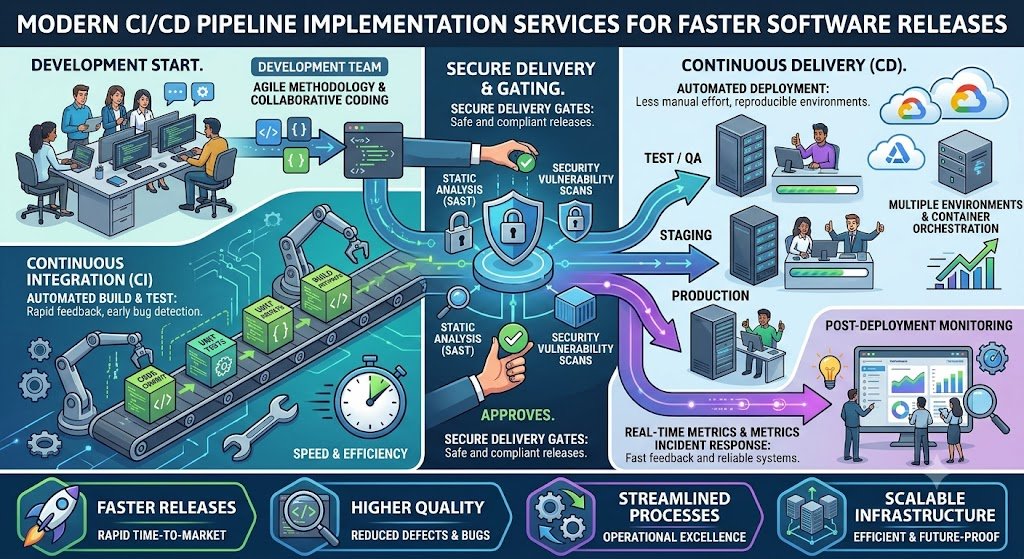
A CI/CD pipeline is a sequence of stages that code passes through from commit to production. Each stage has a specific purpose and specific failure modes.
The Stages
1. Source. The code repository (GitHub, GitLab, Bitbucket). A commit triggers the pipeline.
2. Build. Compile the code, resolve dependencies, and produce a build artefact (binary, container image, package).
3. Test. Run automated tests: unit tests, integration tests, contract tests. Fast tests run first; slower tests run later.
4. Security scan. Scan for vulnerabilities in dependencies, secrets in code, and container image issues. Static analysis (SAST) and dependency scanning (SCA) run here.
5. Artefact registry. Store the build artefact in a registry (Docker registry, Nexus, Artifactory) with a unique version.
6. Deploy to staging. Deploy the artefact to a staging environment that mirrors production.
7. Acceptance tests. Run end-to-end tests against the staging environment.
8. Deploy to production. Deploy to production using the chosen deployment strategy (blue-green, canary, rolling).
9. Post-deployment validation. Smoke tests, monitoring, and health checks confirm the deployment succeeded.
10. Rollback (if needed). If validation fails, roll back to the previous version.
The Pipeline at a Glance
| Stage | Purpose | Failure Impact |
|---|---|---|
| Source | Trigger pipeline | No pipeline |
| Build | Produce artefact | Cannot deploy |
| Test | Validate code | Blocks deployment |
| Security scan | Find vulnerabilities | Blocks deployment |
| Registry | Store artefact | Cannot deploy |
| Staging deploy | Validate in staging | Blocks production |
| Acceptance tests | Validate end-to-end | Blocks production |
| Production deploy | Release | Deployment failure |
| Validation | Confirm success | Rollback |
| Rollback | Recover | Downtime |
Pipeline Design Principles
1. Fast feedback. The pipeline should tell developers within minutes if their change broke something. Run fast tests first; slow tests later.
2. Fail fast. The pipeline should stop at the first failure, not continue to later stages.
3. Reproducible builds. The same commit should produce the same artefact every time.
4. Immutable artefacts. Once built, artefacts are not modified. The same artefact is deployed to staging and production.
5. Pipeline as code. The pipeline definition is stored in version control alongside the code, not configured manually in a UI.
6. Environment parity. Staging should be as close to production as possible.
Deployment Strategies: Reducing Risk
The deployment strategy determines how a new version reaches production and how quickly you can recover if something goes wrong.
1. Recreate (Big Bang)
Stop the old version, start the new version. Simplest, but causes downtime.
When to use: Non-critical applications, development environments.
2. Rolling Deployment
Replace instances one at a time (or in batches). The old version serves traffic while new instances come up.
When to use: Stateless applications with load balancing.
Risk: Mixed versions during rollout; requires backward-compatible changes.
3. Blue-Green Deployment
Run two identical environments (blue and green). Deploy the new version to the inactive environment, validate, then switch traffic.
When to use: Applications that need fast rollback.
Risk: Requires double infrastructure during deployment.
4. Canary Deployment
Route a small percentage of traffic to the new version, monitor, and gradually increase.
When to use: Applications with traffic routing and monitoring.
Risk: Requires traffic management and good observability.
5. Feature Flags
Deploy the new code with features disabled, then enable them gradually for specific users or segments.
When to use: Decoupling deployment from release.
Risk: Flag management complexity; technical debt if flags are not cleaned up.
Deployment Strategy Comparison Table
| Strategy | Downtime | Rollback Speed | Complexity | Best For |
|---|---|---|---|---|
| Recreate | Yes | Slow | Low | Non-critical |
| Rolling | No | Medium | Medium | Stateless apps |
| Blue-green | No | Fast | Medium | Fast rollback needed |
| Canary | No | Fast | High | Risk-averse, observability |
| Feature flags | No | Instant | Medium | Decoupling release |
Rollback
Every deployment strategy must have a rollback plan. Rollback should be:
Fast: minutes, not hours.
Tested: rollback is rehearsed, not improvised.
Automated: triggered by validation failure, not manual decision.
Security in CI/CD: DevSecOps
CI/CD pipelines are a target for attackers and a vector for supply chain attacks. Security must be built into the pipeline, not added later.
The Security Stages
1. Secret scanning. Detect secrets (API keys, passwords) accidentally committed to code.
2. Static application security testing (SAST). Analyse source code for vulnerabilities.
3. Software composition analysis (SCA). Scan dependencies for known vulnerabilities.
4. Container scanning. Scan container images for vulnerabilities.
5. Infrastructure as code (IaC) scanning. Scan Terraform/CloudFormation for misconfigurations.
6. Dynamic application security testing (DAST). Test running applications for vulnerabilities.
7. Compliance checks. Verify that deployments meet compliance requirements (e.g., no personal data in logs).
Security in CI/CD Table
| Stage | Tool Examples | What It Finds |
|---|---|---|
| Secret scanning | GitGuardian, TruffleHog | Committed secrets |
| SAST | SonarQube, Snyk Code | Code vulnerabilities |
| SCA | Snyk, Dependabot | Dependency vulnerabilities |
| Container scanning | Trivy, Clair | Image vulnerabilities |
| IaC scanning | Checkov, tfsec | Misconfigurations |
| DAST | OWASP ZAP, Burp | Runtime vulnerabilities |
Supply Chain Security
The software supply chain is increasingly targeted. Practices:
Signed artefacts: sign build artefacts to verify authenticity.
SBOM (Software Bill of Materials): document all dependencies.
Pinned versions: use specific versions, not latest.
Trusted registries: use only trusted base images and packages.
DPDPA and CI/CD
Pipelines may process personal data in test environments or logs. Under the DPDP Act:
Test data: use synthetic or anonymised data, not production personal data.
Logs: redact personal data from pipeline logs.
Access control: restrict access to pipeline configurations and artefacts.
Audit: log pipeline changes and deployments.
Security Checklist
| Requirement | Implementation | Priority |
|---|---|---|
| Secret scanning | Pre-commit and pipeline | High |
| SAST | Pipeline stage | High |
| SCA | Pipeline stage | High |
| Container scanning | Pipeline stage | High |
| Signed artefacts | Signing in pipeline | Medium |
| SBOM | Generate per build | Medium |
| Test data anonymisation | Synthetic data | High (DPDPA) |
Real Costs in India (2026)
CI/CD costs depend on the tooling chosen (open-source vs managed), the scale, and whether implementation is done in-house or with a partner.
Tooling Costs
| Tool | Monthly Cost (₹) | Monthly Cost ($ approx.) | Notes |
|---|---|---|---|
| Jenkins (self-hosted) | ₹10,000–₹50,000 | $120–$600 | Infrastructure + maintenance |
| GitHub Actions | ₹0–₹50,000+ | $0–$600+ | Free tier, then per-minute |
| GitLab CI | ₹0–₹30,000+ | $0–$360+ | Free tier, then per-user |
| CircleCI | ₹10,000–₹60,000 | $120–$720 | Per-credit pricing |
| Artefact registry | ₹5,000–₹30,000 | $60–$360 | Docker Hub, ECR, Artifactory |
| Security scanning | ₹10,000–₹50,000 | $120–$600 | Snyk, SonarQube |
Implementation Costs
| Scope | Cost (₹) | Cost ($ approx.) | Timeline |
|---|---|---|---|
| Basic pipeline (build, test, deploy) | ₹1–3 lakh | $1,200–$3,600 | 2–4 weeks |
| Intermediate pipeline (add security, staging, rollback) | ₹3–8 lakh | $3,600–$9,600 | 4–8 weeks |
| Advanced pipeline (blue-green, canary, IaC, observability) | ₹8–20 lakh | $9,600–$24,000 | 8–16 weeks |
People Costs
| Role | Monthly Cost (₹) | Monthly Cost ($ approx.) |
|---|---|---|
| DevOps engineer | ₹80,000–₹2 lakh | $960–$2,400 |
| Platform engineer | ₹1–3 lakh | $1,200–$3,600 |
The Cost of Not Having CI/CD
Manual releases cost:
Engineering time: weekends and nights spent on deployments.
Opportunity cost: features delayed by weeks.
Quality cost: bugs found late, expensive to fix.
Risk cost: outages during manual deployments.
For a team of 10 engineers, a manual release process that consumes 20% of engineering time costs roughly ₹15–30 lakh per year in lost productivity—far more than the cost of implementing CI/CD.
Implementation Framework: A Phased Approach With Cost Gates
Phase 1: Assessment (Week 1–2)
Objective: Understand the current delivery process and identify gaps.
Activities:
Map current release process: how code goes from commit to production.
Measure DORA metrics: deployment frequency, lead time, change failure rate, MTTR.
Identify bottlenecks: manual testing, manual deployment, environment issues.
Assess security practices.
Choose tooling: open-source vs managed.
Cost: ₹50,000–₹1.5 lakh ($600–$1,800).
Go/No-Go: Current state understood. DORA baseline established. Tooling chosen.
Phase 2: Basic Pipeline (Week 3–6)
Objective: Automate build, test, and deployment.
Activities:
Set up pipeline as code.
Automate build and unit tests.
Automate deployment to staging.
Set up artefact registry.
Configure notifications.
Cost: ₹1–3 lakh ($1,200–$3,600).
Go/No-Go: Pipeline runs on every commit. Builds and tests automated. Staging deployment automated.
Phase 3: Security and Quality (Week 7–12)
Objective: Add security scanning and quality gates.
Activities:
Add secret scanning, SAST, SCA.
Add container scanning.
Configure quality gates (test coverage, vulnerability thresholds).
Set up test data anonymisation (DPDPA).
Add DAST for staging.
Cost: ₹2–5 lakh ($2,400–$6,000).
Go/No-Go: Security scans run. Quality gates enforce standards. No personal data in test environments.
Phase 4: Advanced Deployment (Week 13–20)
Objective: Implement zero-downtime deployment strategies.
Activities:
Implement blue-green or canary deployment.
Automate rollback.
Implement feature flags.
Set up infrastructure as code.
Add post-deployment validation.
Cost: ₹5–12 lakh ($6,000–$14,400).
Go/No-Go: Zero-downtime deployments work. Rollback tested. IaC in place.
Phase 5: Optimization and Culture (Ongoing)
Objective: Improve continuously and embed the practice.
Activities:
Measure DORA metrics continuously.
Optimize pipeline speed.
Reduce flaky tests.
Train teams on CI/CD practices.
Expand to all applications.
Cost: Ongoing engineering time.
Phase Summary Table
| Phase | Duration | Key Deliverable | Cost (₹) | Go/No-Go Criteria |
|---|---|---|---|---|
| 1. Assessment | 2 weeks | Baseline, tooling | 50,000–1.5 lakh | Baseline established |
| 2. Basic Pipeline | 4 weeks | Build, test, deploy automated | 1–3 lakh | Pipeline runs on commit |
| 3. Security | 6 weeks | Scans, quality gates | 2–5 lakh | Scans run, gates enforce |
| 4. Advanced Deployment | 8 weeks | Blue-green, rollback, IaC | 5–12 lakh | Zero-downtime works |
| 5. Optimization | Ongoing | DORA improvement | Ongoing | Metrics improving |
Risks, Pitfalls, and Governance
The Most Common CI/CD Failures
Pipeline too slow. A pipeline that takes an hour for feedback is not useful. Mitigation: Parallelize stages, run fast tests first, cache dependencies.
Flaky tests. Tests that fail intermittently erode trust in the pipeline. Mitigation: Fix or remove flaky tests, quarantine them.
No rollback. Deployment fails and there is no way to revert. Mitigation: Tested rollback for every deployment.
Security as an afterthought. Vulnerabilities discovered in production. Mitigation: Security scanning in the pipeline.
No environment parity. Staging differs from production, so tests pass but production fails. Mitigation: Infrastructure as code, same configuration.
No observability. Deployment succeeds but issues are not detected. Mitigation: Post-deployment monitoring and alerts.
Risk Summary Table
| Risk | Likelihood | Impact | Mitigation |
|---|---|---|---|
| Pipeline too slow | High | Medium | Parallelize, cache |
| Flaky tests | High | High (trust erosion) | Fix or quarantine |
| No rollback | Medium | Critical | Tested rollback |
| Security afterthought | Medium | High | Pipeline scanning |
| No environment parity | High | High | IaC, parity |
| No observability | High | Medium | Post-deploy monitoring |
Benchmark Summary and Decision Framework
Decision Matrix: Tooling Selection
| Factor | Open-Source (Jenkins, GitLab CE) | Managed (GitHub Actions, CircleCI) |
|---|---|---|
| Cost | Infrastructure + maintenance | Per-minute/per-user |
| Control | Full | Limited |
| Maintenance | High | Low |
| Scalability | Depends on team | High |
| Best for | Teams with DevOps capability | Most teams |
Deployment Strategy Selection Table
| Application Type | Recommended Strategy |
|---|---|
| Stateless web app | Rolling or blue-green |
| Stateful app | Blue-green with careful migration |
| Risk-averse | Canary with monitoring |
| Feature-driven | Feature flags |
The One-Paragraph Decision Rule
If your releases take weeks and cause weekend deployments, start with a basic pipeline: automate build, test, and staging deployment. Add security scanning and quality gates next. Implement blue-green or canary deployment for zero-downtime releases. Measure DORA metrics from day one. Keep the pipeline fast—feedback within 10 minutes. And treat rollback as a first-class capability, tested before you need it.
Frequently Asked Questions
1. How much does CI/CD pipeline implementation cost in India?
A basic pipeline costs ₹1–3 lakh ($1,200–$3,600). An intermediate pipeline with security and staging costs ₹3–8 lakh ($3,600–$9,600). An advanced pipeline with blue-green, canary, and IaC costs ₹8–20 lakh ($9,600–$24,000).
2. What is the difference between continuous delivery and continuous deployment? Continuous delivery keeps software deployable at all times but requires a manual decision to deploy. Continuous deployment deploys every passing change automatically.
3. Which CI/CD tool should I use?
GitHub Actions or GitLab CI for most teams—they are easy to start, integrate with repositories, and scale. Jenkins for teams that need full control and have DevOps capability. CircleCI for teams that want managed infrastructure.
4. What are DORA metrics?
Deployment Frequency, Lead Time for Changes, Change Failure Rate, and Mean Time to Recovery. They are the standard benchmarks for software delivery performance.
5. How fast should a pipeline run?
Feedback should arrive within 10 minutes for the fast stages (build, unit tests). Full pipeline including integration tests can take longer, but should not exceed 30–60 minutes.
6. What is blue-green deployment?
Running two identical environments (blue and green). The new version deploys to the inactive environment, is validated, then traffic switches. Enables fast rollback.
7. What is canary deployment?
Routing a small percentage of traffic to the new version, monitoring, and gradually increasing. Lower risk but requires traffic management and observability.
8. How does DPDPA affect CI/CD?
Test data must be synthetic or anonymised, not production personal data. Pipeline logs must redact personal data. Access to pipeline configurations and artefacts must be controlled.
9. What is DevSecOps?
Integrating security into the CI/CD pipeline: secret scanning, SAST, SCA, container scanning, and IaC scanning run automatically on every change.
10. How do I handle flaky tests?
Fix them if possible; quarantine them if not. Flaky tests erode trust in the pipeline and cause teams to ignore failures.
11. How do I get started with CI/CD?
Start with a basic pipeline: automate build, test, and staging deployment. Measure DORA metrics. Add security scanning and quality gates. Then implement zero-downtime deployment.
12. How can Innovative AI Solutions help?
Innovative AI Solutions implements CI/CD pipelines for Indian engineering teams—pipeline as code, security scanning, blue-green deployment, infrastructure as code, and DORA measurement. Our Delhi-based team handles assessment, implementation, and training. Visit https://innovativeais.com to discuss your requirements.
Contact Innovative AI Solutions
Ready to ship faster without the weekend deployments?
[One-line supporting sentence.]
Contact Information
Innovative AI Solutions
📍 Netaji Subhash Place, Pitampura, Delhi – 110034
🌐 Website: https://innovativeaislabs.com 📧 Email: info@innovativeais.com
📞 Phone: +91 7464 099 059 / +91 96899 67356
Business Services
AI Automation
AI Development
AI Consulting
Machine Learning Solutions
Deep Learning Solutions
Generative AI Services
NLP Solutions
AI Agents
AI Chatbots
Voice AI
CRM Development
Custom Software Development
Website Development
Mobile App Development
About the Author
Abhishek Kumar
Founder & CEO, Innovative AI Solutions
5+ years building production AI systems for Indian businesses. Based in Delhi, serving clients across India.
Ready to build AI solutions for your business?
Innovative AI Solutions — Delhi's leading AI development company. Free consultation available.
Get Free Consultation →
A practical 2026 guide for Indian engineering teams implementing CI/CD—pipeline architecture, deployment strategies, DevSecOps, real rupee costs, DORA metrics, and DPDPA-compliant test data.
#CICD #ContinuousIntegration #ContinuousDeployment #DevOps #Jenkins #GitHubActions #GitLabCI #BlueGreenDeployment #CanaryDeployment #InfrastructureAsCode #DevSecOps #DORAMetrics #DPDPA #MeitY #DelhiNCR #InnovativeAISolutions
Copyright ©️ 2015–2026 Innovative AI Solutions. All Rights Reserved. | Privacy Policy | Terms & Conditions