


The Replatform That Delivered Less Than the Old System
An Indian media company migrates from a traditional CMS to a headless CMS. The motivation is modern: API-first, omnichannel, decoupled frontend. The migration takes nine months and costs ₹45 lakh. The new system launches. Six months later, the editorial team is unhappy. Simple tasks—creating a landing page, previewing a draft, managing navigation—now require developer involvement. The marketing team cannot publish without a sprint. The content team spends more time coordinating with engineering than writing. The headless CMS delivered flexibility the company did not need, at the cost of convenience it did need.
This is the most common failure in headless CMS development: adopting headless for its architectural elegance rather than for a specific problem it solves. Headless is genuinely better for some use cases—multi-channel publishing, decoupled frontends, content reuse across products. It is genuinely worse for others—single-website publishing, editor autonomy, rapid page creation.
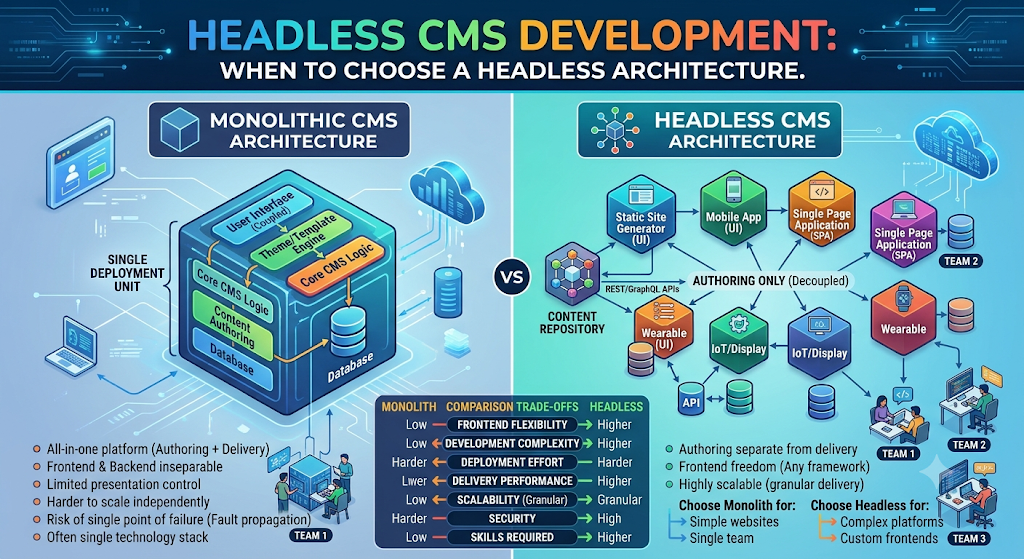
The decision is not "headless vs legacy." It is a trade-off between flexibility and convenience. Headless gives you flexibility: content as structured data, delivered via API to any channel. It takes away convenience: the editor can no longer create a page without a developer building the template. Traditional CMS gives you convenience: editors can create pages, manage navigation, and publish without engineering. It takes away flexibility: the content is bound to the presentation layer.
For Indian businesses, this matters because the wrong choice is expensive. A headless migration costs 2–4x a traditional CMS implementation, and it requires ongoing engineering investment. The businesses that benefit are the ones with genuine multi-channel needs, developer resources, and a content model that justifies the investment. The ones that do not end up with a system that is harder to use and more expensive to maintain than what they had.
India adds specific considerations. DPDPA applies to content that contains personal data—author profiles, customer stories, user-generated content. MeitY AI governance applies if the CMS includes AI-generated content or recommendations. Data localisation may require content storage in India for regulated sectors. And cost sensitivity means the headless premium must be justified by genuine business value.
This guide is written for Indian CTOs, marketing leaders, digital heads, and product managers evaluating headless CMS. We will cover the architecture, the when-to-choose framework, the editor experience, real costs in rupees and dollars, DPDPA compliance, and a phased implementation framework with clear go/no-go gates.
What Headless CMS Actually Is (And What It Is Not)
The Definition
A headless CMS is a content management system that stores and manages content but does not render it. Instead, it exposes content via APIs (REST or GraphQL), and separate frontend applications consume that content and render it.
The "head" in headless refers to the presentation layer. In a traditional CMS (WordPress, Drupal), the CMS includes the presentation layer—it renders the website. In a headless CMS (Strapi, Contentful, Sanity, Payload), the presentation layer is separate.
What Headless CMS Is Not
It is not automatically faster. A headless CMS can be fast, but it requires a well-built frontend. A poorly built headless frontend can be slower than a traditional CMS.
It is not automatically more secure. Headless removes some attack surface (the CMS admin is not publicly exposed), but it introduces new ones (API security).
It is not automatically better for SEO. SEO depends on the frontend implementation. A headless frontend must handle SSR, metadata, sitemaps, and redirects correctly—otherwise SEO suffers.
It is not automatically cheaper. Headless typically costs more to build and maintain than a traditional CMS, because it requires frontend engineering.
The Headless vs Traditional Table
| Dimension | Traditional CMS | Headless CMS |
|---|---|---|
| Content + presentation | Coupled | Decoupled |
| Channels | One (website) | Many (web, app, kiosk, etc.) |
| Editor autonomy | High | Low-Medium |
| Developer involvement | Low | High |
| Initial cost | Lower | Higher |
| Flexibility | Limited | High |
| Best for | Single website | Multi-channel |
For teams building the headless CMS and the frontend applications that consume it, our Website Development and Custom Software Development practices cover the full stack.
When to Choose Headless: The Decision Framework
The decision to go headless should be driven by specific requirements, not by architectural fashion.
When Headless Is the Right Choice
1. Multiple channels. You need to publish to a website, mobile app, kiosk, smart device, WhatsApp, or other channels. Headless lets you manage content once and deliver it everywhere.
2. Multiple frontends. You have multiple web properties (marketing site, docs site, blog, e-commerce) that need to share content. Headless enables content reuse.
3. Decoupled frontend. You have a modern frontend (Next.js, Nuxt, React) that needs content via API. Headless fits naturally.
4. Content reuse across products. You have multiple products that need to display the same content (product descriptions, FAQs, policies). Headless enables reuse.
5. Developer resources. You have frontend engineers who can build and maintain the presentation layer.
6. Performance requirements. You need fine-grained control over performance (SSR, SSG, edge caching). Headless gives you that control.
When Traditional CMS Is the Right Choice
1. Single website. You only need to publish to one website. Headless adds complexity without benefit.
2. Editor autonomy. Editors need to create pages, manage navigation, and publish without developer involvement. Traditional CMS excels here.
3. Limited engineering resources. You do not have frontend engineers to build and maintain the presentation layer.
4. Rapid page creation. Marketing needs to create landing pages quickly. Traditional CMS with page builders is faster.
5. Budget constraints. Traditional CMS is cheaper to build and maintain.
6. SEO-critical content. If SEO is critical and you do not have the engineering to handle SSR/metadata correctly, a traditional CMS may be safer.
The Decision Matrix
| Requirement | Traditional | Headless |
|---|---|---|
| Single website | ✓ | |
| Multiple channels | ✓ | |
| Editor autonomy | ✓ | |
| Decoupled frontend | ✓ | |
| Content reuse | ✓ | |
| Limited engineering | ✓ | |
| Rapid page creation | ✓ | |
| Performance control | ✓ |
The honest test: If you cannot name the second channel or the second frontend that needs the content, you probably do not need headless.
The Architecture: Content Modeling and APIs
A headless CMS architecture has three layers: content modeling, the API layer, and the presentation layer.
Content Modeling
Content modeling is the most important design decision in headless CMS. It defines the structure of content: what fields, what relationships, what validation.
The principles:
Structure over free text. Instead of a single "body" field, break content into structured fields (title, subtitle, image, body, author, tags). This enables reuse across channels.
Reusable components. Define content blocks (hero, call-to-action, testimonial) that can be reused across pages.
Relationships. Define relationships between content types (article → author, product → category).
Localization. If you serve multiple languages, model localization from the start.
The challenge: Content modeling requires upfront thinking. A poorly modeled CMS is hard to change later. Invest in modeling before building.
The API Layer
The API layer exposes content to frontends. Two options:
REST API. Simple, well-understood. Each content type has an endpoint. Good for simple use cases.
GraphQL API. Flexible, allows frontends to request exactly the data they need. Good for complex use cases with multiple frontends.
The recommendation: Use GraphQL if you have multiple frontends with different data needs. Use REST if you have a single frontend or simple needs.
The Presentation Layer
The presentation layer is the frontend that consumes the API. It can be:
Next.js/Nuxt for server-side rendering and static generation.
React/Vue for single-page applications.
Mobile apps (React Native, Flutter).
Other channels (kiosks, smart displays).
The SEO consideration: The frontend must handle SSR or SSG for SEO. A client-side rendered headless site may not rank well. Next.js and Nuxt are common choices because they handle SSR/SSG well.
The Architecture Table
| Layer | Function | Key Decision |
|---|---|---|
| Content modeling | Define content structure | Structure vs flexibility |
| API | Expose content | REST vs GraphQL |
| Presentation | Render content | SSR vs SSG vs CSR |
The Editor Experience: The Hidden Cost
The biggest hidden cost of headless CMS is the editor experience. In a traditional CMS, editors can create pages, manage navigation, and publish without engineering. In a headless CMS, editors often need developers to build templates.
The Editor Challenges
1. No page builder. Most headless CMS do not have a visual page builder. Editors cannot drag and drop to create pages.
2. Preview complexity. Previewing content requires a preview environment. Setting this up is engineering work.
3. Navigation management. Managing menus and navigation often requires code changes.
4. Publishing workflow. Publishing may require coordinating with engineering for deployment.
The Mitigations
1. Visual editing. Some headless CMS (Sanity, Storyblok, Payload) offer visual editing or live preview. This improves the editor experience.
2. Component-based pages. Build a library of page components that editors can compose. This gives editors flexibility without code.
3. Preview environments. Set up preview deployments so editors can see changes before publishing.
4. Editorial workflow. Implement workflow (draft → review → publish) to manage quality.
The Editor Experience Table
| Challenge | Mitigation |
|---|---|
| No page builder | Component library |
| Preview complexity | Preview environments |
| Navigation | Navigation API |
| Publishing | Workflow automation |
Real Costs in India (2026)
Headless CMS costs depend on the CMS choice (open-source vs SaaS), the frontend complexity, and the content modeling effort.
CMS Platform Costs
| Platform | Type | Monthly Cost (₹) | Monthly Cost ($ approx.) |
|---|---|---|---|
| Strapi (self-hosted) | Open-source | ₹5,000–₹30,000 (infra) | $60–$360 |
| Payload (self-hosted) | Open-source | ₹5,000–₹30,000 (infra) | $60–$360 |
| Sanity | SaaS | ₹10,000–₹1,00,000 | $120–$1,200 |
| Contentful | SaaS | ₹25,000–₹2,00,000 | $300–$2,400 |
Implementation Costs
| Scope | Cost (₹) | Cost ($ approx.) | Timeline |
|---|---|---|---|
| Basic headless (one frontend, simple content) | ₹5–15 lakh | $6,000–$18,000 | 8–14 weeks |
| Multi-channel (2–3 frontends, content modeling) | ₹15–35 lakh | $18,000–$42,000 | 14–24 weeks |
| Enterprise (multiple frontends, complex modeling, workflow) | ₹35–80 lakh | $42,000–$96,000 | 24–36 weeks |
Running Costs
| Component | Monthly Cost (₹) | Monthly Cost ($ approx.) | Notes |
|---|---|---|---|
| CMS hosting | ₹5,000–₹50,000 | $60–$600 | Self-hosted or SaaS |
| CDN | ₹5,000–₹25,000 | $60–$300 | Content delivery |
| Frontend hosting | ₹10,000–₹50,000 | $120–$600 | Next.js, Vercel, etc. |
| Maintenance | ₹20,000–₹80,000 | $240–$960 | 15–25% of build annually |
The Cost Comparison
A traditional CMS (WordPress) implementation for a single website costs ₹3–10 lakh. A headless CMS implementation for the same website costs ₹8–20 lakh. The headless premium is justified only when the multi-channel or decoupling benefits are real.
India-Specific Compliance: DPDPA and Data Localisation
DPDPA and CMS
Content may contain personal data: author profiles, customer stories, testimonials, user-generated content. Under the DPDP Act:
Consent: for publishing personal data (e.g., customer testimonials).
Data minimisation: collect only what is needed.
Retention: define retention for content.
Erasure: support removal on request.
Data Localisation
For regulated sectors, content and personal data may need to be stored in India. Choose Indian regions for CMS hosting and CDN.
MeitY AI Governance
If the CMS includes AI features (content generation, recommendations):
Transparency: label AI-generated content.
Accountability: named owner.
Human oversight: editorial review before publishing.
The Compliance Checklist
| Requirement | Implementation | Priority |
|---|---|---|
| Consent for personal data | Testimonial consent | High |
| Data minimisation | Only needed fields | Medium |
| Retention | Content lifecycle | Medium |
| Data localisation | Indian region | Medium (regulated) |
| AI transparency | Label AI content | Medium |
Implementation Framework: A Phased Approach With Cost Gates
Phase 1: Requirements and Decision (Week 1–2)
Objective: Decide whether headless is the right choice.
Activities:
Identify channels and frontends.
Assess editor needs.
Assess engineering resources.
Choose CMS platform.
Define content model.
Cost: ₹50,000–₹1.5 lakh ($600–$1,800).
Go/No-Go: Headless justified. Platform chosen.
Phase 2: Content Modeling (Week 3–5)
Objective: Define the content structure.
Activities:
Define content types and fields.
Define reusable components.
Define relationships.
Define localization.
Validate with editors.
Cost: ₹1–3 lakh ($1,200–$3,600).
Go/No-Go: Content model approved.
Phase 3: CMS and API (Week 6–12)
Objective: Build the CMS and API layer.
Activities:
Configure CMS.
Build API endpoints.
Implement preview.
Implement workflow.
Test with sample content.
Cost: ₹5–15 lakh ($6,000–$18,000).
Go/No-Go: API works. Editors can create content.
Phase 4: Frontend and Launch (Week 13–20)
Objective: Build the frontend and launch.
Activities:
Build frontend (Next.js/Nuxt).
Implement SSR/SSG.
Implement SEO (metadata, sitemaps).
Migrate content.
Launch.
Cost: ₹5–15 lakh ($6,000–$18,000).
Go/No-Go: Site works. SEO correct.
Phase Summary Table
| Phase | Duration | Key Deliverable | Cost (₹) | Go/No-Go Criteria |
|---|---|---|---|---|
| 1. Decision | 2 weeks | Platform, model | 50,000–1.5 lakh | Justified |
| 2. Modeling | 3 weeks | Content model | 1–3 lakh | Approved |
| 3. CMS/API | 7 weeks | API, workflow | 5–15 lakh | Works |
| 4. Frontend | 8 weeks | Frontend, launch | 5–15 lakh | SEO correct |
Risks, Pitfalls, and Governance
The Most Common Headless CMS Failures
Choosing headless without multi-channel need. Complexity without benefit. Mitigation: Decision framework.
Poor content modeling. Hard to change later. Mitigation: Upfront modeling.
Editor experience neglect. Editors cannot publish without developers. Mitigation: Visual editing, component library.
SEO failures. Client-side rendering hurts SEO. Mitigation: SSR/SSG.
No preview. Editors cannot see changes. Mitigation: Preview environments.
Underestimated cost. Headless costs more than expected. Mitigation: Realistic budgeting.
Risk Summary Table
| Risk | Likelihood | Impact | Mitigation |
|---|---|---|---|
| No multi-channel need | High | High (wasted cost) | Decision framework |
| Poor modeling | High | High (rework) | Upfront modeling |
| Editor neglect | High | High (adoption) | Visual editing |
| SEO failures | Medium | High | SSR/SSG |
| No preview | High | Medium | Preview env |
| Cost overrun | High | Medium | Budgeting |
Benchmark Summary and Decision Framework
Decision Matrix: Headless vs Traditional
| Your Situation | Recommended |
|---|---|
| Single website, editors publish | Traditional |
| Multiple channels | Headless |
| Decoupled frontend | Headless |
| Limited engineering | Traditional |
| Content reuse across products | Headless |
| Rapid page creation | Traditional |
Headless Priority Table
| Priority | Capability | Why |
|---|---|---|
| 1 | Content modeling | Foundation |
| 2 | Editor experience | Adoption |
| 3 | API design | Frontend flexibility |
| 4 | Preview | Content quality |
| 5 | SEO (SSR/SSG) | Visibility |
The One-Paragraph Decision Rule
If you have multiple channels or a decoupled frontend, headless is the right choice. If you have a single website and editors need to publish without developers, traditional is better. If you are unsure, start with a traditional CMS and migrate to headless only when you have a genuine multi-channel requirement. Do not choose headless for its architecture. Choose it for the problem it solves.
Frequently Asked Questions
1. What is a headless CMS?
A headless CMS stores and manages content but does not render it. It exposes content via APIs, and separate frontends consume and render it.
2. When should I choose headless over traditional?
When you need multiple channels (web, app, kiosk), a decoupled frontend, or content reuse across products. Not for a single website with editor-driven publishing.
3. How much does headless CMS development cost in India?
Basic headless costs ₹5–15 lakh ($6,000–$18,000). Multi-channel costs ₹15–35 lakh ($18,000–$42,000). Enterprise costs ₹35–80 lakh ($42,000–$96,000).
4. Is headless CMS better for SEO?
Not automatically. SEO depends on the frontend implementation. Headless sites need SSR or SSG and correct metadata handling.
5. What is content modeling?
Content modeling defines the structure of content—what fields, relationships, and validation. It is the most important design decision in headless CMS.
6. Which headless CMS should I use?
Strapi or Payload for open-source self-hosted. Sanity or Contentful for SaaS. Choose based on budget, features, and team preference.
7. How do editors create pages in headless CMS?
Through visual editing tools, component libraries, and preview environments. Without these, editors need developers for every page.
8. What is the difference between REST and GraphQL in headless CMS?
REST has fixed endpoints; GraphQL lets frontends request exactly the data they need. GraphQL is better for multiple frontends with different needs.
9. How does DPDPA affect headless CMS?
Content with personal data (testimonials, author profiles) requires consent, data minimisation, and retention policies.
10. Can I migrate from traditional to headless later?
Yes, but it is expensive and time-consuming. Plan the content model carefully before migrating.
11. How long does headless CMS implementation take?
Basic implementation takes 8–14 weeks. Multi-channel takes 14–24 weeks. Enterprise takes 24–36 weeks.
12. How can Innovative AI Solutions help?
Innovative AI Solutions builds headless CMS implementations for Indian businesses—content modeling, API development, frontend integration, and DPDPA-compliant content management. Our Delhi-based team handles assessment, implementation, and migration. Visit https://innovativeais.com to discuss your requirements.
Contact Innovative AI Solutions
Ready to decide whether headless is right for your content?
[One-line supporting sentence.]
Contact Information
Innovative AI Solutions
📍 Netaji Subhash Place, Pitampura, Delhi – 110034
🌐 Website: https://innovativeaislabs.com 📧 Email: info@innovativeais.com
📞 Phone: +91 7464 099 059 / +91 96899 67356
Business Services
AI Automation
AI Development
AI Consulting
Machine Learning Solutions
Deep Learning Solutions
Generative AI Services
NLP Solutions
AI Agents
AI Chatbots
Voice AI
CRM Development
Custom Software Development
Website Development
Mobile App Development
About the Author
Abhishek Kumar
Founder & CEO, Innovative AI Solutions
5+ years building production AI systems for Indian businesses. Based in Delhi, serving clients across India.
Ready to build AI solutions for your business?
Innovative AI Solutions — Delhi's leading AI development company. Free consultation available.
Get Free Consultation →
A practical 2026 guide for Indian businesses evaluating headless CMS—when headless pays off, content modeling, editor experience, real rupee costs, and DPDPA-compliant content management.
#HeadlessCMS #HeadlessArchitecture #ContentAPI #DecoupledCMS #Strapi #Contentful #Sanity #PayloadCMS #EditorialWorkflow #OmnichannelContent #HeadlessCommerce #CMSMigration #ContentModeling #APIFirst #DPDPA #MeitY #DelhiNCR #InnovativeAISolutions
Copyright ©️ 2015–2026 Innovative AI Solutions. All Rights Reserved. | Privacy Policy | Terms & Conditions