The Expensive Habit of Scaling Up Instead of Fixing
A high-traffic Indian application starts slowing down. Pages take five seconds to load. The dashboard shows the database CPU at 90%. The team's first instinct is to upgrade the database instance—more CPU, more memory, more IOPS. The performance improves for a few weeks. Then it degrades again. The team upgrades again. The cloud bill grows, but the underlying problem was never fixed.
This is the most common and most expensive pattern in high-traffic applications: scaling up instead of optimizing. A database that is slow because of a missing index, an N+1 query, or a poorly designed schema will remain slow no matter how much hardware you throw at it. The hardware upgrade buys time, but it does not solve the problem—and the cost compounds.
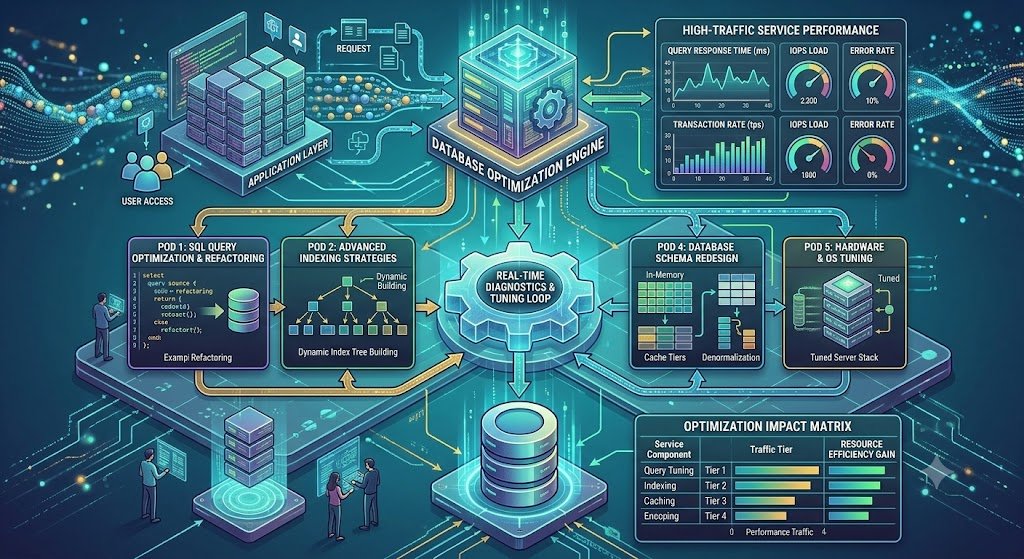
Database performance optimization is the discipline of making databases faster through better queries, correct indexes, appropriate schema design, caching, and scaling strategies—not just bigger hardware. It is the difference between a database that scales gracefully and one that requires constant, expensive upgrades.
For Indian applications, this matters more than ever. Traffic is growing, cloud costs are a real concern, and users expect sub-second response times on mobile. A slow database is not just an infrastructure problem—it is a business problem. Every additional 100ms of latency reduces conversion and increases abandonment.
India adds specific considerations. DPDPA applies to databases that store personal data—which is almost all of them—and requires access controls, encryption, and audit logging. Data localisation affects where databases and replicas can be hosted. Cost management matters because cloud database costs scale with instance size and I/O. And the AI features that modern applications add (recommendations, search, RAG) often interact with the database in ways that create new performance challenges.
This guide is written for Indian CTOs, backend engineers, database administrators, and DevOps teams managing high-traffic applications. We will cover the optimization process, query tuning, indexing, scaling strategies, caching, real costs in rupees and dollars, DPDPA compliance, and a phased implementation framework with clear go/no-go gates.
Diagnosing Performance Problems: Measure Before You Fix
The most common optimization mistake is fixing the wrong problem. Before changing anything, measure.
The Diagnostic Process
1. Identify the slow queries. Most performance problems come from a small number of slow queries. Use slow query logs (PostgreSQL pg_stat_statements, MySQL slow query log) to identify them.
2. Analyse the execution plan. For each slow query, run EXPLAIN ANALYZE to see how the database executes it: which indexes are used, how many rows are scanned, where the time is spent.
3. Check the wait events. What is the database waiting on? CPU, I/O, locks, network? Each has a different fix.
4. Measure the application layer. Is the problem the database, or is it the application making too many queries (N+1), missing caching, or holding connections too long?
5. Establish a baseline. Record current performance metrics (p50, p95, p99 latency, queries per second, CPU, I/O) so you can measure improvement.
Key Metrics to Monitor
| Metric | What It Tells You | Healthy Range |
|---|---|---|
| Query latency (p95/p99) | User experience | < 100ms for OLTP |
| Queries per second (QPS) | Load | Depends on capacity |
| CPU utilisation | Compute bottleneck | < 70% |
| I/O wait | Disk bottleneck | < 10% |
| Active connections | Connection pool health | < 80% of max |
| Cache hit ratio | Buffer cache effectiveness | > 95% |
| Replication lag | Read replica health | < 1 second |
| Lock waits | Contention | Minimal |
Diagnostic Tools
| Tool | Purpose | Cost |
|---|---|---|
| pg_stat_statements (PostgreSQL) | Query performance statistics | Free |
| MySQL slow query log | Slow query identification | Free |
| EXPLAIN ANALYZE | Execution plan analysis | Free |
| pgAdmin / MySQL Workbench | Visual query analysis | Free |
| Datadog / New Relic | APM, database monitoring | Paid |
| Percona Monitoring | Database-specific monitoring | Free/Paid |
For teams building the applications that depend on these databases, our Custom Software Development and AI Development practices cover the full stack.
Query Optimization: The Highest-Leverage Fix
Most database performance problems are query problems. Fixing the query is usually cheaper and more effective than adding hardware.
The Common Query Problems
1. Missing indexes. A query that scans a million rows to find ten is slow because there is no index on the filter column. Adding the right index can reduce the query from seconds to milliseconds.
2. N+1 queries. The application fetches a list of items (1 query), then fetches details for each item (N queries). For 100 items, that is 101 queries instead of 1 or 2. This is one of the most common causes of slow applications.
*3. SELECT . Fetching all columns when only a few are needed wastes I/O and memory. Select only what you need.
4. Inefficient JOINs. Joining large tables without proper indexes, or joining in the wrong order, produces slow queries.
5. Functions in WHERE clauses. WHERE LOWER(email) = 'x' cannot use a standard index on email. Use a functional index or normalize the data.
6. Over-fetching and pagination problems. OFFSET 100000 is slow because the database scans all preceding rows. Use keyset pagination (cursor-based) instead.
7. Lock contention. Long-running transactions hold locks that block other queries.
Query Optimization Techniques
| Problem | Technique | Expected Impact |
|---|---|---|
| Missing index | Add index on filter/join columns | Very high |
| N+1 queries | Batch fetch, JOIN, or dataloader | Very high |
| SELECT * | Select specific columns | Medium |
| Inefficient JOIN | Index join columns, reorder joins | High |
| Function in WHERE | Functional index or normalize | Medium |
| OFFSET pagination | Keyset pagination | High |
| Lock contention | Shorter transactions, appropriate isolation | Medium |
Indexing: The Highest-Impact Change
Indexes are the single highest-impact optimization for most databases. But indexes have costs: they consume storage and slow down writes.
Indexing principles:
Index the columns you filter and join on. The WHERE and JOIN columns are the candidates.
Composite indexes for queries that filter on multiple columns (order matters: most selective first).
Covering indexes include all columns a query needs, so the database does not need to read the table.
Avoid over-indexing. Every index slows down INSERT/UPDATE/DELETE. Index only what queries need.
Monitor index usage. Unused indexes should be removed.
Index Types Table
| Index Type | Use Case |
|---|---|
| B-tree | Default, equality and range queries |
| Hash | Equality only |
| GIN | Full-text search, JSONB, arrays |
| GiST | Geometric, full-text |
| BRIN | Large tables with natural ordering |
Scaling Strategies: When Optimization Is Not Enough
Sometimes optimization is not enough—the data volume or traffic genuinely exceeds a single database's capacity. Then scaling is required.
Vertical Scaling (Scale Up)
Add more CPU, memory, or IOPS to the existing database instance.
Pros: Simple, no application changes. Cons: Expensive, has a ceiling, single point of failure.
Read Replicas (Scale Reads)
Replicate the primary database to one or more read replicas. Route read queries to replicas, write queries to the primary.
Pros: Scales read traffic, provides failover. Cons: Replication lag, application must route reads/writes correctly.
Connection Pooling
Database connections are expensive. Connection pooling (PgBouncer, HikariCP) reuses connections, reducing overhead.
Pros: Reduces connection overhead, allows more application instances. Cons: Requires configuration, can hide connection leaks.
Caching
Cache frequently accessed data in memory (Redis, Memcached) to reduce database load.
Pros: Dramatically reduces database load, sub-millisecond reads. Cons: Cache invalidation complexity, consistency challenges.
Sharding (Scale Writes and Data Volume)
Partition data across multiple databases (shards) based on a shard key (e.g., user ID, tenant ID).
Pros: Scales writes and data volume horizontally. Cons: Complex, cross-shard queries are difficult, rebalancing is hard.
Scaling Strategy Comparison Table
| Strategy | Scales | Complexity | Cost | Best For |
|---|---|---|---|---|
| Vertical scaling | Everything | Low | High | Quick fix, small scale |
| Read replicas | Reads | Medium | Medium | Read-heavy workloads |
| Connection pooling | Connections | Low | Low | Many app instances |
| Caching | Reads | Medium | Low-Medium | Frequently accessed data |
| Sharding | Writes + data | High | High | Very high scale |
The Scaling Decision Order
Optimize queries and indexes first. This is almost always the highest-leverage fix.
Add caching for frequently accessed data.
Add connection pooling if connection overhead is the issue.
Add read replicas for read-heavy workloads.
Scale vertically if the above are insufficient.
Shard only when single-database capacity is genuinely exceeded.
Caching: The Cheapest Performance Win
Caching is often the highest-return optimization. A well-designed cache reduces database load by 80–90% for read-heavy workloads.
Cache Patterns
1. Cache-aside (lazy loading). The application checks the cache; on a miss, it reads from the database and populates the cache.
2. Write-through. The application writes to the cache and the database simultaneously.
3. Write-behind. The application writes to the cache; the cache asynchronously writes to the database.
4. Read-through. The cache itself fetches from the database on a miss.
What to Cache
Frequently read, rarely changed data: product catalogues, user profiles, configuration.
Computed results: aggregated stats, recommendations.
Session data.
API responses (with appropriate invalidation).
Cache Invalidation
The hardest part of caching is invalidation. Strategies:
TTL (time to live): data expires after a period.
Event-based invalidation: data is invalidated when it changes.
Version-based: cache keys include a version that changes on update.
Caching Table
| Pattern | Consistency | Complexity | Best For |
|---|---|---|---|
| Cache-aside | Eventual | Low | Most read-heavy workloads |
| Write-through | Strong | Medium | Data that must be consistent |
| Write-behind | Eventual | High | Write-heavy workloads |
| Read-through | Eventual | Low | Transparent caching |
Real Costs in India (2026)
Database optimization costs depend on the scope: a one-time audit, ongoing tuning, or a scaling project.
Audit and Optimization Costs
| Scope | Cost (₹) | Cost ($ approx.) | Timeline |
|---|---|---|---|
| Performance audit (queries, indexes, schema) | ₹50,000–₹1.5 lakh | $600–$1,800 | 1–2 weeks |
| Query optimization (top 20 slow queries) | ₹1–3 lakh | $1,200–$3,600 | 2–4 weeks |
| Indexing strategy and implementation | ₹50,000–₹2 lakh | $600–$2,400 | 2–4 weeks |
| Caching layer implementation | ₹1–4 lakh | $1,200–$4,800 | 3–6 weeks |
| Read replica setup and routing | ₹1–3 lakh | $1,200–$3,600 | 3–6 weeks |
| Sharding architecture | ₹5–20 lakh | $6,000–$24,000 | 8–16 weeks |
Infrastructure Costs
| Component | Monthly Cost (₹) | Monthly Cost ($ approx.) | Notes |
|---|---|---|---|
| Primary database (managed) | ₹20,000–₹2,00,000 | $240–$2,400 | Depends on instance size |
| Read replicas | ₹15,000–₹1,50,000 each | $180–$1,800 each | Per replica |
| Redis cache | ₹5,000–₹60,000 | $60–$720 | Managed Redis |
| Connection pooler | ₹0–₹15,000 | $0–$180 | PgBouncer self-hosted or managed |
| Monitoring | ₹10,000–₹40,000 | $120–$480 | APM, database monitoring |
The Cost of Not Optimizing
A database that requires constant vertical scaling costs increasingly more each time. For a high-traffic application, the difference between an optimized database and an unoptimized one can be 50–80% of the database infrastructure cost.
Example: A database instance that costs ₹1,50,000/month could be reduced to ₹40,000/month with proper optimization and caching—a saving of ₹13 lakh per year.
India-Specific Compliance: DPDPA and Data Localisation
DPDPA and Databases
Databases store personal data. Under the DPDP Act:
Access control: only authorized users should access personal data.
Encryption: data at rest should be encrypted.
Audit logging: access to personal data should be logged.
Data minimisation: store only what is necessary.
Retention: delete data when no longer needed.
Erasure: support data deletion on request.
Data Localisation
For regulated sectors (BFSI, healthcare), data localisation may require databases and replicas in India. Cloud providers offer Indian regions (AWS Mumbai, Azure Pune, GCP Mumbai).
Compliance Checklist
| Requirement | Implementation | Priority |
|---|---|---|
| Encryption at rest | Database encryption | High |
| Access control | Role-based DB access | High |
| Audit logging | Log queries on sensitive tables | High |
| Data minimisation | Review schema for unnecessary fields | Medium |
| Erasure support | Deletion workflows | High |
| Data localisation | Indian region | Medium (regulated) |
Implementation Framework: A Phased Approach With Cost Gates
Phase 1: Performance Audit (Week 1–2)
Objective: Identify the slow queries and performance bottlenecks.
Activities:
Enable slow query logging.
Analyse top queries by time and frequency.
Review execution plans.
Check index usage.
Measure baseline metrics.
Cost: ₹50,000–₹1.5 lakh ($600–$1,800).
Go/No-Go: Slow queries identified. Baseline established. Priorities defined.
Phase 2: Query and Index Optimization (Week 3–6)
Objective: Fix the highest-impact queries and indexes.
Activities:
Add missing indexes.
Rewrite inefficient queries.
Fix N+1 queries in the application.
Remove unused indexes.
Measure improvement.
Cost: ₹1–3 lakh ($1,200–$3,600).
Go/No-Go: p95 latency improved. Slow queries reduced.
Phase 3: Caching Layer (Week 7–10)
Objective: Reduce database load with caching.
Activities:
Identify cacheable data.
Implement cache-aside pattern.
Set up Redis.
Implement invalidation strategy.
Measure cache hit ratio.
Cost: ₹1–4 lakh ($1,200–$4,800).
Go/No-Go: Cache hit ratio >80%. Database load reduced.
Phase 4: Scaling Infrastructure (Week 11–16)
Objective: Add read replicas and connection pooling.
Activities:
Set up read replicas.
Route reads to replicas.
Implement connection pooling.
Monitor replication lag.
Test failover.
Cost: ₹1–3 lakh ($1,200–$3,600) plus infrastructure.
Go/No-Go: Read traffic distributed. Replication lag acceptable.
Phase 5: Continuous Monitoring (Ongoing)
Objective: Monitor and tune continuously.
Activities:
Set up database monitoring.
Alert on slow queries.
Review performance weekly.
Tune as data grows.
Cost: Ongoing monitoring and engineering.
Phase Summary Table
| Phase | Duration | Key Deliverable | Cost (₹) | Go/No-Go Criteria |
|---|---|---|---|---|
| 1. Audit | 2 weeks | Baseline, slow queries identified | 50,000–1.5 lakh | Priorities defined |
| 2. Query & Index | 4 weeks | Optimized queries and indexes | 1–3 lakh | p95 improved |
| 3. Caching | 4 weeks | Cache layer | 1–4 lakh | Hit ratio >80% |
| 4. Scaling | 6 weeks | Read replicas, pooling | 1–3 lakh | Reads distributed |
| 5. Monitoring | Ongoing | Continuous monitoring | Ongoing | Stable performance |
Risks, Pitfalls, and Governance
The Most Common Database Optimization Failures
Optimizing without measuring. Changes are made based on intuition, not data. Mitigation: Measure baseline and improvement.
Over-indexing. Adding indexes for every query slows writes. Mitigation: Index only what queries need; monitor index usage.
Cache invalidation bugs. Stale data served from cache. Mitigation: Clear invalidation strategy, TTL.
Sharding too early. Sharding adds complexity that is not needed at most scales. Mitigation: Exhaust optimization, caching, and read replicas first.
Ignoring the application layer. The database is blamed for N+1 queries caused by the application. Mitigation: Profile the application, fix query patterns.
No monitoring. Performance degrades silently. Mitigation: Continuous monitoring and alerting.
Risk Summary Table
| Risk | Likelihood | Impact | Mitigation |
|---|---|---|---|
| Optimizing without measuring | High | Medium (wasted effort) | Measure baseline |
| Over-indexing | Medium | Medium (slow writes) | Monitor index usage |
| Cache invalidation bugs | Medium | High (stale data) | Clear strategy, TTL |
| Sharding too early | Medium | High (complexity) | Exhaust simpler options |
| Ignoring application layer | High | High (misdiagnosis) | Profile app |
| No monitoring | High | Medium | Continuous monitoring |
Benchmark Summary and Decision Framework
Decision Matrix: Optimization vs Scaling
| Symptom | First Action | Then |
|---|---|---|
| Slow queries | Query optimization | Indexing |
| High CPU | Identify slow queries | Optimize or scale up |
| High I/O | Indexing, caching | Faster storage |
| Connection exhaustion | Connection pooling | Reduce connection leaks |
| Read-heavy load | Caching | Read replicas |
| Write-heavy load | Batch writes, sharding | Sharding |
Optimization Priority Table
| Optimization | Impact | Effort | Priority |
|---|---|---|---|
| Missing indexes | Very High | Low | 1 |
| N+1 queries | Very High | Medium | 2 |
| Caching | High | Medium | 3 |
| Connection pooling | Medium-High | Low | 4 |
| Query rewriting | High | Medium | 5 |
| Read replicas | Medium | Medium | 6 |
| Sharding | High (at scale) | Very High | 7 |
The One-Paragraph Decision Rule
If your database is slow, start with measurement: enable slow query logging, analyse execution plans, and establish a baseline. Fix the slowest queries and add missing indexes before doing anything else. Add caching for frequently read data. Add connection pooling if connection overhead is high. Add read replicas for read-heavy workloads. Scale vertically only after the above. Shard only when single-database capacity is genuinely exceeded. And monitor continuously so problems are caught before users notice.
Frequently Asked Questions
1. How much does database performance optimization cost in India?
A performance audit costs ₹50,000–₹1.5 lakh ($600–$1,800). Query optimization costs ₹1–3 lakh ($1,200–$3,600). A caching layer costs ₹1–4 lakh ($1,200–$4,800). Read replica setup costs ₹1–3 lakh ($1,200–$3,600). Sharding architecture costs ₹5–20 lakh ($6,000–$24,000).
2. What is the most common cause of slow databases?
Missing indexes and N+1 queries. Most slow databases are caused by a small number of queries that scan too many rows or execute too many times.
3. Should I scale up or optimize first?
Optimize first. Scaling up hides the problem and increases cost. Fix queries, indexes, and caching before adding hardware.
4. What is the N+1 query problem?
The application fetches a list of items (1 query), then fetches details for each item (N queries). For 100 items, that is 101 queries. Fix with JOINs, batch fetching, or dataloaders.
5. When should I use read replicas?
When read traffic exceeds what a single database can handle, and the application can tolerate replication lag. Read replicas are a good fit for read-heavy workloads like reporting, catalogues, and profiles.
6. When should I shard my database?
Only when a single database's capacity (writes, data volume) is genuinely exceeded. Sharding adds significant complexity. Exhaust optimization, caching, connection pooling, and read replicas first.
7. How does DPDPA affect database optimization?
Databases store personal data. Encryption at rest, access control, audit logging, data minimisation, and erasure support are required. Optimization must not compromise these controls.
8. What caching strategy should I use?
Cache-aside for most read-heavy workloads. Write-through for data that must be consistent. TTL and event-based invalidation for cache freshness.
9. How do I monitor database performance?
Use slow query logs, APM tools (Datadog, New Relic), and database-specific monitoring (pg_stat_statements, Percona Monitoring). Alert on slow queries, high CPU, and replication lag.
10. What is connection pooling and why does it matter?
Connection pooling reuses database connections across application requests, reducing the overhead of creating connections. It matters when many application instances connect to one database.
11. How do I handle database performance during traffic spikes?
Caching, connection pooling, read replicas, and load shedding at the application layer. Pre-scale infrastructure before known spikes (festive sales, campaign launches).
12. How can Innovative AI Solutions help?
Innovative AI Solutions provides database performance optimization services for Indian high-traffic applications—audits, query optimization, indexing strategy, caching layers, read replica setup, and continuous monitoring. Our Delhi-based team handles assessment, implementation, and tuning. Visit https://innovativeais.com to discuss your requirements.
Contact Innovative AI Solutions
Ready to stop upgrading hardware and start fixing the queries?
[One-line supporting sentence.]
Contact Information
Innovative AI Solutions
📍 Netaji Subhash Place, Pitampura, Delhi – 110034
🌐 Website: https://innovativeaislabs.com 📧 Email: info@innovativeais.com
📞 Phone: +91 7464 099 059 / +91 96899 67356
Business Services
AI Automation
AI Development
AI Consulting
Machine Learning Solutions
Deep Learning Solutions
Generative AI Services
NLP Solutions
AI Agents
AI Chatbots
Voice AI
CRM Development
Custom Software Development
Website Development
Mobile App Development
About the Author
Abhishek Kumar
Founder & CEO, Innovative AI Solutions
5+ years building production AI systems for Indian businesses. Based in Delhi, serving clients across India.
Ready to build AI solutions for your business?
Innovative AI Solutions — Delhi's leading AI development company. Free consultation available.
Get Free Consultation →
A practical 2026 guide for Indian engineering teams optimizing high-traffic databases—query tuning, indexing, caching, read replicas, real rupee costs, and DPDPA-compliant data controls.
#DatabasePerformance #QueryOptimization #Indexing #DatabaseTuning #PostgreSQL #MySQL #ReadReplicas #ConnectionPooling #Caching #Sharding #SlowQueries #DPDPA #MeitY #HighTraffic #DelhiNCR #InnovativeAISolutions
Copyright ©️ 2015–2026 Innovative AI Solutions. All Rights Reserved. | Privacy Policy | Terms & Conditions