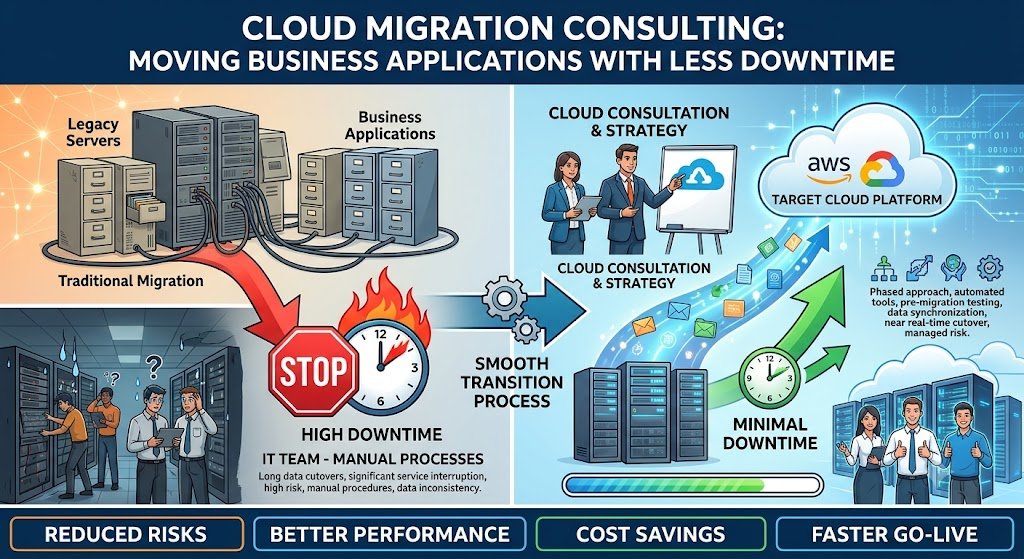
The Migration That Took Eighteen Months and Cost Twice the Budget An Indian manufacturing company decides to migrate its ERP and supporting applications to the cloud. The business case is strong: lower infrastructure costs, better scalability, improved disaster recovery. A vendor is selected. The migration begins. Eighteen months later, the project is over budget, three applications are still on-premise, the cutover caused two days of downtime that the business is still recovering from, and the team is exhausted.
This is a common story, and it is rarely caused by technical failure. It is caused by treating cloud migration as a technical move rather than a business transition. Migration involves applications, data, integrations, security, compliance, people, and processes. Each of these must be planned, tested, and executed with care. The technical move is the easy part.
Cloud migration consulting is the discipline of planning and executing migrations that minimize downtime, control cost, and deliver the business outcomes that justified the move. It is not about lifting servers and dropping them in the cloud. It is about understanding which applications should move, how they should move, what must change, and how to do it without disrupting the business.
For Indian businesses, the stakes are high. Cloud infrastructure offers real benefits—scalability, disaster recovery, cost flexibility—but a botched migration can cost more than the benefits. Downtime during cutover affects customers and revenue. Data localisation requirements (RBI for financial services, DPDPA for personal data) constrain where data can go. Legacy applications may not be cloud-ready. And the skills required to operate in the cloud differ from those required on-premise.
This guide is written for Indian CTOs, IT leaders, and business heads planning a cloud migration. We will cover the migration strategies (the "6 Rs"), the cutover planning that minimizes downtime, the zero-downtime techniques, real costs in rupees and dollars, DPDPA and data localisation compliance, and a phased implementation framework with clear go/no-go gates.
Why Cloud Migrations Fail
Before discussing how to migrate, it is worth understanding why migrations fail. The patterns are predictable.
The Common Failure Modes
1. No business case. The migration is driven by "everyone is moving to cloud" rather than a specific business outcome. Without a clear case, there is no way to measure success or justify the investment.
2. Lift and shift everything. Moving every application as-is, without assessing whether it should be migrated, re-architected, or retired. This moves technical debt to the cloud, where it is more expensive.
3. Underestimating the complexity. Migration involves applications, data, integrations, security, compliance, and people. Each adds complexity that is not visible in the initial plan.
4. No cutover plan. The cutover is planned at the last minute, without testing, and causes extended downtime.
5. Ignoring data localisation. Moving data to a region that violates RBI or DPDPA requirements creates compliance risk.
6. No skills transition. The team is trained on-premise; the cloud requires different skills. Without training, the team cannot operate the new environment.
7. No post-migration optimization. The migration is complete, but the environment is not optimized for cost or performance. The cloud bill grows.
Failure Mode Table
| Failure Mode | Cause | Prevention |
|---|---|---|
| No business case | Trend-driven migration | Define outcomes and metrics |
| Lift and shift everything | No assessment | Apply 6 Rs framework |
| Underestimated complexity | Incomplete planning | Comprehensive assessment |
| No cutover plan | Last-minute planning | Tested cutover runbook |
| Data localisation violation | Region selection without compliance review | Compliance assessment upfront |
| No skills transition | Training neglected | Training plan |
| No post-migration optimization | Migration seen as end | FinOps, optimization |
For teams building the applications and integrations that migration affects, our Custom Software Development and AI Development practices cover the full stack.
The 6 Rs: Migration Strategies
Not every application should be migrated the same way. The "6 Rs" framework categorizes migration strategies based on business value and technical fit.
1. Retire
Some applications are no longer needed. Before migrating, identify and retire them. This reduces migration scope and cost.
When to use: Applications with low usage, redundant functionality, or no business owner.
2. Retain
Some applications should not be migrated—at least not now. They may be too complex, too costly to migrate, or have compliance constraints that make on-premise preferable.
When to use: Applications with data localisation requirements, legacy systems that are being replaced, or systems with no cloud-ready alternative.
3. Rehost (Lift and Shift)
Move the application to the cloud without changes. This is the fastest migration but does not take advantage of cloud-native features.
When to use: Applications that need to move quickly, with minimal changes, and where cloud benefits (cost, scalability) are not the primary goal.
4. Replatform (Lift, Tinker, and Shift)
Move the application with some optimization—for example, migrating a database to a managed service, or containerizing an application.
When to use: Applications that can benefit from managed services (databases, caching) without full re-architecture.
5. Refactor / Re-architect
Redesign the application to be cloud-native—microservices, serverless, managed services. This is the most expensive and time-consuming but delivers the most cloud benefits.
When to use: Applications that are core to the business and can benefit significantly from cloud-native architecture.
6. Repurchase
Replace the application with a SaaS alternative. For example, replacing an on-premise CRM with a SaaS CRM.
When to use: Applications where a SaaS alternative is better, cheaper, or more capable.
The 6 Rs Table
| Strategy | Effort | Cloud Benefits | Best For |
|---|---|---|---|
| Retire | Low | N/A | Unused applications |
| Retain | None | None | Compliance-constrained, legacy |
| Rehost | Low | Basic | Quick migration, minimal change |
| Replatform | Medium | Moderate | Managed services, containers |
| Refactor | High | Maximum | Core, business-critical apps |
| Repurchase | Low-Medium | High | Commodity applications |
The portfolio approach: Apply the 6 Rs across your application portfolio. Most enterprises find that 20–30% can be retired, 30–40% rehosted, 20–30% replatformed, and 10–20% refactored. A portfolio approach balances cost, speed, and benefit.
Cutover Planning: Minimizing Downtime
The cutover is the moment of highest risk in a migration. It is when the application moves from the old environment to the new one. Poor cutover planning is the most common cause of downtime.
The Cutover Plan
A cutover plan documents:
Timeline: the sequence of steps, with times.
Roles: who does what.
Dependencies: what must happen before what.
Rollback plan: how to revert if something fails.
Communication: who is informed, when, and how.
Testing: what is tested before and after cutover.
The Cutover Approaches
1. Big bang cutover. Everything moves at once, usually during a maintenance window. Simple but risky—if something fails, the entire application is down.
2. Phased cutover. Move components or user groups in phases. Lower risk, but more complex coordination.
3. Blue-green deployment. Run two identical environments (blue and green). Switch traffic from blue to green once green is validated. Enables fast rollback.
4. Canary release. Route a small percentage of traffic to the new environment, monitor, and gradually increase. Lower risk, requires traffic routing capability.
5. Strangler fig pattern. Gradually replace parts of the old application with new components, routing traffic to the new components as they are validated.
Cutover Approach Comparison Table
| Approach | Downtime | Risk | Complexity | Best For |
|---|---|---|---|---|
| Big bang | Window | High | Low | Small apps, maintenance windows |
| Phased | Minimal | Medium | Medium | Complex apps |
| Blue-green | Near-zero | Low | Medium | Apps with traffic routing |
| Canary | None | Low | High | Apps with traffic management |
| Strangler fig | None | Low | High | Gradual modernization |
Zero-Downtime Techniques
For applications that cannot tolerate downtime:
1. Database replication. Replicate the database to the new environment continuously, then switch reads and writes at cutover.
2. Dual writes. Write to both old and new databases during transition, then cut over reads and eventually writes.
3. DNS failover with low TTL. Route traffic via DNS; low TTL enables fast failover.
4. Load balancer switch. Route traffic through a load balancer; switch the backend at cutover.
5. Feature flags. Deploy the new environment, route specific features or users to it via feature flags, gradually increase.
The Cutover Runbook
A cutover runbook is a detailed, step-by-step document that the team follows during cutover. It includes:
Pre-cutover checklist (backups, testing, communication).
Cutover steps with timing.
Validation steps (how to confirm the new environment is working).
Rollback steps (how to revert if validation fails).
Post-cutover checklist (monitoring, communication).
The runbook must be tested. A runbook that has not been rehearsed will fail in unexpected ways.
Cutover Checklist
| Item | Check |
|---|---|
| Backups taken | Old and new environments |
| Replication verified | Data consistent |
| Runbook reviewed | Team knows steps |
| Rollback tested | Rollback works |
| Communication sent | Stakeholders informed |
| Monitoring ready | Alerts configured |
| On-call team | Available during cutover |
Data Migration: The Hardest Part
Application migration is often straightforward. Data migration is where migrations fail.
Data Migration Challenges
1. Volume. Large databases take time to migrate and validate.
2. Consistency. Data must be consistent between old and new systems during transition.
3. Schema changes. The new environment may require schema changes, which require transformation.
4. Data quality. Legacy data often has quality issues that surface during migration.
5. Downtime. Data migration often requires downtime unless replication is used.
Data Migration Approaches
| Approach | Downtime | Complexity | Best For |
|---|---|---|---|
| Offline migration | Hours–days | Low | Small data, maintenance window |
| Online migration (replication) | Minutes | High | Large data, minimal downtime |
| Dual-write | None | High | Zero downtime |
| Change data capture (CDC) | None | High | Continuous sync |
Data Validation
After migration, data must be validated:
Row counts: do old and new tables have the same number of rows?
Checksums: do aggregated values match?
Sample comparison: do sample records match?
Application testing: do the applications work with the migrated data?
Data Migration Checklist
| Item | Check |
|---|---|
| Schema mapped | Old to new schema documented |
| Transformation tested | Data transformations validated |
| Volume estimated | Migration time known |
| Replication configured | If online migration |
| Validation scripts | Row counts, checksums ready |
| Rollback plan | Data can be reverted |
Real Costs in India (2026)
Cloud migration costs depend on the number of applications, the migration strategy, and the complexity of data and integrations.
Assessment and Consulting Costs
| Scope | Cost (₹) | Cost ($ approx.) | Timeline |
|---|---|---|---|
| Migration readiness assessment | ₹1.5–5 lakh | $1,800–$6,000 | 2–4 weeks |
| Migration strategy and roadmap | ₹3–10 lakh | $3,600–$12,000 | 4–8 weeks |
| Cutover planning and runbook | ₹1–3 lakh | $1,200–$3,600 | 2–4 weeks |
Migration Execution Costs
| Scope | Cost (₹) | Cost ($ approx.) | Timeline |
|---|---|---|---|
| Single application (rehost) | ₹1–5 lakh | $1,200–$6,000 | 2–6 weeks |
| Single application (replatform) | ₹3–12 lakh | $3,600–$14,400 | 4–10 weeks |
| Single application (refactor) | ₹10–40 lakh | $12,000–$48,000 | 10–24 weeks |
| Enterprise migration (20+ apps) | ₹50 lakh–₹3 crore+ | $60,000–$3,60,000+ | 6–18 months |
Post-Migration Costs
| Component | Monthly Cost (₹) | Monthly Cost ($ approx.) | Notes |
|---|---|---|---|
| Cloud infrastructure | Varies | Varies | Depends on architecture |
| Managed services | Varies | Varies | Databases, caching, etc. |
| Monitoring | ₹10,000–₹60,000 | $120–$720 | Depends on scale |
| Optimization (FinOps) | 5–10% of cloud spend | — | Ongoing |
The Hidden Costs
Skills transition. The team must be trained on cloud operations. This is often underestimated.
Integration changes. Applications that integrate with on-premise systems may need changes.
Compliance review. Data localisation and DPDPA compliance require legal and security review.
Post-migration optimization. The cloud bill is often higher than expected until the environment is optimized.
India-Specific Compliance: Data Localisation and DPDPA
Data Localisation
For regulated sectors, data localisation constrains where data can be stored:
RBI (financial services): payment system data must be stored in India.
DPDPA: cross-border transfers only to notified countries (list not finalised as of early 2026).
Healthcare: health data localisation requirements.
Migration implications:
Region selection: choose Indian regions (AWS Mumbai, Azure Pune, GCP Mumbai).
Cross-border replication: only for permitted purposes.
DR: primary and DR both in India for regulated data.
DPDPA
Migration involves moving personal data. Under the DPDP Act:
Consent: existing consent covers processing; migration must not expand purposes.
Security: data in transit and at rest must be protected.
Breach notification: if migration causes a breach, notification applies.
Retention: retention policies must be maintained post-migration.
Compliance Checklist
| Requirement | Implementation | Priority |
|---|---|---|
| Data localisation | Indian region selection | High (regulated) |
| Encryption in transit | TLS for migration | High |
| Encryption at rest | Cloud encryption | High |
| Access control | IAM policies | High |
| Audit logging | Cloud trail, logs | High |
| Breach notification | Incident response plan | High |
Implementation Framework: A Phased Approach With Cost Gates
Phase 1: Assessment (Week 1–4)
Objective: Understand the application portfolio and define the migration strategy.
Activities:
Inventory applications, dependencies, and data.
Apply the 6 Rs to each application.
Assess compliance requirements (data localisation, DPDPA).
Define business outcomes and success metrics.
Estimate cost and timeline.
Cost: ₹1.5–5 lakh ($1,800–$6,000).
Go/No-Go: Portfolio assessed. Strategy defined. Business case validated.
Phase 2: Planning and Design (Week 5–12)
Objective: Design the target architecture and migration plan.
Activities:
Design target cloud architecture.
Plan data migration approach.
Plan cutover approach (big bang, blue-green, etc.).
Define security and compliance controls.
Build migration roadmap with phases.
Cost: ₹3–10 lakh ($3,600–$12,000).
Go/No-Go: Architecture approved. Migration plan detailed.
Phase 3: Pilot Migration (Week 13–20)
Objective: Migrate one non-critical application to validate the approach.
Activities:
Migrate pilot application.
Test performance, security, and functionality.
Refine the migration process based on learnings.
Validate cutover runbook.
Cost: ₹1–5 lakh ($1,200–$6,000) depending on application.
Go/No-Go: Pilot successful. Process validated. Runbook works.
Phase 4: Production Migration (Week 21–40)
Objective: Migrate production applications in waves.
Activities:
Migrate applications in waves based on priority.
Execute cutover with tested runbook.
Monitor performance post-migration.
Rollback if issues arise.
Cost: ₹50 lakh–₹3 crore+ ($60,000–$3,60,000+) depending on scope.
Go/No-Go: Applications migrated. Performance acceptable. Compliance verified.
Phase 5: Optimization (Month 10–12)
Objective: Optimize the cloud environment for cost and performance.
Activities:
Review cloud spend.
Right-size instances.
Implement auto-scaling.
Optimize storage.
Establish FinOps practices.
Cost: Ongoing (5–10% of cloud spend).
Go/No-Go: Cloud spend optimized. Performance stable.
Phase Summary Table
| Phase | Duration | Key Deliverable | Cost (₹) | Go/No-Go Criteria |
|---|---|---|---|---|
| 1. Assessment | 4 weeks | Portfolio, strategy, business case | 1.5–5 lakh | Business case validated |
| 2. Planning | 8 weeks | Architecture, migration plan | 3–10 lakh | Plan approved |
| 3. Pilot | 8 weeks | Pilot migration | 1–5 lakh | Pilot successful |
| 4. Production | 20 weeks | Production migrations | 50 lakh–3 crore | Migrations complete |
| 5. Optimization | 3 months | Optimized cloud environment | Ongoing | Spend optimized |
Risks, Pitfalls, and Governance
The Most Common Migration Failures
No business case. Migration without defined outcomes. Mitigation: Define outcomes and metrics upfront.
Lift and shift everything. Migrating technical debt. Mitigation: Apply 6 Rs framework.
Underestimated complexity. Missing dependencies and integrations. Mitigation: Comprehensive assessment.
Untested cutover. Runbook fails in production. Mitigation: Test cutover and rollback.
Data localisation violation. Data moved to non-compliant region. Mitigation: Compliance review in phase one.
No skills transition. Team cannot operate cloud environment. Mitigation: Training plan.
No post-migration optimization. Cloud bill grows unchecked. Mitigation: FinOps from day one.
Risk Summary Table
| Risk | Likelihood | Impact | Mitigation |
|---|---|---|---|
| No business case | High | High (wasted spend) | Define outcomes |
| Lift and shift everything | High | Medium (technical debt) | 6 Rs framework |
| Underestimated complexity | High | High (over budget) | Comprehensive assessment |
| Untested cutover | Medium | High (downtime) | Test runbook |
| Data localisation violation | Medium | Critical (penalties) | Compliance review |
| No skills transition | High | Medium (operational issues) | Training plan |
| No optimization | High | Medium (cost) | FinOps |
Benchmark Summary and Decision Framework
Decision Matrix: Migration Strategy per Application
| Application Characteristic | Recommended Strategy |
|---|---|
| Unused or redundant | Retire |
| Compliance-constrained, legacy | Retain |
| Quick migration needed, minimal change | Rehost |
| Can benefit from managed services | Replatform |
| Core to business, needs cloud-native | Refactor |
| Commodity, SaaS alternative exists | Repurchase |
Cutover Approach Selection Table
| Application Criticality | Recommended Cutover |
|---|---|
| Non-critical | Big bang in maintenance window |
| Business-critical | Blue-green or phased |
| Mission-critical, zero downtime | Canary or strangler fig |
The One-Paragraph Decision Rule
If you are planning a cloud migration, start with an assessment—not a vendor selection. Inventory applications, apply the 6 Rs, and define the business outcomes. Validate data localisation and DPDPA compliance before choosing a region. Pilot with one non-critical application to test the process and runbook. Migrate production applications in waves with tested cutover plans and rollback procedures. Train the team on cloud operations. And optimize costs from day one—migration is not complete when the servers move; it is complete when the business does not notice they did.
Frequently Asked Questions
1. How much does cloud migration consulting cost in India?
A migration readiness assessment costs ₹1.5–5 lakh ($1,800–$6,000). Strategy and roadmap costs ₹3–10 lakh ($3,600–$12,000). Migrating a single application costs ₹1–40 lakh ($1,200–$48,000) depending on strategy. Enterprise migration (20+ apps) costs ₹50 lakh–₹3 crore+ ($60,000–$3,60,000+).
2. What are the 6 Rs of cloud migration?
Retire, Retain, Rehost, Replatform, Refactor, Repurchase. Each application is assessed and assigned to the appropriate strategy based on business value and technical fit.
3. How do I minimize downtime during migration?
Use blue-green deployment, canary releases, database replication, DNS failover with low TTL, and a tested cutover runbook with rollback procedures.
4. What is the difference between rehost and replatform?
Rehost (lift and shift) moves the application without changes. Replatform makes some optimizations—like moving to a managed database or containerizing—without full re-architecture.
5. Should I refactor everything to cloud-native?
No. Refactoring is expensive and time-consuming. Apply it selectively to applications that are core to the business and can benefit significantly. Most applications can be rehosted or replatformed.
6. How does data localisation affect cloud migration?
For regulated sectors (RBI, healthcare), data must be stored in India. Choose Indian cloud regions (AWS Mumbai, Azure Pune, GCP Mumbai) and avoid cross-border replication for regulated data.
7. How do I migrate a large database with minimal downtime?
Use online migration with replication (continuous sync between old and new), then switch at cutover. Dual-write and change data capture (CDC) enable near-zero downtime.
8. What is a cutover runbook?
A detailed, step-by-step document for the cutover: pre-cutover checklist, cutover steps with timing, validation steps, rollback steps, and post-cutover checklist. It must be tested before production use.
9. How long does cloud migration take?
A single application takes 2–24 weeks depending on strategy. Enterprise migration of 20+ applications takes 6–18 months. Timeline depends on complexity and compliance requirements.
10. How do I control cloud costs after migration?
Implement FinOps practices: right-size instances, use auto-scaling, optimize storage, review spend regularly, and use reserved instances for predictable workloads.
11. What skills does the team need for cloud operations?
Cloud architecture, infrastructure as code, security, monitoring, and cost management. Training and certification are essential before and during migration.
12. How can Innovative AI Solutions help?
Innovative AI Solutions provides cloud migration consulting for Indian businesses—assessment, 6 Rs strategy, target architecture, cutover planning, zero-downtime techniques, data localisation and DPDPA compliance, and post-migration optimization. Our Delhi-based team handles planning and execution. Visit https://innovativeais.com to discuss your requirements.
Contact Innovative AI Solutions
Ready to migrate to the cloud without the business noticing?
[One-line supporting sentence.]
Contact Information
Innovative AI Solutions
📍 Netaji Subhash Place, Pitampura, Delhi – 110034
🌐 Website: https://innovativeaislabs.com 📧 Email: info@innovativeais.com
📞 Phone: +91 7464 099 059 / +91 96899 67356
Business Services
AI Automation
AI Development
AI Consulting
Machine Learning Solutions
Deep Learning Solutions
Generative AI Services
NLP Solutions
AI Agents
AI Chatbots
Voice AI
CRM Development
Custom Software Development
Website Development
Mobile App Development
About the Author
Abhishek Kumar
Founder & CEO, Innovative AI Solutions
5+ years building production AI systems for Indian businesses. Based in Delhi, serving clients across India.
Ready to build AI solutions for your business?
Innovative AI Solutions — Delhi's leading AI development company. Free consultation available.
Get Free Consultation →
A practical 2026 guide for Indian businesses planning cloud migration—6 Rs strategies, cutover planning, zero-downtime techniques, real rupee costs, and data localisation and DPDPA compliance.
#CloudMigration #MigrationConsulting #LiftAndShift #Replatform #Refactor #ZeroDowntime #CutoverPlanning #DatabaseMigration #DataLocalisation #DPDPA #MeitY #AWSMigration #AzureMigration #CloudStrategy #DelhiNCR #InnovativeAISolutions
Copyright ©️ 2015–2026 Innovative AI Solutions. All Rights Reserved. | Privacy Policy | Terms & Conditions