The Copilot That Nobody Uses
An Indian enterprise deploys an internal AI copilot across its operations team. The copilot can answer questions from the company knowledge base, draft emails, and summarise documents. The launch is celebrated. Three months later, usage data tells a different story: 12% of licensed users open it weekly, and most sessions are one-off experiments rather than daily workflow.
The copilot works. It just does not fit into how people actually work. It sits in a separate tab, requires copy-pasting context, and answers questions that are faster to resolve by asking a colleague. It was built as a generic assistant rather than a focused tool for a specific internal workflow.
This is the most common failure in AI copilot development for internal business applications. The technology is capable. The design is wrong. A copilot succeeds when it is embedded in the workflow, has access to the right context, and takes actions that save real time—not when it is a general-purpose chatbot with a corporate logo.
The market has matured rapidly. Microsoft offers a spectrum from extending Microsoft 365 Copilot (low effort, built-in governance) to building fully custom agents with Copilot Studio or Azure AI Foundry (high customization, full responsibility for compliance) . Third-party development shops offer embedded copilots starting from ₹1,50,000 ($1,850) for basic scoped builds . The build-vs-extend decision is now the first architectural choice, and it determines cost, control, and compliance burden.
For Indian businesses, this matters because internal copilots are where AI investment meets operational reality. A sales operations copilot that drafts follow-ups and updates CRM records saves hours per week. A finance copilot that answers policy questions and routes approvals reduces email volume. A support copilot that surfaces past resolutions reduces handle time. These are measurable outcomes. But they require deliberate design.
India adds specific considerations. DPDPA applies to employee and customer data accessed by the copilot, and the GCC context is particularly relevant: 83% of India GCCs have invested in GenAI, and 58% in Agentic AI, making data protection compliance a board-level concern . MeitY's IT Amendment Rules 2026 impose labelling and provenance requirements for synthetically generated audio-visual content, though AI-generated text is excluded from the SGI definition . And cost management matters because token bills for internal copilots scale with adoption, and a successful copilot can become expensive if not architected for efficiency .
This guide is written for Indian CTOs, IT heads, operations leaders, and product managers building internal copilots. We will cover the build-vs-extend decision, the architecture patterns, the workflow integration, real costs in rupees and dollars, DPDPA compliance, and a phased implementation framework with clear go/no-go gates.
Build vs Extend: The First Decision
Before writing code or configuring a platform, the most important decision is whether to extend an existing copilot platform or build a custom copilot. Microsoft's guidance frames this as three paths: Adopt, Extend, and Build .
Adopt: Use the Copilot You Already Have
Microsoft 365 Copilot and similar out-of-the-box assistants provide summarization, drafting, and Q&A across Microsoft 365 data. The effort is low, governance is built-in, and the cost is predictable licensing.
When to adopt: Your users primarily need help with productivity tasks (summarizing meetings, drafting emails, finding documents) within Microsoft 365 applications. You do not need custom workflows, external system access, or specialized reasoning.
Limitations: Low customization, limited access to non-Microsoft data, and no ability to take actions in internal systems without extensions.
Extend: Add Your Data and Logic to an Existing Copilot
Extending Copilot (via declarative agents in Copilot Studio or Copilot connectors) lets you connect organizational knowledge and simple actions while keeping Microsoft's orchestration, security, and compliance controls. Effort is medium, and you inherit the platform's guardrails .
When to extend: The scenario aligns with productivity workflows, you mainly need the copilot to use organizational knowledge and automate small tasks, and custom logic and integrations remain simple. Examples: an HR agent answering benefits questions from SharePoint, a finance agent retrieving budget data from an ERP .
Limitations: Medium customization. You work within the platform's orchestration and model choices. Complex multi-step workflows or external system orchestration may require a custom build.
Build: Create a Fully Custom Copilot
Building a custom copilot (using Azure AI Foundry, Copilot Studio with pro-code, or a third-party framework) gives full control over prompts, orchestration, data routing, tool integration, and model selection. It also transfers full responsibility for compliance, security, and operations .
When to build: You need specialized workflows Copilot cannot handle, custom reasoning or multi-step orchestration, direct system API integration, external application access, or autonomous operation. You have the engineering capability to build and maintain the copilot, and you accept the governance burden.
Limitations: Higher cost, longer timeline, and full compliance responsibility. A custom copilot is a product you own and operate, not a feature you enable.
Build vs Extend Decision Table
| Factor | Adopt | Extend | Build |
|---|---|---|---|
| Effort | Low | Medium | Medium–High |
| Data sources | Microsoft 365 | M365 + internal | Any |
| Customization | Low | Medium | High |
| Workflow complexity | Simple | Moderate | Complex |
| Compliance responsibility | Microsoft | Shared | You |
| Best for | Productivity | Knowledge + simple actions | Specialized workflows |
For teams that need a custom copilot embedded in an internal application, our AI Development and AI Agents practices cover the full stack.
Architecture: What a Good Internal Copilot Needs
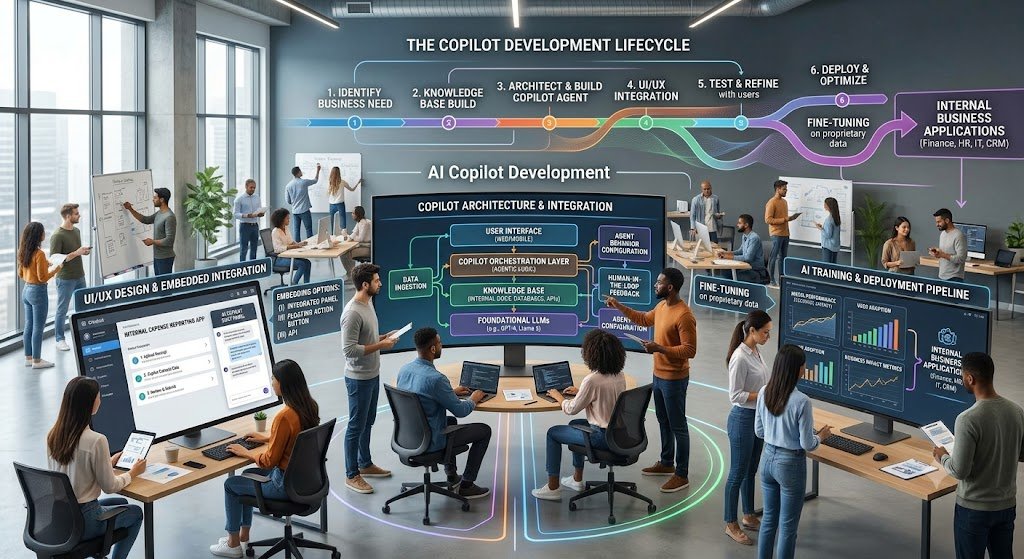
A production internal copilot has five architectural layers. Missing any of them produces a copilot that either does not work or cannot be trusted.
Layer 1: Context and Retrieval
The copilot needs access to the right data: internal documents, policies, customer records, product data. This is typically implemented through RAG (Retrieval-Augmented Generation), which retrieves relevant passages and grounds the copilot's responses in them.
For internal business applications, the retrieval sources are often SharePoint, Confluence, CRM, ERP, and internal databases. Microsoft's Foundry sample demonstrates a "Modern Workplace Assistant" that connects to SharePoint for company policy documents and to an MCP server for documentation .
Key design decision: Retrieval must respect the same permissions as the underlying systems. An employee should not be able to ask the copilot and receive a document they could not open in SharePoint.
Layer 2: Tool and Action Execution
A copilot that only answers questions is a search engine with better language. A copilot that takes actions—creating records, sending emails, updating fields, triggering workflows—is useful.
Tools are exposed to the copilot as callable functions. In Microsoft's architecture, this can be through MCP (Model Context Protocol) tools, native connectors, or custom APIs . The design principle is the same: the copilot decides what to do, and the tool execution layer ensures it is done safely.
Key design decision: Every write action should have validation, rollback, and approval controls. A copilot that creates duplicate records or sends incorrect emails is worse than no copilot.
Layer 3: Workflow Embedding
The copilot must live where the work happens. A side panel inside the CRM, a command in Teams, a button in the internal tool. If the copilot requires switching tabs and copy-pasting context, adoption will be low.
Key design decision: Embed the copilot in the primary workflow, not as a separate destination. The best copilot is the one the user does not have to think about opening.
Layer 4: Governance and Audit
Every copilot action should be logged: what the user asked, what the copilot retrieved, what it did, and what the outcome was. This is essential for debugging, for compliance, and for improving the copilot over time.
Key design decision: Audit logging is not optional for internal copilots that access personal data or take consequential actions.
Layer 5: Model and Cost Management
The copilot's model choice determines both quality and cost. A copilot that routes every request to a frontier model will have an unpredictable token bill. A copilot that routes simple queries to a cheap model and complex queries to a capable model will be more sustainable .
Key design decision: Implement model routing from day one. Gemini 3.x Pro and Claude Sonnet 5 are positioned for high-volume, cost-sensitive work; GPT-5.6 Sol and Claude Fable 5 are for hard reasoning . Use the cheapest adequate model for each request type.
Architecture at a Glance
| Layer | Function | Key Consideration |
|---|---|---|
| Context | Retrieve documents and data | Permission-aware retrieval |
| Tools | Take actions in systems | Validation, rollback, approval |
| Workflow | Embed in the user's work | Low friction, in-app |
| Governance | Log and audit | Mandatory for sensitive data |
| Cost | Route to the right model | Model tiering from day one |
Real Costs in India (2026)
Internal copilot costs have two components: build cost and running cost. The build cost depends heavily on whether you extend an existing platform or build custom.
Build Costs
| Scope | Build Cost (₹) | Build Cost ($ approx.) | Timeline |
|---|---|---|---|
| Extend Copilot (declarative agent, 1–2 data sources) | ₹50,000–₹1.5 lakh | $600–$1,800 | 2–4 weeks |
| Embedded copilot (single app, basic RAG, read-only) | ₹1.5–4 lakh | $1,800–$4,800 | 3–6 weeks |
| Custom copilot (multi-source RAG, actions, approval) | ₹5–15 lakh | $6,000–$18,000 | 8–16 weeks |
| Enterprise copilot (multi-app, orchestration, governance) | ₹15–40 lakh | $18,000–$48,000 | 16–28 weeks |
Note: USD conversions at ₹83/$. Third-party embedded copilot development starts from ₹1,50,000 ($1,850) for a scoped build . Custom builds depend on the number of integrations, data sources, and governance requirements.
Running Costs
| Component | Monthly Cost (₹) | Monthly Cost ($ approx.) | Notes |
|---|---|---|---|
| LLM API (token cost) | ₹10,000–₹1,00,000+ | $120–$1,200+ | Scales with usage; model choice is the biggest lever |
| Vector database | ₹5,000–₹40,000 | $60–$480 | pgvector is ~75% cheaper than managed at 10M vectors |
| Hosting/infrastructure | ₹10,000–₹50,000 | $120–$600 | Cloud or on-prem |
| Maintenance | 15–25% of build annually | — | Fixes, model updates, dependency upgrades |
The Token Bill in Context
For a copilot handling 20,000 requests per day with 2,000 input tokens and 500 output tokens on a mid-tier model, the token cost is roughly $5,400 per month (₹4.5 lakh) before retrieval . Moving the same load to a top-end model roughly triples the bill. Prompt caching and tighter prompts can halve it. The model choice and prompt design, not the engineering headcount, determine this number.
Self-hosting a frontier-scale open model requires roughly eight H200 GPUs at about $36 per hour, with a crossover against hosted APIs typically above $12,000–$19,000 per month of sustained usage . For most Indian enterprises, a hosted API is cheaper and far less operational work.
The ROI Case
A sales operations copilot that saves each representative 30 minutes per day across a team of 50 representatives is 25 hours per day of recovered capacity. At a loaded cost of ₹500 per hour, that is ₹12,500 per day, or roughly ₹3 lakh per month. The copilot pays for itself if the build and running costs are below this value—which they typically are for a focused, well-integrated copilot.
India-Specific Compliance: DPDPA and MeitY
DPDPA and Internal Copilots
Internal copilots process employee data, customer data, and business data. Under the DPDP Act, the organisation must determine whether it is a Data Fiduciary or Data Processor for each processing activity, and comply accordingly .
Key obligations:
Purpose limitation: Data used for the copilot must be consistent with the purpose for which it was collected. Employee data collected for HR administration cannot be repurposed for AI training without a lawful basis .
Consent and notice: Data Principals must be informed about the purposes of processing .
Data minimisation: Employees should use only the minimum personal information necessary and remove or mask identifiers where possible .
Vendor due diligence: Third-party AI platforms must be assessed for data handling, security architecture, and contractual commitments .
Audit and access control: The copilot must respect existing permissions and log access to personal data.
MeitY IT Amendment Rules 2026
The IT Amendment Rules 2026 introduce obligations for synthetically generated information (SGI), including AI-generated audio, visual, and audio-visual content. AI-generated text does not fall within the SGI definition, but the rules impose labelling and provenance requirements for visual content and compressed takedown timelines .
Implication for internal copilots: If the copilot generates visual content (charts, images, videos) that could be perceived as real, the rules may apply. Text-only copilots are largely outside the SGI scope, but existing IT Rules obligations for unlawful content still apply.
Compliance Checklist
| Requirement | Implementation | Priority |
|---|---|---|
| Permission-aware retrieval | Copilot respects source permissions | High |
| Audit logging | Log queries, retrievals, actions | High |
| Data minimisation | Mask PII where possible | High |
| Purpose limitation | Document copilot use case | High |
| Vendor DPAs | Contracts with LLM/vector vendors | High |
| SGI labelling (if visual output) | Label generated visuals | Medium |
Implementation Framework: A Phased Approach With Cost Gates
Phase 1: Workflow Selection and Build-vs-Extend Decision (Week 1–2) Objective: Choose a focused workflow and decide the architecture.
Activities:
Identify the workflow where a copilot saves the most time (sales ops, support, finance, HR).
Map the data sources and systems the copilot needs.
Assess whether the workflow can be handled by extending Copilot or requires a custom build.
Define success metrics (time saved, adoption rate, error reduction).
Cost: ₹0–₹1 lakh ($0–$1,200) for internal assessment.
Go/No-Go: Workflow selected. Build-vs-extend decision made. Metrics defined.
Phase 2: Prototype (Week 3–6)
Objective: Build a working prototype with read-only retrieval.
Activities:
Connect to one or two data sources.
Implement RAG with permission-aware retrieval.
Build the copilot interface (side panel, command, or embedded).
Test with a small group of users.
Cost: ₹1.5–4 lakh ($1,800–$4,800) for embedded prototype .
Go/No-Go: Users find the prototype useful. Retrieval accuracy is acceptable.
Phase 3: Actions and Approval Controls (Week 7–12)
Objective: Add write actions with human approval.
Activities:
Implement tool calling for actions (create, update, send).
Build approval gates for consequential actions.
Implement validation and rollback.
Add audit logging.
Cost: ₹3–8 lakh ($3,600–$9,600).
Go/No-Go: Actions work safely. Approval gates function. No data corruption.
Phase 4: Workflow Integration and Scale (Week 13–20)
Objective: Embed the copilot in the primary workflow and scale.
Activities:
Integrate with the primary application (CRM, ERP, internal tool).
Implement model routing and cost controls.
Build observability dashboards.
Onboard the full team.
Cost: ₹5–15 lakh ($6,000–$18,000).
Go/No-Go: Adoption rate meets target. Cost per request is sustainable.
Phase Summary Table
| Phase | Duration | Key Deliverable | Cost (₹) | Go/No-Go Criteria |
|---|---|---|---|---|
| 1. Selection | 2 weeks | Workflow, architecture | 0–1 lakh | Decision made |
| 2. Prototype | 4 weeks | Read-only copilot | 1.5–4 lakh | Users find it useful |
| 3. Actions | 6 weeks | Write actions, approvals | 3–8 lakh | Actions safe |
| 4. Integration | 8 weeks | Embedded, scaled | 5–15 lakh | Adoption target met |
Risks, Pitfalls, and Governance
The Most Common Internal Copilot Failures
Building a generic assistant instead of a focused tool. A copilot that tries to do everything does nothing well. Mitigation: Start with one workflow, one user group.
Ignoring permissions. The copilot exposes data the user should not see. Mitigation: Permission-aware retrieval, testing.
Unbounded actions. The copilot creates duplicates or sends incorrect communications. Mitigation: Validation, approval gates, rollback.
Token cost overrun. The copilot uses frontier models for every request. Mitigation: Model routing, caching, prompt optimisation.
Low adoption. The copilot is not embedded in the workflow. Mitigation: In-app integration, user involvement in design.
DPDPA violations. Personal data processed beyond consent. Mitigation: Purpose limitation, data minimisation, audit.
Risk Summary Table
| Risk | Likelihood | Impact | Mitigation |
|---|---|---|---|
| Generic, unfocused copilot | High | High (low adoption) | Focus on one workflow |
| Permission bypass | Medium | Critical | Permission-aware retrieval |
| Unbounded actions | High | High (data corruption) | Validation, approval |
| Cost overrun | High | Medium | Model routing, caching |
| Low adoption | High | High (wasted investment) | Workflow embedding |
| DPDPA violations | Medium | High | Purpose limitation, audit |
Benchmark Summary and Decision Framework
Decision Matrix: Adopt vs Extend vs Build
| Your Situation | Recommended Path | Why |
|---|---|---|
| Productivity tasks in M365 | Adopt Copilot | Lowest effort, built-in governance |
| Knowledge retrieval + simple actions | Extend Copilot | Medium effort, inherits guardrails |
| Specialized workflow, external systems | Build custom | Full control, full responsibility |
| Multi-step orchestration, autonomous | Build custom | Copilot cannot handle complexity |
Copilot Design Priority Table
| Priority | Capability | Why |
|---|---|---|
| 1 | Permission-aware retrieval | Security, compliance |
| 2 | Workflow embedding | Adoption |
| 3 | Model routing | Cost control |
| 4 | Audit logging | Governance |
| 5 | Action approval gates | Safety |
The One-Paragraph Decision Rule
If your users need productivity help within Microsoft 365, adopt Copilot. If they need organizational knowledge and simple actions, extend it. If they need a copilot embedded in a specific internal workflow with access to external systems and actions, build it—but start read-only, add actions with approval, and embed it where the work happens. Do not build a generic assistant. Build a tool for one workflow, prove it, then expand.
Frequently Asked Questions
1. How much does AI copilot development cost in India?
Extending Copilot costs ₹50,000–₹1.5 lakh. An embedded copilot starts from ₹1.5–4 lakh ($1,800–$4,800) . A custom copilot with actions and governance costs ₹5–15 lakh ($6,000–$18,000). Enterprise copilots cost ₹15–40 lakh ($18,000–$48,000).
2. Should I build a custom copilot or extend Microsoft 365 Copilot?
Extend Copilot if your scenario aligns with productivity workflows and you mainly need organizational knowledge. Build custom if you need specialized workflows, external system access, or complex orchestration .
3. What is RAG and why does it matter for internal copilots?
RAG (Retrieval-Augmented Generation) retrieves relevant internal documents and grounds the copilot's responses in them. It reduces hallucination and enables citation.
4. How do I prevent the copilot from accessing data the user should not see? Implement permission-aware retrieval. The copilot must respect the same permissions as the underlying systems. Test access control thoroughly before launch.
5. How do I control the token cost of an internal copilot?
Use model routing: cheap models for simple queries, capable models for complex ones. Use prompt caching and tighter prompts. Monitor cost per request and per user .
6. How does DPDPA affect internal copilots?
Copilots process employee and customer data. Purpose limitation, data minimisation, vendor due diligence, and audit logging apply .
7. What are the IT Amendment Rules 2026 and do they apply to internal copilots? They regulate synthetically generated information (SGI), including AI-generated visual content. AI-generated text is excluded from SGI. If your copilot generates visual content, labelling requirements may apply .
8. How do I get employees to use the copilot?
Embed it in the primary workflow. Do not make it a separate destination. Involve users in design. Measure time saved and share wins.
9. What actions should a copilot take automatically?
Start with read-only. Add writes with human approval. Expand to bounded autonomy only after the copilot has proven reliable.
10. How long does copilot development take?
Extending Copilot takes 2–4 weeks. An embedded copilot takes 3–6 weeks. A custom copilot with actions takes 8–16 weeks.
11. What is the biggest risk in internal copilot development?
Building a generic assistant that nobody uses. Focus on one workflow, embed it, measure adoption.
12. How can Innovative AI Solutions help?
Innovative AI Solutions builds AI copilots for internal business applications—embedded assistants, RAG pipelines, action execution, approval controls, and DPDPA-compliant governance. Our Delhi-based team handles workflow selection, architecture, and implementation. Visit https://innovativeais.com to discuss your requirements.
Contact Innovative AI Solutions
Ready to build an internal copilot that people actually use?
[One-line supporting sentence.]
Contact Information
Innovative AI Solutions
📍 Netaji Subhash Place, Pitampura, Delhi – 110034
🌐 Website: https://innovativeaislabs.com 📧 Email: info@innovativeais.com
📞 Phone: +91 7464 099 059 / +91 96899 67356
Business Services
AI Automation
AI Development
AI Consulting
Machine Learning Solutions
Deep Learning Solutions
Generative AI Services
NLP Solutions
AI Agents
AI Chatbots
Voice AI
CRM Development
Custom Software Development
Website Development
Mobile App Development
About the Author
Abhishek Kumar
Founder & CEO, Innovative AI Solutions
5+ years building production AI systems for Indian businesses. Based in Delhi, serving clients across India.
Ready to build AI solutions for your business?
Innovative AI Solutions — Delhi's leading AI development company. Free consultation available.
Get Free Consultation →
A practical 2026 guide for Indian enterprises building internal AI copilots—build vs extend decisions, RAG architecture, workflow embedding, real rupee costs, and DPDPA and MeitY-compliant governance.
#AICopilot #InternalBusinessApplications #CopilotDevelopment #BuildVsExtend #CopilotStudio #CustomAIAssistant #EnterpriseCopilot #RAG #DPDPA #MeitY #InternalTools #AIGovernance #CopilotArchitecture #DelhiNCR #InnovativeAISolutions
Copyright ©️ 2015–2026 Innovative AI Solutions. All Rights Reserved. | Privacy Policy | Terms & Conditions