The CRM That Knows Everything and Does Nothing
An Indian sales team runs on Salesforce. Every lead, every opportunity, every customer interaction is recorded. The data is rich. The dashboards are comprehensive. And yet, the sales representative still spends two hours a day on manual work: updating fields after calls, drafting follow-up emails, checking account history before a meeting, and routing leads to the right person.
The CRM knows everything. It does not do anything.
This is the gap that AI agent integration fills. An agent connected to the CRM can read the data, reason about it, and take action—updating records, drafting communications, routing leads, and escalating exceptions. The CRM becomes not just a system of record, but a system of action.
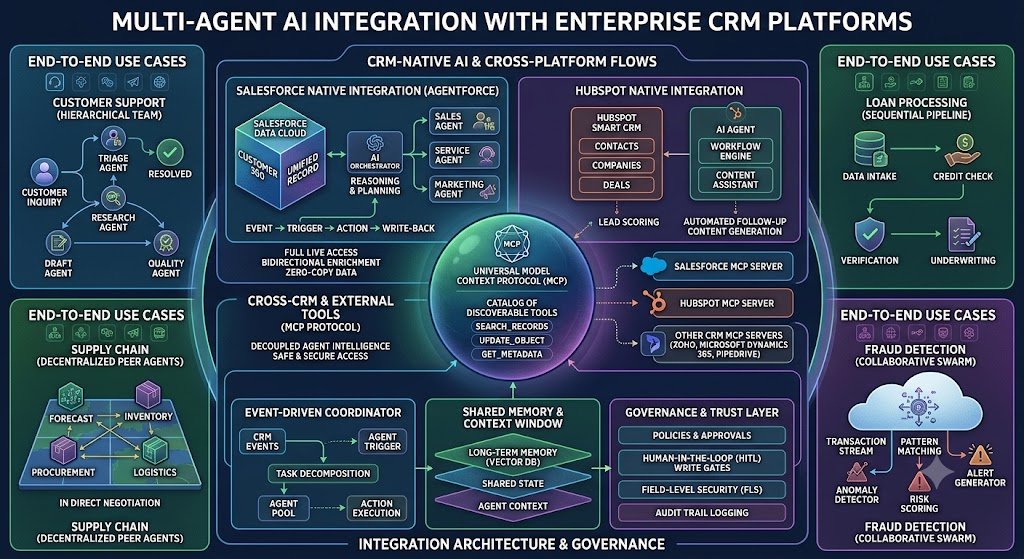
The integration landscape has matured rapidly in 2026. Salesforce has Agentforce and MCP servers. HubSpot has Breeze agents and workflow integration. Zoho has built-in MCP support. Each platform offers a different path to connecting agents, with different costs, controls, and constraints. Choosing the right integration approach is not about which platform is "best." It is about which integration pattern fits your existing CRM, your governance requirements, and your operational reality.
For Indian businesses, this matters because CRM is where revenue operations happen. A sales team that can act on CRM data faster—with AI assistance—converts more, responds faster, and wastes less time on administration. But an agent that acts without proper controls can create duplicate records, send inappropriate communications, or expose data to the wrong people.
India adds specific considerations. DPDPA applies to customer data in the CRM, and agent actions must respect consent and purpose limitation. MeitY AI governance applies to AI-driven decisions, requiring transparency and accountability. Data localisation may require CRM data and agent processing to stay in India for regulated sectors. And pricing models—credits, per-action, per-outcome—determine whether the integration is economically viable at scale.
This guide is written for Indian CTOs, sales operations leaders, CRM administrators, and founders evaluating AI agent integration. We will cover the integration patterns for Salesforce, HubSpot, and Zoho; the MCP standard that is changing how agents connect; the approval controls; real costs in rupees and dollars; DPDPA compliance; and a phased implementation framework with clear go/no-go gates.
The Integration Landscape: Three Approaches
There are three ways to connect an AI agent to a CRM. Each has different capabilities and trade-offs.
Approach 1: Native Agent Builders
The CRM vendor provides its own agent-building platform. Salesforce has Agentforce. HubSpot has Breeze. Zoho has Zia Agents.
How it works: You build or configure agents within the CRM's platform, using the vendor's tools, and the agents operate on the CRM's data and workflows.
Strengths: Deep integration with CRM data and permissions, vendor support, no separate infrastructure.
Weaknesses: Locked into the vendor's ecosystem, pricing tied to the vendor's model, limited ability to use external models or tools.
Approach 2: MCP Servers (Model Context Protocol)
MCP is an open standard that lets AI agents connect to external systems through standardized "servers." The CRM exposes its capabilities as MCP tools, and any MCP-compatible agent can call them.
How it works: The CRM runs an MCP server that exposes actions (query records, create records, update fields) as tools. An external agent (built on any platform) connects to the MCP server and uses the tools.
Strengths: Agent-agnostic (works with any MCP-compatible agent), vendor-neutral, allows external agents to access CRM capabilities.
Weaknesses: Requires MCP server support from the CRM (Salesforce and Zoho now offer it), potentially more complex setup.
Approach 3: API Integration (Custom)
The agent calls the CRM's REST or SOAP APIs directly.
How it works: You build a custom integration layer that translates agent actions into API calls.
Strengths: Full control, works with any CRM that has APIs.
Weaknesses: Most development effort, must handle authentication, rate limits, and error handling yourself.
Integration Approach Comparison
| Approach | Integration Depth | Flexibility | Effort | Best For |
|---|---|---|---|---|
| Native Agent Builder | Deep | Limited to vendor | Low-Medium | Single-vendor CRM |
| MCP Server | Medium | High (agent-agnostic) | Medium | Multi-agent, external agents |
| Custom API | Custom | Full | High | Unique requirements |
For teams building the agent integrations and custom MCP servers, our AI Agents and CRM Development practices cover the full stack.
Salesforce: Agentforce and MCP Servers
Salesforce has the most mature agent ecosystem of the three, with two paths: Agentforce (native) and MCP servers (external agent access).
Agentforce: Native Agent Platform
Agentforce is Salesforce's agent layer. Agents are built with Agent Builder, using topics, actions, and Flows. They operate on Salesforce data and respect Salesforce permissions.
Key capabilities:
Agent Builder: build agents with topics (what the agent handles), actions (what it can do), and instructions.
Multi-agent orchestration: orchestrator agents can transfer conversations to specialized connected agents without losing context. This is showcased in the Pronto sample app, where employee and customer service assistants share a storefront explorer subagent .
AgentExchange: marketplace for partner-built agents.
Data 360 grounding: agents grounded in Salesforce data.
Pricing: Agentforce uses Flex Credits. A standard action costs 20 Flex Credits, and Flex Credits are purchased in blocks at $500 per 100,000 credits (approximately $0.10 per action). There is also a conversation-based model at $2 per conversation, and per-user add-ons starting at $125 per user per month . The break-even between credits and conversation pricing is roughly 20 actions per interaction—below 20 actions, Flex Credits is cheaper; above 20, conversations pricing wins .
For Indian enterprises: The pricing complexity means careful modeling is essential. A high-volume FAQ agent may cost $0.10 per interaction on Flex Credits, while a complex multi-step sales agent may cost $3.50+ and be better on conversation pricing. Salesforce Foundations provides 200,000 free Flex Credits to Enterprise Edition customers, allowing validation before purchase .
Salesforce MCP Servers
Salesforce's Headless Toolkit allows you to expose business logic to external agents through Hosted MCP Servers. The Pronto sample app demonstrates this: an employee custom MCP server lets employees use any third-party agent (Claude, Slack, etc.) to interact with Pronto's orders and storefronts. The server exposes Apex tools, REST tools, and even agent MCP tools (exposing agent-driven behavior through MCP) .
Key implication: Salesforce can be both the system of record and the tool provider for external agents. This is powerful for enterprises that want to use specialized external agents while keeping data in Salesforce.
Salesforce Integration Summary
| Capability | Agentforce | MCP Server |
|---|---|---|
| Agent location | Inside Salesforce | External agent calls Salesforce tools |
| Agent builder | Salesforce Agent Builder | Any MCP-compatible agent |
| Pricing | Flex Credits or conversations | Salesforce licensing + external agent costs |
| Best for | Salesforce-native agents | External agent access to Salesforce data |
HubSpot: Breeze Agents and Workflow Integration
HubSpot's approach is simpler and more outcome-oriented than Salesforce's. Breeze agents are built into the CRM, priced per outcome, and activated from workflows.
Breeze Agents
HubSpot offers several Breeze agents: Customer Agent, Prospecting Agent, Data Agent, and Breeze Assistant. The key ones for sales are:
Prospecting Agent: identifies and recommends leads for outreach. Priced at $1.00 per lead recommended for outreach .
Customer Agent: resolves customer conversations. Priced at $0.50 per resolved conversation .
These are outcome-based prices—you pay when the agent completes the task, not per action or per seat . This makes cost modeling simpler and aligns incentives.
Workflow Integration
HubSpot's "Run Agent" workflow action lets you deploy agents directly from workflows. You configure which agent to run, what information it receives, and what output it generates. The output can then be used in other workflow actions—updating records, triggering follow-ups, and so on .
Example use cases:
Use the Company Research Agent to review a company summary before a first meeting, and copy the data to a custom property .
Use the Customer Health Agent to categorize a record and send it to different workflow branches .
Use a Lead Follow Up Agent to create a personalized email draft when a new lead is created .
HubSpot MCP Servers
HubSpot publishes two official MCP servers on every paid Sales Hub tier, plus an MCP client. This allows Breeze agents to both expose CRM records to outside AI tools and reach out to supported apps including Notion, Slack, Gmail, Gong, and Zapier .
HubSpot Pricing
Starter: $7/seat/month (annual) or $10 month-to-month.
Professional: $90/seat/month with $1,500 one-time onboarding.
Enterprise: $150/seat/month with $3,500 one-time onboarding.
Breeze credits: $10 per pack of 1,000; Customer Agent 50 credits per resolution ($0.50); Prospecting Agent 100 credits per recommended lead ($1.00) .
For Indian businesses: HubSpot is the pragmatic choice for SMBs and mid-market teams that want agents live quickly, with predictable per-outcome pricing. The limitation is that Breeze works best when everything lives in HubSpot; external knowledge sources need workarounds .
HubSpot Integration Summary
| Capability | Breeze Agents | MCP Servers |
|---|---|---|
| Agent location | Inside HubSpot | HubSpot exposes tools to external agents |
| Activation | Workflows, Breeze Assistant | MCP client |
| Pricing | Per outcome (resolution, lead) | HubSpot licensing + external agent costs |
| Best for | SMB/mid-market, quick deployment | External agent access to HubSpot |
Zoho CRM: Built-In MCP Support
Zoho has taken a different approach: rather than building a proprietary agent builder, it has exposed CRM capabilities through pre-built MCP servers that any MCP-compatible agent can use.
Zoho MCP Servers
Zoho CRM provides five pre-built MCP servers, each focused on a CRM functional area:
Data Insights: read-only query and analysis (search records, monitor pipelines, identify trends).
Data Operations: create, update, manage records, bulk operations, lead conversion, duplicate detection.
Module Customization: configure data model, custom modules, fields, layouts.
Workflow & Process Automation: set up automation, workflow triggers, field updates, email alerts, webhooks .
The MCP servers act as a bridge between AI agents and Zoho CRM, exposing CRM capabilities as callable tools. AI agents interpret user prompts, map them to the right CRM actions, and execute them. All actions are bound by the authenticated user's CRM roles and permissions, with OAuth-based authentication .
Zia Agents
Zoho also offers Zia Agents, which can be invoked from workflow rules. You configure the agent with instructions, tools, and connections, deploy it, and then select it as an action in a workflow rule. The agent analyzes the relevant CRM record when the workflow runs .
Example: A Lead Follow Up Agent reviews a new lead's information and prepares a personalized follow-up email draft, using tools to retrieve the lead record and create the email draft .
Zoho Positioning
Zoho's MCP-first approach makes it the most agent-agnostic of the three. You can connect any MCP-compatible agent (Claude Desktop, Cursor, VS Code, etc.) to Zoho CRM and perform CRM operations through natural language . For Indian businesses already on Zoho, this is a low-friction path to agent integration.
Zoho Integration Summary
| Capability | MCP Servers | Zia Agents |
|---|---|---|
| Agent location | External (any MCP agent) | Inside Zoho |
| Activation | MCP client connection | Workflow rules |
| Pricing | Zoho licensing + external agent costs | Zoho licensing |
| Best for | Agent-agnostic integration | Zoho-native automation |
Approval Controls and Operational Safeguards
Integrating an agent with a CRM is not just about connecting APIs. It is about ensuring the agent acts safely. The safeguards that separate a robust integration from one that creates incidents fall into five categories .
Validation
Every write action should be validated against the schema, business rules, and policy constraints of the CRM before execution. Validation belongs in the integration layer, not the agent, because the agent decides what to do and the integration layer ensures it is legal within the CRM .
Rollback
Every write action should be paired with a rollback path. If a multi-step workflow fails at step three, the CRM should not be left in a partially updated state. Rollback can use native transaction support or compensating actions .
Exception Handling
Explicit patterns for low confidence, missing data, unavailable systems, and policy violations. Exceptions should escalate to human review with full context, not fail silently .
Retry Logic
Distinguish transient failures worth retrying from permanent failures requiring escalation. Retry logic should be CRM-specific—Salesforce rate limits differ from HubSpot's, and each needs appropriate backoff .
Human-in-the-Loop Routing
Explicit thresholds and confidence scores determine which actions proceed automatically and which pause for review. Well-designed HITL routing does not slow the workflow; it concentrates human attention on the decisions that need it .
The Staged Progression
The recommended integration roadmap is read-only first, then low-stakes writes with human approval, then bounded autonomous writes . This builds operational trust and validates the integration before agents act without oversight.
Safeguards Table
| Safeguard | Purpose | Implementation |
|---|---|---|
| Validation | Prevent illegal writes | Schema, business rules, policy checks |
| Rollback | Recover from partial failures | Transactions or compensating actions |
| Exception handling | Escalate when uncertain | Human review with context |
| Retry logic | Handle transient failures | CRM-specific backoff |
| HITL routing | Human oversight for high-risk | Confidence thresholds |
Real Costs in India (2026)
AI agent CRM integration costs have two components: the CRM/agent platform costs and the integration development costs.
Platform Costs (Annual, for a 10-user sales team)
| Platform | CRM Cost (₹) | Agent Cost (₹) | Total (₹) | Total ($ approx.) |
|---|---|---|---|---|
| HubSpot Starter + Breeze | ₹70,000/year | Usage-based (₹0.50/resolution, ₹1/lead) | ₹70,000+ usage | $840+ usage |
| HubSpot Professional + Breeze | ₹9,00,000/year | Usage-based | ₹9,00,000+ usage | $10,800+ usage |
| Salesforce Enterprise + Agentforce | ₹21,00,000/year (approx.) | Flex Credits ($0.10/action) | ₹21,00,000+ usage | $25,200+ usage |
| Zoho CRM + MCP | ₹60,000–₹2,00,000/year | External agent costs | ₹60,000+ | $720+ |
Note: USD conversions at ₹83/$. Salesforce and HubSpot pricing varies by edition and contract; these are indicative. HubSpot Breeze credits are $10 per 1,000; Customer Agent 50 credits per resolution ($0.50); Prospecting Agent 100 credits per lead ($1.00) . Salesforce Flex Credits are $500 per 100,000, with a standard action at 20 credits (~$0.10) .
Integration Development Costs
| Scope | Cost (₹) | Cost ($ approx.) | Timeline |
|---|---|---|---|
| Single agent, single CRM | ₹2–5 lakh | $2,400–$6,000 | 4–8 weeks |
| Multi-agent, single CRM | ₹5–12 lakh | $6,000–$14,400 | 8–16 weeks |
| Multi-agent, multi-CRM + MCP | ₹12–30 lakh | $14,400–$36,000 | 16–28 weeks |
The Cost Optimization Lever
For Salesforce, the choice between Flex Credits and conversation pricing matters. A FAQ agent that resolves in 1–3 actions costs $0.10–$0.30 on Flex Credits versus $2.00 per conversation—a 85–95% saving. A complex SDR workflow with 35+ actions costs $3.50+ on Flex Credits versus $2.00 per conversation—conversation pricing wins . Model your specific use case before committing.
India-Specific Compliance: DPDPA and MeitY
DPDPA
CRM data is personal data. Under the DPDP Act:
Consent: customers must consent to their data being processed for the purpose it was collected.
Purpose limitation: agent actions must stay within the consented purpose.
Access control: agents should only access data the authenticated user is authorized to see (Salesforce, HubSpot, and Zoho all enforce this natively).
Audit logging: every agent action should be logged for accountability.
Retention: define retention periods for CRM data and agent logs.
MeitY AI Governance
MeitY's guidelines apply to AI-driven CRM decisions:
Transparency: customers should know when they are interacting with an AI.
Accountability: a named owner for agent behavior.
Human oversight: for consequential actions (e.g., large deal approvals, contract commitments).
Data Localisation
For regulated sectors, CRM data and agent processing may need to stay in India. Salesforce offers Hyperforce EU regions but Indian region availability should be verified. HubSpot and Zoho offer Indian data centers.
Compliance Checklist
| Requirement | Implementation | Priority |
|---|---|---|
| Consent | CRM consent fields, purpose tracking | High |
| Access control | CRM-native permissions | High |
| Audit trail | Agent action logging | High |
| Human oversight | Approval gates for high-value actions | High |
| Data localisation | Indian region deployment | Medium (regulated) |
Implementation Framework: A Phased Approach With Cost Gates
Phase 1: CRM Readiness Assessment (Week 1–3)
Objective: Determine which CRM and integration approach fits.
Activities:
Inventory CRM platform and edition.
Assess agent capabilities (Agentforce, Breeze, Zoho MCP).
Evaluate pricing model against expected volume.
Assess data quality and permissions.
Define the first use case (read-only recommended).
Cost: ₹50,000–₹1.5 lakh ($600–$1,800).
Go/No-Go: Platform decision made. Use case defined.
Phase 2: Read-Only Agent (Week 4–10)
Objective: Connect an agent with read-only access.
Activities:
Configure MCP server or native agent.
Implement read-only tools (query, search).
Test data access and permissions.
Build read-only workflow (e.g., account research).
Cost: ₹1–3 lakh ($1,200–$3,600).
Go/No-Go: Agent reads correct data. Permissions enforced.
Phase 3: Low-Stakes Writes with Approval (Week 11–18)
Objective: Add write actions with human approval.
Activities:
Implement write tools (create, update).
Build approval gate for writes.
Implement validation and rollback.
Test with real users.
Cost: ₹3–8 lakh ($3,600–$9,600).
Go/No-Go: Writes work. Approval gate functions. No data corruption.
Phase 4: Bounded Autonomy (Week 19–28)
Objective: Expand to bounded autonomous actions.
Activities:
Define confidence thresholds for autonomy.
Implement exception handling and escalation.
Expand agent scope.
Monitor and tune.
Cost: ₹5–15 lakh ($6,000–$18,000).
Go/No-Go: Autonomous actions reliable. Exception rate acceptable.
Phase Summary Table
| Phase | Duration | Key Deliverable | Cost (₹) | Go/No-Go Criteria |
|---|---|---|---|---|
| 1. Assessment | 3 weeks | Platform, use case | 50,000–1.5 lakh | Decision made |
| 2. Read-Only | 7 weeks | Read-only agent | 1–3 lakh | Permissions work |
| 3. Writes with Approval | 8 weeks | Write actions, approval | 3–8 lakh | Writes safe |
| 4. Bounded Autonomy | 10 weeks | Autonomous actions | 5–15 lakh | Reliable |
Risks, Pitfalls, and Governance
The Most Common CRM Agent Failures
Unbounded writes. Agent creates duplicate records, sends inappropriate emails, or updates wrong fields. Mitigation: Validation, approval gates, rollback.
Permission bypass. Agent accesses data the user should not see. Mitigation: CRM-native permissions, testing.
Cost overrun. Agent usage exceeds budget, especially on credit-based pricing. Mitigation: Usage monitoring, cost alerts, model selection.
Integration fragility. API changes break the integration. Mitigation: Monitoring, abstraction layer, retry logic.
No audit trail. Cannot prove what the agent did. Mitigation: Comprehensive logging.
DPDPA violations. Agent processes data beyond consent. Mitigation: Purpose limitation, consent tracking.
Risk Summary Table
| Risk | Likelihood | Impact | Mitigation |
|---|---|---|---|
| Unbounded writes | High | High (data corruption) | Validation, approval |
| Permission bypass | Medium | Critical | CRM permissions, testing |
| Cost overrun | High | Medium | Monitoring, alerts |
| Integration fragility | Medium | High | Abstraction, retry |
| No audit trail | Medium | High | Logging |
| DPDPA violations | Medium | Critical | Purpose limitation |
Benchmark Summary and Decision Framework
Decision Matrix: Platform Selection
| Your Situation | Recommended Platform | Why |
|---|---|---|
| Already on Salesforce Enterprise | Agentforce + MCP servers | Native integration, deep data access |
| Already on HubSpot Pro/Enterprise | Breeze agents | Outcome pricing, quick deployment |
| Already on Zoho CRM | Zoho MCP servers | Agent-agnostic, low friction |
| Want external agent access | MCP servers (any CRM) | Agent-agnostic, vendor-neutral |
| SMB, budget-constrained | HubSpot Breeze | $0.50/resolution, $1/lead |
Integration Approach Selection Table
| Need | Recommended Approach |
|---|---|
| Deep CRM-native automation | Native agent builder |
| External agent access to CRM | MCP server |
| Custom agent with specific model | Custom API integration |
| Multi-CRM access | MCP servers for each |
The One-Paragraph Decision Rule
If you are already on Salesforce, start with Agentforce for native agents and MCP servers for external agent access. If you are on HubSpot, start with Breeze agents—they are cheap, outcome-priced, and quick to deploy. If you are on Zoho, use its MCP servers to connect the agent of your choice. In all cases, start read-only, add writes with approval, then expand to bounded autonomy. Validate every write, log every action, and keep humans in the loop for anything consequential.
Frequently Asked Questions
1. How much does AI agent CRM integration cost in India?
Integration development costs ₹2–5 lakh ($2,400–$6,000) for a single agent, ₹5–12 lakh ($6,000–$14,400) for multi-agent, and ₹12–30 lakh ($14,400–$36,000) for multi-CRM. Platform costs depend on the CRM: HubSpot Breeze is $0.50/resolution, Salesforce Agentforce is ~$0.10/action or $2/conversation.
2. What is MCP and why does it matter for CRM integration?
MCP (Model Context Protocol) is an open standard that lets AI agents connect to external systems through standardized servers. Salesforce, HubSpot, and Zoho all support MCP, enabling agent-agnostic integration.
3. Should I use Salesforce Agentforce or HubSpot Breeze?
Choose Agentforce if you are already on Salesforce and need deep data grounding, but expect higher cost and longer deployment. Choose Breeze if you are on HubSpot and want quick, outcome-priced agents.
4. How does Salesforce Agentforce pricing work?
Flex Credits at $500 per 100,000; a standard action costs 20 credits (~$0.10). Conversation pricing is $2 per conversation. Break-even is around 20 actions per interaction .
5. How does HubSpot Breeze pricing work?
Customer Agent is $0.50 per resolved conversation. Prospecting Agent is $1.00 per lead recommended. Credits are $10 per 1,000 .
6. What is Zoho's approach to AI agents?
Zoho offers built-in MCP support with five pre-built servers (Data Insights, Data Operations, Module Customization, Workflow & Process Automation) that any MCP-compatible agent can use .
7. How do I prevent an agent from making bad writes in the CRM?
Validation (schema, business rules), rollback paths, approval gates for high-risk actions, and confidence thresholds that trigger human review .
8. How does DPDPA affect CRM agent integration?
CRM data is personal data. Consent, purpose limitation, access control, audit logging, and retention policies apply. Agents must respect the same permissions as users.
9. What is the recommended rollout sequence?
Read-only first, then low-stakes writes with human approval, then bounded autonomous writes .
10. Can I connect an external agent (like Claude) to Salesforce?
Yes, using Salesforce's Hosted MCP Servers. The Pronto sample app demonstrates external agents accessing Salesforce data via MCP .
11. How do I control costs with credit-based pricing?
Monitor usage, set budget alerts, choose the right pricing model (credits vs conversation), and optimize agent actions to reduce steps .
12. How can Innovative AI Solutions help?
Innovative AI Solutions builds AI agent integrations for Indian businesses—Salesforce Agentforce, HubSpot Breeze, Zoho MCP, custom MCP servers, approval controls, and DPDPA-compliant deployment. Our Delhi-based team handles assessment, integration, and governance. Visit https://innovativeais.com to discuss your requirements.
Contact Innovative AI Solutions
Ready to make your CRM act, not just record?
[One-line supporting sentence.]
Contact Information
Innovative AI Solutions
📍 Netaji Subhash Place, Pitampura, Delhi – 110034
🌐 Website: https://innovativeaislabs.com 📧 Email: info@innovativeais.com
📞 Phone: +91 7464 099 059 / +91 96899 67356
Business Services
AI Automation
AI Development
AI Consulting
Machine Learning Solutions
Deep Learning Solutions
Generative AI Services
NLP Solutions
AI Agents
AI Chatbots
Voice AI
CRM Development
Custom Software Development
Website Development
Mobile App Development
About the Author
Abhishek Kumar
Founder & CEO, Innovative AI Solutions
5+ years building production AI systems for Indian businesses. Based in Delhi, serving clients across India.
Ready to build AI solutions for your business?
Innovative AI Solutions — Delhi's leading AI development company. Free consultation available.
Get Free Consultation →
A practical 2026 guide for Indian businesses integrating AI agents with Salesforce, HubSpot and Zoho CRM—native agent builders, MCP servers, approval controls, real rupee costs, and DPDPA compliance.
#AIAgentIntegration #CRMIntegration #SalesforceAgentforce #HubSpotBreeze #ZohoMCP #MCPServer #AgentOrchestration #CRMAutomation #AIAgents #ApprovalControls #DPDPA #MeitY #AgentforcePricing #HubSpotPricing #DelhiNCR #InnovativeAISolutions
Copyright ©️ 2015–2026 Innovative AI Solutions. All Rights Reserved. | Privacy Policy | Terms & Conditions