



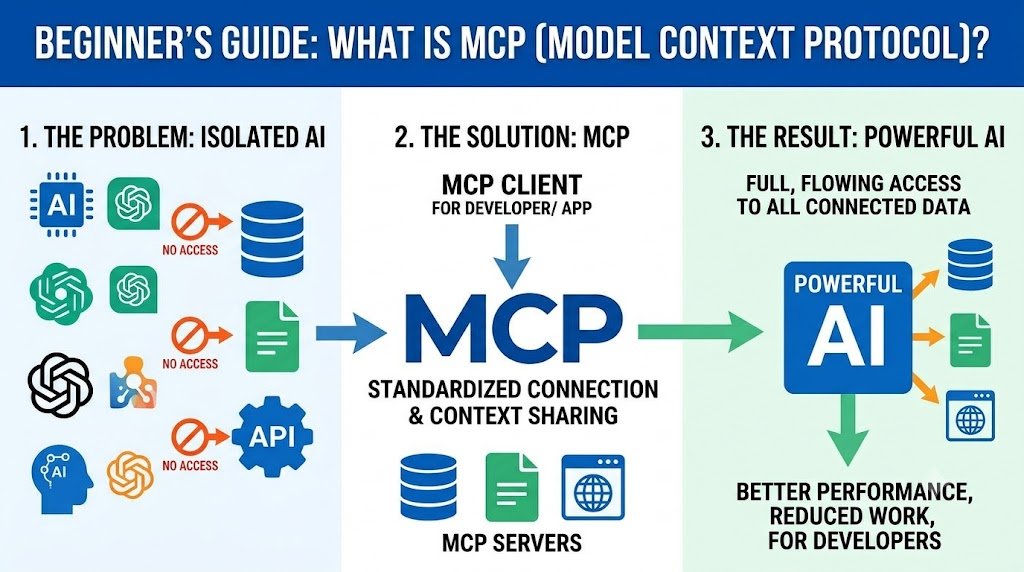
What Is MCP?
MCP (Model Context Protocol) is an open standard that lets AI models connect to external tools, data sources, and services.
Think of it as USB-C for AI. Before USB-C, every device had a different cable. Before MCP, every AI integration was built from scratch. MCP provides one standard way for AI models to talk to the outside world.
Anthropic introduced MCP in late 2024. By 2026, it has become a widely adopted standard, supported by major AI platforms and developer tools.
This guide explains what MCP is, how it works, and how developers can build with it — in plain language, with examples.
For organisations building AI integrations, Innovative AI Solutions provides AI development and AI agents.
The Problem MCP Solves
Before MCP, connecting an AI model to external tools was messy.
| Problem | Impact |
|---|---|
| Custom integrations | Every tool needed its own code |
| No standard | Each AI platform did it differently |
| Fragile | Changes broke integrations |
| Duplicated effort | Same integration rebuilt repeatedly |
| Limited reuse | Could not share integrations across models |
MCP solves this by providing one standard protocol. Build an MCP server once — any MCP-compatible AI can use it.
The USB-C Analogy
| Before USB-C | Before MCP |
|---|---|
| Different cables for every device | Different code for every AI integration |
| Proprietary connectors | Proprietary APIs |
| No standard | No standard |
| After USB-C | After MCP |
| One cable for everything | One protocol for AI integrations |
| Universal standard | Open standard |
| Works across devices | Works across AI models |
Core Concepts
MCP has three main primitives.
| Primitive | What It Does | Example |
|---|---|---|
| Tools | Functions the AI can call | Search, calculate, send email |
| Resources | Data the AI can read | Files, database records, API responses |
| Prompts | Reusable prompt templates | "Summarize this document" |
Tools
Tools are functions the AI can invoke. They perform actions.
| Tool Example | What It Does |
|---|---|
| search_web | Searches the internet |
| query_database | Runs a database query |
| send_email | Sends an email |
| create_ticket | Creates a support ticket |
| get_weather | Fetches weather data |
Resources
Resources are data the AI can read. They provide context.
| Resource Example | What It Provides |
|---|---|
| file://docs/report.pdf | A PDF document |
| db://customers/123 | A customer record |
| api://inventory | Inventory data |
| config://settings | Configuration |
Prompts
Prompts are reusable templates that guide the AI.
| Prompt Example | What It Does |
|---|---|
| summarize_document | Summarizes a document |
| analyze_sentiment | Analyzes sentiment |
| generate_report | Creates a report |
| review_code | Reviews code |
MCP Architecture
MCP uses a client-server architecture.
| Component | Role |
|---|---|
| Host | The AI application (e.g., Claude Desktop, IDE) |
| Client | Connects the host to servers |
| Server | Exposes tools, resources, prompts |
| Transport | How messages are sent (stdio, HTTP) |
How It Works
| Step | What Happens |
|---|---|
| 1. Host starts | AI application launches |
| 2. Client connects | Client connects to MCP servers |
| 3. Server exposes | Server lists tools, resources, prompts |
| 4. AI requests | AI decides to use a tool |
| 5. Client calls | Client sends request to server |
| 6. Server executes | Server runs the tool |
| 7. Result returns | Result goes back to AI |
| 8. AI responds | AI uses result in response |
Architecture Diagram (Text)
text в”Њв”Ђв”Ђв”Ђв”Ђв”Ђв”Ђв”Ђв”Ђв”Ђв”Ђв”Ђв”Ђв”Ђв”Ђв”Ђв”Ђв”Ђв”Ђв”Ђв”Ђв”Ђв”Ђв”Ђв”Ђв”Ђв”Ђв”Ђв”Ђв”Ђв” в”‚ Host Application в”‚ в”‚ (Claude Desktop, IDE, etc.) в”‚ └┬─────────────────────────────┛ в”‚ в”њв”Ђв”Ђ MCP Client в”Ђв”Ђв” в”‚ в”‚ в”‚ в”‚ в”Њв–јв”Ђв”Ђв”Ђв”Ђв”Ђв”Ђв”Ђв”Ђв”Ђв”Ђв”Ђвђђв”Ђв”Ђв”Ђв”Ђв”Ђв”Ђв”Ђв”Ђв”Ђв”Ђв”Ђв”ђв”Ђв”Ђв”Ђв”Ђв”Ђв”Ђв”Ђв”Ђв”Ђв”Ђв”Ђв”
в”‚ MCP Server 1 в”‚ MCP Server 2 в”‚
в”‚ (Filesystem) в”‚ (Database) в”‚ в””в”Ђв”Ђв”Ђв”Ђв”Ђв”Ђв”Ђв”Ђв”Ђв”Ђв”Ђв”Ђв”Ђв”Ђв”Ђв”Ђв”Ђв”Ђв”Ђв”Ђв”Ђв”Ђв”Ђв”Ђв”Ђв”Ђв”Ђв”Ђв”Ђв”Ђв”Ђв”Ђв”Ђв”Ђв”Ђв”Ђв”Ђв”Ђв”Ђ
MCP vs Alternatives
| Approach | Standard? | Reusable? | Complex? |
|---|---|---|---|
| Custom API integration | No | No | Yes |
| Function calling | Model-specific | Partially | Medium |
| Plugins | Platform-specific | No | Medium |
| MCP | Yes | Yes | Low |
MCP vs Function Calling
| Aspect | Function Calling | MCP |
|---|---|---|
| Scope | Model-specific | Cross-model |
| Definition | In prompt or API | Standard protocol |
| Reuse | Limited | High |
| Discovery | Manual | Automatic |
| Transport | API-specific | Standard (stdio, HTTP) |
MCP vs APIs
| Aspect | API | MCP |
|---|---|---|
| Purpose | General integration | AI-specific integration |
| Discovery | Documentation | Automatic |
| Schema | Varies | Standard |
| AI-native | No | Yes |
Transport Options
MCP supports multiple transport methods.
| Transport | Use Case | Pros | Cons |
|---|---|---|---|
| stdio | Local servers | Simple, fast | Local only |
| HTTP + SSE | Remote servers | Remote, scalable | More complex |
| WebSocket | Real-time | Bidirectional | More complex |
stdio Standard input/output. Best for local servers running on the same machine.
HTTP + SSE
HTTP with Server-Sent Events. Best for remote servers.
Real-World MCP Examples
Developer Tools
| MCP Server | What It Does |
|---|---|
| Filesystem | Read/write local files |
| Git | Git operations |
| GitHub | Repository management |
| PostgreSQL | Database queries |
| SQLite | Local database |
| Puppeteer | Browser automation |
Business Tools
| MCP Server | What It Does |
|---|---|
| Slack | Send messages, read channels |
| Google Drive | Access documents |
| Notion | Read/write pages |
| Jira | Issue management |
| Stripe | Payment operations |
| Salesforce | CRM operations |
Data Tools
| MCP Server | What It Does |
|---|---|
| Google Maps | Location data |
| Weather | Weather data |
| Web search | Search the internet |
| Fetch | Fetch web pages |
| Memory | Persistent memory |
Building Your First MCP Server
Here is a minimal MCP server in Python.
Step 1: Install the SDK
bash pip install mcp
Step 2: Create a Simple Server
python from mcp.server import Server from mcp.server.stdio import stdio_server from mcp.types import Tool, TextContent
app = Server("my-first-server")
@app.list_tools() async def list_tools(): return [
Tool(
name="greet", description="Greet a person by name", inputSchema={ "type": "object", "properties": { "name": {"type": "string"} }, "required": ["name"] } ) ]
@app.call_tool() async def call_tool(name: str, arguments: dict): if name == "greet": person = arguments["name"] return [TextContent( type="text", text=f"Hello, {person}!" )]
async def main(): async with stdio_server() as (read, write): await app.run(read, write, app.create_initialization_options())
if __name__ == "__main__": import asyncio asyncio.run(main())
Step 3: Add a Resource
python @app.list_resources() async def list_resources(): return [ { "uri": "config://app", "name": "App Configuration", "mimeType": "application/json" } ]
@app.read_resource() async def read_resource(uri: str): if uri == "config://app": return '{"version": "1.0", "env": "production"}'
Step 4: Add a Prompt
python @app.list_prompts() async def list_prompts(): return [ { "name": "summarize", "description": "Summarize a document", "arguments": [ { "name": "text", "description": "Text to summarize", "required": True } ] } ]
@app.get_prompt() async def get_prompt(name: str, arguments: dict): if name == "summarize": text = arguments["text"] return { "messages": [ { "role": "user", "content": f"Summarize this: {text}" } ] }
Step 5: Run and Connect
Run the server, then connect it to an MCP-compatible host (Claude Desktop, IDE, or custom client).
MCP Server Configuration
Hosts configure MCP servers in a config file.
json { "mcpServers": { "my-server": { "command": "python", "args": ["/path/to/server.py"] }, "filesystem": { "command": "npx", "args": ["-y", "@modelcontextprotocol/server-filesystem", "/path"] } } }
Best Practices
| Practice | Why |
|---|---|
| Clear tool names | AI picks better tools |
| Detailed descriptions | AI understands when to use |
| Strict schemas | Fewer errors |
| Error handling | Graceful failures |
| Timeouts | Prevent hangs |
| Logging | Debug issues |
| Least privilege | Security |
| Input validation | Prevent injection |
Tool Design Principles
| Principle | Example |
|---|---|
| Single purpose | search_web not do_everything |
| Descriptive names | get_customer_by_id not get_c |
| Clear descriptions | "Returns customer record by ID" |
| Strict schema | Required fields, types |
| Helpful errors | "Customer not found: 123" |
Security Considerations
| Risk | Mitigation |
|---|---|
| Prompt injection | Validate inputs, sandbox |
| Data leakage | Least privilege |
| Unauthorized access | Authentication |
| Malicious tools | Review servers |
| Resource exhaustion | Rate limits, timeouts |
| Supply chain | Trusted sources only |
MCP Ecosystem (2026)
| Category | Examples |
|---|---|
| Hosts | Claude Desktop, IDEs, custom apps |
| Official servers | Filesystem, Git, GitHub, PostgreSQL |
| Community servers | Slack, Notion, Jira, Stripe |
| SDKs | Python, TypeScript, Java, Kotlin |
| Frameworks | LangChain, LlamaIndex integrations |
India-Specific Considerations
MCP for Indian Businesses
| Use Case | MCP Server |
|---|---|
| Customer support | Zoho, Freshdesk |
| Payments | Razorpay, Stripe |
| Communication | WhatsApp, Slack |
| Documents | Google Drive, local files |
| Databases | PostgreSQL, MySQL |
Compliance
| Requirement | Impact |
|---|---|
| DPDPA | Local MCP servers for sensitive data |
| Data localization | Self-hosted servers |
| AI governance | Audit tool usage |
Cost
| Approach | Cost |
|---|---|
| Self-hosted MCP servers | Free (infrastructure) |
| Custom MCP development | ₹50,000–₹3,00,000 |
| Cloud-hosted MCP | ₹5,000–₹50,000/month |
Decision Framework
Should You Build an MCP Server?
| Criteria | Weight | Score (1–5) | Weighted Score |
|---|---|---|---|
| You have a tool/data AI needs | 25% | ||
| You use MCP-compatible AI | 20% | ||
| You want reuse across models | 20% | ||
| You have developer resources | 15% | ||
| Security is manageable | 10% | ||
| ROI justifies effort | 10% | ||
| Total | 100% | /5 |
Recommended Action
| Score | Recommendation |
|---|---|
| 4.0–5.0 | Build an MCP server |
| 3.0–3.9 | Use existing MCP servers |
| 2.0–2.9 | Evaluate later |
| 1.0–1.9 | Not yet |
Frequently Asked Questions
1. What is MCP in simple words?
MCP (Model Context Protocol) is an open standard that lets AI models connect to external tools and data. Think of it as USB-C for AI — one standard connection for everything.
2. Who created MCP?
Anthropic introduced MCP in late 2024. It has since become a widely adopted open standard supported by major AI platforms and developer tools.
3. What problem does MCP solve?
Before MCP, every AI integration was custom-built. MCP provides one standard protocol, so integrations can be built once and reused across AI models.
4. What are the core concepts of MCP?
MCP has three primitives: tools (functions the AI can call), resources (data the AI can read), and prompts (reusable templates).
5. How does MCP work?
A host application (like Claude Desktop) runs an MCP client, which connects to MCP servers. Servers expose tools, resources, and prompts. The AI requests them, the client calls the server, and results return to the AI.
6. What is the difference between MCP and function calling?
Function calling is model-specific and defined in prompts or APIs. MCP is a standard protocol with automatic discovery, cross-model reuse, and standard transport.
7. What is the difference between MCP and an API?
APIs are general-purpose integrations. MCP is AI-specific, with automatic discovery, standard schemas, and AI-native design.
8. What transport does MCP use?
stdio for local servers, HTTP + SSE for remote servers, and WebSocket for real-time.
9. How do I build an MCP server?
Install the SDK (Python, TypeScript, Java, Kotlin), define tools, resources, and prompts, run the server, and connect it to an MCP-compatible host via config.
10. Is MCP secure?
MCP itself is a protocol. Security depends on implementation. Use least privilege, validate inputs, sandbox servers, and review third-party servers.
11. What MCP servers exist in 2026?
Official servers for filesystem, Git, GitHub, PostgreSQL, SQLite, Puppeteer. Community servers for Slack, Notion, Jira, Stripe, Google Drive, and more.
12. How can Innovative AI Solutions help?
Innovative AI Solutions is a Delhi-based AI development company. We build MCP servers, AI agents, and integrations with transparent pricing and full code ownership. Explore our AI agents and AI development.
Contact Innovative AI Solutions
Ready to build MCP servers and AI integrations?
We help Indian businesses design, build, and deploy AI integrations with transparent pricing and full code ownership.
Contact Information
Innovative AI Solutions
📍 Netaji Subhash Place, Pitampura, Delhi – 110034
🌐 Website: https://innovativeais.com 📧 Email: info@innovativeais.com
рџ“ћ Phone: +91 7464 099 059 / +91 96899 67356
Business Services
•⁠⁠AI Automation •⁠⁠AI Development •⁠⁠AI Consulting
•⁠⁠Machine Learning Solutions
•⁠⁠Deep Learning Solutions
•⁠⁠Generative AI Services
•⁠⁠NLP Solutions •⁠⁠AI Agents •⁠⁠AI Chatbots •⁠⁠Voice AI •⁠⁠CRM Development
•⁠⁠Custom Software Development
•⁠⁠Website Development
•⁠⁠Mobile App Development
About the Author
Abhishek Kumar
Founder & CEO, Innovative AI Solutions
5+ years building production AI systems for Indian businesses. Based in Delhi, serving clients across India.
Ready to build MCP servers and AI integrations?
Innovative AI Solutions — Delhi's leading AI development company. Free consultation available.
Get Free Consultation в†’
A beginner's 2026 guide to MCP (Model Context Protocol) — what it is, how it works, architecture, servers, clients, real examples, and how to build your first MCP server.
#MCP #ModelContextProtocol #BeginnersGuide #Developers #2026 #AI #Anthropic #MCPServer #MCPClient #Architecture #Tools #Resources #Prompts #Integration #API #FunctionCalling #AIAgents #LLM #India #DelhiNCRTech #DeveloperGuide #InnovativeAISolutions
Copyright © 2015–2026 Innovative AI Solutions. All Rights Reserved. | Privacy Policy | Terms & Conditions


