



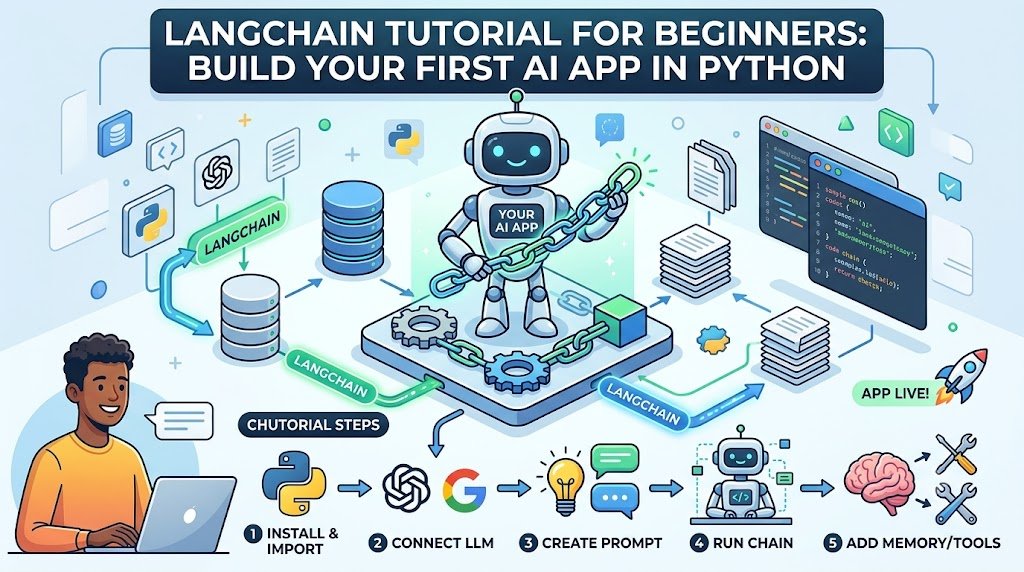
What Is LangChain?
LangChain is an open-source framework for building applications powered by large language models (LLMs).
It gives you standard building blocks — prompts, models, chains, memory, tools, and retrievers — so you do not rebuild the same plumbing for every AI app.
If you are building a chatbot, a RAG system, a document Q&A tool, or an AI agent, LangChain gives you the pieces to assemble it in Python (and JavaScript).
This tutorial walks you through building your first LangChain app in Python — from installation to a working RAG system.
For organisations building AI applications, Innovative AI Solutions provides AI development and generative AI services.
What You Will Build
By the end of this tutorial, you will have built:
| Step | What You Build |
|---|---|
| 1 | A basic LLM call |
| 2 | A prompt template |
| 3 | A chain |
| 4 | A chatbot with memory |
| 5 | A RAG app that answers from your documents |
All in Python, all runnable locally.
Prerequisites
| Requirement | Details |
|---|---|
| Python | 3.9 or higher |
| pip | Package manager |
| API key | OpenAI, Google, or Anthropic |
| Editor | VS Code, PyCharm, or similar |
| Terminal | Command line access |
Step 1: Install LangChain
Create a project folder and virtual environment.
bash mkdir langchain-tutorial cd langchain-tutorial python -m venv venv source venv/bin/activate # On Windows: venv\Scripts\activate Install LangChain and the OpenAI integration.
bash pip install langchain langchain-openai python-dotenv For other providers:
bash pip install langchain-google-genai # Gemini pip install langchain-anthropic # Claude
Step 2: Set Up Your API Key
Create a .env file in your project folder.
text
OPENAI_API_KEY=your_api_key_here
Load it in Python:
python from dotenv import load_dotenv load_dotenv() Never hardcode API keys in your code. Use environment variables.
Step 3: Your First LLM Call
Create step1_llm.py.
python from dotenv import load_dotenv from langchain_openai import ChatOpenAI
load_dotenv()
llm = ChatOpenAI(model="gpt-4o-mini", temperature=0.7)
response = llm.invoke("Explain what a large language model is in two sentences.") print(response.content) Run it:
bash python step1_llm.py What happened:
| Line | What It Does |
|---|---|
| load_dotenv() | Loads API key from .env |
| ChatOpenAI(...) | Creates an LLM instance |
| llm.invoke(...) | Sends a prompt, gets a response |
| response.content | Extracts the text |
Step 4: Prompt Templates
Hardcoding prompts is limiting. Prompt templates let you reuse prompts with variables.
Create step2_prompt.py.
python from dotenv import load_dotenv from langchain_openai import ChatOpenAI from langchain_core.prompts import ChatPromptTemplate
load_dotenv()
llm = ChatOpenAI(model="gpt-4o-mini", temperature=0.7)
prompt = ChatPromptTemplate.from_messages([ ("system", "You are a helpful assistant that explains things simply."), ("user", "Explain {topic} in {style} style.") ])
chain = prompt | llm
response = chain.invoke({ "topic": "vector databases", "style": "conversational" })
print(response.content) What happened:
| Component | What It Does |
|---|---|
| ChatPromptTemplate | Reusable prompt with variables |
| {topic}, {style} | Placeholders filled at runtime |
| prompt | llm | Pipes prompt into LLM (LCEL) |
| chain.invoke(...) | Runs the chain with variables |
Step 5: Understanding LCEL
LCEL (LangChain Expression Language) uses the pipe operator | to chain components.
python chain = prompt | llm | parser
| Component | Role |
|---|---|
| prompt | Formats input |
| llm | Generates response |
| parser | Processes output |
You can chain as many components as you need.
Adding an Output Parser
python from langchain_core.output_parsers import StrOutputParser
chain = prompt | llm | StrOutputParser() result = chain.invoke({"topic": "RAG", "style": "simple"}) print(result) # Just the string
Step 6: Build a Chatbot With Memory
LLMs are stateless. Memory lets them remember conversation.
Create step3_chatbot.py.
python from dotenv import load_dotenv from langchain_openai import ChatOpenAI from langchain_core.prompts import ChatPromptTemplate, MessagesPlaceholder from langchain_core.messages import HumanMessage, AIMessage
load_dotenv()
llm = ChatOpenAI(model="gpt-4o-mini", temperature=0.7)
prompt = ChatPromptTemplate.from_messages([ ("system", "You are a friendly assistant. Keep answers short."), MessagesPlaceholder(variable_name="history"), ("user", "{input}") ])
chain = prompt | llm
history = []
def chat(user_input): response = chain.invoke({ "history": history, "input": user_input }) history.append(HumanMessage(content=user_input)) history.append(AIMessage(content=response.content)) return response.content
Test the chatbot
print(chat("Hi, my name is Abhishek.")) print(chat("What is my name?")) print(chat("What did I just ask you?")) Run it:
bash python step3_chatbot.py What happened:
| Component | What It Does |
|---|---|
| MessagesPlaceholder | Reserves space for history |
| history | Stores conversation turns |
| HumanMessage, AIMessage | Message types |
| Loop | Maintains context across turns |
Step 7: Build a RAG App
RAG (Retrieval-Augmented Generation) lets your app answer from your own documents.
Install Dependencies
bash pip install langchain-community chromadb pypdf
Create a Document
Create knowledge.txt:
text Innovative AI Solutions is a Delhi-based AI development company. We build custom AI systems including chatbots, RAG systems, and AI agents. Our pricing starts at в‚№50,000 for simple projects. We serve clients across India and internationally. Contact: info@innovativeais.com
Build the RAG App
Create step4_rag.py.
python from dotenv import load_dotenv from langchain_openai import ChatOpenAI, OpenAIEmbeddings from langchain_community.document_loaders import TextLoader from langchain.text_splitter import RecursiveCharacterTextSplitter from langchain_community.vectorstores import Chroma from langchain_core.prompts import ChatPromptTemplate from langchain_core.output_parsers import StrOutputParser from langchain_core.runnables import RunnablePassthrough
load_dotenv()
1. Load documents
loader = TextLoader("knowledge.txt") documents = loader.load()
2. Split into chunks
splitter = RecursiveCharacterTextSplitter( chunk_size=500, chunk_overlap=50 ) chunks = splitter.split_documents(documents)
3. Create embeddings and vector store
embeddings = OpenAIEmbeddings() vectorstore = Chroma.from_documents(chunks, embeddings)
4. Create retriever
retriever = vectorstore.as_retriever(search_kwargs={"k": 2})
5. Create prompt
prompt = ChatPromptTemplate.from_messages([ ("system", "Answer the question using only the context below. " "If you don't know, say so.\n\nContext:\n{context}"), ("user", "{question}") ])
6. Create LLM
llm = ChatOpenAI(model="gpt-4o-mini", temperature=0)
7. Build RAG chain
def format_docs(docs): return "\n\n".join(doc.page_content for doc in docs)
rag_chain = ( {"context": retriever | format_docs, "question": RunnablePassthrough()} | prompt | llm | StrOutputParser() )
8. Ask questions
questions = [ "Where is Innovative AI Solutions based?", "What services do they offer?", "What is the starting price?",
"What is the capital of France?" # Out of context
]
for q in questions: print(f"Q: {q}") print(f"A: {rag_chain.invoke(q)}\n") Run it:
bash python step4_rag.py What happened:
| Step | What It Does |
|---|---|
| Load | Reads your document |
| Split | Breaks into chunks |
| Embed | Converts chunks to vectors |
| Store | Saves in Chroma |
| Retrieve | Finds relevant chunks |
| Augment | Adds chunks to prompt |
| Generate | LLM answers from context |
Step 8: Add Streaming
Streaming shows responses as they generate.
python for chunk in rag_chain.stream("What services do they offer?"): print(chunk, end="", flush=True)
Step 9: Add Conversation Memory to RAG
Combine RAG with memory for follow-up questions.
python from langchain_core.messages import HumanMessage, AIMessage
history = []
def chat_with_rag(question):
Retrieve context
docs = retriever.invoke(question) context = format_docs(docs)
Build messages
messages = [ ("system", f"Answer using this context:\n{context}") ] messages.extend(history) messages.append(("user", question))
Get response
response = llm.invoke(messages)
Update history
history.append(HumanMessage(content=question)) history.append(AIMessage(content=response.content))
return response.content
print(chat_with_rag("What services do they offer?")) print(chat_with_rag("Tell me more about the first one."))
Core LangChain Components
| Component | Purpose | Example |
|---|---|---|
| Models | LLMs and embeddings | ChatOpenAI, OpenAIEmbeddings |
| Prompts | Reusable templates | ChatPromptTemplate |
| Chains | Compose components | LCEL pipe |
| Memory | Conversation history | MessagesPlaceholder |
| Retrievers | Fetch relevant docs | vectorstore.as_retriever() |
| Vector Stores | Store embeddings | Chroma, Pinecone |
| Tools | Functions for agents | Custom tools |
| Agents | Autonomous decision-making | ReAct, OpenAI tools |
LangChain vs LlamaIndex
| Aspect | LangChain | LlamaIndex |
|---|---|---|
| Focus | General LLM apps | RAG and data |
| Flexibility | High | High for RAG |
| Learning curve | Moderate | Moderate |
| RAG | Good | Excellent |
| Agents | Excellent | Good |
| Community | Larger | Active |
Use LangChain for general apps and agents. Use LlamaIndex for RAG-heavy apps.
Common Errors and Fixes
| Error | Cause | Fix |
|---|---|---|
| API key not found | Missing .env | Check .env and load_dotenv() |
| Rate limit | Too many requests | Add delays, reduce calls |
| Token limit | Prompt too long | Reduce chunk size, context |
| Import error | Missing package | pip install langchain-... |
| Empty retrieval | Poor embeddings | Check chunks, embedding model |
| Hallucination | No context | Improve prompt, add citations |
Best Practices
| Practice | Why |
|---|---|
| Use environment variables | Keep keys safe |
| Use LCEL | Composable, standard |
| Chunk carefully | Better retrieval |
| Add citations | Traceable answers |
| Test prompts | Iterate for quality |
| Handle errors | Graceful failures |
| Log requests | Debug and monitor |
| Use streaming | Better UX |
Project Structure
text langchain-tutorial/ в”њв”Ђв”Ђ .env в”њв”Ђв”Ђ knowledge.txt в”њв”Ђв”Ђ requirements.txt в”њв”Ђв”Ђ step1_llm.py в”њв”Ђв”Ђ step2_prompt.py в”њв”Ђв”Ђ step3_chatbot.py в””в”Ђв”Ђ step4_rag.py
Next Steps
| What to Learn | Why |
|---|---|
| LangGraph | Build stateful agents |
| LangSmith | Debug and evaluate |
| Vector databases | Pinecone, Weaviate, pgvector |
| Tools and agents | Give AI actions |
| Deployment | Ship to production |
| Evaluation | Measure quality |
India-Specific Considerations
Cost
| Component | Cost (INR/month) |
|---|---|
| LLM API (low volume) | ₹500–₹5,000 |
| Embeddings | ₹200–₹2,000 |
| Vector store (Chroma self-hosted) | в‚№0 |
| Vector store (managed) | ₹1,500–₹15,000 |
| Hosting | ₹500–₹5,000 |
Indian LLMs
| Model | Use With LangChain |
|---|---|
| Sarvam | Via API |
| Krutrim | Via API |
| Gemini | langchain-google-genai |
Compliance
| Requirement | Impact |
|---|---|
| DPDPA | Avoid personal data in prompts |
| Data privacy | Self-host vector stores |
| AI governance | Log and audit |
Decision Framework
Is LangChain Right for You?
| Criteria | Weight | Score (1–5) | Weighted Score |
|---|---|---|---|
| Building an LLM app | 25% | ||
| Need composable components | 20% | ||
| Python or JS | 15% | ||
| Need RAG or agents | 20% | ||
| Want community support | 10% | ||
| Comfortable with abstractions | 10% | ||
| Total | 100% | /5 |
Recommended Framework
| If You... | Use |
|---|---|
| Build general LLM apps | LangChain |
| Build RAG-heavy apps | LlamaIndex |
| Build agents | LangChain or LangGraph |
| Want minimal abstraction | Raw SDK |
| Need both | LangChain + LlamaIndex |
Frequently Asked Questions
1. What is LangChain in simple words?
LangChain is a Python framework for building AI apps powered by LLMs. It gives you building blocks — prompts, chains, memory, retrievers, and agents — so you do not rebuild plumbing.
2. Do I need to know Python to use LangChain?
Yes. LangChain is a Python (and JavaScript) library. Basic Python is required.
3. Is LangChain free?
Yes. LangChain is open source. You pay for the LLM API and any managed services you use.
4. Which LLM should I use with LangChain?
OpenAI (GPT-4o mini), Google (Gemini), or Anthropic (Claude). LangChain supports all major providers.
5. What is LCEL?
LCEL (LangChain Expression Language) is the pipe-based syntax for composing components: prompt | llm | parser.
6. What is the difference between LangChain and LlamaIndex?
LangChain is general-purpose for LLM apps. LlamaIndex focuses on RAG and data. Both can be used together.
7. Can I build a chatbot with LangChain?
Yes. This tutorial shows a chatbot with memory in Step 6 and a RAG chatbot in Step 9.
8. What is RAG in LangChain?
RAG (Retrieval-Augmented Generation) retrieves relevant documents and adds them to the prompt so the LLM answers from your data.
9. How much does a LangChain app cost to run?
Low-volume apps cost ₹500–₹5,000/month for LLM API and embeddings. Vector store and hosting add ₹500–₹15,000/month.
10. What is LangGraph?
LangGraph is LangChain's framework for building stateful, multi-step agents. It extends LangChain for complex workflows.
11. What is LangSmith?
LangSmith is LangChain's platform for debugging, testing, and evaluating LLM apps.
12. How can Innovative AI Solutions help?
Innovative AI Solutions is a Delhi-based AI development company. We build LangChain apps — chatbots, RAG systems, and AI agents — with transparent pricing and full code ownership. Explore our generative AI services and AI agents.
Contact Innovative AI Solutions
Ready to build your first AI app?
We help Indian businesses design, build, and deploy LangChain applications with transparent pricing and full code ownership.
Contact Information
Innovative AI Solutions
📍 Netaji Subhash Place, Pitampura, Delhi – 110034
🌐 Website: https://innovativeais.com 📧 Email: info@innovativeais.com
рџ“ћ Phone: +91 7464 099 059 / +91 96899 67356
Business Services
•⁠⁠AI Automation •⁠⁠AI Development •⁠⁠AI Consulting
•⁠⁠Machine Learning Solutions
•⁠⁠Deep Learning Solutions
•⁠⁠Generative AI Services
•⁠⁠NLP Solutions •⁠⁠AI Agents •⁠⁠AI Chatbots •⁠⁠Voice AI •⁠⁠CRM Development
•⁠⁠Custom Software Development
•⁠⁠Website Development
•⁠⁠Mobile App Development
About the Author
Abhishek Kumar
Founder & CEO, Innovative AI Solutions
5+ years building production AI systems for Indian businesses. Based in Delhi, serving clients across India.
Ready to build your first AI app?
Innovative AI Solutions — Delhi's leading AI development company. Free consultation available.
Get Free Consultation в†’
A hands-on 2026 LangChain tutorial for beginners — install LangChain, connect an LLM, build chains, add memory, and create your first RAG app in Python.
#LangChain #Tutorial #Beginners #Python #2026 #AI #LLM #Chains #Memory #RAG #Agents #Chatbot #OpenAI #Gemini #Claude #VectorStore #PromptTemplate #India #DelhiNCRTech #AIDevelopment #MachineLearning #GenerativeAI #InnovativeAISolutions
Copyright © 2015–2026 Innovative AI Solutions. All Rights Reserved. | Privacy Policy | Terms & Conditions


