



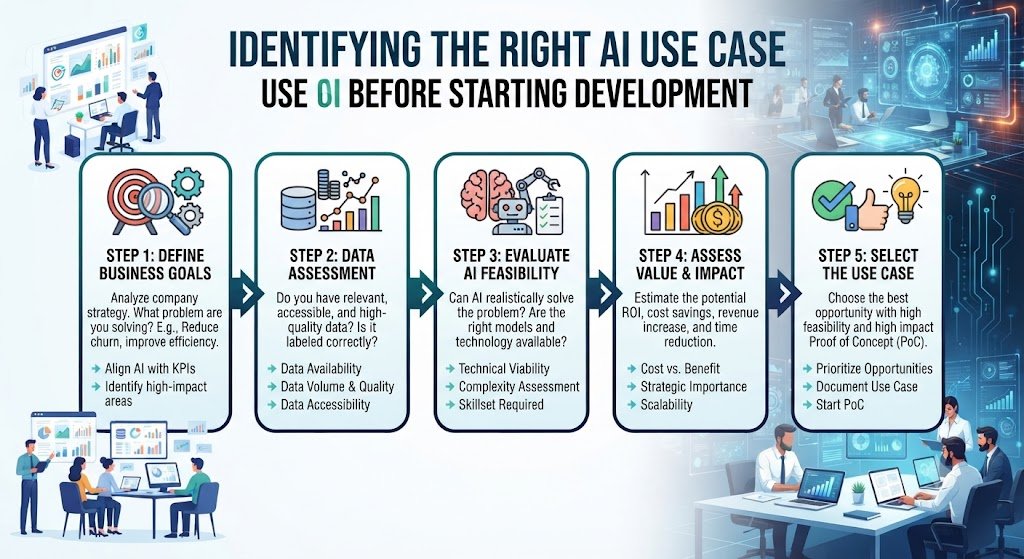
The Most Expensive AI Mistake Happens Before Development Begins Most AI projects do not fail because of bad engineering. They fail because the wrong problem was chosen.
A growing Indian business decides it needs AI. Leadership is excited. A vendor is selected. Development begins. Six months and several lakhs later, the system works — but nobody uses it. The process it automated was not a real bottleneck. The data was not ready. The team was not involved. The ROI never materialised.
This is not a technology failure. It is a use case selection failure.
The most important AI decision is not which model to use, which vendor to hire, or which platform to build on. It is choosing the right use case before development starts.
This guide provides a structured, India-specific framework for identifying the right AI use case. It covers where to look, how to score candidates, what data you need, how to calculate ROI, and how to avoid the mistakes that sink AI projects.
What Is an AI Use Case?
An AI use case is a specific business problem that AI can solve, with a defined process, measurable outcome, and identifiable owner.
It is not:
"We want to use AI"
"We need an AI strategy"
"We should automate something"
"Our competitors are using AI"
It is:
"We need to reduce invoice processing time from 4 hours to 30 minutes"
"We need to capture after-hours leads that currently go unanswered"
"We need to predict Diwali-season demand to reduce stockouts"
"We need to qualify 500 daily leads without adding sales headcount"
A good use case has four elements:
| Element | Question to Answer |
|---|---|
| Problem | What specific business problem are we solving? |
| Process | Which process does this affect? |
| Outcome | What measurable result do we expect? |
| Owner | Who is accountable for success? |
Why Use Case Selection Determines AI Project Success
The Cost of Choosing Wrong
| Mistake | Consequence |
|---|---|
| Automating a broken process | Faster bad outcomes |
| Choosing a low-volume process | ROI never materialises |
| Ignoring data readiness | Model performs poorly |
| No clear owner | Project stalls |
| Over-engineering the first project | High cost, low adoption |
| Ignoring governance | Regulatory and reputational risk |
| Skipping the pilot | Full investment in unproven solution |
The Cost of Choosing Right
Faster time to value
Higher adoption
Clear ROI
Stronger internal support for future AI projects
Lower risk
Better vendor alignment
The 7-Filter Framework for Identifying the Right AI Use Case
Use these seven filters to evaluate every candidate use case.
Filter 1: Business Value
Question: Does this use case solve a real, expensive, or painful problem?
What to look for:
Revenue impact (more sales, higher conversion, lower churn)
Cost impact (less manual work, fewer errors, lower headcount growth)
Risk impact (less fraud, better compliance, fewer penalties)
Customer impact (faster response, better experience)
Strategic impact (competitive advantage, scalability)
Red flags:
"It would be cool to have"
No clear business metric
Nobody can explain why it matters
Filter 2: Process Volume and Repetitiveness
Question: Is this process high-volume and repetitive enough to justify AI?
What to look for:
Daily, weekly, or monthly volume
Time spent per task
Number of people involved
Frequency of errors
Rule of thumb: If a process happens fewer than 50 times per month and takes less than 2 minutes per instance, AI may not be worth it.
Filter 3: Data Readiness
Question: Do we have the data AI needs?
What to check:
| Data Requirement | Why It Matters |
|---|---|
| Historical data exists | AI learns from past examples |
| Data is accessible | Systems can export or connect |
| Data is reasonably clean | Errors reduce model accuracy |
| Data is labelled (for supervised AI) | AI needs examples of correct outcomes |
| Data is compliant | DPDPA and privacy requirements |
| Data is sufficient in volume | Too little data produces weak models |
Red flags:
Data is trapped in paper records
Data is in disconnected spreadsheets
No historical data exists
Data contains personal information without consent
Filter 4: Technical Feasibility
Question: Can AI realistically solve this today?
What to look for:
Similar use cases exist in production
Vendors can demonstrate working systems
Integration points are clear (APIs, databases)
The process is rule-based enough or has enough examples
The solution does not require AGI or impossible accuracy
Red flags:
"No one has done this before"
Requires 100% accuracy in a subjective task
Depends on data you do not have
Integration is impossible with current systems
Filter 5: Governance and Compliance
Question: Can we deploy this responsibly under Indian law?
What to check:
Does it process personal data? (DPDPA applies)
Does it make decisions about people? (Explainability required)
Does it operate in a regulated industry? (RBI, SEBI, IRDAI, etc.)
Does it need human oversight?
Can we audit and explain decisions?
Red flags:
No consent mechanism for personal data
No audit trail
No human escalation path
Regulator has not approved similar use cases
Filter 6: Adoption and Change Readiness
Question: Will the team actually use it?
What to look for:
The team experiencing the pain wants a solution
Leadership supports the change
Training and support can be provided
The AI fits into existing workflows
The output is trusted and actionable
Red flags:
"We'll force them to use it"
Team was not consulted
The AI replaces tasks people enjoy or value
No plan for training
Filter 7: ROI and Payback
Question: Does the math work?
Basic ROI formula:
Annual Benefit =
(Time saved × Hourly cost) + (Error reduction × Cost per error) + (Revenue uplift) + (Risk reduction value)
Annual Cost =
(Implementation amortised over 3 years) + (Annual subscription) + (Internal management)
Payback Period =
Total Investment ÷ Annual Benefit
Target: Payback within 6–18 months for most Indian SMEs.
The AI Use Case Scorecard
Score each candidate use case from 1 to 5 on each criterion.
| Criterion | Weight | Score 1–5 | Weighted Score |
|---|---|---|---|
| Business value | 20% | ||
| Process volume | 15% | ||
| Repetitiveness | 10% | ||
| Data readiness | 15% | ||
| Technical feasibility | 10% | ||
| Governance and compliance | 10% | ||
| Adoption readiness | 10% | ||
| ROI and payback | 10% | ||
| Total | 100% | /5 |
Interpretation:
4.0+: Strong candidate. Proceed to pilot.
3.0–3.9: Possible candidate. Validate assumptions.
Below 3.0: Do not proceed. Fix gaps or choose another use case.
Where to Look for AI Use Cases in Your Business
1. Start with Pain Points
Ask teams:
What work frustrates you?
What takes too long?
What requires constant follow-up?
What causes errors?
What would you automate first?
2. Map High-Volume Processes
Look for:
Order processing
Invoice processing
Customer support
Lead qualification
Appointment scheduling
Document verification
Report generation
Employee onboarding
3. Find Revenue Leakage
Look for:
Leads not followed up
Carts abandoned
Invoices delayed
Renewals missed
Customers churning
Pricing errors
4. Identify Compliance and Risk Burdens
Look for:
Manual audits
Document checks
Fraud detection
Regulatory reporting
Data privacy management
5. Analyse Bottlenecks
Use process mining or manual observation to find:
Where work waits
Where handoffs lose time
Where rework happens
Where approvals slow things down
6. Review Customer Feedback
Look for:
Common complaints
Response time issues
Quality problems
Communication gaps
7. Examine Employee Time Use
Ask:
What do people spend most time on?
What tasks are repetitive?
What tasks require copy-paste?
What tasks switch between many systems?
Candidate Use Cases by Business Function
| Function | Common AI Use Cases | Typical ROI Timeline |
|---|---|---|
| Sales | Lead qualification, outreach, CRM entry, proposal generation | 3–6 months |
| Marketing | Personalisation, content generation, campaign analysis | 4–8 months |
| Customer Support | Query handling, ticket routing, status updates | 4–8 months |
| Operations | Order processing, inventory sync, scheduling | 4–10 months |
| Finance | Invoice processing, reconciliation, reporting | 4–8 months |
| HR | Resume screening, onboarding, query handling | 4–8 months |
| Procurement | Vendor document processing, PO matching, approvals | 5–10 months |
| IT | Ticket triage, password resets, monitoring | 3–6 months |
| Legal/Compliance | Document review, contract analysis, regulatory tracking | 6–12 months |
| Manufacturing | Quality checks, predictive maintenance, demand forecasting | 6–12 months |
Data Readiness Checklist
Before choosing a use case, verify data readiness.
□ Historical data exists for at least 3–6 months □ Data is stored digitally □ Data can be exported or accessed via API □ Data quality is acceptable (low error rate) □ Data is labelled or outcomes are recorded □ Data volume is sufficient (hundreds to thousands of examples) □ Personal data is handled with consent under DPDPA □ Data is secure and access-controlled □ Data ownership is clear □ Data can be used for AI training without violating contracts If most boxes are unchecked, the use case is not ready. Fix data first.
How to Calculate ROI for an AI Use Case
Step 1: Quantify Current Cost
| Cost Category | Calculation | Example |
|---|---|---|
| Labour | Hours × hourly cost | 4 hrs/day × ₹300/hr = ₹1,200/day |
| Errors | Error rate × cost per error | 5% × ₹500 = ₹25/order |
| Delays | Delay cost per day | ₹10,000/day lost revenue |
| Opportunity | Missed leads × conversion × value | 100 leads × 10% × ₹5,000 = ₹50,000 |
Step 2: Estimate AI Impact
| Impact Category | Estimated Reduction |
|---|---|
| Labour | 60–90% |
| Errors | 50–80% |
| Delays | 40–70% |
| Opportunity | 15–30% improvement |
Step 3: Estimate AI Cost
| Cost Category | Typical Range (INR) |
|---|---|
| Discovery and design | ₹50,000–₹2,00,000 |
| Development | ₹1,50,000–₹8,00,000 |
| Integration | ₹50,000–₹3,00,000 |
| Ongoing monthly | ₹10,000–₹75,000 |
Step 4: Calculate Payback
Example:
Current annual cost: ₹18,00,000
Estimated annual savings: ₹12,00,000
Implementation cost: ₹4,00,000
Ongoing annual cost: ₹3,00,000
Net annual benefit: ₹9,00,000
Payback: 4,00,000 ÷ 9,00,000 = 5.3 months
Pilot Design: Testing the Use Case Before Full Development
A pilot is the bridge between use case selection and full development.
Pilot Principles
| Principle | Description |
|---|---|
| Small scope | One process, one team, one metric |
| Real data | Use actual business data, not samples |
| Defined success | Metrics agreed before start |
| Time-boxed | 3–6 weeks |
| Paid | Vendors should be paid for pilots |
| Documented | Learnings captured for scale decision |
Pilot Success Metrics
Time reduction
Error reduction
Cost per transaction
User adoption
Integration success
Model accuracy
Business impact
Pilot Investment
| Pilot Type | Duration | Cost (INR) | Cost (USD) |
|---|---|---|---|
| Simple automation | 3–4 weeks | ₹75,000–₹1,50,000 | $900–$1,800 |
| AI assistant | 4–6 weeks | ₹1,50,000–₹3,00,000 | $1,800–$3,600 |
| Complex workflow | 6–8 weeks | ₹3,00,000–₹5,00,000 | $3,600–$6,000 |
Build vs. Buy vs. Pilot: Choosing the Right Path
| Option | When to Choose | Pros | Cons |
|---|---|---|---|
| Off-the-shelf tool | Standard use case, low complexity | Fast, low cost | Limited customisation |
| Custom development | Unique process, integration needs | Fits exactly | Higher cost, longer timeline |
| Pilot first | Uncertain ROI, new use case | Validates before full investment | Adds 3–6 weeks |
| Staff augmentation | Internal team needs AI skills | Flexible | Management overhead |
| Consulting + build | Need strategy and execution | End-to-end | Higher cost |
Common Mistakes in AI Use Case Selection
Mistake 1: Starting with technology, not problem. "We want AI" is not a use case.
Mistake 2: Choosing the most exciting use case, not the most valuable. Excitement does not pay bills.
Mistake 3: Ignoring data readiness. No data, no AI.
Mistake 4: Automating a broken process. Fix the process first.
Mistake 5: No clear owner. Projects without owners stall.
Mistake 6: Skipping governance. DPDPA and MeitY guidelines apply.
Mistake 7: Expecting 100% automation. Plan for human-in-the-loop.
Mistake 8: Not involving the team. Adoption fails without buy-in.
Mistake 9: Underestimating integration. AI that does not connect creates new work.
Mistake 10: No pilot. Full investment without validation is risky.
Frequently Asked Questions
1. What is an AI use case?
An AI use case is a specific business problem that AI can solve, with a defined process, measurable outcome, and accountable owner. It is not a general desire to "use AI."
2. Why is use case selection important before development?
Because the wrong use case wastes time, money, and trust. Most AI project failures are use case failures, not technology failures.
3. How many AI use cases should we evaluate?
Start with 5–10 candidate use cases. Score them using the framework. Shortlist 2–3. Pilot one.
4. What data do we need before starting AI development?
You need historical data relevant to the problem, stored digitally, accessible, reasonably clean, and sufficient in volume. For supervised AI, you need labelled examples.
5. How do we calculate ROI for an AI use case?
Quantify current labour cost, error cost, delay cost, and opportunity cost. Estimate AI impact. Estimate implementation and ongoing costs. Calculate payback period.
6. What is a good payback period for AI in India?
Most Indian SMEs should target payback within 6–18 months. High-volume, repetitive processes often pay back in 3–8 months.
7. Should we build custom AI or use off-the-shelf tools?
Use off-the-shelf for standard use cases. Build custom for unique processes, complex integrations, or competitive advantage. Pilot first when uncertain.
8. How do we know if our data is ready for AI?
Use the data readiness checklist in this guide. If most boxes are unchecked, fix data first.
9. What is the role of governance in use case selection?
Governance determines whether a use case can be deployed responsibly. DPDPA and MeitY guidelines apply. Use cases involving personal data or high-stakes decisions need stronger oversight.
10. How long does it take to identify the right AI use case?
A structured discovery and scoring process takes 1–3 weeks. A pilot adds 3–6 weeks. Full development follows only after validation.
11. What if we choose the wrong use case?
A pilot limits the damage. If the pilot fails, you learn why and choose another use case without full investment.
12. How can Innovative AI Solutions help?
Innovative AI Solutions is a Delhi-based AI development company specialising in AI use case discovery, pilot design, and production development for Indian businesses. We help you identify the right use case, validate it with a pilot, and build only what creates measurable value. Learn more at https://innovativeais.com.
Contact Innovative AI Solutions
Ready to identify the right AI use case before you invest in development?
We help Indian businesses choose, validate, and build AI systems that deliver measurable ROI.
Contact Information
Innovative AI Solutions
📍 Netaji Subhash Place, Pitampura, Delhi – 110034
🌐 Website: https://innovativeais.com 📧 Email: info@innovativeais.com
📞 Phone: +91 7464 099 059 / +91 96899 67356
Business Services
• AI Automation
• AI Development
• AI Consulting
• Machine Learning Solutions
• Deep Learning Solutions
• Generative AI Services
• NLP Solutions
• AI Agents
• AI Chatbots
• Voice AI
• CRM Development
• Custom Software Development
• Website Development
• Mobile App Development
About the Author
Abhishek Kumar
Founder & CEO, Innovative AI Solutions
5+ years building production AI systems for Indian businesses. Based in Delhi, serving clients across India.
Ready to build AI solutions for your business?
Innovative AI Solutions — Delhi's leading AI development company. Free consultation available.
Get Free Consultation →
A practical 2026 framework for Indian businesses to identify the right AI use case before development — so every AI project starts with value, data, and governance in place.
#AIUseCase #AIProjectSelection #AIFramework #AIforSMEs #AIDevelopmentIndia #AIconsultingDelhi #DataReadiness #AIROI #AIPilot #AIGovernance #DPDPA #MeitYGuidelines #AIimplementation #DigitalTransformation #DelhiNCRTech #BusinessAI #AIStrategy #AIAdoption #AIcost #AIvalue #TechDecision #IndianBusiness #SmartAI #InnovativeAISolutions
Copyright ©️ 2015–2026 Innovative AI Solutions. All Rights Reserved. | Privacy Policy | Terms & Conditions


