Why Enterprises Need AI Document Processing
Every enterprise processes documents. Invoices. Purchase orders. KYC documents. Contracts. Claims. Applications. Shipping documents. Bank statements. The volume is enormous, and most of it is still handled manually.
Manual document processing is slow, expensive, and error-prone. Someone receives a document, reads it, extracts data, enters it into a system, and routes it for the next step. Each document takes minutes. At scale, this becomes a significant cost centre.
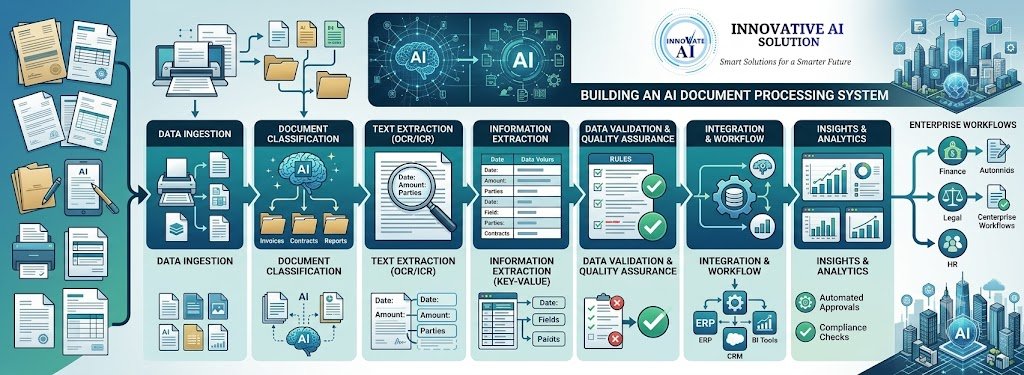
AI document processing changes this. Documents are ingested automatically, data is extracted using OCR and AI, values are validated against rules and databases, exceptions are routed to humans, and validated data flows into business systems — all without manual intervention for the majority of documents.
This guide explains how to build an AI document processing system for enterprise workflows in 2026. It covers architecture, OCR, extraction, validation, exception handling, integration, and costs in India.
For organisations building document processing systems, Innovative AI Solutions provides AI automation services and custom software development.
What AI Document Processing Does
The Capabilities
| Capability | What It Does |
|---|
| Document intake | Receive documents from any source |
| Classification | Identify document type |
| OCR | Extract text from images |
| Field extraction | Extract specific fields |
| Validation | Check data correctness |
| Exception routing | Send uncertain documents to humans |
| System integration | Push data to business systems |
| Audit logging | Record all processing |
The Business Value
| Metric | Manual | AI Automated |
|---|
| Processing time | 10 minutes/document | 30 seconds/document |
| Cost per document | ₹50–₹150 | ₹5–₹20 |
| Error rate | 3–5% | 0.5–2% |
| Capacity | 50/day/person | 1,000+/day/system |
Document Types Handled
| Industry | Document Types |
|---|
| Banking | KYC, cheques, statements |
| Insurance | Claims, policies |
| Healthcare | Patient records, prescriptions |
| Logistics | Shipping documents, e-way bills |
| Retail | Invoices, purchase orders |
| Government | Applications, records |
Architecture of an AI Document Processing System
The Core Pipeline
text Document intake (email, scan, API, upload) ↓ Document classification (identify type) ↓ Preprocessing (deskew, denoise, enhance) ↓ OCR (text detection + recognition) ↓ Layout analysis (understand structure) ↓ Field extraction (identify and extract fields) ↓ Validation (check correctness) ↓ Confidence assessment ├── High confidence → Auto-process └── Low confidence → Human review ↓ System integration (push to ERP, CRM, database) ↓ Audit logging
Component 1: Document Intake
| Source | Integration |
|---|
| Email | Email parsing, attachment extraction |
| Scan folders | Batch monitoring |
| API uploads | REST API |
| Mobile capture | App integration |
| Cloud storage | Event triggers |
Component 2: Document Classification
| Classification | Purpose |
|---|
| Document type | Route to appropriate extraction |
| Vendor | Use vendor-specific templates |
| Priority | Queue ordering |
| Quality | Pre-emptive handling |
Component 3: OCR
| OCR Type | Best For |
|---|
| Printed text OCR | Standard documents |
| Handwriting recognition | Handwritten forms |
| Mixed recognition | Documents with both |
Component 4: Field Extraction
| Extraction Method | Best For |
|---|
| Template-based | Consistent layouts |
| AI-based | Variable layouts |
| Hybrid | Mixed documents |
Component 5: Validation
| Validation Type | Purpose |
|---|
| Format validation | Field formats |
| Range validation | Value ranges |
| Cross-field validation | Consistency |
| Database validation | Against master data |
| Checksum validation | Numbers with checksums |
Component 6: Exception Handling
| Exception Type | Handling |
|---|
| Low confidence | Human review |
| Validation failure | Human review |
| OCR failure | Retry, then review |
| Unusual format | Manual handling |
Component 7: System Integration
| Target System | Integration |
|---|
| ERP | Push invoices, orders |
| CRM | Push customer data |
| Database | Store structured data |
| Workflow tools | Trigger processes |
Building the System: Step by Step
Step 1: Assess Document Landscape (Weeks 1–3)
| Activity | Purpose |
|---|
| Inventory document types | Know what you process |
| Measure volume | Quantify opportunity |
| Assess quality | Identify challenges |
| Map current process | Understand workflow |
| Calculate current cost | Baseline for ROI |
Step 2: Define Extraction Requirements (Weeks 3–4)
| Activity | Purpose |
|---|
| Define fields per document type | What to extract |
| Define validation rules | How to check |
| Define exception rules | When to escalate |
| Define integration targets | Where data goes |
Step 3: Build OCR and Extraction (Weeks 4–10)
| Activity | Purpose |
|---|
| Implement OCR | Text extraction |
| Implement classification | Document routing |
| Implement field extraction | Data extraction |
| Test accuracy | Verify quality |
Step 4: Build Validation (Weeks 8–14)
| Activity | Purpose |
|---|
| Implement format validation | Check formats |
| Implement cross-field validation | Check consistency |
| Implement database validation | Check against master data |
| Test validation | Verify accuracy |
Step 5: Build Exception Handling (Weeks 12–18)
| Activity | Purpose |
|---|
| Build human review queue | Exception handling |
| Build review interface | Efficient review |
| Implement escalation | Route complex cases |
| Track exception rates | Monitor quality |
Step 6: Build Integration (Weeks 16–22)
| Activity | Purpose |
|---|
| Integrate with ERP | Push invoice data |
| Integrate with CRM | Push customer data |
| Integrate with workflows | Trigger processes |
| Test end-to-end | Verify data flow |
Step 7: Deploy and Optimise (Weeks 22+)
| Activity | Purpose |
|---|
| Staged rollout | Manage risk |
| Monitor accuracy | Track quality |
| Optimise exception rates | Reduce manual review |
| Scale to more document types | Expand coverage |
What It Costs in India
Implementation Costs
| Scope | Cost Range (INR) | Cost Range (USD) | Timeline |
|---|
| Single document type | ₹3,00,000–₹8,00,000 | $3,600–$9,600 | 8–14 weeks |
| Multi-document types | ₹8,00,000–₹20,00,000 | $9,600–$24,000 | 14–24 weeks |
| Full document platform | ₹20,00,000–₹50,00,000 | $24,000–$60,000 | 24–40 weeks |
| Enterprise document AI | ₹50,00,000–₹1,50,00,000+ | $60,000–$180,000+ | 40–64 weeks |
Cost by Component
| Component | Cost Range (INR) | Cost Range (USD) |
|---|
| OCR implementation | ₹1,00,000–₹4,00,000 | $1,200–$4,800 |
| Classification | ₹75,000–₹3,00,000 | $900–$3,600 |
| Field extraction | ₹2,00,000–₹6,00,000 | $2,400–$7,200 |
| Validation | ₹1,50,000–₹5,00,000 | $1,800–$6,000 |
| Exception handling | ₹1,00,000–₹4,00,000 | $1,200–$4,800 |
| System integration | ₹2,00,000–₹8,00,000 | $2,400–$9,600 |
Ongoing Costs
| Cost Category | Monthly Range (INR) | Monthly Range (USD) |
|---|
| OCR/AI API usage | ₹10,000–₹80,000 | $120–$960 |
| Infrastructure | ₹10,000–₹50,000 | $120–$600 |
| Human review (exceptions) | ₹30,000–₹3,00,000 | $360–$3,600 |
| Monitoring | ₹5,000–₹30,000 | $60–$360 |
| Maintenance | ₹15,000–₹80,000 | $180–$960 |
Cost Per Document
| Document Type | Manual Cost (INR) | AI Cost (INR) |
|---|
| Simple invoice | ₹50–₹80 | ₹2–₹8 |
| Complex form | ₹80–₹150 | ₹5–₹20 |
| KYC document | ₹40–₹100 | ₹3–₹12 |
| Contract | ₹200–₹500 | ₹15–₹50 |
ROI Calculation
| Factor | Value |
|---|
| Monthly documents | 10,000 |
| Manual cost per document | ₹80 |
| Monthly manual cost | ₹8,00,000 |
| Automation rate | 80% |
| AI cost per document | ₹8 |
| AI cost for automated | ₹64,000 |
| Human cost for exceptions | ₹1,60,000 |
| Total AI system cost | ₹2,24,000 |
| Monthly saving | ₹5,76,000 |
| Annual saving | ₹69,12,000 |
| Payback period | Under 3 months |
Validation and Exception Handling
Why Validation Matters
Raw OCR achieves 95–99% accuracy. Validation pushes effective accuracy to 98–99.5%.
| Validation Layer | Accuracy |
|---|
| Raw OCR | 95–99% |
| + Format validation | 97–99% |
| + Cross-field validation | 98–99.5% |
| + Database validation | 99–99.9% |
Exception Rate Management
| Exception Rate | Review Burden (10,000 docs/month) |
|---|
| 1% | 100 documents |
| 2% | 200 documents |
| 5% | 500 documents |
| 10% | 1,000 documents |
Every percentage point of exception rate adds significant review burden. Reducing exceptions is a key optimisation.
Exception Reduction Strategies
| Strategy | Impact |
|---|
| Better document capture | Fewer low-quality scans |
| Improved OCR models | Higher raw accuracy |
| Better validation | Catch errors earlier |
| Error pattern analysis | Fix systematic issues |
India-Specific Considerations
Common Indian Documents
| Document | Processing Consideration |
|---|
| GST invoices | Variable layouts, specific fields |
| E-way bills | Standardised format |
| Aadhaar/PAN | Standard formats, sensitive |
| Cheques | MICR, handwritten amount |
| Bank statements | Varied formats by bank |
| Property documents | Poor quality, stamps |
Indian Language Support
| Language | Support Level |
|---|
| English | Excellent |
| Hindi | Good |
| Hinglish | Moderate |
| Regional languages | Variable |
Compliance
| Requirement | Implementation |
|---|
| DPDPA | Data protection, consent |
| RBI | Financial data handling |
| IRDAI | Insurance data requirements |
| Audit trails | Log all processing |
Decision Framework: Document Processing Readiness
Readiness Scorecard
| Criteria | Weight | Score (1–5) | Weighted Score |
|---|
| Document volume justifies investment | 25% |
| Document types identified | 20% |
| Fields defined | 15% |
| Systems integrable | 15% |
| Exception handling plan | 15% |
| Budget for implementation | 10% |
| Total | 100% | /5 |
Document Priority Matrix
| Document Type | Volume | Complexity | Priority |
|---|
| High volume, simple | High | Low | Immediate |
| High volume, complex | High | High | High |
| Low volume, simple | Low | Low | Medium |
| Low volume, complex | Low | High | Evaluate |
Implementation Roadmap
| Phase | What to Build | Timeline | Cost (INR) |
|---|
| Phase 1 | OCR, classification | 6–10 weeks | ₹2,00,000–₹7,00,000 |
| Phase 2 | Field extraction, validation | 6–10 weeks | ₹3,50,000–₹11,00,000 |
| Phase 3 | Exception handling | 4–6 weeks | ₹1,00,000–₹4,00,000 |
| Phase 4 | System integration | 4–6 weeks | ₹2,00,000–₹8,00,000 |
Frequently Asked Questions
1. What is an AI document processing system?
An AI document processing system ingests documents, extracts data using OCR and AI, validates the data, routes exceptions to humans, and pushes validated data into business systems.
2. How much does it cost to build an AI document processing system in India?
Single document type costs ₹3,00,000–₹8,00,000 ($3,600–$9,600). Multi-document types cost ₹8,00,000–₹20,00,000 ($9,600–$24,000). Full platforms cost ₹20,00,000–₹50,00,000 ($24,000–$60,000).
3. How accurate is AI document processing?
Raw OCR achieves 95–99% accuracy. With validation, 98–99.5%. With human review of exceptions, 99.5–99.9%.
4. How much can I save with document processing automation?
For 10,000 documents monthly, automation saves ₹5,76,000 monthly with payback under 3 months. At 80% automation rate with ₹8 per document cost.
5. What documents can be processed?
Invoices, purchase orders, KYC documents, contracts, claims, applications, shipping documents, bank statements, and any document with structured information.
6. How do I handle exceptions?
Build a human review queue for low-confidence and validation-failure documents. Track exception rates and work to reduce them through better capture and validation.
7. Can AI document processing handle Indian languages?
English is excellent. Hindi is good. Hinglish is moderate. Regional language support varies. Verify capability for your specific documents.
8. What validation should I implement?
Format validation (field formats), cross-field validation (consistency), database validation (against master data), and checksum validation (for numbers with checksums).
9. How do I integrate with existing systems?
Use API integration for real-time data push, batch integration for scheduled transfers, or file-based integration for legacy systems. Data mapping translates between formats.
10. How does DPDPA affect document processing?
DPDPA requires data protection, consent, and audit trails. Documents containing personal data must be processed compliantly.
11. How long does it take to build?
Single document type takes 8–14 weeks. Multi-document types take 14–24 weeks. Full platforms take 24–40 weeks.
12. How can Innovative AI Solutions help?
Innovative AI Solutions is a Delhi-based AI development company that builds document processing systems. We implement OCR, field extraction, validation, exception handling, and system integration — designed for Indian document types and DPDPA compliance. Explore our AI automation services and custom software development.
Contact Innovative AI Solutions
Ready to automate your document processing?
We help Indian enterprises build AI document processing systems that extract, validate, and route documents automatically.
Contact Information
Innovative AI Solutions
📍 Netaji Subhash Place, Pitampura, Delhi – 110034
🌐 Website: https://innovativeais.com 📧 Email: info@innovativeais.com
📞 Phone: +91 7464 099 059 / +91 96899 67356
Business Services
• AI Automation • AI Development • AI Consulting • Machine Learning Solutions • Deep Learning Solutions • Generative AI Services • NLP Solutions • AI Agents • AI Chatbots • Voice AI • CRM Development • Custom Software Development • Website Development • Mobile App Development
About the Author
Abhishek Kumar
Founder & CEO, Innovative AI Solutions
5+ years building production AI systems for Indian businesses. Based in Delhi, serving clients across India.
Ready to build AI solutions for your business?
Innovative AI Solutions — Delhi's leading AI development company. Free consultation available.
Get Free Consultation →
A complete 2026 guide to building an AI document processing system for enterprise workflows — architecture, OCR, extraction, validation, and costs in India.
#AIDocumentProcessing #EnterpriseWorkflows #2026 #OCR #Extraction #Validation #IDP #IntelligentDocumentProcessing #InvoiceProcessing #KYCAutomation #DocumentAI #Architecture #Implementation #Costs #India #DelhiNCRTech #EnterpriseApps #StartupApps #DocumentAutomation #TechIndia #DigitalProducts #WorkflowAutomation #BusinessAutomation #DataExtraction #InnovativeAISolutions
Copyright © 2015–2026 Innovative AI Solutions. All Rights Reserved. | Privacy Policy | Terms & Conditions