



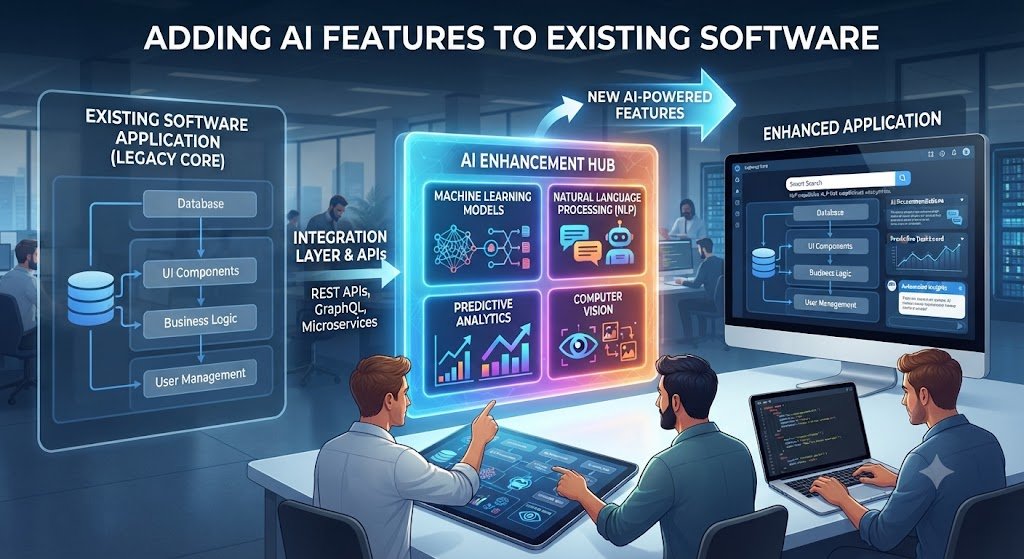
The Additive Approach: Why Most Businesses Should Not Rebuild to Add AI Your software works. It processes orders, manages customers, handles invoices, and runs your operations. The last thing you want is to freeze the roadmap for a full rewrite just to add AI.
The good news: you do not need to. Most AI features that move retention and revenue attach as a thin layer that reads the data you already store, calls a model over an API, and returns the result through the routes you already run.
This is the additive approach — integrating AI capabilities into your existing application without replacing its core architecture. It preserves what works while injecting intelligence where it matters.
The evidence supports this approach. A study found that 95% of enterprise generative AI pilots delivered no measurable profit impact, and the cause traced back to weak integration with real workflows rather than to the model itself. The model is rarely the problem. Integration is.
This guide covers the architecture patterns, integration strategies, implementation steps, costs, and governance requirements for adding AI features to existing software applications in 2026.
The Core Principle: Integrate, Do Not Rebuild
Traditional software follows a simple flow: User → UI → API → Database. Adding AI introduces a new layer between the API and the database — an intelligence layer that handles unstructured data and non-deterministic outputs.
The goal is to add this layer without rewriting the core. This means:
Preserving existing business logic while unlocking new capabilities
Using API-first strategies to connect legacy stacks with modern AI models
Implementing incrementally through modular plugins or microservices to avoid downtime and excessive costs
The AI Integration Architecture
New Components Required
| Component | Purpose | Example |
|---|---|---|
| Orchestration Layer | Manages flow between user input, context, and retrieved data | LangChain, custom service |
| Vector Database | Stores embeddings for semantic search | Pinecone, Weaviate, pgvector |
| AI Gateway | Centralizes routing, security, and provider switching | Custom proxy, APISIX |
| Guardrails | Prevents hallucinations, data leaks, off-brand responses | Hard-coded logic, policy engine |
| Evaluation Layer | Tests AI outputs against golden datasets | LLM-as-judge, regression gates |
A typical AI-native architecture inserts these components between the existing API layer and database, creating a new intelligence path while leaving the original CRUD path intact.
The Three Non-Invasive Architecture Patterns
Pattern 1: The Wrapper Pattern (Facade)
A new AI service wraps the existing system. The AI reads from existing APIs, processes data, and returns results through a new interface. The core application remains untouched.
Best for: Semantic search, content generation, classification features added to stable applications.
Pattern 2: The Asynchronous Data Pipeline
AI processes data asynchronously. When a record is created or updated, a job queues the AI processing. Results are written back when ready.
Best for: Batch classification, document processing, enrichment features that do not require immediate results.
Pattern 3: The Intelligent Proxy Layer
An AI gateway sits between the user and the application. It intercepts requests, applies intelligence (routing, enrichment, validation), and forwards to the core system.
Best for: Adding AI to existing user interfaces without modifying them, gradual rollout of AI capabilities.
What Data AI Needs
AI integration depends on data. Before choosing an architecture pattern, assess your data readiness.
| Data Requirement | What to Check |
|---|---|
| API availability | Does your system expose documented REST or GraphQL APIs? |
| Data accessibility | Can you query records programmatically? |
| Data cleanliness | Is the data structured and reasonably accurate? |
| Data volume | Do you have enough historical examples for AI to learn? |
| Data compliance | Does the data contain personal information requiring DPDPA compliance? |
Modern, API-ready systems with clean data land at the low end of integration cost. Legacy systems with no clean data access land at the high end — not because the AI is harder to build, but because the path to reach the data is longer and less predictable.
Where to Add AI Features in Your Application
High-Impact AI Features by Application Type
| Application Type | AI Feature | Integration Effort | Business Impact |
|---|---|---|---|
| CRM | Lead scoring, email drafting, conversation summaries | Medium | High |
| ERP | Invoice processing, demand forecasting, anomaly detection | High | High |
| Support Desk | Query classification, suggested responses, auto-routing | Low-Medium | High |
| E-commerce | Product recommendations, semantic search, review analysis | Medium | High |
| HR Platform | Resume screening, onboarding automation, query handling | Medium | Medium |
| Analytics | Natural language queries, automated insights, anomaly alerts | Medium | High |
| Document Management | Intelligent search, extraction, classification | Low-Medium | High |
The Safest First Features
Semantic search and classification are the safest first bets. Both read data you already hold and write a result back without changing any flow your users touch, which keeps the blast radius small.
Implementation Roadmap: From Assessment to Production
Phase 1: Opportunity Audit (Weeks 1–2)
Identify where AI creates the most value with the least disruption. Score candidates by business impact, integration complexity, and data readiness.
Phase 2: Architecture Design (Weeks 2–4)
Choose the integration pattern (wrapper, async pipeline, or proxy). Define API contracts between the AI layer and existing systems. Select AI providers and vector database.
Phase 3: Proof of Concept (Weeks 4–8)
Build a working prototype with real data. Test the integration path end to end. Validate that the AI output is accurate and useful.
Pilot investment: ₹1.5–5 lakhs ($2,000–$6,000) for a narrow use case
Phase 4: Shadow Mode Pilot (Weeks 8–12)
Run the AI alongside existing processes without exposing it to users. Compare AI outputs against human outputs. Measure accuracy, latency, and cost.
Phase 5: Incremental Rollout (Weeks 12–20)
Deploy to a small percentage of traffic using feature flags. Monitor quality, latency, and user feedback. Gradually increase exposure — 1%, then 10%, then 25%, then 50%, then 100%.
Phase 6: Full Integration and Monitoring (Ongoing)
Add the AI feature to the standard release process. Monitor token costs, model performance, and user adoption. Plan model updates and retraining.
Technical Implementation: Stack-Specific Guidance
Node.js Applications
For Node.js apps, AI features attach as a thin layer over existing Express or Fastify routes. Key considerations:
| Challenge | Solution |
|---|---|
| Event loop blocking | Move CPU-heavy work (embedding math, image processing) to worker threads |
| Long response times | Stream tokens to the browser via Server-Sent Events or WebSockets |
| Timeout failures | Raise timeout limits on AI routes, or stream to keep connections alive |
| Cost runaway | Implement rate limiting and context management |
A full AI answer can take 10 to 30 seconds. Users will not wait for a spinner. Streaming tokens makes the response appear as it is written, the way ChatGPT does.
Python/Django Applications
Django's Python foundation provides direct access to the AI/ML ecosystem. AI features integrate through Django REST Framework endpoints that call models or AI APIs.
RAG: Retrieval-Augmented Generation
The most common mistake is trying to fine-tune a model on your product data. For 99% of use cases, fine-tuning is the wrong approach. It is expensive, slow to update, and does not prevent hallucinations.
The industry standard is RAG. A robust RAG pipeline includes:
Hybrid Search — combines vector similarity with keyword matching
LLM Reranker — evaluates candidates to ensure only the highest-precision context reaches the final model
Grounded Generation — the AI answers from retrieved facts, not from its training data
AI Integration Costs in India: 2026 Benchmarks
Cost by Integration Path
| Integration Path | Cost Range (INR) | Cost Range (USD) | What It Includes |
|---|---|---|---|
| Modern, API-ready system | ₹4–12 lakhs | $4,800–$14,400 | Native API connection, minimal changes, single feature |
| Partially modern system | ₹12–25 lakhs | $14,400–$30,000 | Some custom middleware, multiple integration points |
| Legacy system | ₹25–40 lakhs+ | $30,000–$48,000+ | Custom middleware, data access layer from scratch |
These ranges cover a single AI feature added to one existing system: scoping, integration work, testing, and deployment.
Cost by Project Tier
| Tier | What You Get | Typical Cost (INR) | Timeline |
|---|---|---|---|
| Pilot / POC | One narrow use case, one system | ₹1.5–5 lakhs | 2–4 weeks |
| Entry integration | Single AI feature connected to one live system | ₹4–12 lakhs | 4–8 weeks |
| Standard SMB build | AI connected to 2–3 systems with real workflows | ₹12–35 lakhs | 8–16 weeks |
| Advanced multi-system | Custom logic, RAG on your data, multiple channels | ₹35–80 lakhs | 4–8 months |
Most small businesses land in the first three tiers.
Ongoing Costs
| Cost Component | Monthly Range (INR) | Monthly Range (USD) |
|---|---|---|
| LLM API calls | ₹4,000–₹2,00,000+ | $48–$2,400+ |
| Vector database | ₹3,000–₹30,000 | $36–$360 |
| Cloud infrastructure | ₹5,000–₹50,000 | $60–$600 |
| Monitoring and evaluation | ₹10,000–₹50,000 | $120–$600 |
| Maintenance | ₹15,000–₹75,000 | $180–$900 |
A custom agent in India runs roughly ₹8–20 lakhs for a startup-grade bot, plus monthly LLM API costs from about ₹4,000 to ₹25,000 at 5,000 conversations a month.
Security and Compliance for AI Integration
Security Patterns for Production AI Features
Deploying AI features securely means controlling what the AI layer can access, execute, and retain.
Zero Trust for AI: Every AI interaction should be authenticated and authorized. Use token-based identity for employees and partners. Apply least-privilege access controls.
Data Masking: Mask sensitive data in both request and response layers. Prevent exfiltration patterns without altering existing API infrastructure.
API Key Injection: Keep API keys backend-only. Never expose them in prompts, memory, or model-accessible context.
Sandboxed Execution: Run AI-generated code in isolated environments with OS-level isolation. Enforce policies at the OS level rather than the application layer.
Audit Logging: Correlate AI traces with platform audit logs. Every AI action should be attributable and reviewable.
DPDPA Requirements for AI Features
The DPDP Rules, 2025 apply to AI systems processing personal data. For AI features added to existing software:
| Requirement | Implementation |
|---|---|
| Data Minimisation | AI should access only the data necessary for its task |
| Purpose Limitation | Data collected for one purpose cannot be repurposed for AI without consent |
| Consent | Obtain consent before processing personal data with AI |
| Storage Limitation | Delete AI training data when the purpose is fulfilled |
| Security Safeguards | Implement encryption, access controls, and monitoring |
| Grievance Redressal | Provide a mechanism for data principals to raise concerns |
For AI systems, DPDPA is not a one-time checkbox — obligations attach across the whole lifecycle of a data principal’s interaction.
IndiaAI Governance Guidelines
MeitY’s seven principles (Sutras) apply to AI features added to existing software: Trust, People First, Innovation over Restraint, Fairness & Equity, Accountability, Understandable by Design, Safety, Resilience & Sustainability.
Real-World Examples from Indian Enterprises
L&T’s RAIma Assistant: L&T deployed an AI-powered assistant called RAIma across its enterprise, delivering a 70% improvement in IT and HR query resolution while increasing employee engagement and HR productivity by 15%.
IndiaFirst Life: IndiaFirst Life is bringing AI agents into critical workflows built on its existing Salesforce foundation to improve speed, consistency, and customer experience at scale.
European Grocer Case: A European grocer achieved a 20% reduction in stock-outs through AI-enhanced forecasting layered on their 2010 ERP — without modifying the ERP itself.
Common Mistakes in AI Integration
Mistake 1: Rebuilding when you should be integrating. A core rewrite is rarely necessary. Add AI as a layer.
Mistake 2: Starting with the hardest feature. Begin with semantic search or classification. Both have low integration effort and small blast radius.
Mistake 3: Skipping the shadow mode. Run AI alongside existing processes before exposing it to users.
Mistake 4: Ignoring latency. AI responses take 1–30 seconds. Stream tokens and show loading states.
Mistake 5: Underestimating token costs. AI costs scale with usage. Implement rate limiting and caching.
Mistake 6: No security architecture. A prompt injection can become a tool call. Apply zero trust from day one.
Mistake 7: Treating DPDPA as an afterthought. Compliance obligations attach across the entire AI lifecycle.
Mistake 8: No evaluation framework. Build golden datasets and regression gates before deployment.
Frequently Asked Questions
1. Do I need to rebuild my software to add AI?
No. Most AI features attach as a thin layer that reads your existing data, calls a model over an API, and returns results through your existing routes. A rebuild is rarely necessary.
2. What is the safest first AI feature to add?
Semantic search and classification. Both read data you already hold and write results back without changing user-facing flows, keeping the blast radius small.
3. How much does it cost to add AI to existing software in India?
A pilot starts at ₹1.5–5 lakhs ($2,000–$6,000). Entry-level integration for a modern, API-ready system costs ₹4–12 lakhs ($4,800–$14,400). Legacy system integration runs ₹25–40 lakhs+ ($30,000–$48,000+).
4. Why do legacy systems cost more to integrate?
Legacy systems were built before AI integration was a consideration. Data is rarely structured for direct API access. Custom middleware and data access layers are often required. The additional cost is for the path to the data, not for the AI itself.
5. What is RAG and should I use it?
RAG (Retrieval-Augmented Generation) is the industry standard for grounding AI in your data. It retrieves relevant facts before generating a response, preventing hallucinations and keeping answers current. For 99% of use cases, RAG is the right approach — not fine-tuning.
6. How do I handle AI latency in my application?
Stream tokens to the browser via Server-Sent Events or WebSockets so the response appears as it is written. Show loading states immediately. Raise timeout limits on AI routes.
7. What security measures do I need for AI features?
Apply zero trust for every AI interaction. Use data masking for sensitive information. Keep API keys backend-only. Run AI-generated code in sandboxed environments. Correlate AI traces with audit logs.
8. How does DPDPA affect AI features added to existing software?
DPDPA requires data minimisation, consent, purpose limitation, storage limitation, and security safeguards. For AI systems, these obligations attach across the entire lifecycle of data processing — not as a one-time check.
9. What is an AI gateway and why do I need one?
An AI gateway centralizes routing, security, and provider switching. It reduces coupling between your application and specific AI providers, making it easier to switch models or add new capabilities without rewriting application logic.
10. How long does AI integration take?
A pilot takes 2–4 weeks. Entry-level integration takes 4–8 weeks. Standard multi-system builds take 8–16 weeks. Advanced multi-system integration takes 4–8 months.
11. Can I add AI without downtime?
Yes. The additive approach — using feature flags and staged rollouts — allows you to deploy AI features to 1% of users first, monitor quality, and expand or roll back with a config change.
12. How can Innovative AI Solutions help?
Innovative AI Solutions is a Delhi-based AI development company specialising in adding production-grade AI features to existing software for Indian businesses. We help you choose the right integration pattern, build the AI layer without disrupting your core application, and ensure DPDPA compliance from day one. Learn more at https://innovativeais.com.
Contact Innovative AI Solutions
Ready to add AI to your existing software without a rebuild?
We help Indian businesses integrate AI features incrementally, securely, and with measurable ROI.
Contact Information
Innovative AI Solutions
📍 Netaji Subhash Place, Pitampura, Delhi – 110034
🌐 Website: https://innovativeais.com 📧 Email: info@innovativeais.com
📞 Phone: +91 7464 099 059 / +91 96899 67356
Business Services
• AI Automation
• AI Development
• AI Consulting
• Machine Learning Solutions
• Deep Learning Solutions
• Generative AI Services
• NLP Solutions
• AI Agents
• AI Chatbots
• Voice AI
• CRM Development
• Custom Software Development
• Website Development
• Mobile App Development
About the Author
Abhishek Kumar
Founder & CEO, Innovative AI Solutions
5+ years building production AI systems for Indian businesses. Based in Delhi, serving clients across India.
Ready to build AI solutions for your business?
Innovative AI Solutions — Delhi’s leading AI development company. Free consultation available.
Get Free Consultation →
A practical 2026 guide for Indian businesses on adding AI features to existing software — without rebuilding the core.
#AddAIFeatures #AIIntegration #ExistingSoftware #AItoSaaS #AIarchitecture #RAG #AIGateway #LegacyModernization #AIIntegrationCost #AIIntegrationIndia #AIintegrationDelhi #DPDPA #AIsecurity #ZeroTrust #IncrementalDeployment #FeatureFlags #VectorDatabase #OrchestrationLayer #AIforSMEs #EnterpriseAI #DigitalTransformation #IndianBusiness #TechIntegration #AIadoption #InnovativeAISolutions
Copyright ©️ 2015–2026 Innovative AI Solutions. All Rights Reserved. | Privacy Policy | Terms & Conditions


