



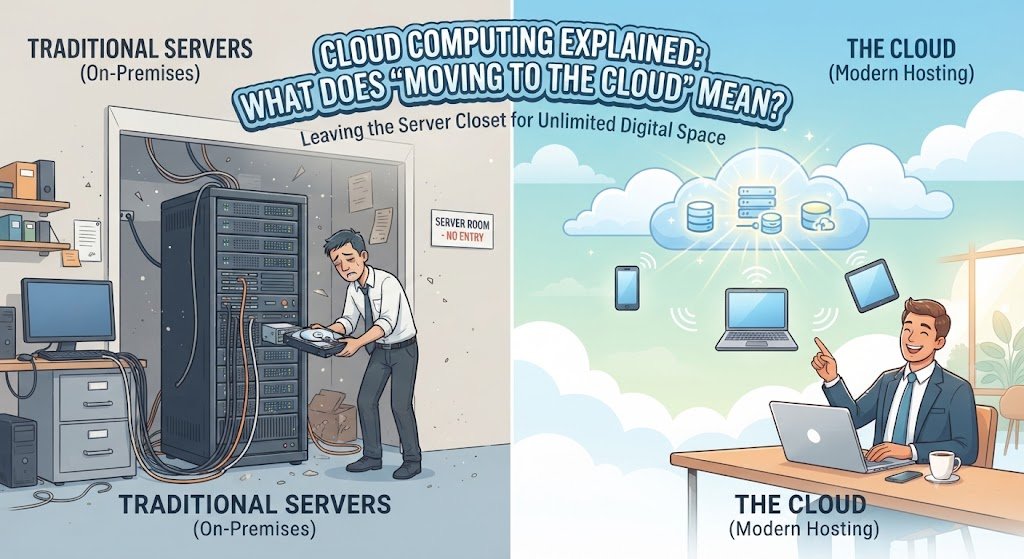
The Phrase Everyone Uses and Nobody Explains
"Moving to the cloud" is one of the most common phrases in business technology. It appears in strategy documents, board presentations, vendor pitches, and news headlines. It is assumed to be understood.
But ask ten business leaders what "the cloud" actually is, and you will get ten different answers. Some describe it as renting servers. Others describe it as software accessed over the internet. Others describe it as a vague modernisation initiative.
The confusion is understandable. "The cloud" is a metaphor, and metaphors obscure as much as they reveal. The cloud is not a place. It is not a technology. It is a business model for consuming computing resources.
This guide explains what cloud computing actually is, what "moving to the cloud" involves, the different service and deployment models, what it costs in India, and what it means for Indian businesses in 2026.
For organisations planning cloud adoption, Innovative AI Solutions provides specialised AI development services and cloud-ready solutions.
What "The Cloud" Actually Is
The Simple Definition
The cloud is computing resources — servers, storage, databases, networking, software — delivered over the internet and paid for on a usage basis.
Instead of buying and maintaining your own servers, you rent capacity from a cloud provider. Instead of installing software on your own computers, you access it over the internet. Instead of building data centres, you use someone else's.
The Key Characteristics
| Characteristic | What It Means |
|---|---|
| On-demand | Resources available when needed |
| Self-service | Provision without human interaction |
| Pay-per-use | Pay for what you consume |
| Elastic | Scale up and down as needed |
| Broad access | Available over the internet |
| Shared | Resources shared across customers |
The Cloud Is Not
| Myth | Reality |
|---|---|
| A physical place | It is distributed infrastructure |
| Always cheaper | Cost depends on usage patterns |
| Always simpler | Requires new skills and practices |
| A single technology | A collection of services |
| Only for large companies | Available at any scale |
What "Moving to the Cloud" Actually Means
It Is Not One Thing
"Moving to the cloud" describes a range of activities, from moving a single application to transforming an entire IT estate.
| What It Can Mean | Scope |
|---|---|
| Moving email to cloud | Single service |
| Moving a website to cloud | Single application |
| Moving databases to cloud | Data layer |
| Moving entire data centre | Full infrastructure |
| Building cloud-native applications | New development |
The Common Scenarios
| Scenario | What It Involves |
|---|---|
| Replace on-premise servers | Rent cloud servers instead |
| Move to SaaS | Replace installed software with cloud software |
| Modernise applications | Rebuild apps for cloud |
| Build new in cloud | Develop cloud-native applications |
| Hybrid approach | Mix of cloud and on-premise |
What Changes When You Move
| Aspect | On-Premise | Cloud |
|---|---|---|
| Cost model | Capital expenditure | Operating expenditure |
| Provisioning | Weeks to months | Minutes |
| Scaling | Buy more hardware | Adjust capacity |
| Maintenance | Your responsibility | Provider's responsibility |
| Location | Your data centre | Provider's data centres |
| Control | Full control | Shared control |
The Service Models
Infrastructure as a Service (IaaS)
You rent fundamental computing resources — virtual machines, storage, networking.
| What You Get | What You Manage |
|---|---|
| Virtual machines | Operating system |
| Storage | Runtime |
| Networking | Applications |
Data
Examples: AWS EC2, Azure Virtual Machines, Google Compute Engine
Best for: Lift-and-shift migrations, full control requirements.
Platform as a Service (PaaS)
You rent a platform for deploying applications — the provider manages the infrastructure.
| What You Get | What You Manage |
|---|---|
| Runtime environment | Applications |
| Middleware | Data |
Database
Infrastructure
Examples: AWS Elastic Beanstalk, Azure App Service, Google App Engine
Best for: Application development, reduced operational overhead.
Software as a Service (SaaS)
You use software delivered over the internet — the provider manages everything.
| What You Get | What You Manage |
|---|---|
| Complete application | Configuration |
| Infrastructure | Users |
| Updates | Data (sometimes) |
Support
Examples: Gmail, Salesforce, Microsoft 365, Zoho
Best for: Standard business functions, no customisation needed.
The Service Model Comparison
| Model | You Manage | Provider Manages | Control |
|---|---|---|---|
| On-premise | Everything | Nothing | Full |
| IaaS | OS, apps, data | Infrastructure | High |
| PaaS | Apps, data | Platform | Moderate |
| SaaS | Configuration | Everything | Low |
The Shared Responsibility Model
| Layer | On-Premise | IaaS | PaaS | SaaS |
|---|---|---|---|---|
| Data | You | You | You | You |
| Applications | You | You | You | Provider |
| Runtime | You | You | Provider | Provider |
| Operating System | You | You | Provider | Provider |
| Virtualisation | You | Provider | Provider | Provider |
| Servers | You | Provider | Provider | Provider |
| Storage | You | Provider | Provider | Provider |
| Networking | You | Provider | Provider | Provider |
The Deployment Models
Public Cloud
Resources shared across multiple customers, operated by a cloud provider.
| Characteristic | Detail |
|---|---|
| Ownership | Cloud provider |
| Access | Over the internet |
| Cost | Pay-per-use |
| Scalability | High |
| Control | Limited |
Best for: Most workloads, cost efficiency.
Private Cloud
Resources dedicated to a single organisation.
| Characteristic | Detail |
|---|---|
| Ownership | Organisation or dedicated provider |
| Access | Private network |
| Cost | Higher |
| Scalability | Limited by capacity |
| Control | High |
Best for: Regulated industries, sensitive data.
Hybrid Cloud
Combination of public and private cloud.
| Characteristic | Detail |
|---|---|
| Ownership | Mixed |
| Access | Both |
| Cost | Variable |
| Scalability | Flexible |
| Control | Selective |
Best for: Balancing control and cost, gradual migration.
Multi-Cloud
Using multiple public cloud providers.
| Characteristic | Detail |
|---|---|
| Ownership | Multiple providers |
| Access | Over the internet |
| Cost | Variable |
| Scalability | High |
| Control | Distributed |
Best for: Avoiding vendor lock-in, best-of-breed services.
Deployment Model Comparison
| Model | Cost | Control | Complexity | Best For |
|---|---|---|---|---|
| Public | Lowest | Lowest | Lowest | Most workloads |
| Private | Highest | Highest | Highest | Regulated industries |
| Hybrid | Moderate | Moderate | High | Balanced needs |
| Multi-cloud | Variable | Moderate | Highest | Avoiding lock-in |
What the Cloud Costs in India
Cost Comparison: On-Premise vs Cloud
Scenario: Mid-size business application
| Cost Component | On-Premise (3-year) | Cloud (3-year) |
|---|---|---|
| Hardware | ₹15,00,000 | ₹0 |
| Software licences | ₹5,00,000 | Included |
| Data centre | ₹8,00,000 | ₹0 |
| Power and cooling | ₹3,00,000 | ₹0 |
| IT staff | ₹30,00,000 | ₹10,00,000 |
| Cloud services | ₹0 | ₹40,00,000 |
| Total | ₹61,00,000 | ₹50,00,000 |
Cloud is often cheaper over three years, but not always. The comparison depends on usage patterns, scale, and existing infrastructure.
Typical Cloud Costs in India
| Service | Monthly Range (INR) | Monthly Range (USD) |
|---|---|---|
| Small VM | ₹2,000–₹5,000 | $24–$60 |
| Medium VM | ₹5,000–₹15,000 | $60–$180 |
| Large VM | ₹15,000–₹50,000 | $180–$600 |
| Database (managed) | ₹5,000–₹40,000 | $60–$480 |
| Storage (per TB) | ₹2,000–₹5,000 | $24–$60 |
| Load balancer | ₹2,000–₹8,000 | $24–$96 |
The Cloud Cost Trap
Cloud costs can exceed expectations if not managed.
| Cost Trap | Why It Happens |
|---|---|
| Over-provisioning | Resources sized larger than needed |
| Idle resources | Resources not shut down |
| Data transfer | Egress costs accumulate |
| Forgotten resources | Development environments left running |
| Poor architecture | Inefficient cloud-native design |
Cloud cost management is an ongoing discipline, not a one-time decision.
India-Specific Considerations
Cloud Providers in India
| Provider | India Regions |
|---|---|
| AWS | Mumbai, Hyderabad |
| Azure | Pune, Chennai |
| GCP | Mumbai, Delhi |
| Indian providers | Multiple (E2E, NxtGen, Sify) |
Data Residency Requirements
| Requirement | Implication |
|---|---|
| DPDPA | Data protection obligations |
| RBI | Financial data localisation |
| IRDAI | Insurance data requirements |
| Government | May require Indian infrastructure |
India-Specific Benefits
| Benefit | Explanation |
|---|---|
| India regions | Lower latency for Indian users |
| Rupee billing | Simplified accounting |
| Local support | Providers with India presence |
| Compliance | Data residency options |
India-Specific Challenges
| Challenge | Consideration |
|---|---|
| Connectivity | Variable network quality |
| Cost sensitivity | Budget constraints |
| Skills gap | Cloud expertise availability |
| Vendor lock-in | Provider dependency |
Decision Framework: Cloud Readiness
Should You Move to the Cloud?
| Factor | Favours Cloud | Favours On-Premise |
|---|---|---|
| Variable demand | ✓ | |
| Predictable demand | ✓ | |
| Fast growth | ✓ | |
| Stable scale | ✓ | |
| Limited IT staff | ✓ | |
| Strong IT team | ✓ | |
| Compliance flexibility | ✓ | |
| Strict data residency | ✓ | |
| Cost sensitivity | Depends | Depends |
Cloud Readiness Scorecard
| Criteria | Weight | Score (1–5) | Weighted Score |
|---|---|---|---|
| Workload suitability | 25% | ||
| Team capability | 20% | ||
| Compliance requirements | 20% | ||
| Budget model | 15% | ||
| Executive support | 10% | ||
| Vendor readiness | 10% | ||
| Total | 100% | /5 |
Migration Approach Selection
| Your Situation | Recommended Approach |
|---|---|
| New applications | Cloud-native development |
| Standard applications | Lift-and-shift or replatform |
| Legacy applications | Evaluate carefully |
| Regulated workloads | Private or hybrid cloud |
| Cost-sensitive workloads | Analyse TCO carefully |
Common Misconceptions
Misconception 1: Cloud Is Always Cheaper
Cloud costs depend on usage. Over-provisioned cloud resources can cost more than on-premise. Cloud cost management is essential.
Misconception 2: Cloud Is Less Secure
Cloud providers invest more in security than most organisations can. However, security is a shared responsibility — you must secure your applications and data.
Misconception 3: Cloud Means No Infrastructure
You still manage applications, data, and configurations. The infrastructure is managed by the provider, but cloud requires new operational practices.
Misconception 4: Cloud Is Simpler
Cloud requires new skills — cloud architecture, cost management, security, automation. It is different, not necessarily simpler.
Misconception 5: Moving to Cloud Is One-Time
Cloud adoption is ongoing. Workloads evolve, new services emerge, and optimisation continues indefinitely.
Frequently Asked Questions
1. What does "moving to the cloud" actually mean?
It means using computing resources — servers, storage, databases, software — delivered over the internet instead of owning and maintaining them yourself. It can range from moving one application to transforming an entire IT estate.
2. What is cloud computing in simple terms?
Cloud computing is renting computing resources over the internet and paying for what you use. Instead of buying servers, you rent them. Instead of installing software, you access it online.
3. What are the main cloud service models?
IaaS (Infrastructure as a Service) — rent infrastructure. PaaS (Platform as a Service) — rent a platform for applications. SaaS (Software as a Service) — use software over the internet.
4. What is the difference between public, private, and hybrid cloud?
Public cloud shares resources across customers. Private cloud dedicates resources to one organisation. Hybrid cloud combines both, using each where appropriate.
5. Is cloud cheaper than on-premise?
It depends. Cloud is often cheaper for variable or growing workloads. On-premise may be cheaper for stable, high-volume workloads. Total cost of ownership analysis is essential.
6. Is cloud secure?
Cloud providers invest heavily in security. However, security is a shared responsibility — you must secure your applications, data, and configurations. Cloud can be more secure than on-premise if used correctly.
7. What are the benefits of moving to the cloud?
Scalability, flexibility, reduced capital expenditure, access to advanced services, geographic reach, and reduced infrastructure management burden.
8. What are the risks of moving to the cloud?
Vendor lock-in, unexpected costs, compliance challenges, skills gaps, and dependency on provider reliability.
9. How long does it take to move to the cloud?
Moving a single application takes weeks. Moving an entire data centre takes months to years. The timeline depends on scope and complexity.
10. How does DPDPA affect cloud adoption in India?
DPDPA requires data protection, consent, and potentially data residency. Cloud providers offer India regions, but compliance must be maintained regardless of where data is stored.
11. Should I use one cloud provider or multiple?
Single provider is simpler and often cheaper. Multiple providers avoid lock-in and enable best-of-breed services. Multi-cloud adds complexity and should be justified by specific requirements.
12. How can Innovative AI Solutions help?
Innovative AI Solutions is a Delhi-based technology company that helps businesses plan and execute cloud adoption. We assess workloads, recommend migration approaches, and build cloud-native solutions — including AI-powered applications. Explore our AI development services to accelerate your cloud transformation.
Contact Innovative AI Solutions
Ready to move to the cloud?
We help Indian businesses plan cloud adoption, assess workloads, and execute migration with proper governance.
Contact Information
Innovative AI Solutions
📍 Netaji Subhash Place, Pitampura, Delhi – 110034
🌐 Website: https://innovativeais.com 📧 Email: info@innovativeais.com
📞 Phone: +91 7464 099 059 / +91 96899 67356
Business Services
• AI Automation • AI Development • AI Consulting • Machine Learning Solutions • Deep Learning Solutions • Generative AI Services • NLP Solutions • AI Agents • AI Chatbots • Voice AI • CRM Development • Custom Software Development • Website Development • Mobile App Development
About the Author
Abhishek Kumar
Founder & CEO, Innovative AI Solutions
5+ years building production AI systems for Indian businesses. Based in Delhi, serving clients across India.
Ready to build AI solutions for your business?
Innovative AI Solutions — Delhi's leading AI development company. Free consultation available.
Get Free Consultation →
A plain-English 2026 guide to cloud computing — what "moving to the cloud" means, service and deployment models, costs, and what it means for Indian businesses.
#CloudComputing #MovingToTheCloud #2026 #IaaS #PaaS #SaaS #PublicCloud #PrivateCloud #HybridCloud #CloudMigration #CloudBenefits #CloudCost #OnPremise #India #DelhiNCRTech #EnterpriseApps #StartupApps #CloudStrategy #CloudProviders #TechIndia #DigitalProducts #CloudAdoption #CloudGuide #BusinessTechnology #InnovativeAISolutions
Copyright © 2015–2026 Innovative AI Solutions. All Rights Reserved. | Privacy Policy | Terms & Conditions


